How to Check Jazz Balance (Complete Guide)
Check your Jazz balance with *111#, in the Jazz World app or on WhatsApp. Also see remaining MBs, minutes and SMS in seconds.
Sometimes you recharge your Jazz SIM and then forget how much balance is actually left. It happens a lot, especially when you’re using different packages or switching between calls, SMS, and internet. And honestly, it gets even more confusing when you’re not sure how to check the remaining MBs or minutes.
So, if you’re in that situation, don’t worry. I’ll walk you through the simple and practical ways to check your jazz balance, both offline and online, so you always know exactly what you have left.
Checking Jazz Balance Using USSD Codes
The easiest and quickest way to check your balance is by using USSD codes directly from your phone. You don’t need internet for this, which makes it super reliable.
Main Balance Check
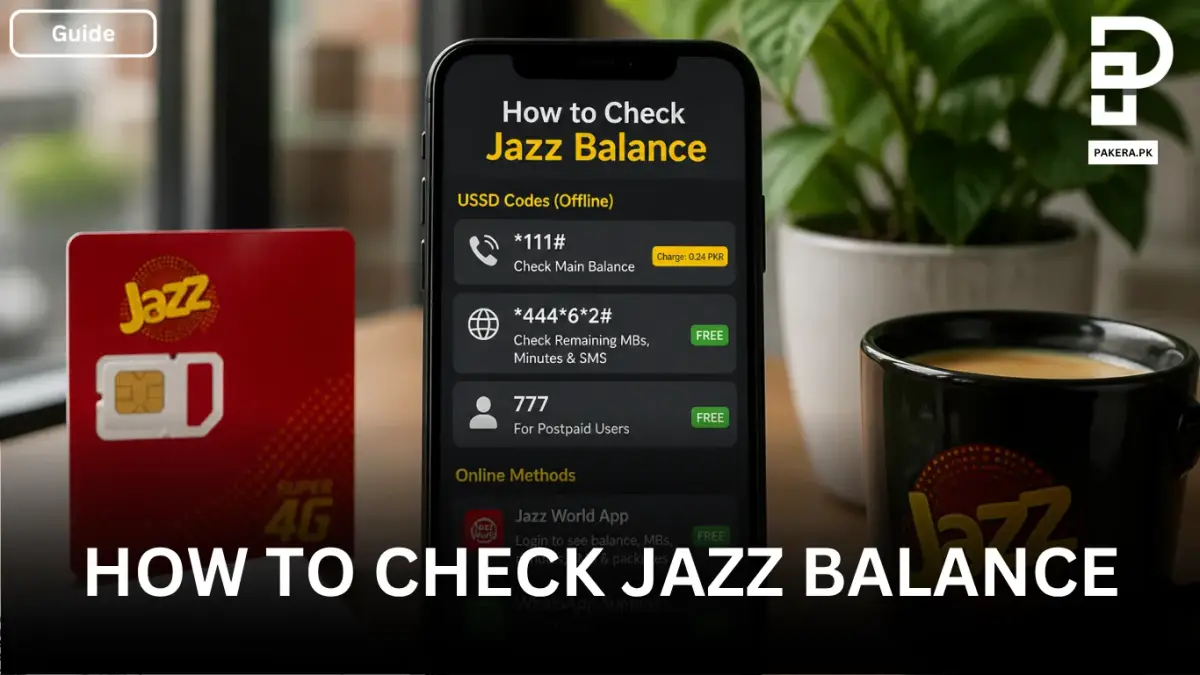
First, open your phone’s dialer and dial *111#.
Within a few seconds, your remaining balance will appear on the screen. This method is straightforward and works on all types of phones.
There is a small charge of 0.24 PKR for this check, so keep that in mind. However, most of the other checking options are free.
Checking Remaining MBs, Minutes, and SMS
If you want to see how many internet MBs, call minutes, or SMS you still have left in your package, you can dial 4446*2#.
This gives you a detailed breakdown of your remaining resources, which is useful if you’re using bundles and want to manage your usage better.
For Postpaid Users
If you’re using a postpaid Jazz SIM, the process is slightly different.
You can simply dial 777 to check your balance and account details. This method is specifically designed for postpaid users and gives relevant information accordingly.
Checking Jazz Balance Online
If you prefer using apps or online methods, Jazz also provides digital options that are quite convenient.
Using the Jazz World App
One of the easiest ways is through the Jazz World App.
After downloading the app and signing up (or logging in), you can instantly see your balance on the main screen. The app also shows:
- Remaining MBs
- Minutes and SMS
- Active packages
It’s a good option if you want everything in one place without dialing codes again and again.
Using WhatsApp Support
Another method is through WhatsApp.
You can send a simple “Hi” message to 0300-3008000. This connects you to the support bot, where you can get information about your balance and other account details.
This method feels more natural, especially if you’re already using WhatsApp regularly.
Frequently Asked Questions
What is the code to check Jazz balance?
Is there any charge for checking Jazz balance?
How can I check remaining MBs on Jazz?
Can I check Jazz balance without using a code?
What is the balance check method for Jazz postpaid users?
Conclusion
Checking your Jazz balance is actually very simple once you know the right method. Whether you prefer dialing a quick code like *111# or using the Jazz World App, both options work efficiently depending on your situation.
If you’re someone who likes quick checks, USSD codes are perfect. But if you want detailed information in one place, the app or WhatsApp option makes more sense. Either way, staying updated on your balance helps you avoid unexpected interruptions and manage your usage better.
About the author

Tax, Bills and Technology Writer
Ali Akhtar is a young and curious voice here at Pakistan Era. He is currently pursuing his A-Levels and has a growing interest in Pakistan’s changing industrial landscape and educational trends. Ali likes to write in a way that helps him explain and explore the world around him. His writing reflects the perspective of the new generation navigating the evolving trends of Pakistan where technology, youth innovation, and shifting opportunities are reshaping the country’s future.