M-Tag Charged Twice or the Wrong Toll in Pakistan: Check Your Trip History and Complain
M-Tag charged twice or the wrong toll? Check the History tab in the One Network app, compare with NHA's rates, then complain on 1313 or by email. Steps inside.
If your M-Tag was charged twice or charged the wrong toll, open the History tab in the M-TAG One Network app, note the plaza, date, time and amount of the wrong line, and compare it with the notified toll for your vehicle class. Then complain to One Network on 1313, by email to connect@onenetwork.pk, or through the app's complaint form. If the dispute is about the toll plaza itself, such as a wrong vehicle class, the National Highway Authority (NHA) also takes complaints.
Do it the same week. A complaint with a plaza name, a time and a screenshot is easy to trace. A complaint that says "I think I was overcharged last month" is not. If the barrier did not open at all, the problem is different: see why an M-Tag stops working at a toll plaza.
| Problem | Where to see it | Complain to |
|---|---|---|
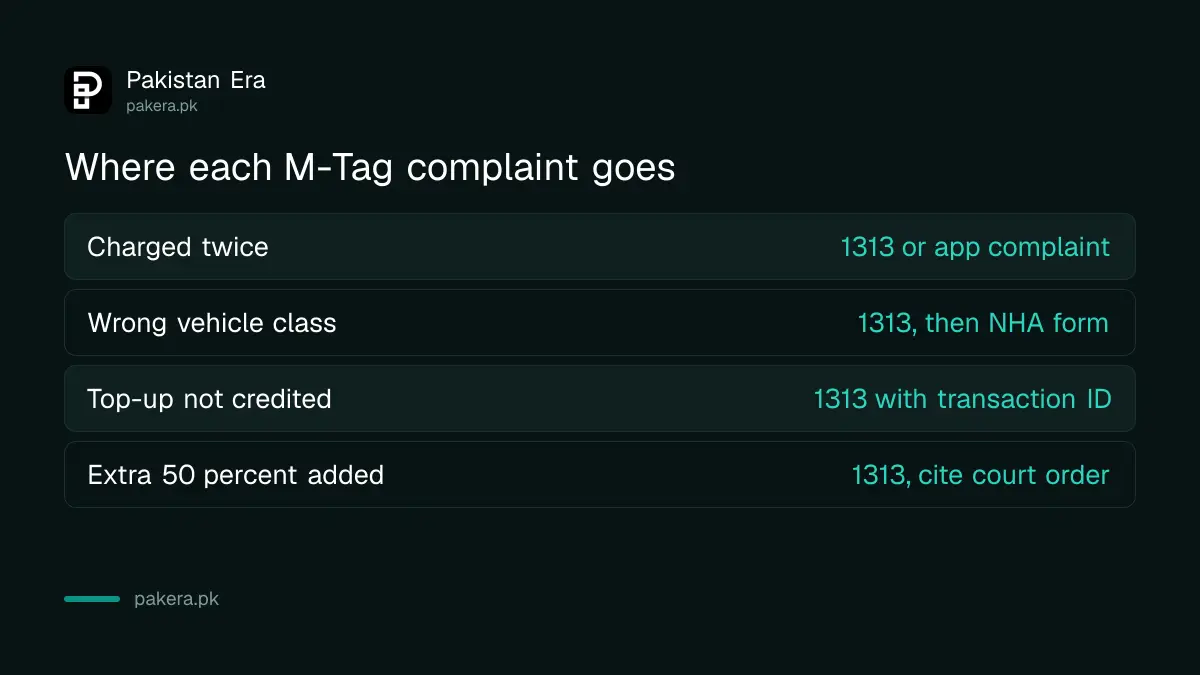
| Same plaza charged twice | App History tab | 1313, app complaint or email |
| Car charged as a wagon or bigger | Amount in History against the notified rate | 1313, then NHA complaint form |
| Short trip charged as a full run | Entry and exit plazas in History | 1313 with both plaza names |
| Extra 50 percent still added | Amount above the notified rate | 1313, quoting the court suspension |
| Top-up paid, balance not credited | Bank or wallet receipt | 1313 with the transaction ID |
The app's History tab shows every toll deduction
The M-TAG One Network app lists each trip with its details and cost in the History tab, and compares your monthly spending. It is the only place where you can see every deduction yourself, so start there before you call anyone.
- Install the M-TAG One Network app from Google Play or the App Store. The publisher is One Network (Private) Limited.
- Sign in with the mobile number linked to your M-Tag account and enter the OTP.
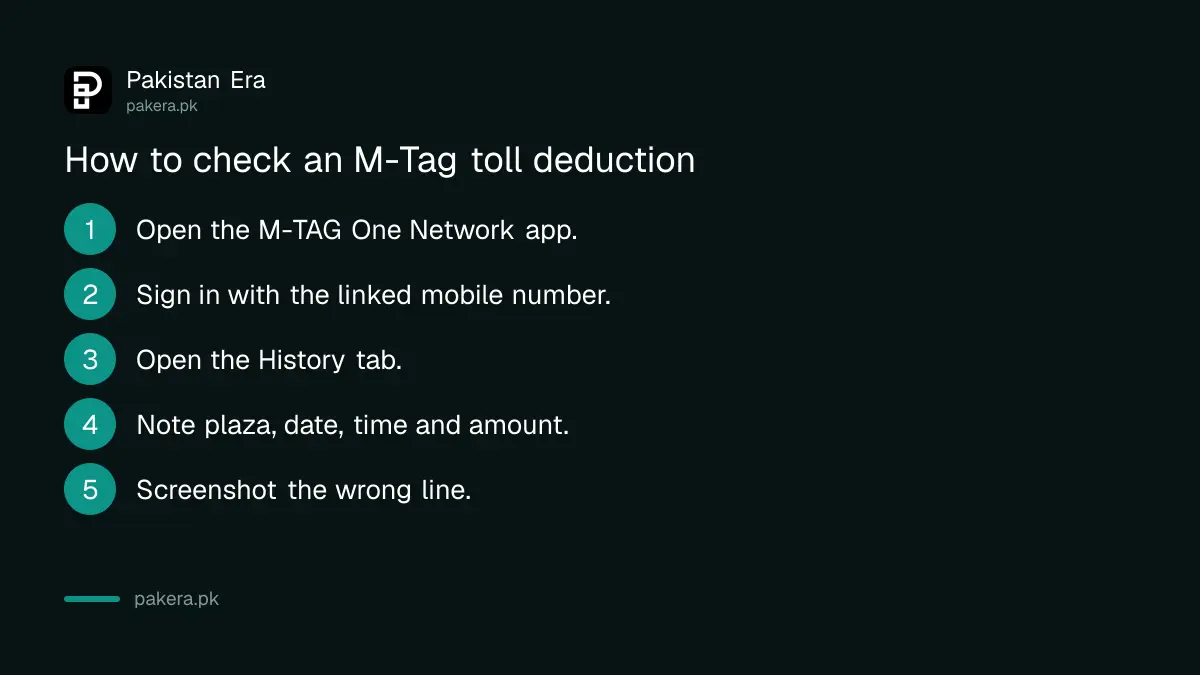
- Open the History tab.
- Find the trip. Note the plaza name, date, time and amount.
- Take a screenshot of the line, and of any line that looks like a repeat.
The app does not work for you if the OTP never arrives. That usually means the tag is linked to a different mobile number or CNIC. The M-Tag ID and balance check by CNIC shows how to find out whose name the tag is in and how to fix it.
Compare the deduction with the notified toll
A deduction is wrong only if it differs from the rate NHA notified for your road and vehicle class. A car pays Rs 1,430 for the full M-2 from Lahore to Islamabad, and between Rs 700 and Rs 1,500 for the full run on other motorways.
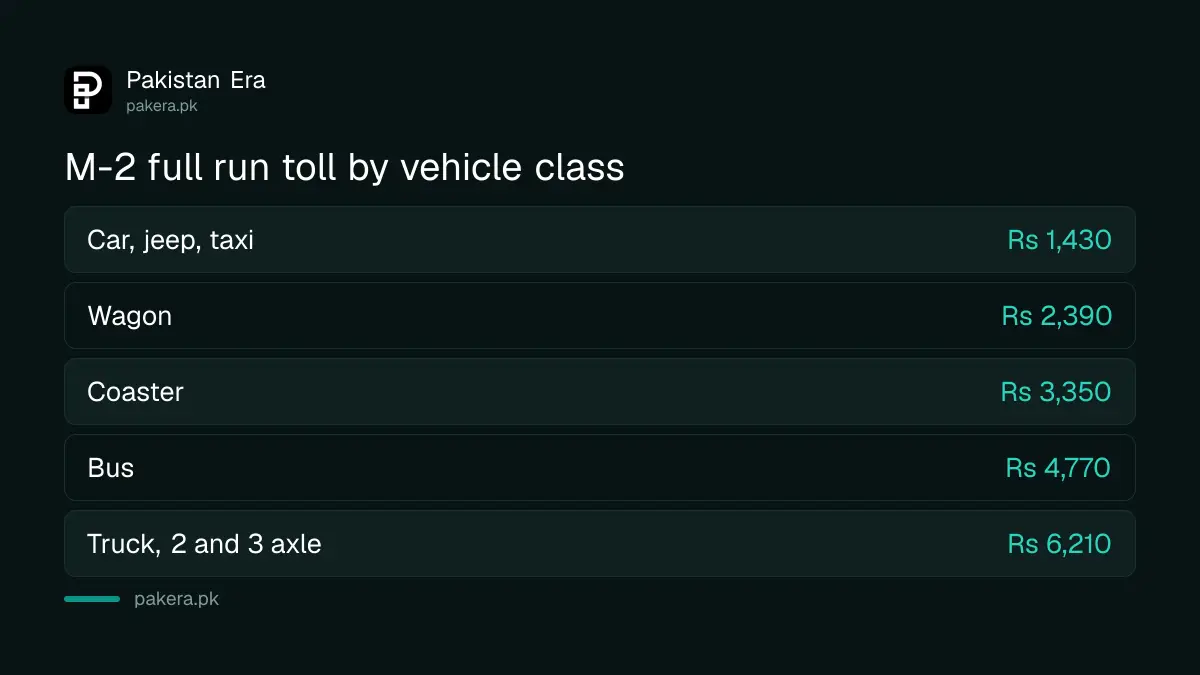
Check the class first. NHA uses six classes, and a car charged as a wagon pays much more. On the M-2, the full run costs:
| M-2 class | Vehicle | Per km | Full run |
|---|---|---|---|
| 1 | Car, jeep, taxi | Rs 3.98 | Rs 1,430 |
| 2 | Wagon | Rs 6.68 | Rs 2,390 |
| 3 | Coaster | Rs 9.34 | Rs 3,350 |
| 4 | Bus | Rs 13.32 | Rs 4,770 |
| 5 | Truck, 2 and 3 axle | Rs 17.33 | Rs 6,210 |
| 6 | Articulated truck | Rs 22.29 | Rs 7,980 |
Those M-2 rates apply from 5 July 2026 to 23 April 2027. For a short trip on the M-2, multiply the distance by the per km rate to get a rough figure. If you got off at Kallar Kahar but paid close to Rs 1,430 in a car, ask why.
For the other motorways, the motorway toll rates for every vehicle class list the full NHA table effective 10 July 2026. The exits in order are in the M-2 toll plazas from Islamabad to Lahore.
Collect five details before you complain
One Network can trace a deduction only if you give it enough to find the record. Have your M-Tag ID, vehicle number, plaza name, date and time, and the amount charged against the amount you expected. A screenshot of the History line helps most.
- M-Tag ID and the vehicle registration number.
- Plaza name, and for a closed motorway like the M-2, both the entry and exit plazas.
- Date and time of the crossing.
- Amount charged and the notified amount for your class.
- Screenshot of the History line, or the cash receipt if you paid at the booth.
For a top-up that left your bank but never reached the tag, add the bank or wallet transaction ID and time. Check first that you typed your own tag ID. Money sent to a wrong ID credits that account, which is the most common reason a top-up "vanishes". Recharging an M-Tag online covers that case.
Complain to One Network first
One Network runs the M-Tag accounts, so it is the first stop for any wrong deduction. It lists three channels: the 1313 helpline, open 24 hours, the email connect@onenetwork.pk, and a complaint form inside the M-TAG One Network app.
- Call 1313 and give the five details. Ask for a complaint or reference number and write it down.
- Send the same details and screenshot to connect@onenetwork.pk, with the reference number in the subject line.
- Or file the complaint inside the app, which keeps it linked to your account.
Use one main channel and keep the same reference number in every follow-up. Three separate complaints about one deduction only slow it down.
Running company vehicles? One Network has a separate M-TAG Fleet app for fleet accounts. It shows balances for all registered fleet vehicles and recharges through 1-Link. The same helpline and email handle fleet complaints.
Escalate to NHA if the plaza is at fault
NHA collects tolls on national highways and motorways, so a wrong vehicle class or a plaza charging above the notified rate is an NHA matter too. Use its online complaint form with the same five details and your One Network reference number. A tag more than five years old has been blocked since 1 July 2026, and replacing an old M-Tag costs Rs 300 at a registration centre.
The NHA complaint form and zone office numbers lists where each type of road complaint goes. If neither body replies, the federal government's Pakistan Citizen Portal accepts complaints against NHA.
Charged the old 50 percent extra for having no tag or a low balance? That charge is suspended by the Islamabad High Court. The extra motorway toll without an M-Tag sets out the court order and what to say on 1313.
Common questions
How do I check my M-Tag toll history?
Open the History tab in the M-TAG One Network app. It lists each trip with the plaza, date and cost. The 9909 SMS shows only the balance, not the history.
My M-Tag was charged twice at the same plaza. What should I do?
Screenshot both lines in the app's History tab, then report them on 1313 or through the app's complaint form. Give the plaza, date, time and both amounts, and ask for a reference number.
How do I know if I was charged the wrong vehicle class?
Compare the deduction with NHA's notified rate. A car pays Rs 1,430 for the full M-2. A higher figure for the same trip suggests you were charged as a wagon or bigger.
What is the M-Tag complaint email?
connect@onenetwork.pk. One Network also takes complaints on the 1313 helpline and through the complaint form in the M-TAG One Network app.
Can I complain to NHA about an M-Tag deduction?
Yes, when the plaza is at fault, such as a wrong class or a toll above the notified rate. Use NHA's online complaint form and quote your One Network reference number.
Is there an M-Tag app for company vehicles?
Yes. One Network's M-TAG Fleet app shows balances for all registered fleet vehicles and recharges them through 1-Link.
How we verified this
What we checked and where we read it.
Last checked 21 November 2026. The History tab, the three complaint channels and the card top-ups are from One Network's listing for the M-TAG One Network app on Google Play, which matches its App Store listing. The M-TAG Fleet features are from One Network's App Store listing for that app. M-2 rates are from NHA's notice for enhancement of toll rates on the Lahore to Islamabad motorway, valid 5 July 2026 to 23 April 2027, and the other motorway figures from NHA's general toll notification effective 10 July 2026. Both are scanned PDFs on the NHA website. NHA's and One Network's websites were not reachable when we checked on 21 November.
About the author

Senior Writer, Public Services and Technology
Shahid joined us in 2024 as an author. He is a senior contributor to Pakistan's leading technology websites. He writes detailed articles, mostly covering his expertise in the latest tech, mobiles, apps, gadgets, and step-by-step guides. His ideology is to help people understand the latest trends and explain complex methods through very easy-to-understand guides.