PTCL eBill Registration: Get Your PTCL Bill by Email and Find Your Account ID
Register for PTCL eBill free and get your landline or Flash Fiber bill by email. Field rules, the Know your Account ID button and fixes for common errors.
To get your PTCL bill by email, open PTCL eBill Registration on ptcl.com.pk, choose Wireline, enter the owner's name, the owner's CNIC, the phone number with area code, the Account ID, your email and your mobile number, type the captcha and submit. No Account ID? The same form has a "Know your Account ID!" button that finds it from your telephone number.
PTCL eBill registration is free. It suits anyone whose paper bill arrives late, goes to an old address, or gets lost in a building's mailbox. Once your email is on the account, the bill comes to your inbox every month, and you can pay it the same day.
How to register for the PTCL eBill
The PTCL eBill form takes about two minutes. Choose Wireline for a landline or Flash Fiber connection, fill in the owner's details exactly as PTCL holds them, give an email address and a mobile number, and submit. The owner's CNIC must match the connection.
- Go to ptcl.com.pk, open Support, and under Billing and Payments click eBill.
- Select the service type: Wireline (landline, DSL or Flash Fiber) or Wireless (EVO or CharJi).
- Type the Name, using letters only, between 3 and 30 characters.
- Type the Owner CNIC in the format 12345-1234567-1, with both dashes.
- Enter the Telephone No with the area code, for example 0421234567 for Lahore.
- Enter the Account ID from your bill. It is 10 to 15 digits long.
- Add your Email Address and Mobile No (an 03xx code plus 7 digits).
- Type the captcha text and submit.
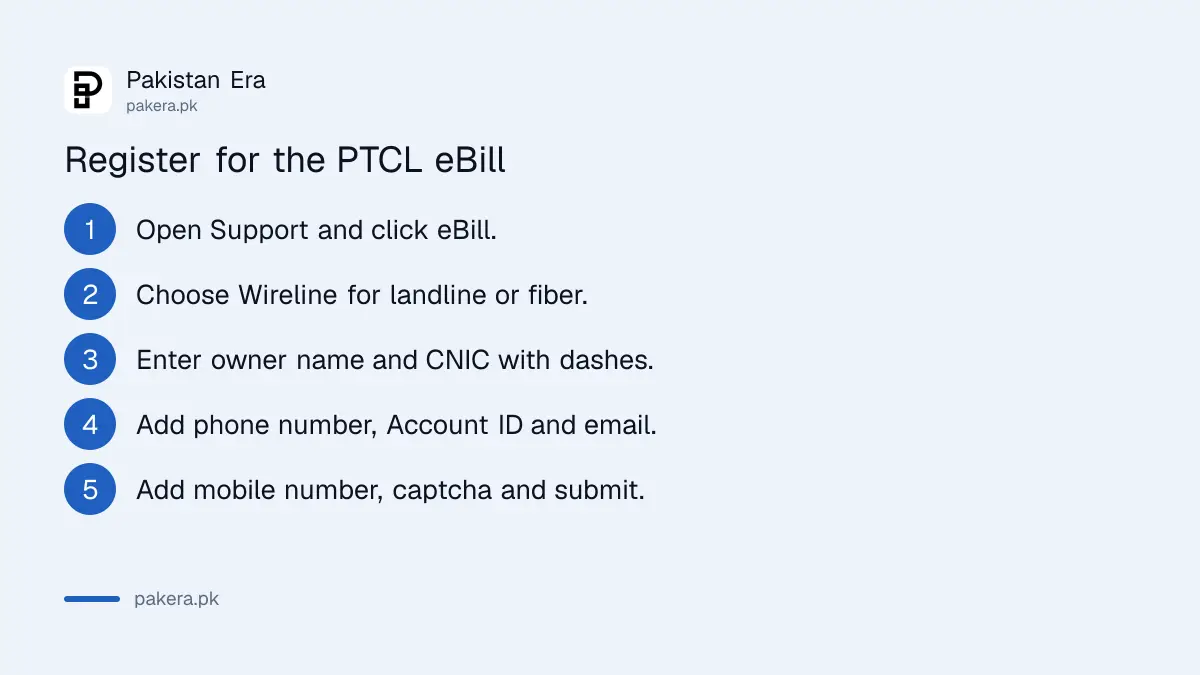
We checked the form on 17 November 2026. It checks each field as you type, so a CNIC without dashes or a mobile code outside 0300 to 0349 is rejected before you submit.
How to find your PTCL Account ID without a bill
Click the "Know your Account ID!" button at the top of the eBill form. The button needs only the telephone number with area code, which is the one field the form marks for this lookup. PTCL then shows the Account ID so you can finish the registration.
The form marks fields with one star for eBill registration and two stars for the Account ID lookup. Only the telephone number carries two stars. In practice, you type the phone number first, press the button, and then fill in the rest.
Other ways to get the Account ID:
- Any old PTCL bill, paper or PDF, shows it near the top.
- A duplicate bill downloaded through the PTCL bill check online service shows the same number.
- The PTCL WhatsApp self-service line, 0331 1218 1218, has a "know your bill" option.
- Calling 1218 from the landline itself.
Fields the PTCL eBill form asks for
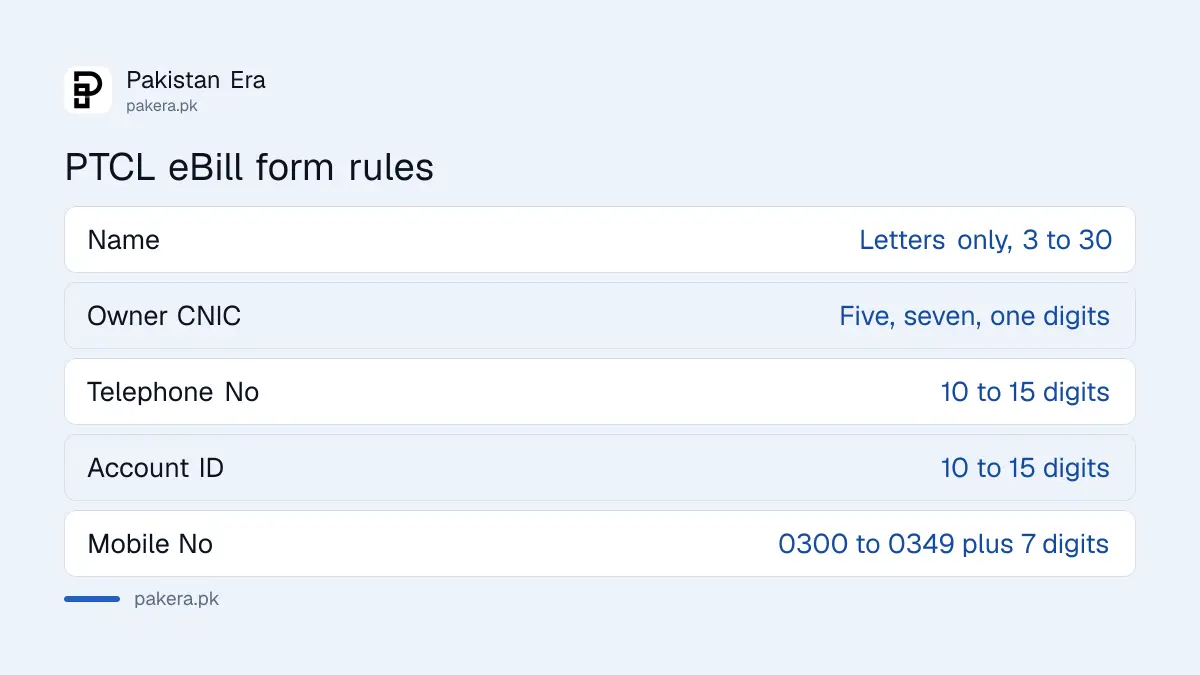
The form has eight fields for a landline. Wireless connections add the MDN number and the ESN or ICCID printed on the device. Each field has a length or format rule, and most failed registrations break one of them, usually the CNIC dashes or the mobile number split.
| Field | Rule on the form | Example |
|---|---|---|
| Name | Letters only, 3 to 30 characters | Ali Raza |
| Owner CNIC | xxxxx-xxxxxxx-x with dashes | 35202-1234567-1 |
| Telephone No | 10 to 15 digits, with area code | 0421234567 |
| Account ID | 10 to 15 digits, from the bill | Printed on the bill |
| MDN No (wireless only) | 9 to 11 digits | On the EVO bill |
| ESN No or ICCID (wireless only) | 8 to 15 characters | On the device label |
| Email Address | A working email, up to 50 characters | name@example.com |
| Mobile No | Code 0300 to 0349, then 7 digits | 0333 and 1234567 |
Use the owner's name and CNIC, not the tenant's. A rented house often has a PTCL line in the landlord's name. In that case the landlord's CNIC goes in the form, and your own email and mobile can still receive the bill.
What to do after the eBill arrives
Pay it before the due date printed on the bill. Keep the emails in one folder, because each one shows the month's charges and taxes, which helps at tax return time.
For the yearly tax figure, use the PTCL withholding tax statement form under Support, which adds up the tax for any months you choose. It needs the same telephone number and Account ID as the eBill form.
Is your internet bill higher than expected? Check whether you crossed the monthly data limit. The PTCL internet usage check shows the volume used against the fair usage limit.
Problems with PTCL eBill registration and fixes
Most eBill problems are a CNIC that does not match the connection, a missing Account ID, or an email that goes to spam. Fix the field the form highlights, use the owner's CNIC, and add PTCL's sender to your contacts so the bill lands in your inbox.
- "Please use CNIC Format": add both dashes, five digits, seven digits, one digit.
- "Click on button Know your Account ID": the Account ID box is empty or too short. Use the lookup button.
- "Mobile Code must be between 0300 and 0349": type the first four digits in the small box and the last seven in the next box.
- Name rejected: remove dots and numbers. "M. Ali" fails; "M Ali" works.
- No email after a month: look in spam and promotions folders, then call 1218 to confirm the email on file.
For a complaint that a bill never arrived or is wrong, raise it through PTCL complaint 1218 or the WhatsApp line.
Common questions about PTCL eBill
Is PTCL eBill registration free?
Yes. The form on ptcl.com.pk is free, and the bill comes to your email at no charge.
Can a tenant register for the PTCL eBill?
Yes, but the form needs the owner's name and CNIC as PTCL holds them. The email and mobile number can be the tenant's own.
How do I find my PTCL Account ID?
Press "Know your Account ID!" on the eBill form and enter the telephone number with area code. It is also printed on every PTCL bill.
Does PTCL eBill work for Flash Fiber?
Yes. Choose Wireline. Flash Fiber, DSL and landline connections all use a telephone number and Account ID.
Which mobile numbers does the form accept?
Codes from 0300 to 0349, followed by seven digits. That covers Jazz, Zong, Ufone and Telenor numbers.
Will I still get a paper bill after registering?
To stop paper bills, ask PTCL on 1218 once the first eBill reaches your inbox.
How we verified this
What we checked and where we read it.
Last checked 17 November 2026. We read every field, label and validation rule on the PTCL eBill Registration form, including the "Know your Account ID!" button and the one-star and two-star marks. The WhatsApp number 0331 1218 1218 and its "know your bill" option come from PTCL's WhatsApp support page, and the 1218 helpline and care@ptcl.net.pk from the PTCL Support Center.
About the author

Global Affairs & Political Economy Writer
Muhammad Hatim is a book lover who started writing because he enjoys it. At Pakistan Era he writes about international relations, geopolitics and the global economy, with a particular interest in South Asia and the forces behind current events.