How to Reactivate Your Blocked Ufone SIM After Incorrect PIN Entries (PUK Code Required)
Where to find your Ufone PUK code and how to unblock a locked SIM with it, plus how to get the code if the pack is long gone.
Introduction
If your Ufone SIM has been blocked because of too many incorrect PIN entries, don't worry. This is a common issue that occurs when the wrong PIN code is entered multiple times. Once the SIM is blocked, it cannot be used until it is unlocked with a Personal Unblocking Key (PUK) code.
Fortunately, reactivating a blocked Ufone SIM is usually a straightforward process. As long as you have access to the required information, you can obtain the PUK code and regain access to your SIM within a short time.
Why Does a Ufone SIM Get Blocked?
A Ufone SIM becomes blocked when the PIN code is entered incorrectly several times. The PIN is designed to protect your SIM from unauthorized access, but repeated incorrect attempts trigger a security lock.
When this happens, your phone will display a message indicating that a PUK code is required. Until the correct PUK code is entered, the SIM will remain inaccessible.
How to Reactivate a Blocked Ufone SIM
If your Ufone SIM is asking for a PUK code, you can reactivate it by obtaining the correct code and unlocking the SIM.
Find the PUK Code on Your Ufone Starter Pack
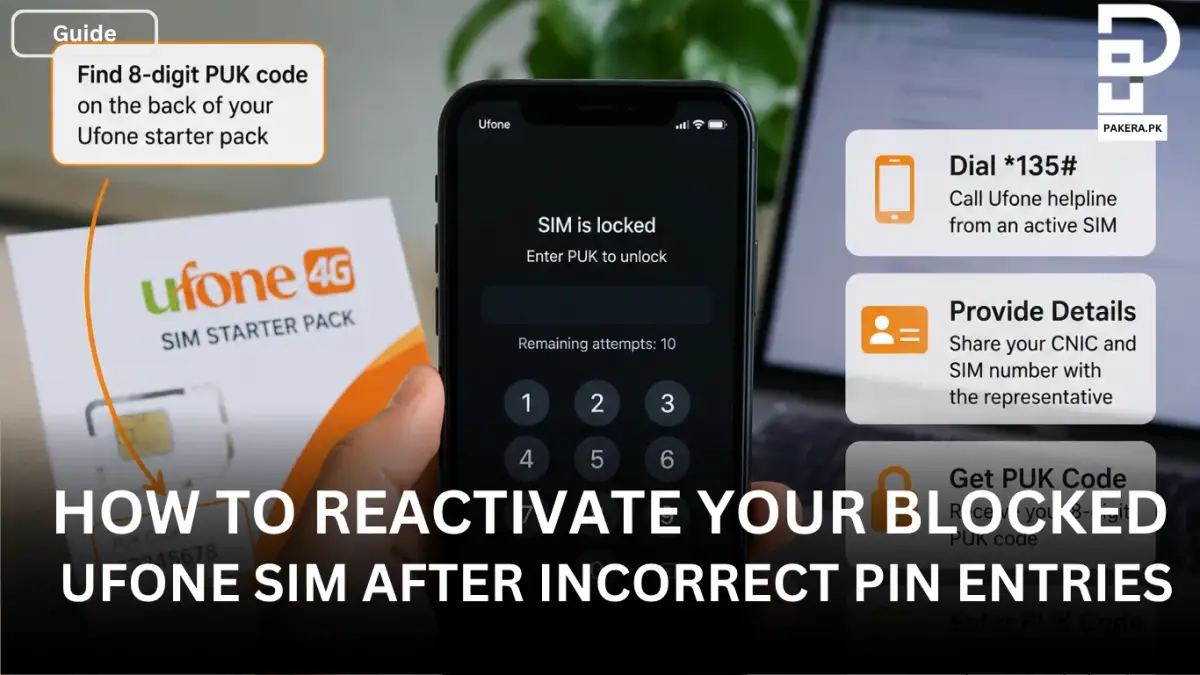
The easiest way to recover your SIM is by checking the original Ufone starter pack. In many cases, the 8-digit PUK code is printed on the back of the SIM packaging.
If you still have the starter pack, locate the PUK code and keep it ready before proceeding.
Contact Ufone Customer Support
If you no longer have the starter pack or cannot find the PUK code, you can contact Ufone customer support.
Dial *135# from an active Ufone SIM and connect with a customer service representative. You may be asked to provide your CNIC number and the blocked Ufone SIM number for verification purposes.
After successful verification, the representative can provide you with the required PUK code.
Unlock the SIM and Set a New PIN
Once you have received the correct PUK code, enter it when your phone prompts you to do so.
After the PUK code is accepted, you will be asked to create a new PIN. Choose a PIN that is easy for you to remember but difficult for others to guess. Once the new PIN is confirmed, your Ufone SIM will be reactivated and ready to use again.
Tips to Avoid SIM Blocking in the Future
To reduce the chances of your SIM getting blocked again:
- Store your PIN and PUK codes in a safe place.
- Avoid repeatedly guessing the PIN if you are unsure of it.
- Keep your original Ufone starter pack for future reference.
- Use a PIN that you can easily remember.
Frequently Asked Questions
What is a PUK code?
Where can I find my Ufone PUK code?
Can I reactivate my blocked Ufone SIM without a PUK code?
What information is required to get a Ufone PUK code?
Will my data be lost after unlocking the SIM?
Conclusion
If your Ufone SIM has been blocked because of too many incorrect PIN entries, the solution is to obtain the correct PUK code and use it to unlock the SIM. You can either find the 8-digit PUK code on your original Ufone starter pack or contact Ufone customer support for assistance. After entering the PUK code and setting a new PIN, your SIM will be reactivated and ready to use again.
About the author

Public Services and Education Journalist
Fajr Riaz is a journalist and content writer at Pakistan Era, based in Lahore. She covers the questions people meet in everyday life in Pakistan: how a public service works, what a change in the rules means, and where to find a reliable answer.