Optix WiFi Password Change in Pakistan: 192.168.100.1 Login and Every Default Username
Change your Optix WiFi password at 192.168.100.1 with the 3 default logins Optix lists, find the WLAN key field, and fix logins that fail or keys it rejects.
To change your Optix WiFi password, open 192.168.100.1 in a browser, log in with one of the three logins Optix publishes (telecomadmin / admintelecom, Epadmin / adminEp, or root / admin), go to the WLAN tab and replace the key in the WPA Preshared Key field. Those are Optix's own instructions, from its FAQ page.
Optix is one of the few home internet companies in Pakistan that prints its router steps and logins publicly. That makes the job easy, and it also means anyone on your WiFi can find the same logins. We read Optix's FAQ, packages and contact pages on 24 October 2026. Below are the steps, which login to try first, a confusing line about password length, and what to do when the page refuses you.
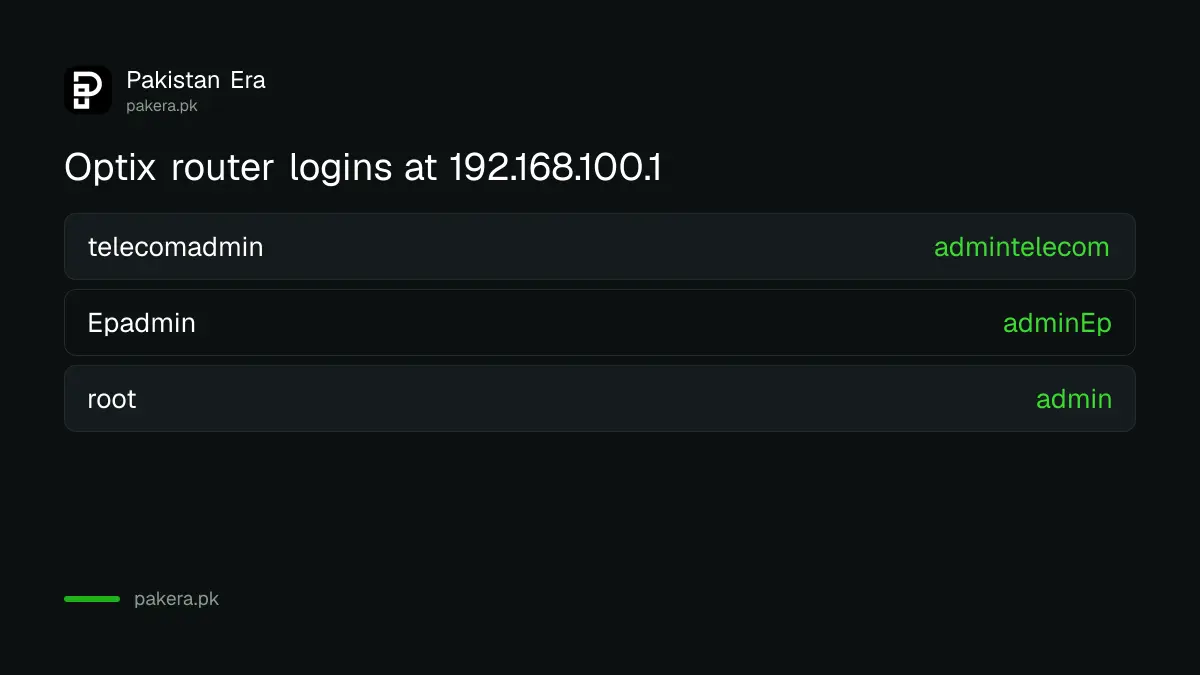
Optix router login: 192.168.100.1 and three default usernames
Optix's FAQ gives one address, 192.168.100.1, and three username and password pairs. Different ONT models answer to different pairs, so try them in order until one opens. You must be on the Optix WiFi or a LAN cable for the page to load.
| Try | Username | Password |
|---|---|---|
| 1 | telecomadmin | admintelecom |
| 2 | Epadmin | adminEp |
| 3 | root | admin |
The logins are case sensitive. "Epadmin" has a capital E and "adminEp" has a capital E at the end, so type them exactly as shown. If none of the three works, someone has changed the login, and the next step is the Optix helpline rather than the reset button.
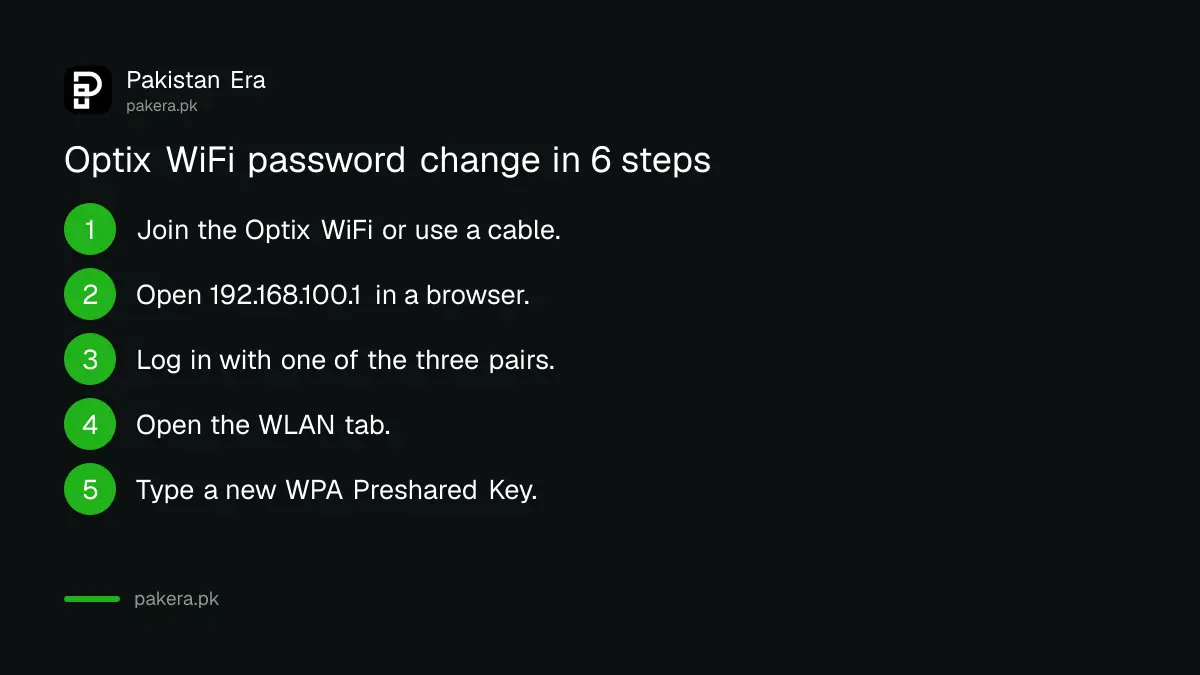
Change the Optix WiFi password in 6 steps
Sign in at 192.168.100.1, open the WLAN tab, find the WPA Preshared Key field, type the new password and save. Your devices will disconnect and need the new key. On dual-band ONTs, check both the 2.4 GHz and 5 GHz settings.
- Connect your phone or laptop to the Optix WiFi, or plug in a LAN cable.
- Type 192.168.100.1 in the browser address bar and press Enter.
- Log in with telecomadmin / admintelecom. If it fails, try Epadmin / adminEp, then root / admin.
- Open the WLAN tab.
- Find the WPA Preshared Key field and type your new password.
- Click Apply or Save, then reconnect every device with the new password.
Optix says it installs a dual-band ONT on plans of 50 Mbps and above. Those boxes usually show two networks. If you change only one, the other keeps working with the old password, and the neighbour you meant to remove stays connected.
The "maximum of 8 characters" line in Optix's FAQ
Optix's FAQ ends its steps with "Ensure the password is a maximum of 8 characters." WPA2 WiFi keys must be at least 8 characters, so this line is very likely meant to say minimum. A password of exactly 8 characters satisfies both readings.
Our advice: go for 10 to 14 characters, mixing letters and numbers. If your ONT rejects it, it will usually say so on screen, and you can drop to 8. Avoid your phone number, house number or family names, which are the first things anyone guesses. A longer key is the single best protection against people using your internet.
The default Optix logins are public, so protect your network
Because Optix prints its router logins online, anyone connected to your WiFi can try them and change your settings. That makes the WiFi password itself your main lock. Share it carefully, and give visitors a guest network if your ONT offers one.
- Do not share the main WiFi key with tenants, shops or neighbours.
- Check the connected devices list on the ONT page for names you do not recognise.
- Ask Optix on 021-11-11-67849 before changing the admin login, so you know whether its team needs it for support.
- Use WPA2 or WPA3 security, never an open network.
The wider steps for locking down a home router are in securing a Wi-Fi router's admin password. Other fibre boxes use the same 192.168.100.1 address, including many PTCL units, as covered in changing a PTCL WiFi password.
When 192.168.100.1 will not open or the login fails
The page only loads from inside your Optix network, so first switch off mobile data and rejoin the WiFi. If the page loads but all three logins fail, the admin password was changed. Call or WhatsApp Optix on 021-11-11-67849, which it lists as open 24 hours.
| Problem | Cause | Fix |
|---|---|---|
| Page will not load | On mobile data, or another router in between | Rejoin the Optix WiFi or use a cable to the ONT |
| All three logins fail | Admin login was changed | Call 021-11-11-67849 |
| New key rejected | Length or characters not accepted | Use 8 to 14 letters and numbers |
| Old key still works | Second band not changed | Change 2.4 GHz and 5 GHz |
| ONT faulty | Hardware | Free in warranty, Rs 2,500 + tax after |
If you have added your own router behind the Optix ONT, 192.168.100.1 may not open from that router's WiFi. Connect straight to the ONT, or change the password on your own router instead. Optix gives a one-year replacement warranty on the ONT, and lists an out-of-warranty replacement at Rs 2,500 plus tax.
Other Optix settings people ask about
Optix's FAQ says bridge mode and port forwarding need a static IP, which costs Rs 500 a month. Complaints are tracked in the MyOptix app. Bills are generated on the 1st of each month and fall due on the 11th, and an unpaid bill suspends the connection.
For gamers and anyone running cameras or a home server, that static IP matters: without it Optix will not set up port forwarding. Once you buy it, Optix says its team configures the forwarding on your ONT against your device's MAC address. If you are comparing Optix with other companies, its prices sit beside seven others in the cheapest home internet packages in Pakistan.
Common questions
What is the Optix router login IP?
192.168.100.1, according to Optix's FAQ. Open it in a browser while connected to the Optix WiFi or a LAN cable.
What are the Optix default username and password?
Optix lists three pairs: telecomadmin / admintelecom, Epadmin / adminEp, and root / admin. Try them in that order.
Where is the WiFi password field on the Optix router?
Under the WLAN tab, in the field called WPA Preshared Key.
How long should the Optix WiFi password be?
Optix's FAQ says "a maximum of 8 characters", but WPA2 needs at least 8. Exactly 8 meets both; most ONTs accept longer keys.
What is the Optix helpline number?
021-11-11-67849, for calls and WhatsApp. Optix lists its support as open 24/7.
Does Optix charge to replace a faulty router?
Not within the one-year warranty. After that, Optix lists Rs 2,500 plus tax for an ONT replacement.
How we verified this
What we checked, where we read it, and what we could not confirm.
Last checked 24 October 2026. The router address, the three logins, the WLAN steps and the password length line come from Optix's FAQ. The helpline, dual-band ONT rule, warranty and static IP price come from its contact page and packages page. Our reading that "maximum" means minimum is our own, based on the WPA2 rule that keys are at least 8 characters. We did not log in to an Optix ONT, so menu labels may vary by model.
About the author

Tax, Bills and Technology Writer
Ali Akhtar is a young and curious voice here at Pakistan Era. He is currently pursuing his A-Levels and has a growing interest in Pakistan’s changing industrial landscape and educational trends. Ali likes to write in a way that helps him explain and explore the world around him. His writing reflects the perspective of the new generation navigating the evolving trends of Pakistan where technology, youth innovation, and shifting opportunities are reshaping the country’s future.