How to Secure Your Home Wi-Fi Router in Pakistan: Admin Password, Firmware and WPA3
Change the router admin password, update firmware, pick WPA3, rename the network and turn off remote management. CISA's home router steps, made simple for you.
Short answer: Change your router's admin password, update its firmware from the maker's website, use WPA3 Personal (AES) if your router offers it, give the network a unique name, and turn off remote management. These are the home router steps the United States cyber agency CISA lists. Most take under 15 minutes.
Many routers in Pakistani homes still run on the password printed on the sticker. Anyone who has stood in your home, or who has seen a photo of the sticker, knows it. A router controls every phone and laptop in the house, so it deserves ten minutes.
We read CISA's home network security page on 12 October 2026. We did not test a specific PTCL, Nayatel or StormFiber router, so menu names below are general. Your router's manual or label gives the exact ones.
Change the default admin password first
CISA says to change your router's default administrator password. Default passwords are well known, and attackers try them first. The admin password is not the Wi-Fi password. It is the one that lets someone change the router's settings.
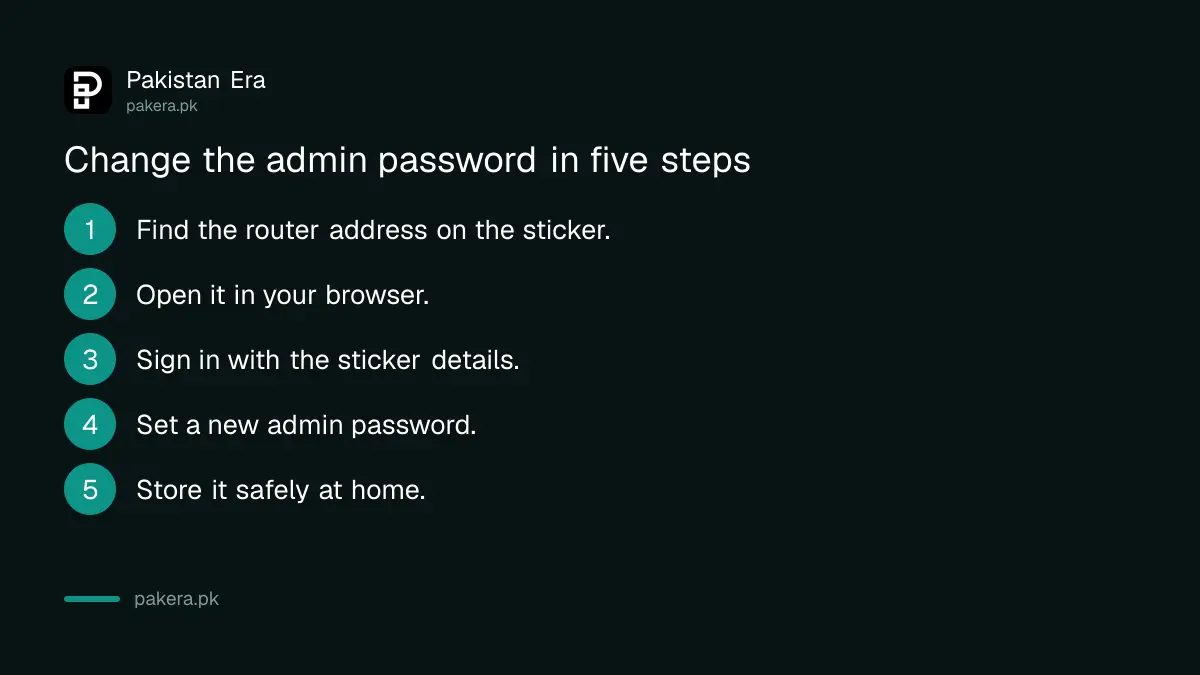
- Find the router's address on the sticker. Many routers use an address such as 192.168.1.1 or 192.168.0.1.
- Connect your phone or laptop to the router, then type that address into the browser.
- Sign in with the user name and password on the sticker.
- Find the section named Administration, System or Password, and set a new admin password.
- Write the new password somewhere safe at home, not on the router.
If your internet provider manages the router, some settings may be locked. Ask the provider's helpline before you reset anything. Our guide on changing your PTCL WiFi password covers one common case.
Update the firmware from the maker's website
CISA tells owners to check the router manufacturer's website to make sure they run the latest firmware. Updates fix security flaws and improve performance. Firmware is the router's own software. It is not your phone's update.
Find the model name and version on the sticker. Search the maker's own website, not a link someone sent you. Download the file and follow the maker's steps, using a cable if you can. Do not switch the router off during the update.
If the router is an old model that no longer gets updates, plan to replace it. Our guide on checking that a router is PTA type approved helps you pick a legal one.
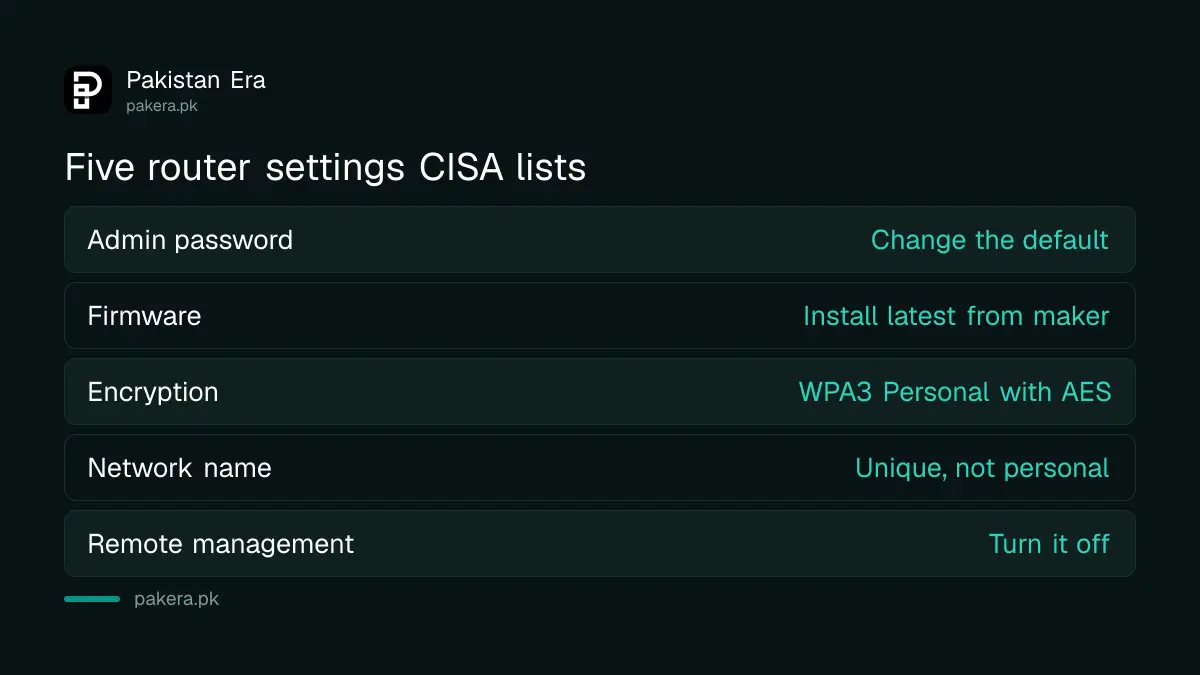
| Setting | What CISA advises | Why |
|---|---|---|
| Admin password | Change the default | Default logins are widely known |
| Firmware | Install the latest from the maker | Closes known security flaws |
| Encryption | WPA3 Personal with AES | Strongest option for home Wi-Fi |
| Network name | Change it, keep it anonymous | Hides who and where you are |
| Remote management | Turn it off | Stops outside access to settings |
Pick WPA3 if your router offers it
CISA recommends WPA3 Personal with AES as the strongest encryption for home networks. Look in the Wireless or Security menu for a setting called Security Mode or Encryption. Choose WPA3 Personal, or WPA2 and WPA3 mixed if some of your devices are older.
If your router offers only WPA2, use WPA2 with AES and a long password. Avoid WEP and open networks, which give no real protection. We did not find CISA's text on mixed mode, so that part is our own advice for older phones and smart TVs.
Make the Wi-Fi password long. Four unrelated words and a number are easier to remember than a short string of symbols, and harder to guess.
Rename the network and switch off remote management
CISA says to change the default network name, called the SSID, and keep it unique without tying it to your identity or location. A name like "Ahmad_House_12" tells a stranger whose network it is. It also tells them the router brand when you leave the default.
CISA also says to turn off remote management, which lets the router's settings be reached from the internet. Look for Remote Management, Remote Access or Web Access from WAN in the Administration menu. If you do not know why it is on, turn it off.
Check your router's speed and placement while you are in there. Our guide on placing your Wi-Fi router for the best signal gives the simple rules.
Check which devices are connected
Most routers show a list of connected devices in a menu called Connected Devices, DHCP Clients or Device List. Look for names you do not know. If you see one, change the Wi-Fi password and reconnect only your own devices.
This is our practical tip, not a CISA item. A smart bulb or a TV can appear with an odd name, so check against what you own before you panic. Write down the list once so you can compare it later.
If your internet is slow or drops, the cause may be the line and not the router. Our guide on making a PTCL complaint on 1218 shows how to raise a fault with the provider.
Common questions
Is the admin password the same as my Wi-Fi password?
No. The Wi-Fi password lets devices join the network.
The admin password lets someone change the router's settings, so it needs its own strong value.
What is WPA3?
WPA3 is a newer security mode for Wi-Fi networks. CISA recommends WPA3 Personal with AES for home networks.
If your router lacks it, use WPA2 with AES.
How do I find my router's address?
It is usually printed on the sticker on the router.
Many routers use 192.168.1.1 or 192.168.0.1, but read your own label to be sure.
Should I reset the router to factory settings?
Only if you cannot sign in or you suspect a problem. A reset can erase the settings your provider set.
Call the provider first if the router came from them.
Can my internet provider change my router settings?
Some providers manage their routers remotely. That is different from a stranger doing it.
Ask the provider what it manages before you turn off a remote feature on its router.
How often should I check the firmware?
CISA gives no schedule on the page we read. Check every few months, and again after any news of a flaw in your router brand.
Note the version number each time.
How we verified this
What we checked, where we read it, and what we could not confirm.
We read CISA's home network security page at cisa.gov on 12 October 2026. CISA is a United States agency, so its advice is general and not specific to Pakistani providers. We did not verify each provider's own router settings or helpline steps.
About the author

Technology Journalist & Multimedia Producer
Ahmad Ali is a technology journalist and multimedia producer at Pakistan Era, joining the team in October 2026. He covers consumer technology and digital life for Pakistani readers, combining research with hands-on product testing.