How to Get Shutterstock Contributor Payouts in Pakistan Through Payoneer
Get Shutterstock contributor earnings in Pakistan: link a new Payoneer account, set a $25 minimum, file the W-8BEN and know the 7th to 15th payment window.
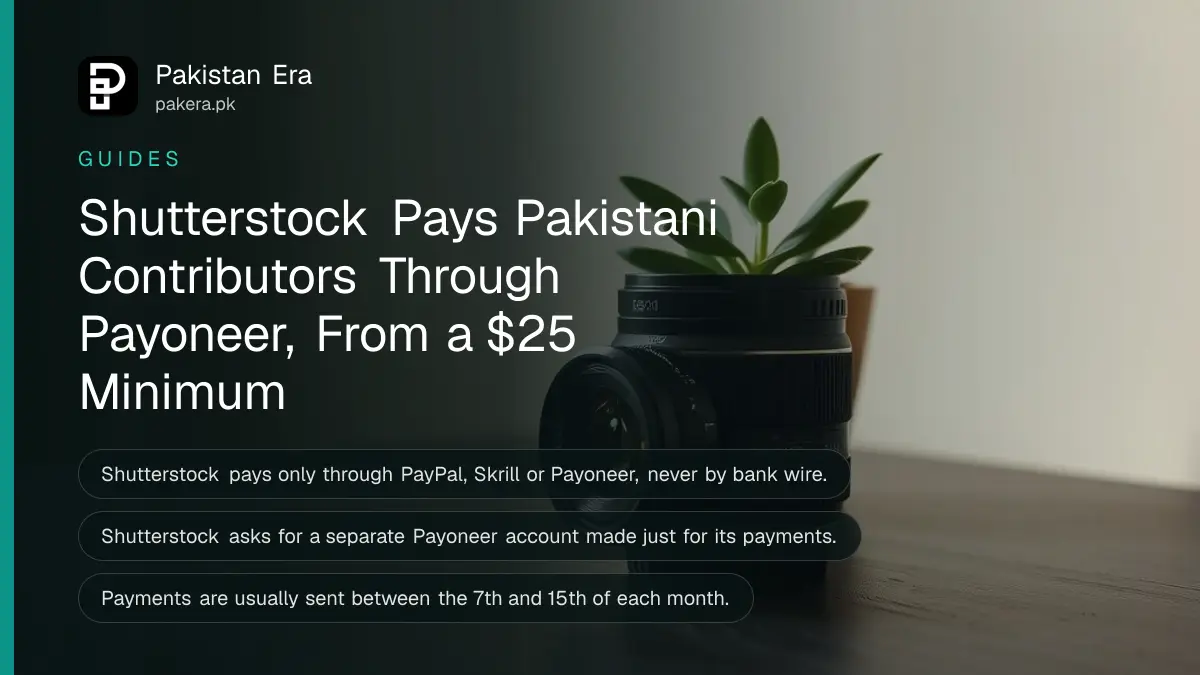
Shutterstock pays contributors only through PayPal, Skrill or Payoneer. It does not pay by bank wire or cheque. For a contributor in Pakistan, Payoneer is the practical route: link a new Payoneer account in Payout information, set a minimum between $25 and $2,000, and submit the W-8BEN tax form. Payments go out between the 7th and 15th of each month.
Many Pakistani photographers and illustrators upload for months, see earnings in the dashboard, and then find nothing arrives. The cause is nearly always one of three things: the wrong payout method, a missing tax form, or a Payoneer account that was never fully linked.
| Item | What Shutterstock's help pages say |
|---|---|
| Payout methods | PayPal, Skrill or Payoneer only |
| Bank wire, bank transfer, cheque | Not supported |
| Minimum payout | You choose, from $25 to $2,000 |
| Payment dates | Usually the 7th to 15th of each month |
| Tax form | Approved W-8BEN needed before any payment |
Payoneer is the route that works for contributors in Pakistan
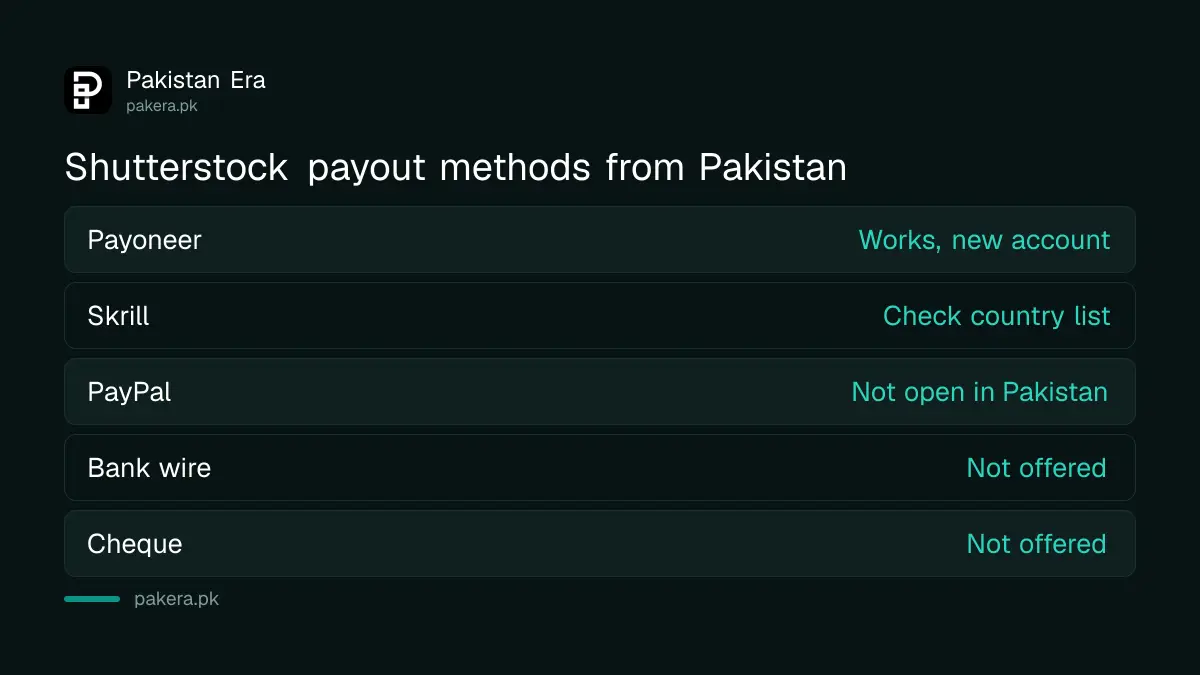
Shutterstock offers three payout methods: PayPal, Skrill and Payoneer. PayPal is not open to Pakistani residents, so most contributors here use Payoneer, which can then send the money to a Pakistani bank account in rupees.
Shutterstock itself tells contributors to check which provider works in their country. If you prefer Skrill, open the Skrill sign-up form first and make sure Pakistan appears as a country of residence before you enter that email in Shutterstock.
The wider picture of getting paid without PayPal in Pakistan explains why Payoneer has become the default for marketplace income.
Link Payoneer from the Payout information page in five steps
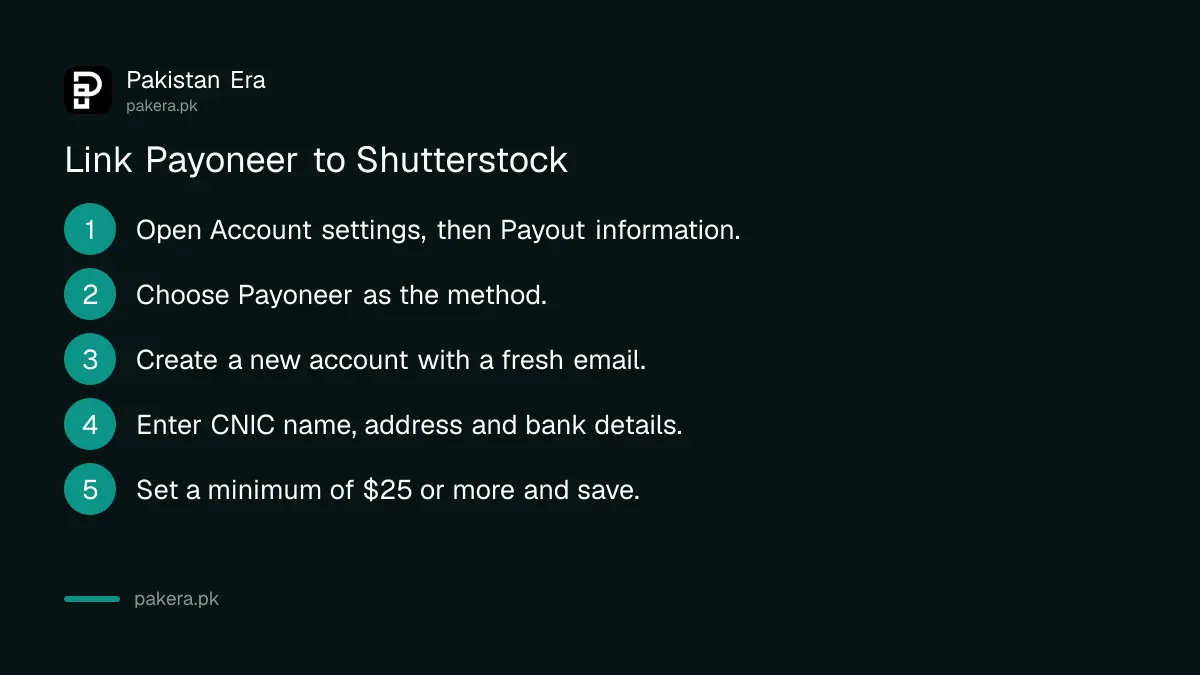
Open Account settings, go to Payout information, choose Payoneer and either connect an existing account or create a new one. Shutterstock wants a separate Payoneer account for its payments, so an account you already use for Fiverr or Upwork will not do.
- Sign in to the Shutterstock contributor site and open Account settings.
- Go to Payout information and choose Payoneer as the payment method.
- Pick "create a new account" and use an email address you have never used with Payoneer.
- Fill in your name as it appears on your CNIC, your date of birth, your full address and your Pakistani bank details.
- Set your minimum payout, save, and wait for the approval email from Payoneer.
Payoneer reviews each new account and may ask for a scan of a government ID. Its confirmation email usually comes within several business days. If Payoneer later asks for documents, upload your CNIC and a recent utility bill or bank statement in its Verification Center.
Under "Make payments to", enter your own name exactly as it appears on the account. Shutterstock does not allow two contributors to share one Payoneer, PayPal or Skrill account.
The W-8BEN tax form must be approved before Shutterstock pays you
Shutterstock will not send a payment until an approved tax form is on file. Contributors who are not US citizens or residents fill in the W-8BEN in the Tax Center. Without it, earnings simply build up and nothing is paid.
Shutterstock's W-8BEN help page says US-source sales can face 30% withholding, and that the rate may be lower or zero for residents of a country with a US tax treaty. The Tax Center asks the questions and picks the right form. Answer them for your own situation, with your Pakistani address.
A W-8BEN lasts for three calendar years. Shutterstock emails you when a new one is due. If your payment is smaller than your earnings figure, the difference is usually the tax deduction, which shows in Payment history once the payment is processed.
Shutterstock pays once a month, and changes take effect the next month
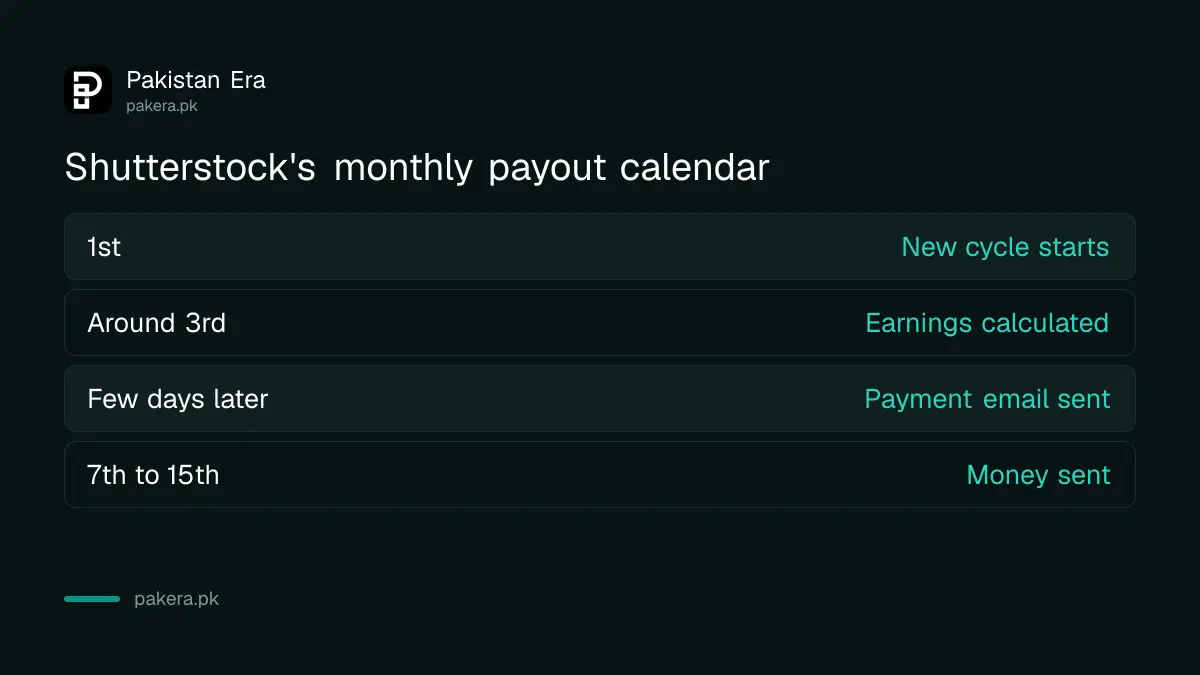
A new cycle starts at midnight US Eastern time on the 1st. Shutterstock calculates the previous month's earnings from about the 3rd, emails eligible contributors, and sends payments between the 7th and 15th. The full process takes about two weeks.
| Date | What happens |
|---|---|
| 1st of the month | New earnings cycle starts |
| Around the 3rd | Last month's earnings are calculated |
| Next few days | Email tells you a payment is coming |
| 7th to 15th | Payment sent to Payoneer, PayPal or Skrill |
If you did not reach your minimum, the balance rolls into the next month. There is no need to request a payment. If you change payout settings after the last day of a month, the change applies from the following month, so the payment in progress still goes to the old method.
Once the money is in Payoneer, moving it to your bank follows the usual steps. Fees for that leg are listed in Payoneer fees in Pakistan.
A payment email with no money usually means the payout account is not ready
If Payment history shows a payment that never arrived, the transfer most likely failed at Payoneer, PayPal or Skrill. Fix the account before the end of that month and Shutterstock reissues the payment automatically in the next cycle.
- Payoneer not linked. Log in to Payoneer directly and finish any open steps. If the connect button fails, wait 24 hours, clear your browser cache and try again.
- Old prepaid card account. If your Shutterstock Payoneer account was set up with a prepaid Mastercard, Payoneer support has to move it to a bank account.
- Email not accepted. For Skrill, wait at least 72 hours after opening the account, then retry.
- Tax form expired. Check Earnings, then Tax Form. An outdated form blocks payment.
Issued payments stay in Payment history even if they failed, and they cannot go back to your balance. They are reissued separately, also between the 7th and 15th. If the money left Payoneer but did not reach your bank, follow the checks for a Payoneer withdrawal not received in Pakistan.
Common questions about Shutterstock payouts in Pakistan
Can Shutterstock pay directly into my Pakistani bank account?
No. Shutterstock does not support bank transfer, wire or cheque. Use Payoneer, then withdraw from Payoneer to your Pakistani bank.
Can I use the same Payoneer account I use for Fiverr?
No. Shutterstock asks for a new Payoneer account created for Shutterstock, with an email address not already used with Payoneer.
What is the lowest minimum payout I can set?
$25. You can set any amount up to $2,000. Earnings below your minimum carry over to the next month.
Do I need to ask Shutterstock to release my payment?
No. Payments are calculated and sent automatically each month once you meet your minimum and have an approved tax form.
Why is my payment less than my earnings?
Earnings in the dashboard are before tax. The payment email shows the amount after any US tax withheld under your W-8BEN status.
How do I declare this income in Pakistan?
It is foreign income and belongs in your annual return. The steps for filing a freelancer's income tax return show where it goes on IRIS.
How we verified this
What we checked and where we read it.
We checked these Shutterstock contributor help pages on 24 November 2026: How do I get paid for my work? (payment cycle and dates), How do I set up or fix my earnings payment method? (three methods, no bank or wire), How do I change my payment settings? ($25 to $2,000 minimum), How do I receive payment via Payoneer? (separate account, new email), What can I do if I received a payment email but no payment? and the W-8BEN tax form FAQ.
Free on WhatsApp
Get last dates and rule changes on WhatsApp
We post new last dates, fee changes and fixes for common problems, a few short posts a day.
Follow Pakera on WhatsAppOther followers cannot see your number.
Pakera Solves It
Which online process wasted your time this week?
A portal that will not load, a form nobody explains, a complaint that went nowhere. Tell us. Every week we pick one, solve it step by step and publish the answer.
About the author

Technology Journalist & Multimedia Producer
Ahmad Ali is a technology journalist and multimedia producer at Pakistan Era, joining the team in October 2026. He covers consumer technology and digital life for Pakistani readers, combining research with hands-on product testing.