Turn On Wi-Fi Calling in Pakistan on Jazz, Zong and Ufone, at No Extra Cost
Weak signal indoors? Turn on Wi-Fi calling on Jazz, Zong or Ufone. Ufone's *9921# code, iPhone and Android settings, costs, and why the switch is missing.
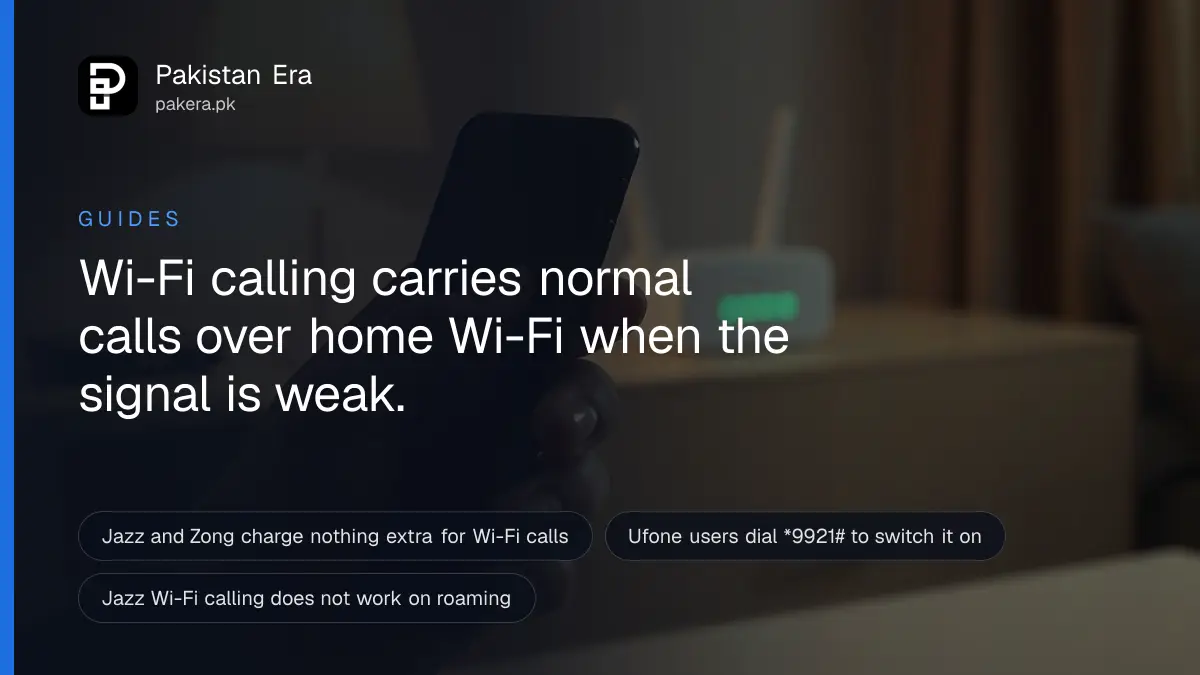
Wi-Fi calling (VoWiFi) lets your phone make normal calls on your own number over home or office Wi-Fi when the mobile signal is weak. Jazz, Zong and Ufone all offer it at no extra charge. On Ufone, dial *9921# first. Then turn on Wi-Fi Calling in your phone's settings.
Every city has houses where calls drop the moment you walk inside. Basements, the back rooms of old brick houses, and the upper floors of new towers are the usual places. People stand on the roof or by the gate to take a call, while the Wi-Fi router in the lounge has full bars.
Wi-Fi calling fixes exactly that. We read the VoWiFi pages of Jazz, Zong and Ufone, and Apple's Wi-Fi Calling page, on 2 October 2026. Here is how to switch it on, what it costs, and why it sometimes does not appear.
Wi-Fi calling uses your normal number and dialler
Wi-Fi calling sends an ordinary phone call over your Wi-Fi internet instead of the mobile tower. You use the phone's normal dialler and your own number. No app is needed, and the person you call sees nothing different. SMS works the same way.
This is not a WhatsApp call. A WhatsApp call needs both people on WhatsApp and online. A Wi-Fi call reaches any mobile or landline, because it joins the operator's normal network once it leaves your router.
Zong lists three places it helps most: buildings with weak indoor signal, the upper floors of high-rise buildings, and times when the mobile network is congested. Ufone adds basements, lifts and concrete buildings.
The cost is the same as a normal call
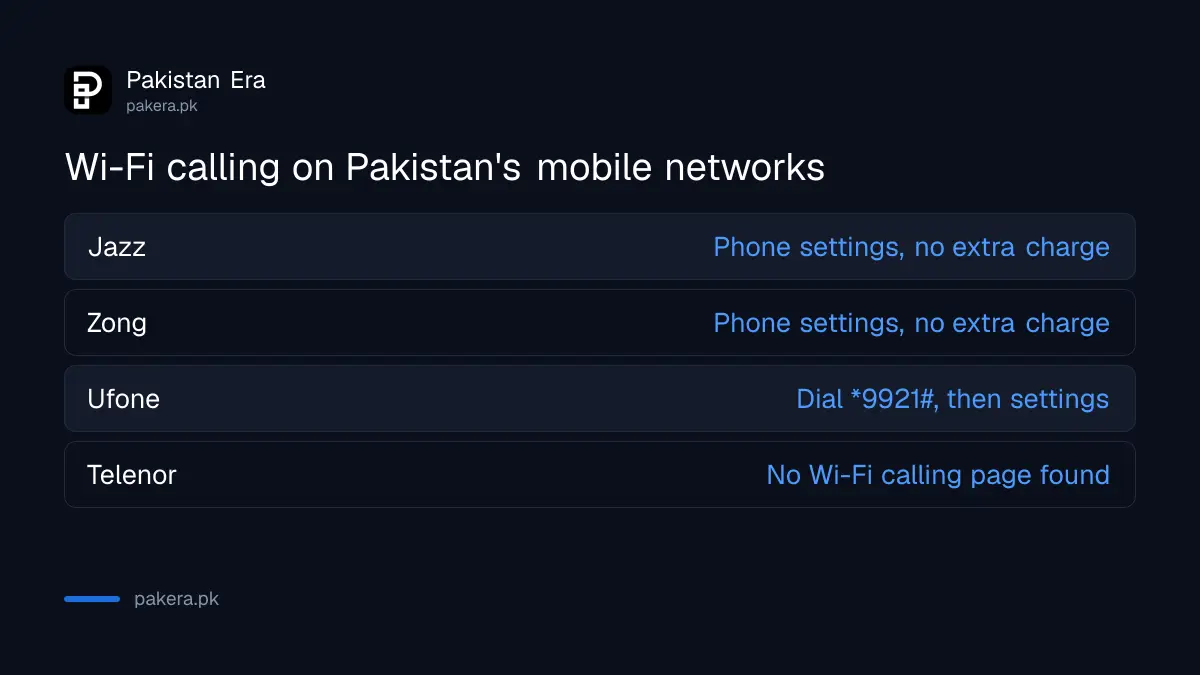
Jazz and Zong both say Wi-Fi calling has no extra charge. Calls and SMS come out of your package minutes, or your normal call rate if you have no bundle. The call travels over your Wi-Fi internet connection.
| Network | How to turn it on | Extra charge | Phones listed |
|---|---|---|---|
| Jazz | Phone settings only, after Jazz provisions it | None | Tested on Samsung, OPPO, VIVO and Digit |
| Zong | Phone settings only | None | List on Zong's site, including Infinix, Tecno and Xiaomi models |
| Ufone | Dial *9921#, then phone settings | Not stated on its page | 14 brands, including Apple and Samsung |
| Telenor | No Wi-Fi calling page found | Not published | Not published |
Telenor publishes a page on VoLTE, which is 4G calling, but we found no Wi-Fi calling page from it. Its website also blocked our reader with a bot check. If you use Telenor, ask its helpline whether VoWiFi is live before you spend time in your settings.
Jazz adds one condition worth knowing. You need "sufficient balance" or an active voice bundle, exactly as for a normal call.
How to turn on Wi-Fi calling on iPhone and Android
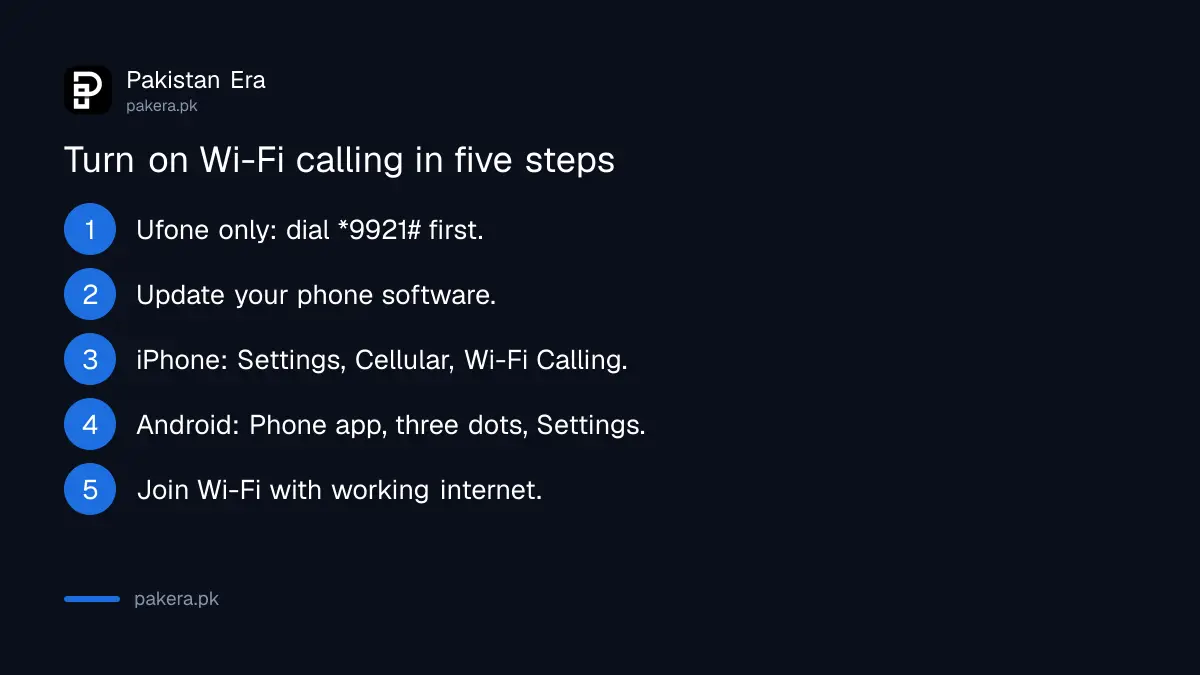
On an iPhone, go to Settings, then Cellular, then Wi-Fi Calling, and turn it on. On Android, open the Phone app, tap the three dots, then Settings, and turn on Wi-Fi Calling. Ufone users dial *9921# before this.
- Ufone only: dial *9921# from your Ufone number. Ufone says this activates Wi-Fi Calling. Dial *9922# to switch it off later.
- Update your phone. Jazz says Wi-Fi calling arrives through normal software updates, and there is no special VoWiFi update.
- On iPhone: open Settings, tap Cellular (the name can differ by region), tap Wi-Fi Calling and turn on Wi-Fi Calling on This iPhone. Tap Enable. If you use two SIMs, pick the line first.
- On Android: open the Phone app, tap the three dots, then Settings, then Wi-Fi Calling. Ufone also gives a second path: Settings, Connections, Mobile networks, Wi-Fi Calling.
- Connect to Wi-Fi with working internet. The Wi-Fi icon appears next to your network name when it is ready. Jazz calls this the VoWiFi icon.
Turn on VoLTE as well, if your phone has the switch. Jazz explains why: Wi-Fi calling works with VoLTE off, but your call will cut when you walk out of Wi-Fi range. With both on, the call can move to 4G without dropping. Ufone says the same, calling it a seamless handover.
Why the Wi-Fi Calling switch is missing or not working
If there is no Wi-Fi Calling option, your phone model or its software probably does not support it on your network. If the option is there but calls still use the tower, the Wi-Fi may be weak or the setting may not be set to prefer Wi-Fi.
Work through these, in this order:
- Check your model on the operator's list. Zong and Ufone both publish compatible handsets. Jazz says it has tested Samsung, OPPO, VIVO and Digit phones.
- Use a 4G SIM. Jazz lists a 4G or LTE SIM as a requirement. An old SIM card may need swapping at a franchise.
- Update the phone's software and restart it.
- Check the internet, not just the Wi-Fi bars. A router with full signal but a dead connection cannot carry a call. A quick look at your internet speed tells you whether the line itself is working.
- Choose Wi-Fi preferred if your phone offers that setting. Jazz says this makes the phone use Wi-Fi first for calls and SMS.
- Try another Wi-Fi network. Jazz lists this among its own fixes.
If your home broadband is the weak link, fix that first. A PTCL complaint on 1218 covers dead lines and slow speed, and persistent problems can go to PTA as a complaint about slow internet.
Wi-Fi calling does not work abroad on Jazz
Jazz says VoWiFi does not work on international roaming, because its Wi-Fi calls are routed inside Pakistan. So it is a fix for weak signal at home, not a way to call Pakistan cheaply from a hotel Wi-Fi in Dubai on a Jazz SIM.
Ufone's page is less clear. It says Wi-Fi calling gives dependable calls "whether at home, in the office, or while travelling abroad", but it does not set out roaming terms or charges. Ask Ufone before you rely on it overseas.
Emergency calls are another limit. Apple says an iPhone uses the mobile network for emergency calls when it is available, and may use Wi-Fi Calling only when there is no mobile service.

Common questions
Is Wi-Fi calling free in Pakistan?
There is no extra charge on Jazz or Zong. The call uses your package minutes or your normal call rate, plus some Wi-Fi data.
How do I activate Wi-Fi calling on Ufone?
Dial *9921# from your Ufone number, then turn on Wi-Fi Calling in your phone settings. Dial *9922# to deactivate.
Does Telenor have Wi-Fi calling?
We found no Wi-Fi calling page from Telenor on 2 October 2026. Ask Telenor's helpline before you try.
Do I need an app for Wi-Fi calling?
No. Zong, Ufone and Jazz all say it works through your phone's normal dialler.
Will my call drop when I leave the house?
It can. Turn on VoLTE too, so the call can move from Wi-Fi to 4G without cutting.
Can I use Jazz Wi-Fi calling outside Pakistan?
No. Jazz says VoWiFi is not available on international roaming.
How we verified this
What we checked, where we read it, and what we could not confirm.
Last checked on 2 October 2026. We read Jazz's JazzFi VoWiFi page and its FAQs, Zong's VoWiFi page and compatible handset list, Ufone's VoWiFi page with the *9921# and *9922# codes, and Apple's Wi-Fi Calling support page. Telenor's site returned a bot check and we found no Telenor Wi-Fi calling page. We did not test a Wi-Fi call on each network ourselves, and menu names vary by phone brand.
About the author

Tax, Bills and Technology Writer
Ali Akhtar is a young and curious voice here at Pakistan Era. He is currently pursuing his A-Levels and has a growing interest in Pakistan’s changing industrial landscape and educational trends. Ali likes to write in a way that helps him explain and explore the world around him. His writing reflects the perspective of the new generation navigating the evolving trends of Pakistan where technology, youth innovation, and shifting opportunities are reshaping the country’s future.