Face ID Not Working on iPhone in Pakistan: 8 Fixes, From Screen Protector to Reset
Fix Face ID not working on iPhone in Pakistan: clean the TrueDepth camera, check settings, masks and sunglasses, add an alternate look, reset, or get service.
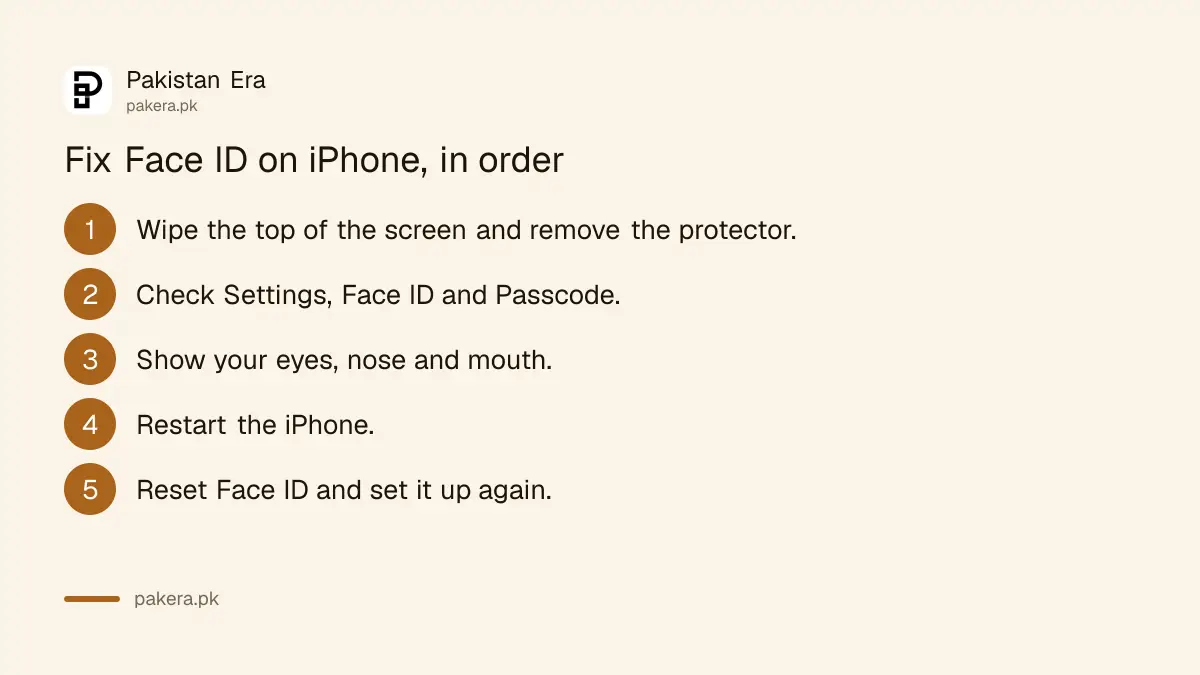
Face ID not working on your iPhone? First wipe the top of the screen, take off any thick screen protector or case edge over the camera, and hold the phone 25 to 50 cm from your face. Then check Settings, Face ID & Passcode, restart the phone, and if nothing works, tap Reset Face ID and set it up again.
Those steps come from Apple's own list for Face ID problems, and they run from the quickest to the most drastic. Go in order. A reset takes about a minute, but it deletes your saved face and any alternate appearance, so try the simple checks first.
Two causes are worth ruling out early: a glass protector that covers the sensors at the top, and damage after a screen or back glass was changed. The first is easy to fix at home. The second needs a technician.
Clean and uncover the TrueDepth camera first
Face ID reads your face through the TrueDepth camera at the top of the screen. Apple says smudges, cases and screen protectors can block it. Wipe the top edge with a soft cloth, and remove any protector or case that sits over the camera area.
If Face ID stopped working right after a new protector went on, that protector is the first suspect. Take it off and test before you change any setting.
On iPhone 18 Pro models, Apple adds a few more checks: try without a screen protector, adjust glasses or a mask in low light, remove heavy makeup, and avoid bright light shining from behind you.
Check that Face ID is set up and turned on for what you use
Face ID can be set up but switched off for some tasks. Open Settings, then Face ID & Passcode, and enter your passcode. Check that Face ID is set up, and that the switches for iPhone Unlock, App Store, Wallet and other apps are on.
- Open Settings.
- Tap Face ID & Passcode and enter your passcode.
- Check that a face is set up.
- Turn on the features you want Face ID for, such as iPhone Unlock and the App Store.
- Check Other Apps for banking and wallet apps that should use Face ID.
Apple also asks you to update to the latest iOS and confirm your model supports Face ID. iPhone X and later models with a notch or Dynamic Island use Face ID. Models with a Home button use Touch ID instead.
If a banking app keeps asking for its PIN even though Face ID works for unlocking, check that app's own security settings as well. Some banking apps have their own switch for biometric login, and locking banking and wallet apps with Face ID uses the iPhone's own setting on top of that.
Show your eyes, nose and mouth, and face the camera
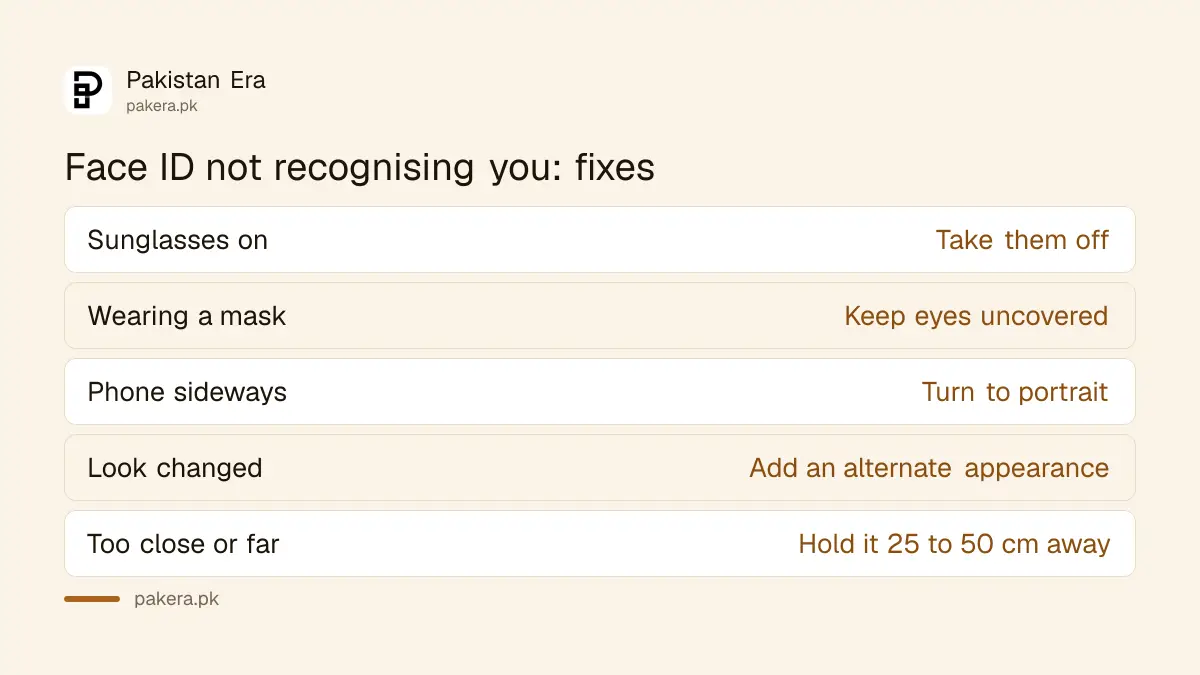
Face ID needs to see your eyes, nose and mouth. Apple says some sunglasses block the infrared light Face ID uses. Hold the iPhone an arm's length away or closer, about 25 to 50 cm, and look at the screen.
| Problem | What to try |
|---|---|
| Wearing sunglasses | Take them off, some block infrared light |
| Wearing a mask | Keep your eyes uncovered, hold the phone higher or closer |
| Phone held sideways | Turn to portrait, or keep your hand off the camera in landscape |
| Looks changed a lot | Add an alternate appearance |
| Phone too close or too far | Hold it 25 to 50 cm from your face |
Face ID with a mask works only in portrait on iPhone. Landscape support depends on your model and iOS version, so if Face ID fails only when the phone is sideways, turn it upright.
Add an alternate appearance if your look changes
Apple suggests an alternate appearance when your look changes a lot, for example with glasses, a beard or heavy makeup. It is a second face scan saved alongside the first. It helps people who switch between a full beard and clean shaven, or wear a niqab or scarf at different times.
- Go to Settings, then Face ID & Passcode.
- Tap Set Up an Alternate Appearance.
- Look into the iPhone and move your head slowly in a circle, as during the first setup.
Restart, then reset Face ID if it still fails
A restart clears many small glitches. Restart the iPhone, enter your passcode, and try Face ID again. If it still fails, reset it: Settings, Face ID & Passcode, Reset Face ID, then set it up again in good light.
- Restart the iPhone and enter your passcode when it starts.
- Try Face ID on the Lock Screen.
- If it fails, go to Settings, Face ID & Passcode, and tap Reset Face ID.
- Tap Set Up Face ID and scan your face again, with the camera clean and nothing on your face.
Your passcode is the backup for everything here. If you have forgotten it as well, Face ID will not save you, and a forgotten iPhone passcode needs a different process that erases the phone.
Get service if setup will not finish
Apple says to get service when Face ID keeps asking you to move your face and never finishes setup, or when the camera is not working. Apple says only a trained technician should service the device.
If Face ID stopped working right after a screen or back glass repair, the TrueDepth camera may have been damaged during the work. Take the phone to an Apple authorised service provider rather than trying another shop.
If you use Stolen Device Protection, a broken Face ID also makes some changes slower, because the iPhone asks for Face ID to change your Apple Account password or passcode when you are away from a familiar place.
Common questions
Why did Face ID stop working after a new screen protector?
The protector may cover the TrueDepth camera at the top of the screen. Apple lists screen protectors as one cause. Remove it and try again.
Does Face ID work with sunglasses?
Not always. Apple says some sunglasses block the infrared light Face ID uses. Take them off and try again.
Will Reset Face ID delete my photos or data?
No. It deletes only your saved face scans. Your photos, apps and data stay. You then set up Face ID again.
Can Face ID be fixed at a local repair shop in Pakistan?
Apple says only a trained technician should service Face ID. Use an Apple authorised service provider.
How far should I hold my iPhone for Face ID?
About an arm's length or closer, roughly 25 to 50 cm, which Apple gives as 10 to 20 inches.
How we verified this
What we checked and where we read it.
Last checked 15 November 2026. Every step comes from Apple Support, If Face ID isn't working on your iPhone or iPad Pro. Apple gives the distance as 10 to 20 inches; the centimetre figure is our conversion. Notes on screen protectors and repairs in Pakistan are our own advice, not Apple's.
About the author

Technology Journalist & Multimedia Producer
Ahmad Ali is a technology journalist and multimedia producer at Pakistan Era, joining the team in October 2026. He covers consumer technology and digital life for Pakistani readers, combining research with hands-on product testing.