If you received a message saying your vehicle has an unpaid traffic challan and you need to click a link to pay it, stop there first.
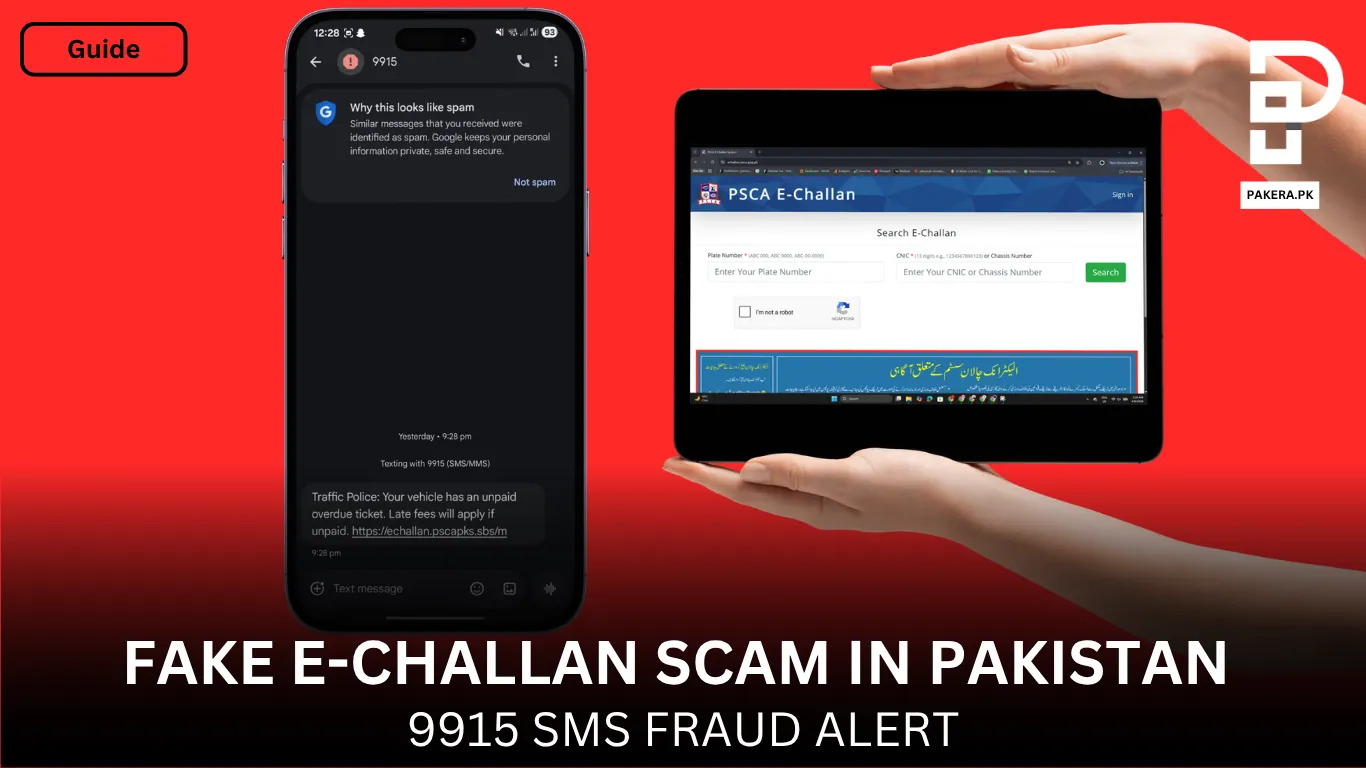
This is not one of those scams that looks obviously fake. That is exactly why people are falling for it. The message looks official, the website looks almost identical to the real e-Challan page, and the whole thing is designed to panic you into paying quickly before you think twice. In the screenshot you shared, even Google Messages is already flagging it as spam, which says a lot by itself.
The dangerous part is that this scam is using the name of Punjab’s e-Challan system and copying the same kind of details people normally enter on the real portal. On the official PSCA system, users search using their plate number along with CNIC or chassis number, which is why the fake page can feel believable at first glance. The official PSCA website also links directly to the real verification portal at echallan.psca.gop.pk.
What this scam is doing
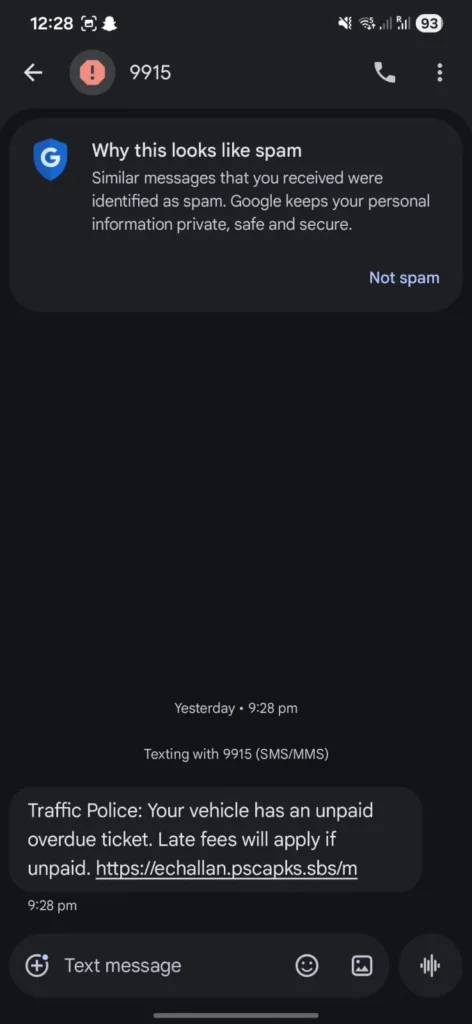
The scam usually starts with an SMS telling you that your vehicle has an overdue challan and late charges may apply if you do not pay. The message then pushes you toward a link that looks close enough to the original site to fool an average person.
Once you open that fake page, it asks for the same kind of information a real challan check would ask for, usually your vehicle number and CNIC or chassis number. That is where most people drop their guard, because they think, “Yes, this is exactly what the real website asks too.”
Then comes the real trap.
Instead of properly checking whether you actually have a traffic violation, the fake page is built to show you a challan anyway and move you toward payment. People discussing the scam online have reported that the fake site can show the same type of fine even when the details entered do not match any real record, which is one of the clearest red flags.
Why this scam is extra dangerous
This fraud is not working because people are careless. It is working because the scam is built smartly.
First, it uses the name and appearance of a real government service. Second, it creates urgency by saying your challan is overdue. Third, it asks for information that people already know is normally required on the real system. And fourth, it makes the payment step feel routine.
PSCA has publicly warned that official e-Challan SMS notifications are sent from 9915, but it also clarified something very important: official SMS messages do not contain links and do not ask you to make online payments or share bank, ATM, debit, or credit card information through SMS. PSCA also said that challans should only be verified through the official portal and that payment can be made through official channels such as ePay Punjab after PSID generation.
So the safer message for people is simple: do not trust the sender name or number alone. If the SMS includes a link, pushes you to pay immediately, or asks for financial details, treat it as suspicious and verify it yourself manually.
This is not a small issue anymore
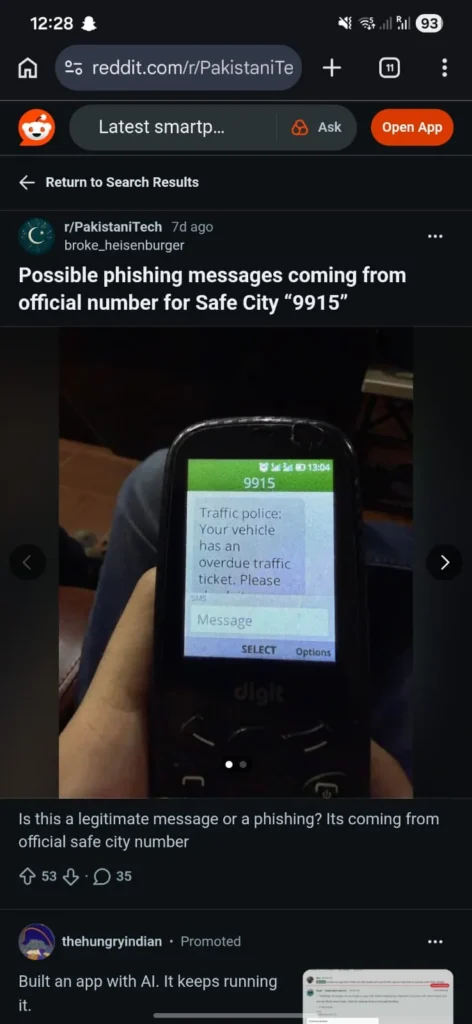
This is not just one random fake page either. In January 2026, Dawn reported that PTA had already blocked more than 100 fake and phishing websites that were misusing the name and logo of Punjab Safe Cities Authority and collecting money illegally in the name of e-Challan. Citizens were advised to use only the official PSCA e-Challan website or the Public Safety App.
That means this is now a proper ongoing fraud pattern, not an isolated incident.
How to check if your e-Challan is real
If you ever receive a challan SMS, do not open the link from the message.
Instead, do this:
1. Close the SMS
Do not click anything inside it.
2. Search the official Punjab e-Challan portal yourself
Open Google and search for the official PSCA e-Challan site, or type the official domain manually: echallan.psca.gop.pk. The PSCA main website itself links to this exact portal.
3. Enter your details there only
Use your plate number and your CNIC or chassis number only on the official portal. That is the real place to verify whether any challan exists.
4. If a challan exists, use the official payment route
PSCA says payment is done through official channels such as ePay Punjab after generating a PSID, not through random SMS links. ePay Punjab also describes PSID as a unique payment identifier used for government dues.
Red flags that should immediately make you stop
If you see any of these, back out right away:
The SMS contains a payment link
PSCA says official e-Challan SMS alerts do not contain links.
The site looks official, but something feels slightly off
Many scam pages are cloned to look almost identical to the real one.
You do not even own a vehicle, but it still shows a challan
That is a major sign something is wrong.
It shows a challan no matter what details you enter
That is not how a real government verification system should work. Reports shared online point to this exact behavior on fake pages.
It asks for card or banking details directly from the SMS flow
PSCA has already warned people not to trust any message asking for bank account, ATM, debit, or credit card details.
What to do if you already clicked the fake link
If you only opened the site but did not enter anything, close it and verify your challan on the real portal.
If you entered your card or payment details, do not wait. Contact your bank immediately and ask them to block or secure your card and review any suspicious transaction attempts. Also verify your challan only through the official PSCA portal. If you need help, PSCA’s spokesperson said citizens can contact helpline 15 and select Option 6 for the facility.
Final word
A lot of scams in Pakistan fail because they look fake. This one is different. It looks official enough to fool normal, careful people. That is why awareness matters here.
If you get an e-Challan SMS with a link, do not trust it blindly, even if it looks like it came from an official source. Never open the payment page from the message itself. Always go to Google, open the official PSCA e-Challan website yourself, and verify from there. One small check can save your money.
FAQs
No. PSCA says official e-Challan notifications are sent from 9915. But PSCA also says official SMS alerts do not contain links and do not ask for banking or card details. So if a message includes a link or payment push, verify it manually before trusting it.
The official verification portal is echallan.psca.gop.pk, and it is linked from the official PSCA website.
No. Citizens have been advised to use only official channels. PSCA specifically warned against paying through suspicious or unofficial websites.
Ignore the SMS link, go to the official portal yourself, and check there. If you still need help, PSCA said people can contact helpline 15 and choose Option 6.