How to Move Free Fire to a New Phone in Pakistan: Bind Your Guest Account First
Move Free Fire to a new phone in Pakistan without losing progress: bind the guest account to Facebook or Google in 7 steps, then log in on the new phone.
To move Free Fire to a new phone without losing your progress, bind your guest account first. On the old phone open Free Fire, tap Settings, then ACCOUNT & BASIC, then ACCOUNT, tap Bind and choose Facebook, Google, VK or another option. On the new phone, install Free Fire and log in with that same account. It is free and takes two minutes.
Skip the binding and the progress stays on the old phone. Garena says a guest account's data is stored on the device, not on its servers. If the phone is lost, reset or the game is deleted, Garena cannot bring it back.
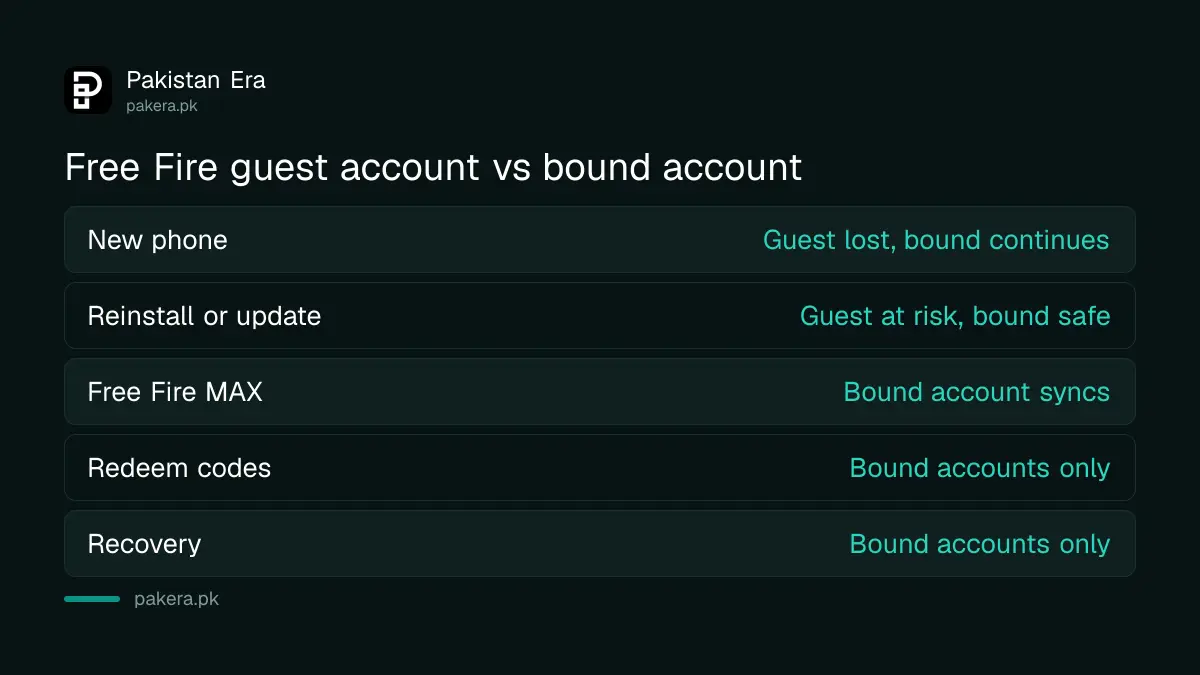
| What happens | Guest account | Bound account |
|---|---|---|
| Change to a new phone | Progress lost | Log in and continue |
| Reinstall or update the game | Can be lost | Safe |
| Play Free Fire MAX with the same progress | No | Yes, data syncs |
| Redeem codes and contact support | No | Yes |
| Recover after phone theft | Impossible | Possible |
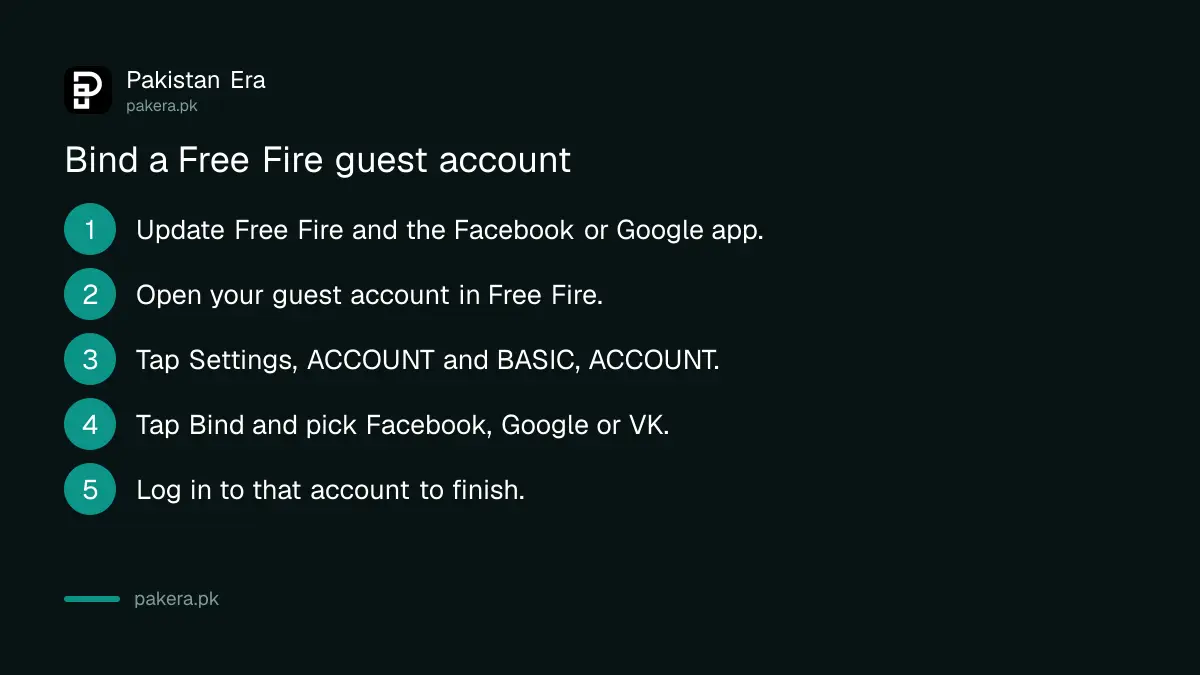
Bind your Free Fire guest account in seven steps
Binding links your guest progress to an account Garena can find again, such as Facebook or Gmail. Do it on the phone that has your progress now. You need the platform's app installed, updated and logged in on that phone before you start.
- Update Free Fire to the latest version from Google Play or the App Store.
- Make sure you have a Facebook, Google, VK or other supported account. Install its app, update it and log in.
- Open Free Fire and enter your guest account.
- Tap Settings, then ACCOUNT & BASIC, then ACCOUNT.
- Tap Bind.
- Pick one option, such as Facebook or Gmail. It must not already be bound to another Free Fire account.
- Log in to that platform account to finish the binding.
Choose carefully. Garena does not let you unbind a Free Fire account from a platform account once it is done. A Google account you control is a safer choice than a Facebook made on a SIM you no longer have.
Log in on the new phone with the same platform account
Once bound, your account works on any phone. Install Free Fire from the official store on the new phone, open it, and choose the same Facebook, Google or other option you bound. Your level, diamonds and items load from Garena's servers.
- On the new phone, install Free Fire from Google Play or the App Store, not from an APK link.
- Install and log in to the same platform app, such as Facebook.
- Open Free Fire and tap that platform's login button, not Guest.
- Check your nickname and level appear as before.
- On the old phone, log out of Free Fire before you sell or give it away.
Garena allows only one login at a time. If you open the account on the new phone while the old phone is still in a match, one of them shows the message that the account is logged in on another device. That is normal when the second phone is yours.
Free Fire MAX uses the same bound account
Free Fire MAX is a separate app with better graphics, but Garena says account progress and items sync across both apps. Log in to MAX with your bound account and everything carries over. Guest accounts do not link between the two apps.
Moving to a stronger phone is a common reason to try MAX. Bind first, then install MAX and log in with the same platform. Your diamonds stay the same in both apps, and any you buy on the official store go to the same account. Free Fire diamonds top up in Pakistan explains the official store and its payment options.
Bound accounts unlock codes, support and recovery
Binding is not only for changing phones. A guest account cannot redeem codes, cannot submit a ticket to Garena's Pakistan support, and cannot be recovered. A bound account can do all three, and can add a recovery email for extra protection. Adding the email is covered in binding a Free Fire recovery email, and the ticket steps in Free Fire customer service tickets in Pakistan.
- Redeem codes: Garena's rewards site rejects guest accounts. See redeeming a Free Fire code.
- Support tickets: only players with linked accounts can submit requests on Garena's Pakistan support site.
- Recovery email: once the account is bound and at level 5, add one in Settings. It lets you recover the account even if you lose the Facebook or Gmail later.
- Two accounts, one phone: bind each to a different platform account, then log out of one to log in to the other.
A friendly warning about phone shops: if a shop sets up your new phone and offers to "transfer the game", let it install the app only. Log in yourself. Never give anyone your Facebook or Gmail password, because Garena says sharing a login can get the account permanently banned. If you think the old phone was tampered with, checking a phone for hacking lists the signs.
Already lost the guest account
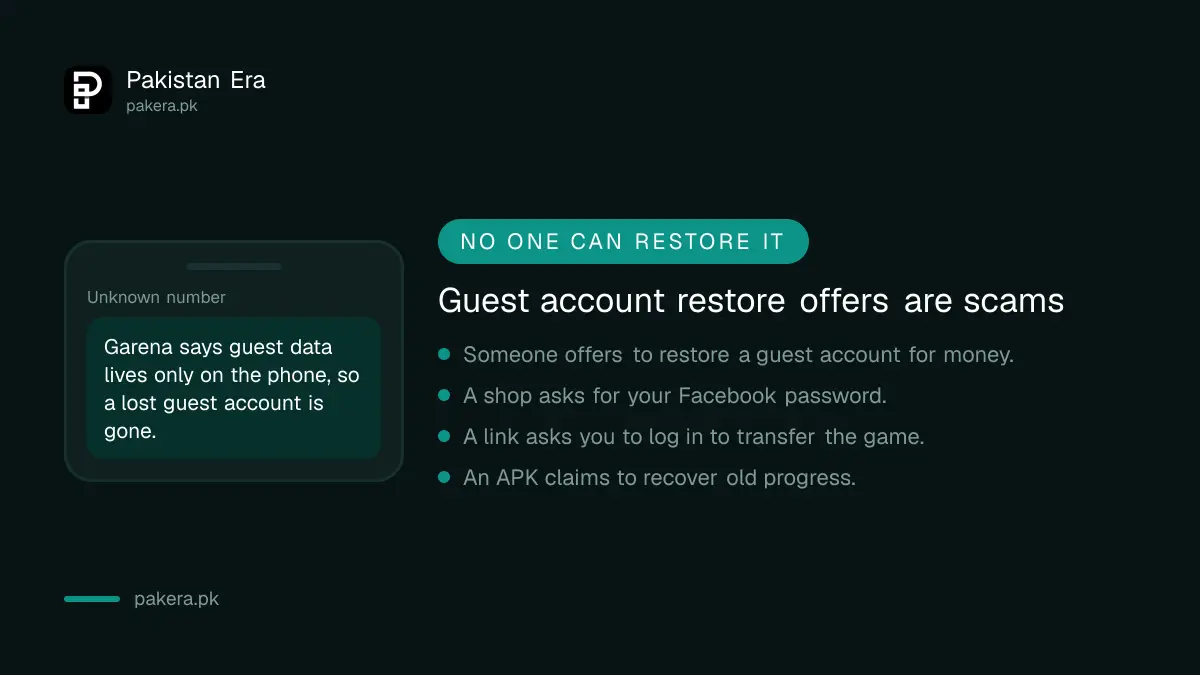
If the phone is gone or the game data was wiped before you bound it, Garena says there is no way to recover a guest account. Support tickets cannot help, because there is nothing on Garena's servers to restore. The only option is a new account.
Be wary of anyone who says they can restore a guest account for a fee. Nobody can, and such offers usually aim to take your new login. Start the new account, bind it on the first day, and add a recovery email at level 5.
Common questions
How do I transfer my Free Fire account from one phone to another?
Bind it to Facebook, Google or another platform on the old phone, then log in with that same platform on the new phone. There is no separate transfer button.
Can I recover a Free Fire guest account after a phone reset?
No. Garena says guest data is stored only on the device, so after a reset or a deleted game it cannot be recovered.
I bound my Free Fire account to the wrong Facebook. Can I change it?
Garena does not support unbinding. A recovery email, once bound, can change the bound platform account. Otherwise you can make a new guest account and bind it correctly.
Why does Bind say the account is already used?
That Facebook, Google or other account is already bound to a different Free Fire account. Each platform account can be bound to one game account, so pick another.
Can I play the same Free Fire account on two phones?
Yes, a bound account works on any phone, but only one login at a time. Logging in on the second phone ends the session on the first.
How we verified this
What we checked and where we read it.
We checked Garena's Free Fire support site for Pakistan on 21 November 2026: the Bind Guest Account article (updated 28 May 2026), Account Protection, Lost Guest Account, Free Fire MAX FAQ, Redemption Codes and How to Submit a Request. The menu path Settings, ACCOUNT & BASIC, ACCOUNT is the one Garena gives; labels can shift slightly between game versions. Sources: Garena Free Fire Pakistan support: Bind Guest Account and Free Fire MAX FAQ.
About the author

Global Affairs & Political Economy Writer
Muhammad Hatim is a book lover who started writing because he enjoys it. At Pakistan Era he writes about international relations, geopolitics and the global economy, with a particular interest in South Asia and the forces behind current events.