How to Enable 5G on Your Phone in Pakistan
Turn on 5G in your settings, brand by brand for Samsung, Xiaomi, Infinix, Tecno, Vivo, Oppo and iPhone, plus fixes when it will not work.
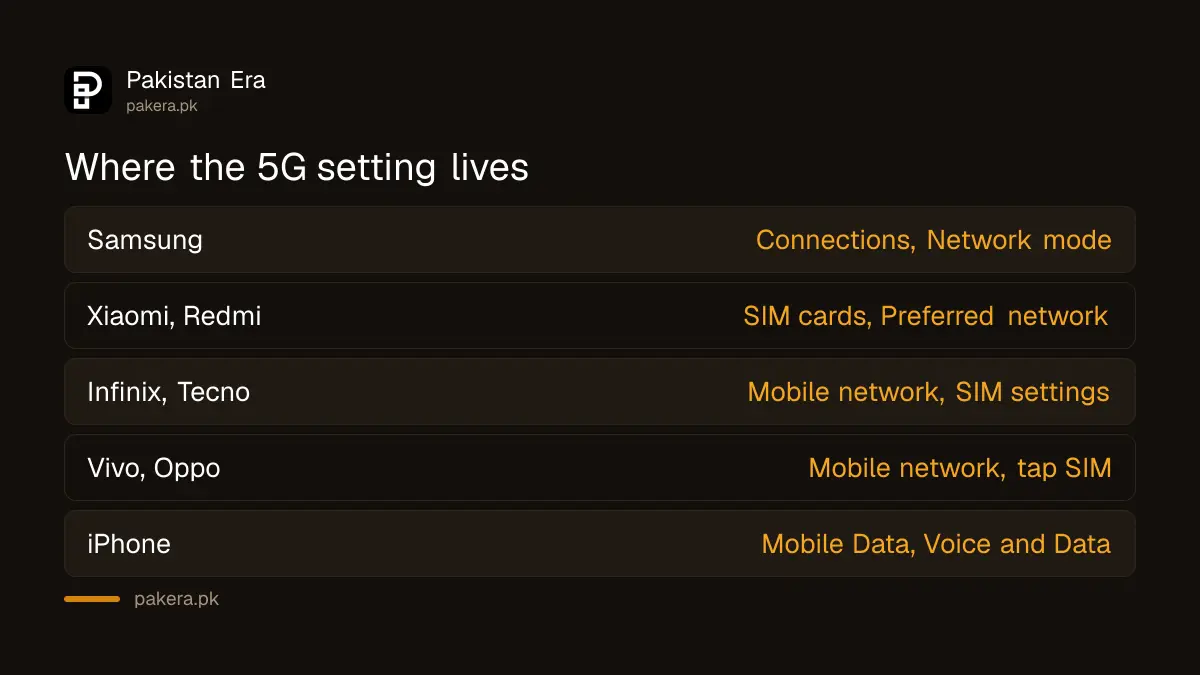
Phones sold in Pakistan often ship with 5G switched off. Not missing, just off, because defaulting to 4G saves battery and, until March 2026, there was nothing here to connect to. So a lot of people are standing inside coverage holding a capable handset that never tries.
Turning it on takes about fifteen seconds once you know where the setting hides, and it hides somewhere different on every brand. With 3.81 million 5G ready phones in the country according to PTA figures, this is a very common fifteen seconds.
Below is the path for each brand actually sold here, then what to do when the setting is on and it still says 4G.
How do you enable 5G on an Android phone?
Open Settings, find Mobile network or Connections, tap your SIM, then open Preferred network type. Choose the option containing 5G, or the automatic setting that includes it. Restart the phone afterwards.
That restart is not optional folklore. The handset registers its capabilities with the network at boot, and switching the setting without rebooting is why people conclude it did not work.
Brand by brand
| Brand | Path | What to select |
|---|---|---|
| Samsung | Settings, Connections, Mobile networks, Network mode | 5G/LTE/3G/2G auto connect |
| Xiaomi, Redmi, Poco | Settings, SIM cards and mobile networks, tap SIM, Preferred network type | Prefer 5G |
| Infinix, Tecno, Itel | Settings, Mobile network, SIM settings, Preferred network type | 5G/4G/3G/2G auto |
| Vivo | Settings, Mobile network, tap SIM, Preferred network type | 5G/4G/3G/2G |
| Oppo, Realme | Settings, Mobile network, tap SIM, Preferred network type | 5G/4G/3G/2G |
| iPhone | Settings, Mobile Data, Mobile Data Options, Voice and Data | 5G Auto or 5G On |
If Preferred network type stops at 4G with no 5G entry, the handset does not have the radios. No setting and no update will change that. Our guide on checking whether your phone supports 5G covers how to be certain.
How do you enable 5G on an iPhone?
Go to Settings, Mobile Data, Mobile Data Options, then Voice and Data. Pick 5G Auto for a balance of speed and battery, or 5G On to force it wherever available.
The catch on iPhone is that this menu only appears when the device is on a network offering 5G. If you are on an iPhone 12 or newer and cannot see the option, that means no coverage rather than no capability.
The difference between the two modes is worth understanding. 5G Auto lets iOS drop to 4G when it decides the speed gain is not worth the battery, which is usually the sensible default. 5G On holds 5G whenever it can, which drains faster.
Should you leave 5G on all the time?
On a phone you charge nightly, yes. On a phone that already struggles to reach evening, no. 5G radios draw more power, particularly at the edge of coverage where the handset works hard to hold a weak signal.
My own take: leave it on automatic. The battery difference in a well-covered area is small, and the automatic modes exist precisely to stop the phone burning charge chasing a signal that is not there.
- Strong coverage, modern battery: leave 5G on or automatic.
- Patchy coverage at home: switch to 4G there, back to automatic when you travel.
- Older phone, tired battery: 4G will genuinely last longer.
- Travelling outside the 22 covered cities: 4G, since there is nothing to connect to anyway.
Why is 5G enabled but not connecting?
Coverage first, settings second, SIM third. Service currently runs on roughly 449 tower sites across 22 cities, so most of Pakistan genuinely has nothing to connect to yet, and no amount of toggling changes that.
- Restart the phone. The most effective single step after changing network settings.
- Toggle flight mode for thirty seconds to force a fresh network scan.
- Check the right SIM slot. On dual SIM phones, 5G is often available on one slot only, and your data SIM may be in the other.
- Reset network settings if nothing else works. You will need to re-enter Wi-Fi passwords afterwards.
- Ask about the SIM. Very old cards occasionally need replacing, covered in our guide on whether you need a new SIM for 5G.
Ufone customers can dial 333 to have the connection checked from the network side, and the UPTCL app shows your connection status without a call.
Does enabling 5G cost anything?
No. There is no activation fee and no separate package. Operators are delivering 5G through existing data bundles during the initial rollout, so switching the setting on changes your speed and not your bill.
What it can change is how quickly your allowance disappears. Faster connections push video to higher resolutions and make large downloads painless, so a bundle that comfortably lasted a month may not any more. Our guide to 5G packages in Pakistan covers what to expect there.
Worth turning on your operator's balance protection at the same time. On Ufone, *6611# stops out-of-bundle data billing against your main balance.
Frequently asked questions about enabling 5G
How do I turn on 5G on my phone in Pakistan?
Settings, Mobile network, Preferred network type, then select the 5G option. Restart the phone afterwards so it re-registers with the network.
Why is there no 5G option in my settings?
Either the phone lacks 5G hardware, or on an iPhone you are not currently in a covered area. Check your handset against your operator's supported device list.
Does turning on 5G drain the battery?
Somewhat, especially at the edge of coverage. Automatic modes reduce this by dropping to 4G when the speed gain is not worth the power.
Do I have to pay to enable 5G?
No. There is no activation charge and no separate 5G package. Your existing data bundle carries the traffic.
Why does my phone keep switching back to 4G?
That is normal on automatic mode when 5G signal is weak. If it happens in a strong coverage area, restart and check Preferred network type again.
Does 5G work on both SIMs in a dual SIM phone?
Often only one slot supports 5G. Check your handset's specification and move your primary data SIM to the slot that does.
About the author

Public Services and Education Journalist
Fajr Riaz is a journalist and content writer at Pakistan Era, based in Lahore. She covers the questions people meet in everyday life in Pakistan: how a public service works, what a change in the rules means, and where to find a reliable answer.