Move Your Gemini Gems to Skills Before November 2026 in Pakistan
Google is replacing Gems with skills in Gemini. Personal accounts lose Gems in November 2026. How to move each Gem yourself and keep your files from Pakistan.
Google is replacing Gems with skills in Gemini. For personal Google accounts in Pakistan, Gems go away in November 2026. Google says it will turn your Gems into skills automatically, but you can move them yourself now: Settings, then Skills, then Create manually, and paste in your Gem's name, description and instructions.
A Gem is a saved custom version of Gemini, such as a "CV checker" or an "Urdu email writer" you set up once and reuse. Google announced on 30 September 2026 that skills will take their place, and its help centre now gives a removal timeline.
We read Google's two help pages on skills on 10 October 2026. The steps below follow them. One warning first: skills need you to be 18 or over. Google does not say what happens to Gems made by younger users, so a user under 18 should copy their Gem instructions into a note now.
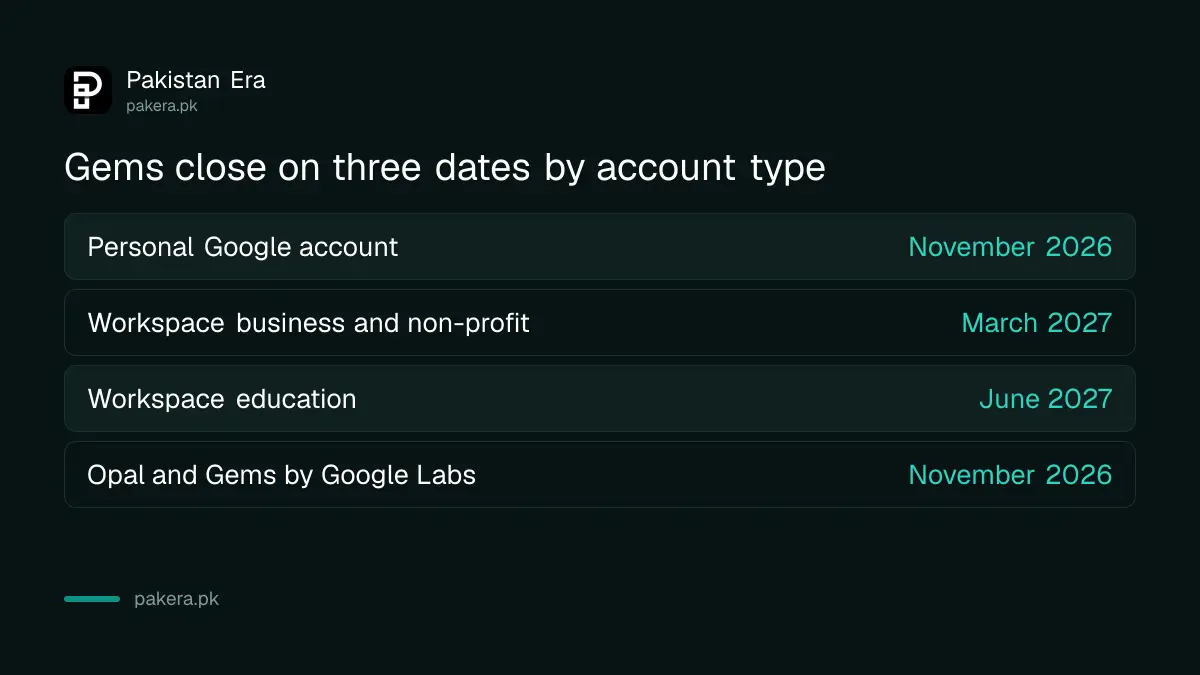
Gems close in November 2026 for personal accounts
Google is removing Gems on three dates, depending on the account you sign in with. Personal Gmail accounts go first, in November 2026. Google has not given an exact day, so treat the start of November as the safe deadline.
| Account type | Gems go away | Skills available now? |
|---|---|---|
| Personal Google account (Gmail) | November 2026 | Yes, if you are 18 or over |
| Workspace business, enterprise, non-profit | March 2027 | Not yet |
| Workspace education (university email) | June 2027 | Not yet |
Opal, Google's experiment for building mini apps, and "Gems by Google Labs" also close in November. If you built something there, save it first.
Google moves Gems for you, but files need care
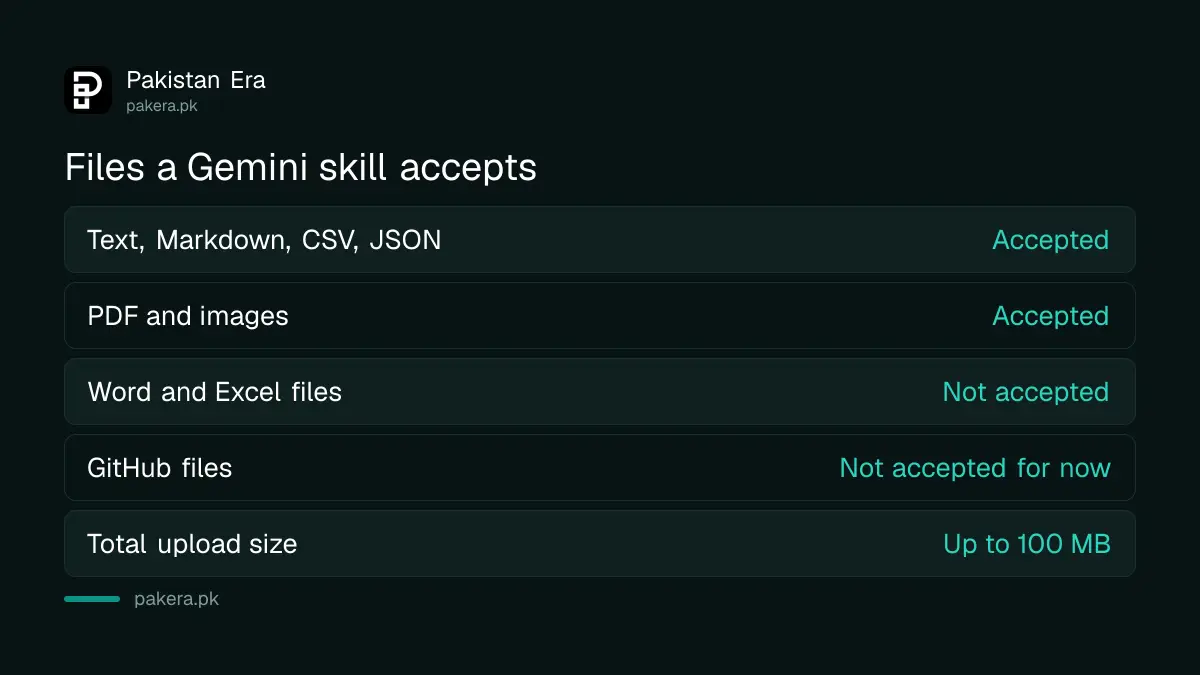
Google says it will turn your Gems into skills automatically when Gems go away, along with any supported files. So doing nothing is allowed. The risk is in the files: skills accept only plain text files, PDFs and images, so a Gem built on a Word or Excel file can lose part of its knowledge.
Skills do not accept .docx, .doc or .xlsx files. They also cannot read GitHub files for now. The total upload must stay under 100 MB. If your Gem depends on a Word CV template or an Excel price list, save it as a PDF or a .csv file before you move it.
How to move a Gem to a skill yourself
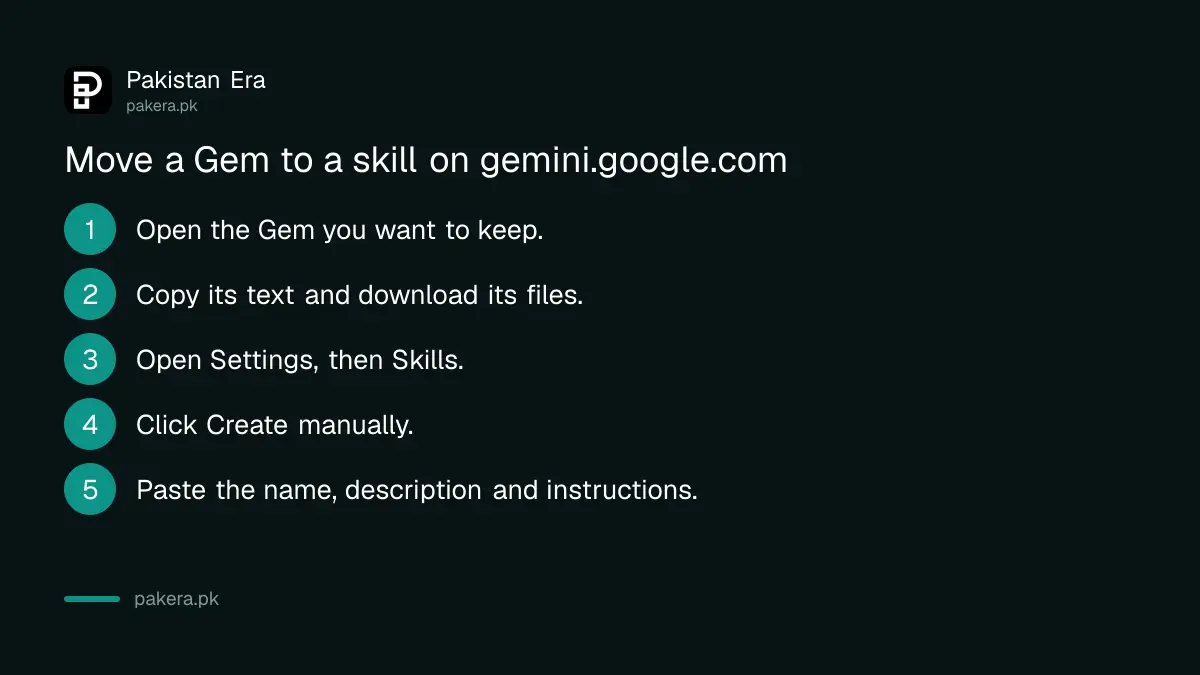
Moving a Gem by hand is quickest on a computer. Open your Gem, copy its text, then build a new skill from a blank template. Google's help page lists these steps for gemini.google.com.
- Open gemini.google.com and open the Gem you want to keep.
- Copy its name, description and instructions into a notepad. Download any knowledge files one by one.
- In a new tab, go to gemini.google.com, open Settings in the sidebar, then Skills.
- Click Create manually near the top of the Skills page.
- Paste the name, description and instructions. Gemini changes the name to the right format.
- Click Create at the top. If you have no files to add, you are done.
Files take one extra step. Google's page says you add files by downloading your new skill as a .zip file, then uploading it again together with the files. To download, hover over the skill on the Skills page, click More, then Download. To upload, click Upload on the Skills page and pick the folder or .zip.
Skills work differently from Gems
A Gem was its own chat window. A skill works inside any chat. You call one by typing / (Google says this will change to @) and picking its name. Gemini can also use a skill on its own when your prompt matches what the skill is for.
You can stack several skills in one chat. A "formal English" skill and a "client proposal" skill can run together, which a Gem could not do. Skills also lack a page listing the chats where you used them, so those chats sit in the normal sidebar.
Some Gem tools are missing for now. Google lists video creation, music creation, Canvas, Deep Research and Guided Learning as not working with skills yet. If your Gem relied on Deep Research, keep a note of how you used it.
Three conditions must be met before you see Skills at all:
- You are 18 or over.
- You use a personal Google account, not a work or school one.
- Gemini Apps Activity, which Google calls Keep Activity, is on.
Skills work in the Gemini mobile app, the Mac app and the web app. Students who use Gemini for flashcards and quizzes from their notes can rebuild that routine as one skill.
Write a better skill while you are moving it
Google gives three tips for skills: say when Gemini should use it, keep the instructions short, and include an example of the output you want. Most old Gems fail the first test, because a Gem never needed to say when to switch on.
So add one line at the top, such as "Use this when I paste a job post and ask for a proposal." That line is what lets Gemini pick the skill by itself. If you collected your Gems while trying the free Gemini year, this is a good moment to delete the ones you never use. Deleting a skill cannot be undone, so download it first if unsure.
Freelancers who keep separate Gems for each client may find skills tidier. One skill per client style, plus one general writing skill, covers what used to take five Gems. Picking the right tool in the first place still matters, and the best AI for Urdu may not be Gemini for every task.
Common questions
When exactly do Gems stop working in Pakistan?
Google says November 2026 for personal Google accounts. It has not given an exact date, so move your important Gems before 1 November.
Will I lose my Gems if I do nothing?
No. Google says it will turn your Gems into skills automatically, with supported files. Word and Excel files are not supported in skills, so convert those first.
Why can't I see Skills in my Gemini settings?
You must be 18 or over, use a personal Google account and have Keep Activity on. Google is also rolling skills out gradually, so some accounts get them later.
Can I use skills on Android and iPhone?
Yes. Google says skills work in the Gemini mobile app, the Gemini app on Mac and at gemini.google.com.
Do skills cost money?
No. Google lists skills for personal accounts and does not limit them to a paid plan. Gems also appear on the free plan on Google's plans page.
How we verified this
What we checked, where we read it, and what we could not confirm.
We last checked this on 10 October 2026. We read Google's help pages About the transition from Gems to skills and Create and manage skills for Gemini Apps, and the Gemini release notes entry dated 30 September 2026.
About the author

Founder and Editor
Umer Kureshi founded Pakistan Era in July 2024 and runs it as administrator, SEO lead and writer, overseeing website operations, search growth, content strategy and coverage of technology and current affairs.