How to Appeal a PUBG Mobile Account Ban, and Which Bans Are Permanent
Banned on PUBG Mobile? Appeal through in-game Customer Service. Account bans run up to 3,650 days, device bans are permanent. PUBG Mobile's rules, explained.
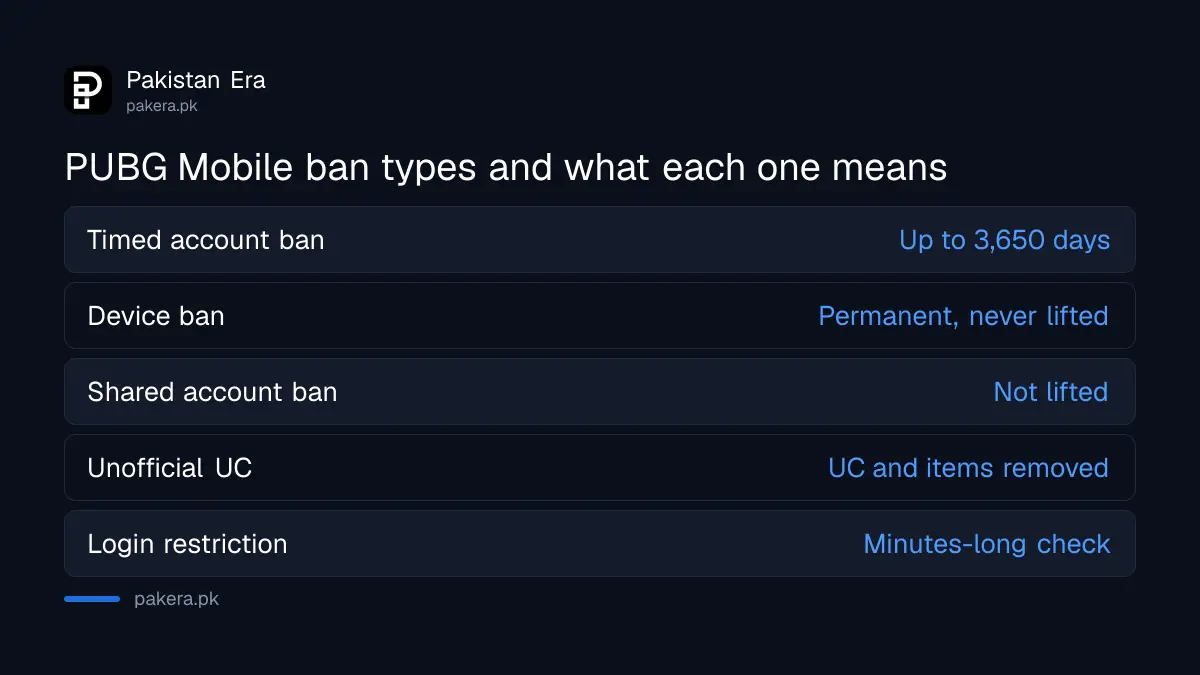
If your PUBG Mobile account is banned, contact the game's Customer Service from the icon in the in-game Settings menu, which PUBG Mobile names as its best support route. Its email is service@pubgmobile.com. A timed ban lifts by itself when it ends. A device ban for cheating is permanent, and a ban caused by a friend using your account will not be lifted.
The message usually appears after a normal login, sometimes days after the match that caused it. Players in Pakistan then search for an "unban" trick, and find sellers offering one for a fee. None of that is how PUBG Mobile works. We read PUBG Mobile's own website, its Security Center and its End User License Agreement on 30 September 2026, and the rules below come from them.
| What you see | What it means | What to do |
|---|---|---|
| Account ban with a time period | A penalty of up to 3,650 days | Wait it out, or contact Customer Service if you think it is wrong |
| Device ban | The phone is blocked for any account, forever | Log in on another device if your account itself is not banned |
| Ban after lending your account | Penalty stays on the account | PUBG Mobile says it will not lift it |
| Network or login restriction notice | A routine check lasting several minutes | Fix your connection and log in again later |
| UC or items removed | Bought through an unofficial seller | Contact Customer Service, and only buy UC officially |
Customer Service inside the game is the official appeal route
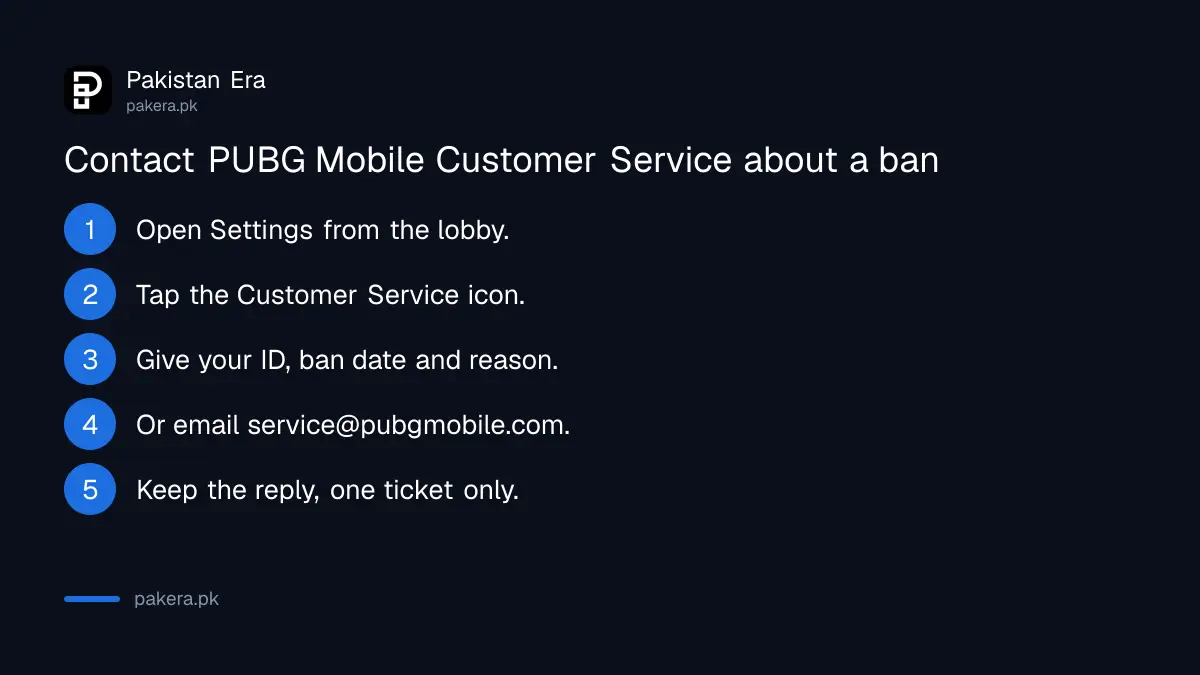
PUBG Mobile's own contact page says the best way to get support is the "Customer Service" icon in the in-game Settings menu. For anything else, it lists the email address service@pubgmobile.com. There is no paid unban service, and no Pakistani office handles bans.
- Open PUBG Mobile and go to Settings from the lobby.
- Tap the "Customer Service" icon.
- Explain the ban in plain words: your Character ID, the date it started and why you think it is wrong.
- If you cannot reach the lobby, email service@pubgmobile.com from the address linked to your account.
- Keep the reply. Do not open a second ticket every day, which only adds to the queue.
We did not file an appeal ourselves, and PUBG Mobile publishes no response time or appeal form on the pages we read. So be patient, and be honest. An appeal that says "I never cheated" for an account you shared with a friend will not go anywhere, as the next section explains.
Be wary of anyone on Facebook, WhatsApp or TikTok who says they can unban your account for money. PUBG Mobile's Security Center posted a warning on 22 September 2026 about fake "official" staff asking for account passwords. Its message is simple: never give it.
PUBG Mobile bans come in three types
PUBG Mobile uses timed account bans of up to 3,650 days, permanent device bans for cheating, and removal of UC or items bought through unofficial sellers. A timed ban ends on its own. A device ban never does. Each has a different fix.
Timed account ban
PUBG Mobile says players who break the rules, including teaming up with cheaters, unfair cooperation and posting prohibited content, get an account ban of up to 3,650 days, which is ten years. Their Rating Points are also reset. Once the penalty period is over, the ban lifts automatically, but the Rating Points start again from zero.
Device ban
Since December 2021, PUBG Mobile has banned devices as well as accounts. If the system decides a player cheated, that phone can no longer log in to or create any PUBG Mobile account. PUBG Mobile says this ban is permanent and "will not be lifted". If your account itself is not banned, you can still log in to it on another phone.
Purchase penalties
PUBG Mobile says it never authorises any person or third-party platform to buy on your behalf. For unauthorised third-party purchases and refund abuse, it confiscates all UC and items obtained that way and can ban the account. Repeat cases get heavier bans.
Lending your account is the ban that cannot be appealed
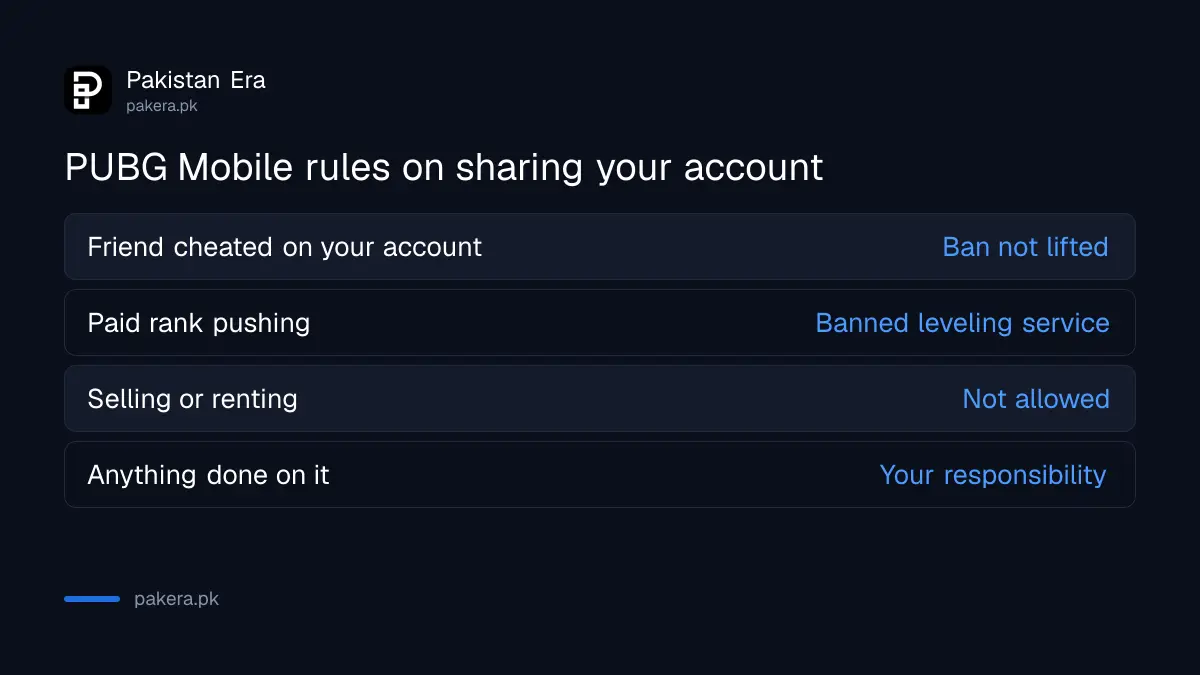
The most common Pakistani ban story is a friend or a paid "rank pusher" playing on your account. PUBG Mobile says penalties target the game account, not the person, so a ban caused by someone else's cheating will not be lifted. Its user agreement bans sharing, selling and renting accounts.
PUBG Mobile answers this exact question on its site. A player lent the account to a friend to rank up, the friend cheated, and the player asked for the ban to be lifted. The answer was no. PUBG Mobile "strongly" advises players not to share accounts.
The End User License Agreement goes further. You may not "sell, resell, rent, lease, share or provide access" to your game account. It also bans "leveling" services, which covers paid rank pushing. And you are responsible for everything that happens on your account, whether you knew about it or not.
Also, a quiet night does not mean you are safe. PUBG Mobile says its security system has two kinds of penalty: one during real-time review, and one after it confirms a violation at a later date. A ban can arrive days after the match, even on a night you did not log in.
Avoid a PUBG Mobile ban with five habits
Most bans come from third-party apps, shared accounts and unofficial UC. PUBG Mobile says even installing cheats or plugins counts as a violation, not just using them. Keep only the official game, never share your login, and buy UC from official channels.
- Remove third-party tools. PUBG Mobile's list includes plug-ins, cracked versions, wall hacks, bots, simulators and network changes. Installing them can be enough for a ban.
- Do not share or sell your account. Not with friends, cousins or rank pushers.
- Buy UC only officially. Midasbuy, the in-game shop and the app stores are the official routes for buying PUBG UC in Pakistan. Cheap UC from a seller can cost you the UC, the items and the account.
- Do not team up with cheaters. PUBG Mobile names this as a ban reason in itself, even if you did not cheat.
- Update only from official sources. The PUBG Mobile 4.6 update came through Google Play, the App Store and the APK on PUBG Mobile's own website, not a mod site.
A "modded" APK from a random site is the easiest way to lose an account, and a phone, in one go. If the device is flagged, PUBG Mobile says no account will work on it again.
If you see a cheater, use the in-game report system. PUBG Mobile asks players to report there, and publishes lists of accounts and devices it has banned.
A login restriction notice is not always a ban
A notice about your network connection or a login restriction is usually not a ban. PUBG Mobile says its system runs a routine security check for several minutes when there is a network issue. Check your connection, wait, and log in again once the restriction lifts.
Players on weak mobile data often mistake this for a ban. Switch between Wi-Fi and mobile data, turn off any VPN, and try again after a few minutes. If the message stays for days, or shows a ban period, that is a real penalty and Customer Service is the next step.
If your account was taken over by someone else and then banned, say so clearly in your ticket. PUBG Mobile lets players sign in with a Facebook or Google account, so if that login was hacked, recover the hacked Facebook account first. And if money was stolen, for example through a fake UC seller, you can report the cybercrime to NCCIA.
Common questions
How long is a PUBG Mobile ban?
Up to 3,650 days, which is ten years, for account bans. A device ban for cheating is permanent.
How do I appeal a PUBG Mobile ban?
Use the "Customer Service" icon in the in-game Settings menu, or email service@pubgmobile.com. PUBG Mobile publishes no separate appeal form or response time.
Can a PUBG Mobile device ban be removed?
No. PUBG Mobile says device bans are permanent and will not be lifted. You can still use an account that is not banned on another phone.
My friend cheated on my account. Can the ban be lifted?
No. PUBG Mobile says penalties target the account, so it will not lift a ban caused by account sharing.
Will I get my UC back after a ban?
Unlikely. PUBG Mobile's user agreement says virtual items and UC have no cash value, and payments are non-refundable except where the law requires.
Do unban services in Pakistan work?
PUBG Mobile names no paid unban route. Its Security Center warns about fake "official" staff asking for passwords, so never give yours to anyone.
How we verified this
What we checked, where we read it, and what we could not confirm.
Last checked on 30 September 2026. The Customer Service icon in Settings and the service@pubgmobile.com address are read on PUBG Mobile's support and contact page and its site footer. The 3,650-day ban, Rating Point reset, automatic lifting, account sharing answer, delayed penalties, installed-cheat rule and network restriction notice are read in PUBG Mobile's Recent Violations List post of 29 June 2023. The permanent device ban is read in its Device ban feature notice of 15 December 2021. Purchase penalties are read in its Unauthorized Third-Party Purchases and Refund Abuse notice of 3 June 2021. Account sharing, leveling services, suspension and non-refundable payments are read in the End User License Agreement on pubgmobile.com, last updated 17 March 2026. The fake staff warning is a Security Center video dated 22 September 2026. We did not file an appeal or test a banned account.
About the author

Senior Writer, Public Services and Technology
Shahid joined us in 2024 as an author. He is a senior contributor to Pakistan's leading technology websites. He writes detailed articles, mostly covering his expertise in the latest tech, mobiles, apps, gadgets, and step-by-step guides. His ideology is to help people understand the latest trends and explain complex methods through very easy-to-understand guides.