PUBG Mobile Flash in Pakistan: Download the Official Light Version for Low-End Phones, Same Account
PUBG Mobile Flash is the official light PUBG for low-end phones in Pakistan: a 1.14 GB APK, same account and matches. How to install it and spot fake files.
PUBG Mobile Flash is the official lighter version of PUBG Mobile. It uses the same account, the same friends and the same matches, but the installer is smaller: about 1.14 GB, against about 1.48 GB for the full Android game. You download it from the PUBG Mobile Flash website, as an APK file for Android. It is free, and it runs version 4.7, the same as the main game.
For players in Pakistan with older phones or little free storage, that difference matters. Here is what Flash is, how to install it safely, and how to tell the real file from the fake "PUBG Lite" files shared in groups.
PUBG Mobile Flash is the official light version of PUBG Mobile
PUBG Mobile Flash comes from the same publisher as PUBG Mobile, and the company first teased it in August 2026 under the name PUBG Mobile Light. Its website describes it as "100% PUBG MOBILE, Now in a FLASH", a smaller download that takes you straight to Erangel.
The Flash website lists six selling points. We set them out below in plain words.
- 100% PUBG Mobile: it is the same game, not a separate game with its own servers.
- One download, straight to Erangel: you start on the classic map without a long first download.
- Flash exclusive improvements: changes made for this lighter app.
- Same account, same friends, same matches: you log in with your existing account and play with the same people.
- Clean UI, classic lobby: a simpler lobby screen.
- Download what you play: you add other maps and modes only when you want them.
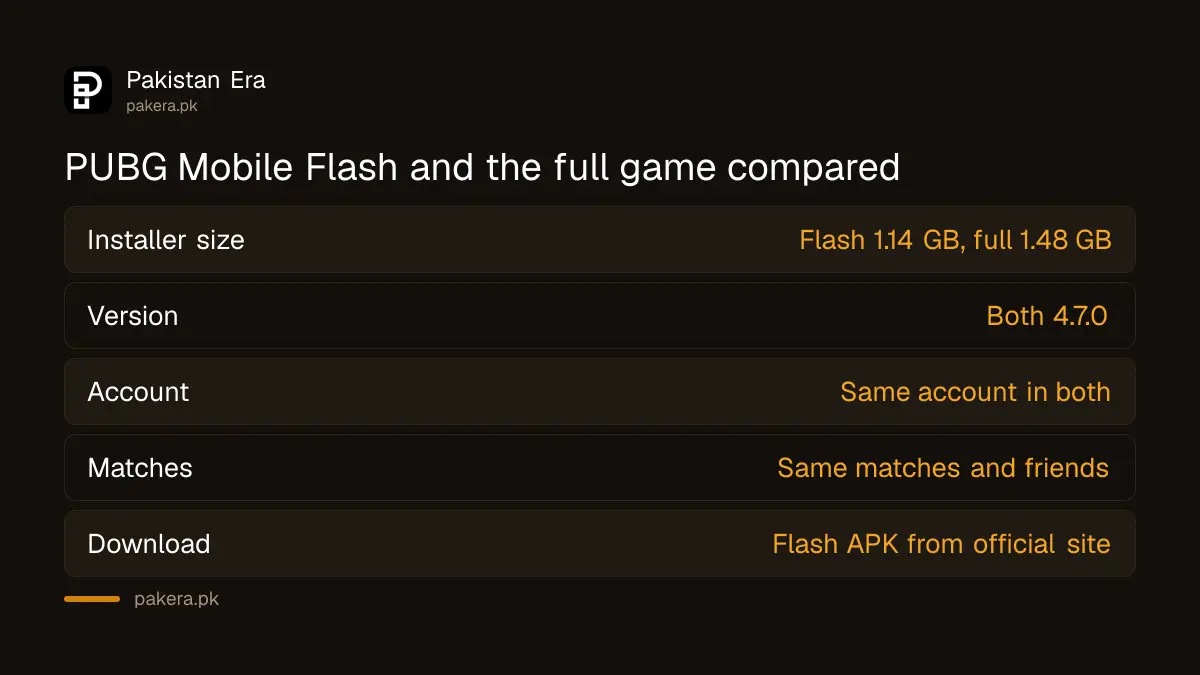
PUBG Mobile Flash and the full game compared
Both apps run version 4.7 and use the same account. Flash starts smaller and lets you choose what to download. The full game installs more at the start. We checked the size of both official installer files on 17 November 2026.
| Point | PUBG Mobile Flash | PUBG Mobile (full) |
|---|---|---|
| Installer size (Android) | About 1.14 GB | About 1.48 GB |
| Version | 4.7.0 | 4.7.0 |
| Account | Same account | Same account |
| Matches and friends | Same matches, same friends | Same |
| Maps at the start | Straight to Erangel, add others later | More content in the first download |
| Where to get it | APK on the PUBG Mobile Flash website | Google Play, App Store or official APK |
| Price | Free | Free |
The saving is about 345 MB on the installer. That is not huge, but "download what you play" means you skip maps and modes you never open. On a 32 GB or 64 GB phone, that space adds up. If you are shopping for a new phone, compare models on our list of gaming phones in Pakistan with official prices.
How to download and install PUBG Mobile Flash on Android
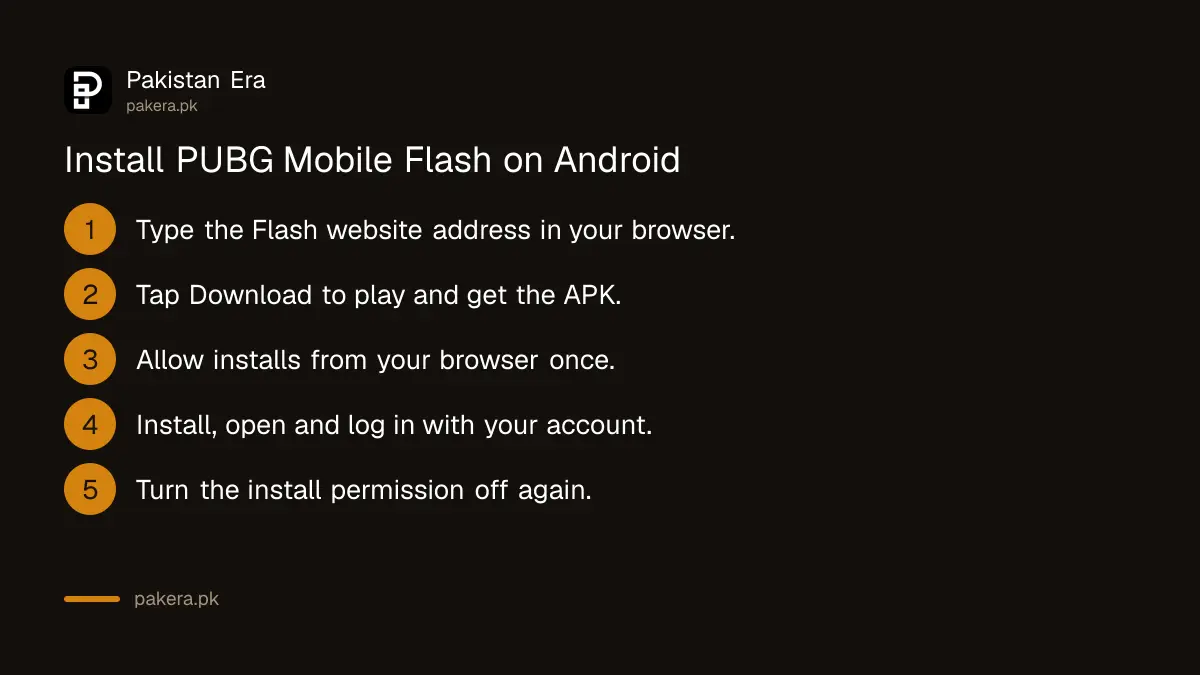
Open the PUBG Mobile Flash website in your phone's browser, tap the download button, and install the APK. Android asks you to allow installs from your browser first. Turn that permission off again after the install, so no other file can install itself.
- On your Android phone, open flash.pubgmobile.com in Chrome or your usual browser. Type the address yourself; do not tap links sent in chat.
- Tap Download to play, then the APK download button.
- Wait for the file of about 1.1 GB to finish. Use Wi-Fi if you can.
- Open the file. If Android blocks it, tap Settings and turn on Allow from this source for your browser.
- Tap Install, then open PUBG Mobile Flash.
- Log in with the same method as your main account, such as Google or Facebook.
- Go back to Settings > Apps > Special app access > Install unknown apps and turn the browser permission off.
Menu names differ a little between Samsung, Infinix, Tecno, Xiaomi and other phones. Search "unknown apps" in your phone's Settings if you cannot find the option.
Keep your account safe when you switch
Before you remove the full game, make sure your account is linked to Google, Facebook or another login, not a guest account. A guest account lives on one phone. If you delete the app without linking it, you can lose that progress.
- In the full game, open Settings and check which logins are linked to your account.
- Link a Google, Facebook or other account if none is linked.
- Note your Character ID from your profile. You need it for support and for the PUBG Mobile redeem code centre.
- Install Flash and log in with the same linked account.
- Check that your level, skins and UC balance show before you delete the full game.
Your UC and items belong to the account, not the app. If you top up, follow the official routes in our PUBG UC top-up guide for Pakistan.
Fake PUBG Lite and Flash files to avoid
Only two places give the real files: the official PUBG Mobile websites and the official app stores. A "PUBG Flash mod", "Lite 4.7 unlimited UC" or similar file from a group or video link is not official. Such files can steal your login or get your account banned.
| Warning sign | What it usually means |
|---|---|
| File promises free UC or skins | Modified game or a login stealer |
| Link comes from a chat group | Not an official download |
| File is much smaller than 1 GB | Not the real Flash installer |
| Asks for your password in a form | Phishing page |
| Called "PUBG Lite 2026" | Not the official Flash app |
A modified file can lead to a ban that is very hard to reverse. Our page on the PUBG Mobile ban appeal explains the types of ban and the official appeal route.
Common questions
Is PUBG Mobile Flash the official game?
Yes. It comes from the PUBG Mobile publisher, and its website calls it "100% PUBG MOBILE". It uses the same account, friends and matches as the full game.
How big is PUBG Mobile Flash?
The official Android installer is about 1.14 GB. The full PUBG Mobile installer is about 1.48 GB. Both sizes are before any extra maps you choose to add.
Can I use my old PUBG Mobile account in Flash?
Yes, if it is linked to a login such as Google or Facebook. Log in with that same method. A guest account stays on the phone where you made it.
Is PUBG Mobile Flash on Google Play?
The Flash website offers it as an APK download. Download it only from that official website, and type the address yourself.
Do Flash players play against full-game players?
Yes. The Flash website says "same matches", so you join the same games as players on the full app.
Is PUBG Mobile Flash free?
Yes. Like the full game, it is free to download and play, with optional in-game purchases.
How we verified this
What we checked and where we read it.
We checked these pages on 17 November 2026: the PUBG Mobile Flash website, for its feature list and its APK link; and the announcements list on the official PUBG Mobile website, which lists "PUBG MOBILE LIGHT is coming?!" on 25 August 2026 and the V4.7 announcement on 11 November 2026. We checked the file sizes of the official Flash and full-game APKs from their download links. The Flash site's page title still reads "PUBG MOBILE Light Official Website", the earlier name of the app.
About the author

Technology Journalist & Multimedia Producer
Ahmad Ali is a technology journalist and multimedia producer at Pakistan Era, joining the team in October 2026. He covers consumer technology and digital life for Pakistani readers, combining research with hands-on product testing.