Is Roblox Blocked in Pakistan? Status and Parental Controls
Roblox opened for us from Lahore and we found no PTA block notice. See Roblox age groups, content labels, spending limits and parental controls, step by step.
Roblox opened normally for us from Lahore on 28 September 2026, and we found no PTA notice blocking it. For parents, the key tools sit in Roblox under Settings, then Parental Controls: a monthly spending limit, a daily screen time limit, chat controls and content maturity settings.
The question comes up in almost every house with a child and a phone. A cousin says Roblox is banned, a video says you need a VPN, and the child says everyone at school plays it. We tested access ourselves and read Roblox's own Help Center pages to answer both halves: can it be used in Pakistan, and how do you keep it safe.
| Question | What we found on 28 September 2026 |
|---|---|
| Does roblox.com open in Pakistan? | Yes, from Lahore on a fixed-line connection |
| Any PTA notice blocking Roblox? | None found on pta.gov.pk |
| Who can chat? | Only users who complete an age check |
| Restricted games | 18+ age-checked users only |
| Spending limit | Set by a linked parent, resets monthly |
Roblox opens in Pakistan, and we found no PTA block notice
On 28 September 2026 we loaded roblox.com from Lahore on a fixed-line internet connection. The home page opened normally, and Roblox's user and game data services answered. We also checked PTA's website and press releases and found no notice about Roblox.
Some posts online say Roblox has been blocked in Pakistan for years. We found nothing from the Pakistan Telecommunication Authority, PTA, to back that. PTA is the body that blocks websites here, and a real block would normally show up as a block page or a failed connection. Neither happened in our test.
Two limits on our check. We tested one fixed-line connection in Lahore, not every mobile network. And we loaded the website and its data services but did not join a live game, because game servers use different connections. If Roblox fails on your mobile data, try Wi-Fi before assuming a ban.
Do not install a random VPN to "fix" Roblox for a child. That hides the child's traffic from you as well, and it can bring in apps you did not choose.
Roblox splits players into age groups
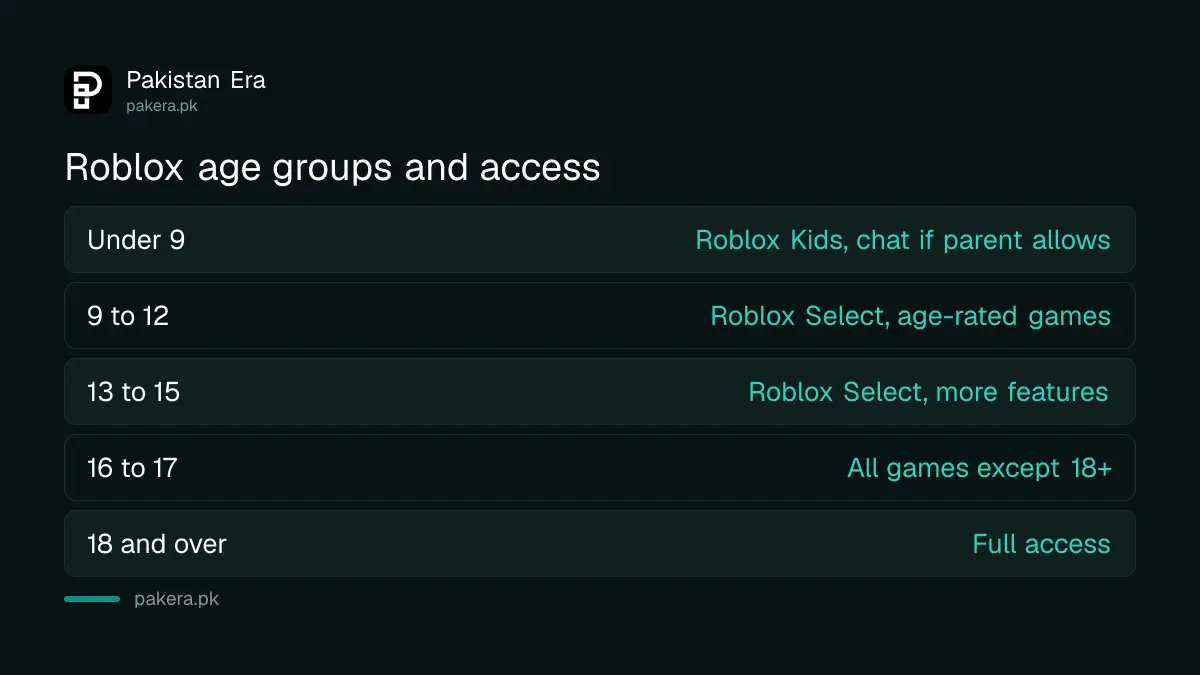
Roblox now groups players by age, and each group sees different games and features. Children under 9 get Roblox Kids, ages 9 to 15 get Roblox Select, and 16 and over get the main Roblox experience. An age check decides the group for chat.
| Age group | Account type | What they can do |
|---|---|---|
| Under 9 | Roblox Kids | Age-rated games; chat only if a parent allows it |
| 9 to 12 | Roblox Select | Age-rated games; chat with similar ages, trusted friends with parent permission |
| 13 to 15 | Roblox Select | Age-rated games, chat with similar ages and trusted friends |
| 16 to 17 | Roblox | All games except 18+, chat with similar ages |
| 18 and over | Roblox | Full access |
All chat on Roblox now needs an age check. There are two ways to do it: facial age estimation, where Roblox estimates age from a short video of the face, or an ID check. Roblox says it deletes the face images and video after processing. The ID route is only for users aged 13 and over.
Chat is filtered by default. Roblox says its filter blocks bullying, sexual content and personal details, and stops attempts to move a child to another app. For players aged 12 and under, posts and chats are also filtered to stop personal information being shared.
Content maturity labels tell you what a game contains
Every Roblox game carries one of four content labels: Minimal, Mild, Moderate or Restricted. Parents can use a slider to choose the highest label their child may play. Restricted games, with strong violence or strong language, are for age-checked adults only.
- Minimal: occasional mild violence, light unrealistic blood, occasional mild fear.
- Mild: repeated mild violence, heavy unrealistic blood, mild crude humour.
- Moderate: moderate violence, light realistic blood, moderate crude humour, unplayable gambling content.
- Restricted: strong violence, heavy realistic blood, romantic themes, alcohol, strong language.
Roblox's own pages differ on the Restricted age. Its content labels page and parents' page say 18 and over. One line in its parental controls overview still says 17 and over. Either way, a child cannot reach it.
Games themed mainly on sensitive social, political or religious issues are also closed to under 13s by default. A parent can switch that on. Game creators set their own content descriptors, so the label is a guide, not a guarantee. Sit with your child for the first few games they pick.
Link a parent account to manage your child's Roblox
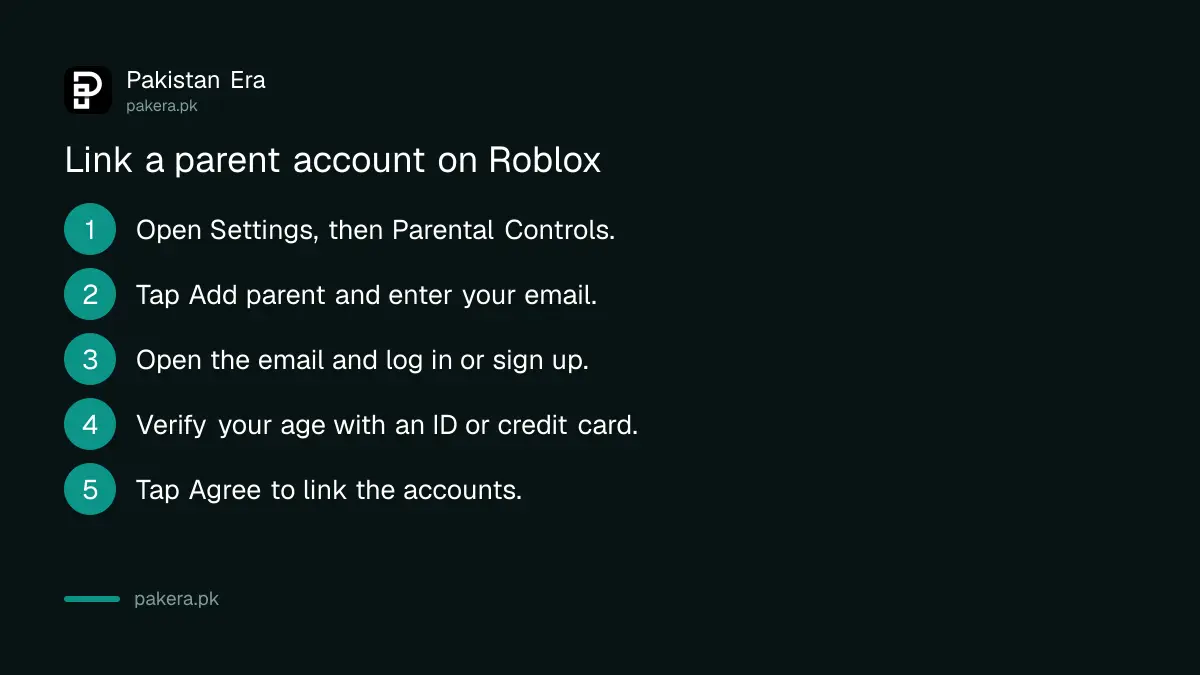
To use parental controls, you need your own Roblox account linked to your child's. Your child goes to Settings, then Parental Controls, and taps Add parent. You then verify your age with a government ID or a credit card and accept the link.
- On your child's account, open Settings, then Parental Controls.
- Tap Add parent and enter your email address.
- Open the email from Roblox and create an account, or log in to yours.
- Verify your age with a government-issued ID or a credit card.
- Tap Agree to link the two accounts.
Your email on Roblox must match the one the request went to. In most regions, Roblox says parents can manage all settings until the child turns 13. Game controls and direct chat can be managed until 15.
Set a monthly spending limit on Robux
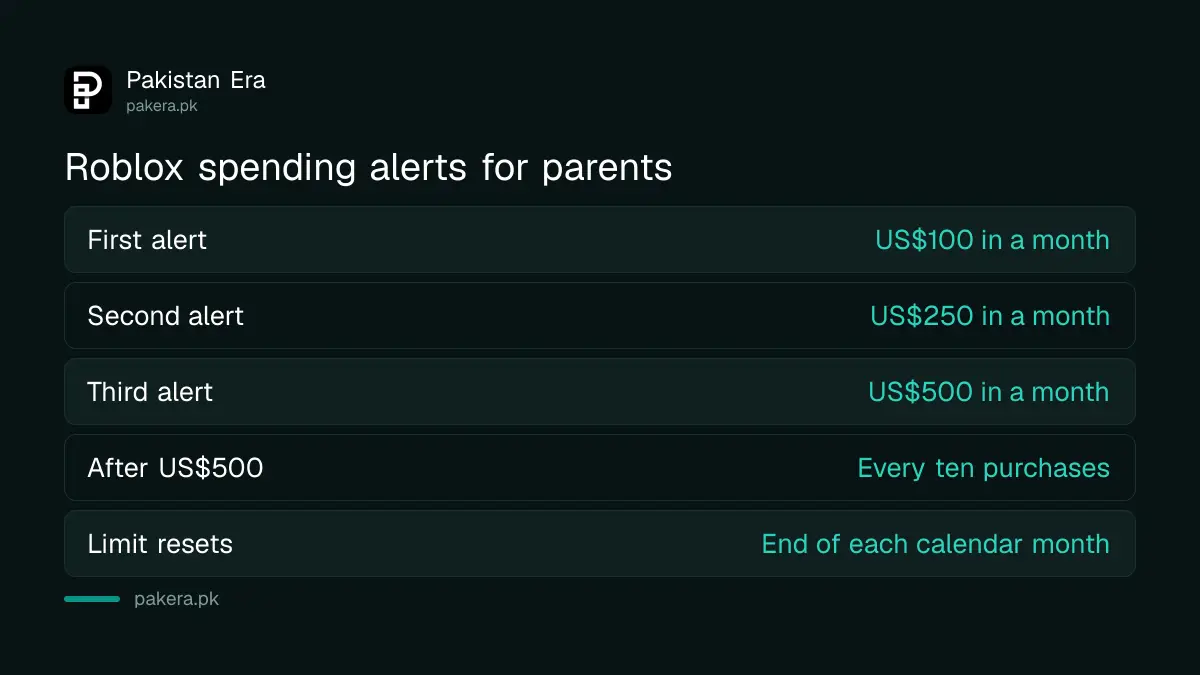
A linked parent can set a monthly spending limit under Settings, Parental Controls, Settings you manage, Spending restrictions. The limit covers Robux and game subscriptions and resets at the end of each calendar month. It does not cover gift card redemptions.
By default, Roblox alerts linked parents when monthly spending passes US$100, US$250 and US$500, or the local equivalent. After US$500, it alerts you every ten transactions. You can also ask for an alert on every single purchase, which we would turn on for a young child.
Two gaps are worth knowing. The limit does not stop gift cards, and Roblox says it may not apply on some game consoles, where you set limits on the console itself. On a phone, most Pakistani families buy Robux through the app store. The payment methods are set out in paying on Google Play in Pakistan, and keeping your own card or wallet off the child's phone is the simplest limit of all.
Control chat, friends and screen time
From the same Parental Controls page you can limit who your child chats with, block and report their connections, turn off private servers and set a daily screen time limit. When the limit is reached, Roblox stops the child playing for the rest of that day.
- Game chat: under 9s need a parent's consent to turn it on.
- Direct chat: under 13s need a parent's consent, and it only works with age-checked users in similar age groups.
- Party: only for age-checked users over 13. You can set it to Friends or No one.
- Connections: view your child's list, then block or report anyone.
- Screen time: pick a daily limit, and see the top 20 games played last week.
Roblox notes that chat features built by individual game developers are not covered by these settings. That is one more reason to check the games themselves. If a stranger asks your child for photos, money or a move to WhatsApp, report the account in Roblox and keep screenshots. Serious cases, such as blackmail, can be reported to NCCIA, following the steps in how to report a cybercrime in Pakistan.
Roblox is one of several games Pakistani children play on phones. The same habits, a spending cap and a daily limit, apply to titles like PUBG Mobile too.
Common questions
Is Roblox banned in Pakistan?
We found no PTA notice blocking Roblox, and roblox.com opened for us from Lahore on 28 September 2026.
What age is Roblox suitable for?
Roblox has groups for all ages. Under 9s get Roblox Kids with age-rated games, and Restricted games are for age-checked adults only.
How do I stop my child spending money on Roblox?
Link a parent account and set a monthly spending limit under Spending restrictions. Keep your card and wallet off the child's phone as well.
Can I limit how long my child plays Roblox?
Yes. Set a daily screen time limit in Parental Controls. Roblox stops play for the rest of the day once it is reached.
Does Roblox chat need an age check?
Yes. All chat now needs facial age estimation or an ID check, and under 13s need a parent's consent for direct chat.
How we verified this
What we checked, where we read it, and what we could not confirm.
Last checked on 28 September 2026. We loaded roblox.com and two Roblox data services from Lahore that day, on one fixed-line connection, and checked PTA's website and press release list for any Roblox notice. We did not test mobile networks or join a live game. The age groups and age checks are from Roblox's Help Center article "Understanding Age Checks on Roblox". The content labels, chat, spending and screen time controls are from its "Parental Controls Overview" and related articles on linking accounts, monthly spending limits and chat filtering.
About the author

Tax, Bills and Technology Writer
Ali Akhtar is a young and curious voice here at Pakistan Era. He is currently pursuing his A-Levels and has a growing interest in Pakistan’s changing industrial landscape and educational trends. Ali likes to write in a way that helps him explain and explore the world around him. His writing reflects the perspective of the new generation navigating the evolving trends of Pakistan where technology, youth innovation, and shifting opportunities are reshaping the country’s future.