How to Add Photos and Videos to Your Google Business Profile in Pakistan: Size Rules
Add photos and videos to your Pakistan shop's Google Business Profile. See the 5 MB and 720 pixel rules, 30 second video limit and why photos get Not approved.
Photos on a Google Business Profile must be JPG or PNG, between 10 KB and 5 MB, and at least 250 by 250 pixels. Google recommends 720 by 720. Videos can be up to 30 seconds and 75 MB, at 720p or higher. Search your business, click Photos, then Add photos.
A shopper in Rawalpindi types your shop name into Google Maps and sees a blurry photo from five years ago, or none at all. They scroll to the next shop. Pictures are the first thing people judge on a profile. We read Google's photo and video rules for Business Profile on 15 October 2026. This guide gives the limits, the steps and the mistakes that get a photo marked "Not approved".
Follow the photo size and format limits
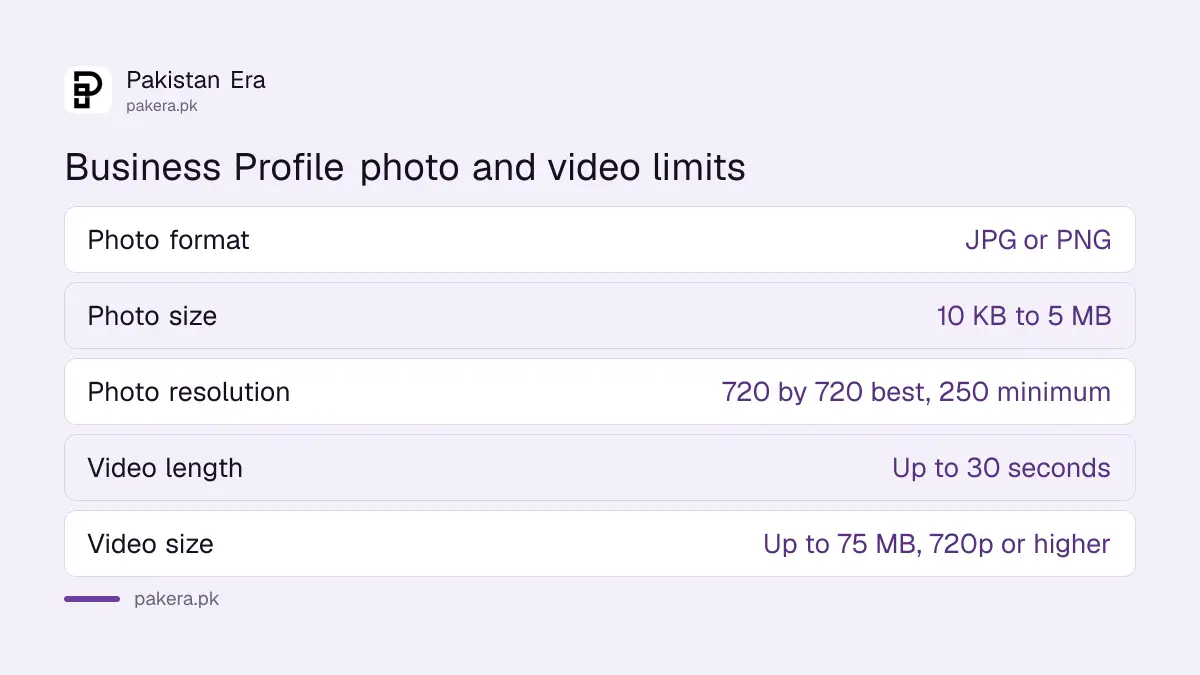
Google's limits for photos are simple. Use JPG or PNG. Keep the file between 10 KB and 5 MB. The minimum size is 250 by 250 pixels, and Google recommends 720 by 720. The photo should be in focus and well lit.
A phone camera easily beats these numbers, so the real danger is a file that is too big or too tiny. A photo sent through a chat app is often compressed and loses detail. Go back to the original file on your phone and upload that instead.
| Rule | Photo | Video |
|---|---|---|
| Format | JPG or PNG | Not stated on the page |
| File size | 10 KB to 5 MB | Up to 75 MB |
| Resolution | 720 by 720 recommended, 250 by 250 minimum | 720p or higher |
| Length | Not applicable | Up to 30 seconds |
Add a logo, a cover photo and real business photos
Google lists three kinds of picture. A logo helps customers recognise your business. A cover photo appears at the top of your profile. Business photos show what your place offers. Start with the logo and cover, then add more.
For a shop, good business photos are the front of the shop in daylight, the shelves, the counter and a few best sellers. For a restaurant, the dining area and the dishes. For a clinic or office, the reception and the entrance. The goal is to help a stranger find the right door and trust what is inside.
Google's page does not list which subjects work best, so those ideas are our advice. The page does say photos must follow Google's content policy, so do not upload someone else's picture.
Upload from Search or Maps
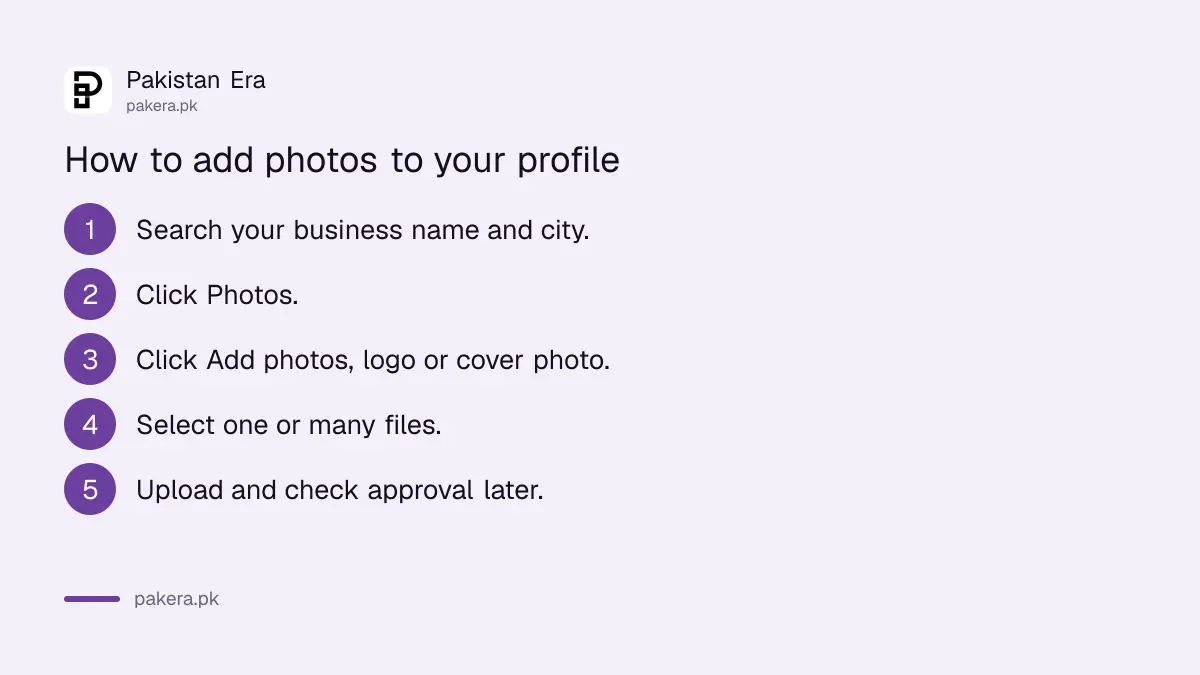
Open Google Search or Maps and search for your business name and city. Click Photos, then Add photos, and pick your files. You can choose several at once. For a cover photo or logo, click Photos, then Add a cover photo or Add a logo.
- Open Google Search or Maps.
- Search for your business name and city.
- Click Photos.
- Click Add photos, or Add a cover photo, or Add a logo.
- Select your files, one or many.
- Upload and check them later for approval.
If you cannot find the option, you may not be signed in to the account that manages the profile, or the profile may be restricted. The steps to fix a suspended Google Business Profile explain the second case. And if you have not yet put your shop on the map, start with how to put a shop on Google Maps.
Avoid heavy filters so your photo is approved
Google says photos should have no significant alterations or excessive use of filters. Photos and videos are reviewed against its content policies. Flagged media is marked "Not approved" and will not appear on your profile.
The page does not list every banned subject, so we will not guess at a full list. Keep it plain: show your real shop, real products and real staff with their permission. Do not add text banners, phone numbers or discount stickers on top of the picture. Honest pictures also survive longer.
| Do | Avoid |
|---|---|
| Use the original sharp phone photo | Sending a photo through a chat app first |
| Light the shot well | Dark or blurry shots |
| Show the real place and products | Heavy filters and big edits |
| Add new photos from time to time | Leaving the first upload for years |
Add a short video of up to 30 seconds
Videos on a Business Profile can run up to 30 seconds, up to 75 MB, at 720p or higher. A slow walk from the street to the door, or a shelf of fresh stock, fits that limit well. Hold the phone sideways and steady.
Thirty seconds is short, so show one thing. A video of a restaurant kitchen is less useful than one clear look at the dining room. Compress a long clip before you upload if it goes over 75 MB. Keep the original too, in case Google marks the first version "Not approved".
When photos bring in questions and complaints, answer them. The guide to replying to Google reviews shows how a good reply helps the next shopper.
Common questions about Business Profile photos
What file types can I upload?
Google lists JPG or PNG for photos, with a size between 10 KB and 5 MB.
What size should my photo be?
Google recommends 720 by 720 pixels, with 250 by 250 as the minimum.
How long can a profile video be?
Up to 30 seconds, up to 75 MB, at 720p or higher.
Why does my photo say Not approved?
Google marks flagged media Not approved and does not show it. Check it against the content policy and remove heavy filters.
How do I add a logo or cover photo?
Click Photos on your profile, then choose Add a logo or Add a cover photo.
Can I upload many photos at once?
Yes. After you click Add photos, you can choose multiple files.
How we verified this
What we checked, where we read it, and what we could not confirm.
Last checked 15 October 2026. We read Google's help page on managing Business Profile photos and videos on 15 October 2026. The file limits, the three photo types, the upload steps and the Not approved rule come from that page. Subject ideas for shops are our own advice. We did not upload to a live profile.
About the author

Technology Journalist & Multimedia Producer
Ahmad Ali is a technology journalist and multimedia producer at Pakistan Era, joining the team in October 2026. He covers consumer technology and digital life for Pakistani readers, combining research with hands-on product testing.