How to Fix a Suspended Google Business Profile in Pakistan
Fix a suspended Google Business Profile in Pakistan: correct the cause, use the free appeals tool and upload NTN, licence or bill evidence within 60 minutes.
To fix a suspended Google Business Profile in Pakistan, first correct whatever broke Google's guidelines, then open the Google Business Profile appeals tool, pick the profile, read the reason Google gives, and select Submit Appeal. Add evidence such as your NTN certificate, trade licence or a business utility bill within 60 minutes, or it will not be attached.
A suspended profile is a shop that vanishes from Google Maps overnight. Customers searching "tailor near me" or "pharmacy in Gulberg" stop finding you, and the calls slow down. For many small businesses in Pakistan, that is real money lost every day.
We read Google's own help pages on suspended profiles and on its guidelines on 9 October 2026. This guide follows Google's steps and maps its list of evidence to the documents a Pakistani business actually has.
Fix the cause before you appeal
Google says to make sure your profile follows all its guidelines before you appeal. An appeal on a profile that still breaks a rule is likely to fail. Fix the name, address, category or duplicate first, then appeal once.
Google's guidelines name several things that can lead to suspension. These are the ones small businesses in Pakistan run into most often:
| Common cause | What Google's guidelines say | How to fix it |
|---|---|---|
| Keywords in the business name | The name must match the real-world name on your signboard and website. Extra information in the name can lead to suspension. | Use only the name on your board, such as "Ali Electronics", not "Ali Electronics Best Mobile Repair Lahore". |
| Virtual office or rented mailing address | A location you rent only for mail, where you do not operate, is not eligible. | Use the real premises you work from, or set up as a service-area business. |
| Home address shown for a business that visits customers | Service-area businesses should hide their address. | Plumbers, electricians and tutors should hide the address and set a service area. |
| No signboard at the address | Businesses showing an address should have permanent signage with the business name. | Put up a fixed board and photograph it. |
| Two profiles for one business | There should be only one profile per business. | Keep one. Do not create a new one while the appeal is open. |
| Address line stuffed with extra words | Address lines must not hold URLs or keywords. | Use the plain street address only. |
Google also says P.O. boxes and mailboxes at remote locations are not acceptable addresses. And a service-area business can list a "virtual" office only if that office is staffed during business hours.
Gather the evidence Google asks for
Google lists four kinds of evidence that can strengthen an appeal: official business registration, a business licence, tax certificates, and business utility bills for electricity, phone, water or internet. The business name and address on them should match the profile.
Here is how those translate to Pakistani documents. This mapping is ours, not Google's, so pick what you have:
- Business registration: an SECP certificate of incorporation for a company, or a registered partnership deed for a firm.
- Business licence: a trade licence from your local council, or a licence from the body that regulates your trade.
- Tax certificate: your FBR NTN certificate, or proof that you registered as a sole proprietor with FBR.
- Utility bill: an electricity bill from your distribution company, or a PTCL, internet or water bill in the business name at the shop address.
Scan them clearly before you start. Also take photos of your signboard outside and the inside of your shop. Google's evidence form has a box to upload documents and explain why the profile should be reinstated, so a clear photo set helps.
One caution: Google's own policies do not allow government ID numbers and other private details on the public profile. Upload documents only inside the appeal form, never as public photos or posts.
Submit the appeal in Google's appeals tool
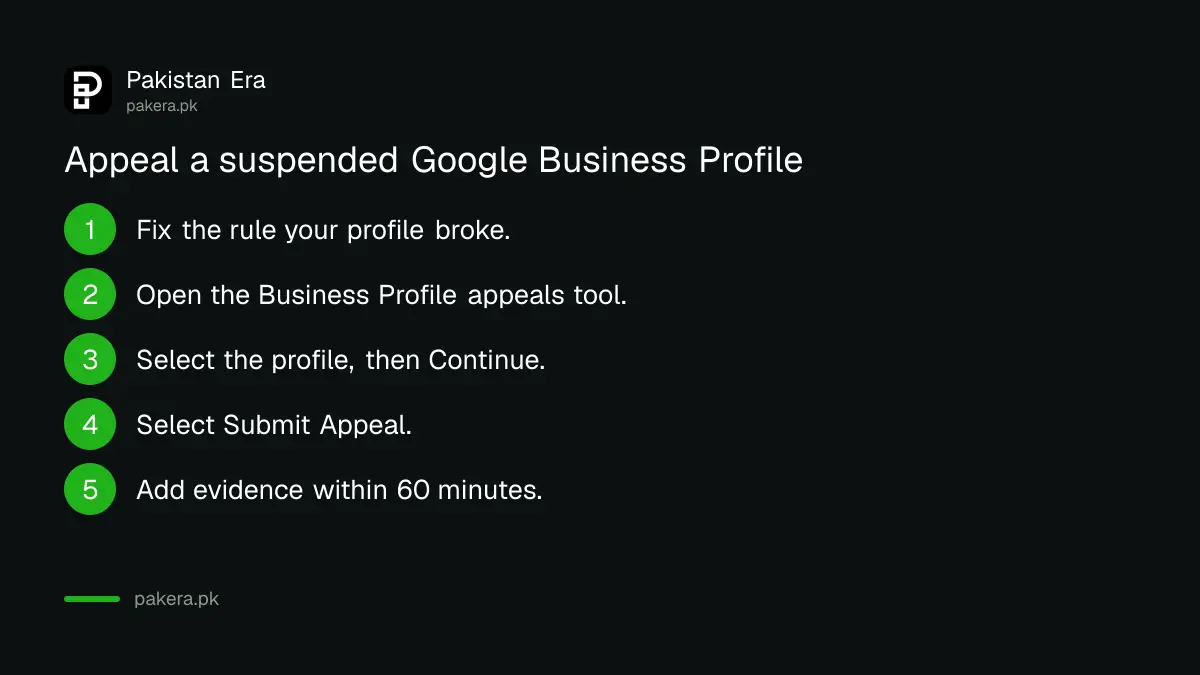
Open the Google Business Profile appeals tool, confirm the Google account, select the suspended profile and Continue. The tool shows the reason and the policy broken. Select Submit Appeal, then Add evidence, upload documents and Submit within 60 minutes.
- Open the Google Business Profile appeals tool from Google's help page on suspended profiles.
- If you are signed in to the account that owns the profile, select Confirm. If not, select Switch account.
- Select the profile you want to appeal, then Continue.
- Read the reason for the action and the linked policy. Make sure you have fixed it.
- At the bottom right, select Submit Appeal.
- Select Add evidence, check your business details, choose your files under Upload documents, and select Submit.
The 60-minute limit is the step people miss. Google says that once you open the evidence form, you must submit it within 60 minutes or it will not be attached to your appeal. Have your scans ready on the phone or laptop before you open it.
The appeal itself happens entirely in Google's free tool. There is no payment step anywhere in the process Google describes. Anyone who calls offering to "reinstate your Google listing" for a fee is not Google.
Check the appeal status and what to do if it is refused
Go back to the appeals tool and select the same profile to see its status: Submitted, Approved, Not Approved, Can't be appealed, or Eligible for appeal. Google emails its decision. If it is refused, you can ask for one additional review with new evidence.
Google says the additional review is only for a denied request, and you can add evidence that was not in the first appeal. So if the first try failed because your bill showed a different address, get a document that matches and send that.
If your whole Google account is restricted, not just the profile, the order changes. Google says to appeal the account restriction first on your Google Account's restrictions page, then appeal the Business Profile after the account is cleared. If you cannot sign in at all, recover the Google account first.
Keep the profile safe after it comes back
After reinstatement, keep the name exactly as on your board, keep one profile per location, and avoid sudden big edits. Reply to customers and add real photos instead of changing the name or category to chase searches.
Google explains what happens on reinstatement. If a profile was removed and is reinstated, both the profile and its owner and managers come back. If a manager's account was the problem, the locations stay and only that manager loses access.
Small, steady activity is the safer path. Answering reviews is one of the best ways to stay active, and replying to Google reviews takes a few minutes a day. If you are setting up a new shop from scratch, start from putting your shop on Google Maps correctly the first time.
Common questions
How long does a Google Business Profile appeal take?
Google does not give a fixed time on its help page. It says it will review the appeal and email you a decision. Check the status in the appeals tool.
Can I make a new profile while my appeal is pending?
No. Google says do not create a new Business Profile for the same business while your appeal is under review.
Which documents work best for a Pakistani shop?
A document showing the same business name and address as the profile. An FBR NTN certificate, a trade licence and a business electricity or PTCL bill are the closest matches to Google's list.
Why was my profile suspended without a warning?
Google can suspend profiles that do not follow its guidelines. The appeals tool shows the reason and links to the policy, so start there.
Does it cost money to reinstate a profile?
No payment step appears in Google's appeal process. Treat anyone asking for a fee to reinstate your listing as a scam.
I manage more than 10 profiles. Do I appeal each one?
Google lets you appeal one profile, say Yes when asked if it is for more than 10, and attach a spreadsheet with evidence and the profile ID for each.
How we verified this
What we checked, where we read it, and what we could not confirm.
Last checked 9 October 2026. We read Google Business Profile Help: fix suspended or disabled profiles, guidelines for representing your business on Google, and the overview of Business Profile policies. We did not run an appeal for this guide. The mapping of Google's evidence types to Pakistani documents is our own.
About the author

Founder and Editor
Umer Kureshi founded Pakistan Era in July 2024 and runs it as administrator, SEO lead and writer, overseeing website operations, search growth, content strategy and coverage of technology and current affairs.