How to Recover a Gmail or Google Account in Pakistan, Free
Recover a Gmail or Google account in Pakistan after a forgotten password, lost phone or hack, using Google's free recovery page, then lock it down for good.
To recover a Gmail or Google account, go to Google's account recovery page at accounts.google.com/signin/recovery, enter your email and answer the questions. It is free. Google does not take phone calls for sign-in help, so anyone in Pakistan who offers to "unlock" your Gmail for a fee is not Google.
Update, 11 October 2026: Gmail also lets you undo send and schedule send.
A locked Gmail is rarely just email. For most people in Pakistan it is also the Google account behind their Android phone, their photos, their YouTube channel and the reset link for Facebook, bank apps and shopping apps. Losing it can lock you out of everything else.
We read Google's own help pages on account recovery, hacked accounts, backup codes and 2-Step Verification on 30 September 2026. Every step below comes from those pages. We did not lock an account ourselves to test the process.
Google account recovery is free and has no helpline
Google account recovery is done only online, on accounts.google.com. Google says you cannot call it for help signing in, and it does not work with any service that claims to offer account or password support. Wrong answers do not end the process, and you can try again.
Google also says it never asks for your password or verification codes by email, phone call or message. So anyone who asks you for that code, whatever name they use, is not Google.
A work or school account is different. If your Gmail ends in your office or university name, Google says these steps might not work and you should ask your administrator.
Match your problem to the right recovery route
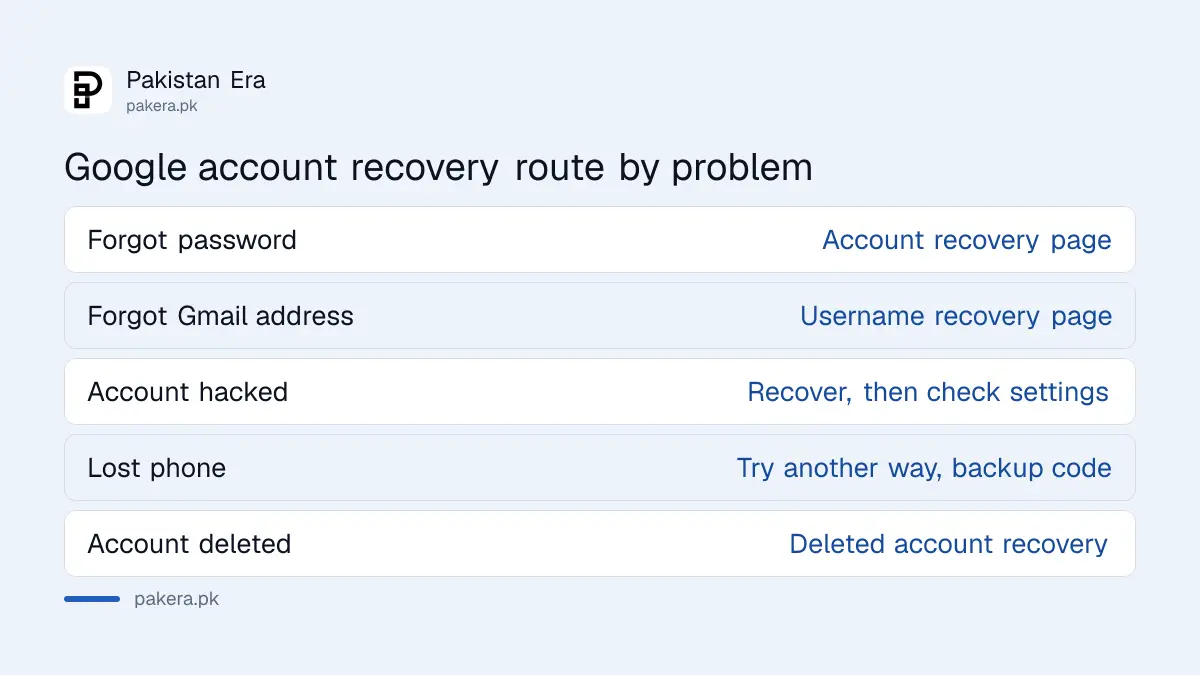
Google has a separate route for each problem: a forgotten password, a forgotten email address, a hacked account and a deleted account. Pick the one that fits, because each asks for different details. The table below lists them with what you need.
| Your problem | Where to start | What helps |
|---|---|---|
| Forgot your password | Account recovery page | Your last password, recovery phone or email |
| Forgot your Gmail address | Username recovery page | Recovery phone or email, and the full name on the account |
| Someone else changed your password | Account recovery page, then the hacked account checks | A device and place you usually sign in from |
| Lost phone with 2-Step Verification on | Sign in and choose Try another way | A backup code, a security key or another signed-in device |
| Account deleted | Recover a deleted account | Act quickly, as older deletions may not be recoverable |
How to recover a Gmail account with a forgotten password
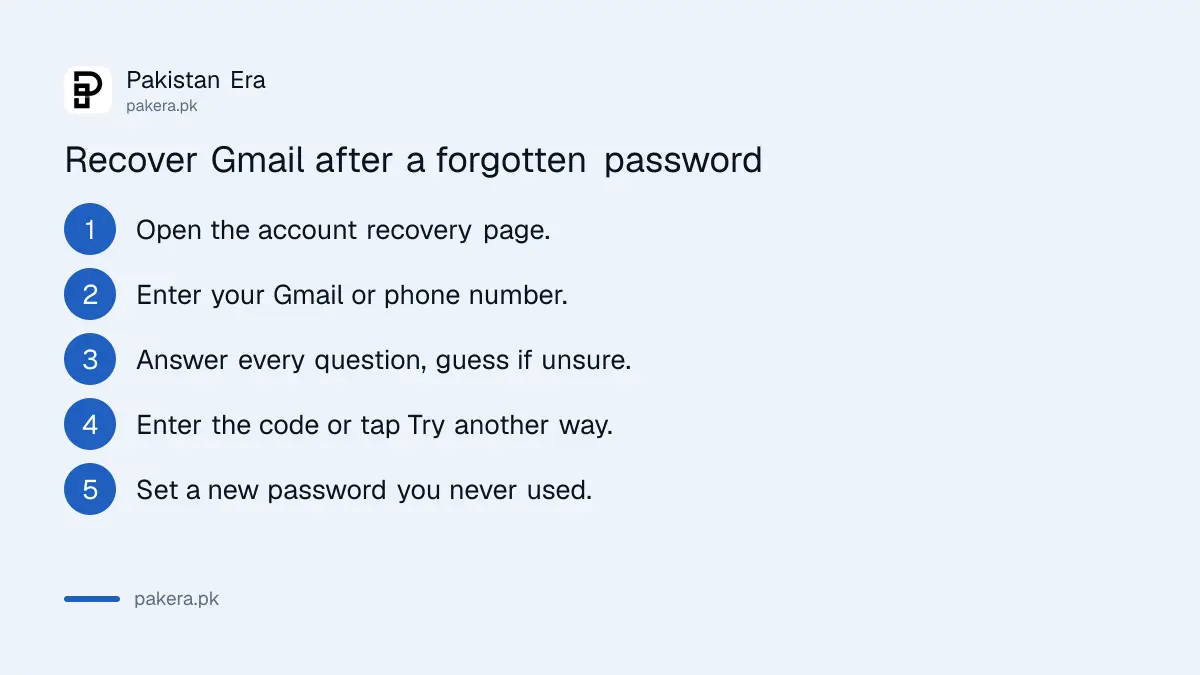
Open the account recovery page, type your Gmail address and answer each question as best you can. Google may send a code to your recovery phone or email. Once it confirms the account is yours, it asks you to set a new password you have not used before.
- Go to accounts.google.com/signin/recovery on a phone or computer you normally use.
- Enter your Gmail address or the phone number on the account.
- Answer each question. If asked for your last password, enter the most recent one you remember.
- Enter the code Google sends to your recovery phone or email, or choose Try another way.
- Set a new, strong password that you have not used on this account before.
Google's tips page is specific about what raises your chances. Use a device you usually sign in on, the same browser, and a place you usually sign in from, such as home or work. Do not skip questions; take your best guess. Watch capital letters in old passwords.
If you get the message "Google couldn't verify this account belongs to you", Google says you can try again. If Google's team emails you, the message is titled "Your Google support inquiry" and may land in spam.
A lost phone or SIM needs a backup code or the same number back
If 2-Step Verification is on and your phone is gone, sign in and tap Try another way. A saved backup code, a security key or another signed-in device will get you in. Without those, get your SIM replaced so the code reaches your number again.
Backup codes are 8-digit codes you print or download from your Google Account. Google gives a set of 10. Each works only once. A downloaded set is saved as a file named Backup-codes-yourusername.txt, so search your computer for that name if you saved them once and forgot.
In Pakistan, the fastest fix for a stolen phone is often the SIM. Ask your mobile network for a replacement SIM on the same number. If your old SIM has been blocked, getting a blocked SIM reopened comes before Google recovery, because the codes go to that number.
One more rule catches people. Google says new recovery or sign-in details can take up to 7 days to take effect. It does this on purpose, so a thief who adds his own number cannot use it at once. Add your recovery details now, while nothing is wrong.
What to do when your Gmail is hacked
If someone changed your password, use the account recovery page first. Once you are back in, check Recent security events and Your devices, remove anything you do not recognise, change your password and turn on 2-Step Verification. Then check Gmail forwarding and filters.
Hackers often leave a quiet way back in. Google's hacked account page lists the Gmail settings to check straight away:
- Automatic forwarding to an address you did not add.
- Filters that delete or hide incoming mail.
- Mail delegation, which gives another person access to your inbox.
- Your recovery phone, recovery email and the name on the account.
- Apps with access to your account, and any payment methods in Google Pay or Play you do not recognise.
Next, change the password on every site that used the same password, or that sends its reset links to this Gmail. That usually means your Facebook, your Instagram account and WhatsApp too. If your Facebook was taken too, start recovering the hacked Facebook account as soon as Gmail is safe.
Google also advises telling your bank if card or bank details were saved in your account. If money was taken or someone is posing as you, report the cybercrime to the National Cyber Crime Investigation Agency.
How to secure your Google account so it does not happen again
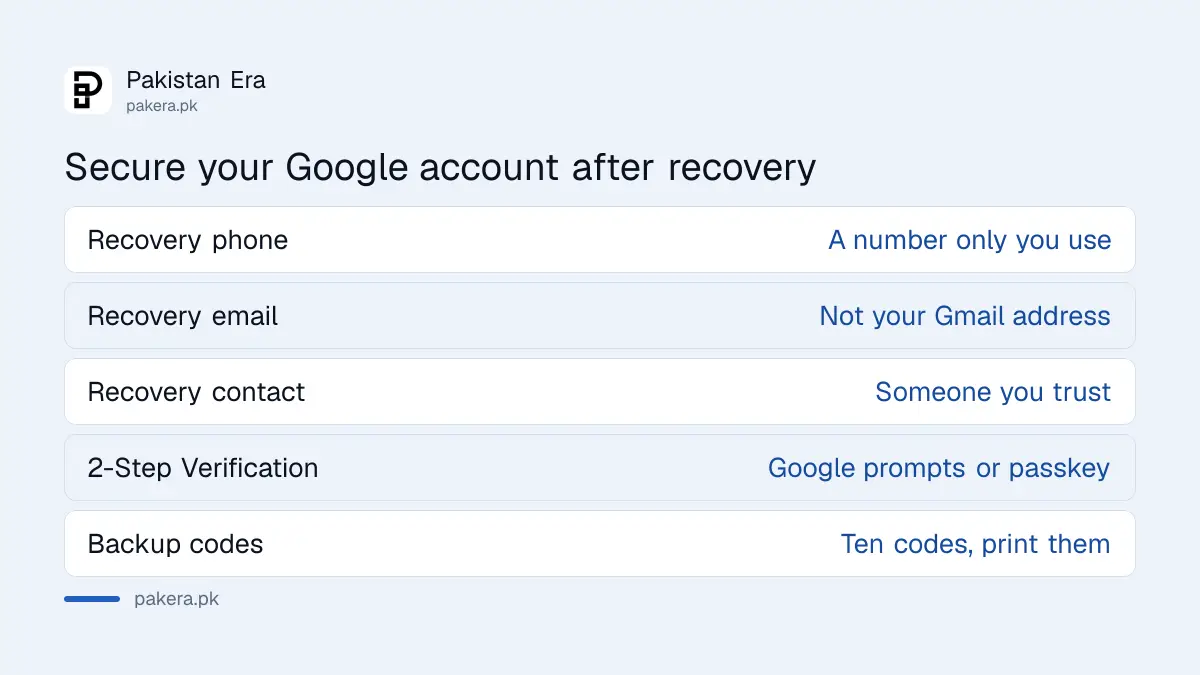
Add a recovery phone that only you use, a recovery email that is different from your Gmail, and a recovery contact you trust. Turn on 2-Step Verification, save backup codes on paper, and never share a code with anyone who calls or messages you.
- Open your Google Account, then Security and sign-in.
- Add or check your recovery phone and recovery email.
- Add a recovery contact: a person you trust with their own Google Account. Once they accept, there is a 7 day wait before they can help.
- Turn on 2-Step Verification. Google recommends Google prompts or a passkey, which also help against SIM swap attacks.
- Get your backup codes and keep a printed copy with your important documents.
A SIM swap is when someone gets a new SIM on your number to receive your codes. Google prompts, the Yes or No tap on your phone, help protect against that.
Also sign in at least once in a while. Google says it may delete an account that has not been used for 2 years.
Common questions
Is there a Google helpline number in Pakistan for Gmail recovery?
No. Google says you cannot call it for help signing in to your account. Recovery happens only on Google's own recovery page. Treat any caller or page offering paid Gmail recovery as a scam.
How many times can I try Google account recovery?
As many as you need. Google says there is no limit on attempts, and wrong guesses do not stop the process.
Can I recover my Gmail without my phone number?
Sometimes. Choose Try another way to use a recovery email, a backup code or a device you are already signed in on. Without any of those, your chances drop, so try from your usual device and place.
Can I recover a deleted Gmail account?
Only if it was deleted recently. Google says an account deleted a while ago may not be recoverable. Use the deleted account recovery route as soon as you can.
Why can I not use my new recovery phone yet?
Google says changes to recovery or sign-in details can take up to 7 days to take effect. It is a safety delay so a hacker cannot use a number he just added.
Where do I find my Google backup codes?
In your Google Account under Security and sign-in, then 2-Step Verification, then Backup codes. If you downloaded them earlier, search your computer for a file starting Backup-codes.
How we verified this
What we checked, where we read it, and what we could not confirm.
Last checked on 30 September 2026. The recovery routes, the no-limit and wrong-guess rules, the 7 day delay and the statement that you cannot call Google for sign-in help come from Google's help page How to recover your Google Account or Gmail. The advice to use a familiar device, browser and place, and the "Your Google support inquiry" email, come from Tips to complete account recovery steps. The Gmail settings to check and the advice on banks come from Secure a hacked or compromised Google Account. The recovery contact and 7 day rules come from Avoid getting locked out of your Google Account. Backup code details come from Sign in with backup codes, Google prompts from Turn on 2-Step Verification, and the 2 year inactivity rule from Recover a recently deleted Google Account. We did not run a recovery on a locked account ourselves.
About the author

Tax, Bills and Technology Writer
Ali Akhtar is a young and curious voice here at Pakistan Era. He is currently pursuing his A-Levels and has a growing interest in Pakistan’s changing industrial landscape and educational trends. Ali likes to write in a way that helps him explain and explore the world around him. His writing reflects the perspective of the new generation navigating the evolving trends of Pakistan where technology, youth innovation, and shifting opportunities are reshaping the country’s future.