e-MTTS Punjab: Track a Vehicle Registration Application Online
Track a Punjab vehicle registration on the MTMIS portal with your application and chassis numbers. Who can use the dealer login, service charges, fixes.
To track a Punjab vehicle registration application, open mtmis.excise.punjab.gov.pk/tracking. You need two things: the application number on your receipt and the vehicle's chassis number. The form asks for both, plus a captcha. Dealers do not use this page. They log in through a separate Special Login.
People search for "e-MTTS" when they want this screen. We checked Excise Punjab's own website on 29 September 2026, and it does not use that name anywhere. The systems it does name are the MTMIS portal for the public and the Dealer Vehicle Registration System, or DVRS, for car and bike dealers. Both run on the same central vehicle record, built with the Punjab Information Technology Board.
We opened the tracking form ourselves and submitted it with only an application number. It refused, and asked for the chassis number too. That one detail saves most people a wasted trip.
e-MTTS in Punjab means the MTMIS portal and the dealer system
The Punjab vehicle portal has two doors. The public door is MTMIS at mtmis.excise.punjab.gov.pk, where anyone can verify a vehicle or track an application. The staff and dealer door is Special Login, which needs an account that Excise issues.
MTMIS stands for Motor Transport Management Information System. On 29 September 2026 its menu offered Vehicle Verification, Application Tracking, Vanity Vehicle Verification, Number Plate Information and Special Login. Special Login opens a password page at mvrs.punjab.gov.pk for authorised users only.
| Who you are | Where you go | What you need |
|---|---|---|
| Vehicle buyer tracking an application | mtmis.excise.punjab.gov.pk/tracking | Application number and chassis number |
| Anyone checking a registered vehicle | mtmis.excise.punjab.gov.pk | Registration number |
| Licensed DVRS dealer | Special Login, mvrs.punjab.gov.pk | Account issued under the dealer licence |
| Dealer applying for a licence | eBiz Punjab portal | Ten documents, listed below |
| Owner waiting for a card | e-Registration Card link on MTMIS | Vehicle details |
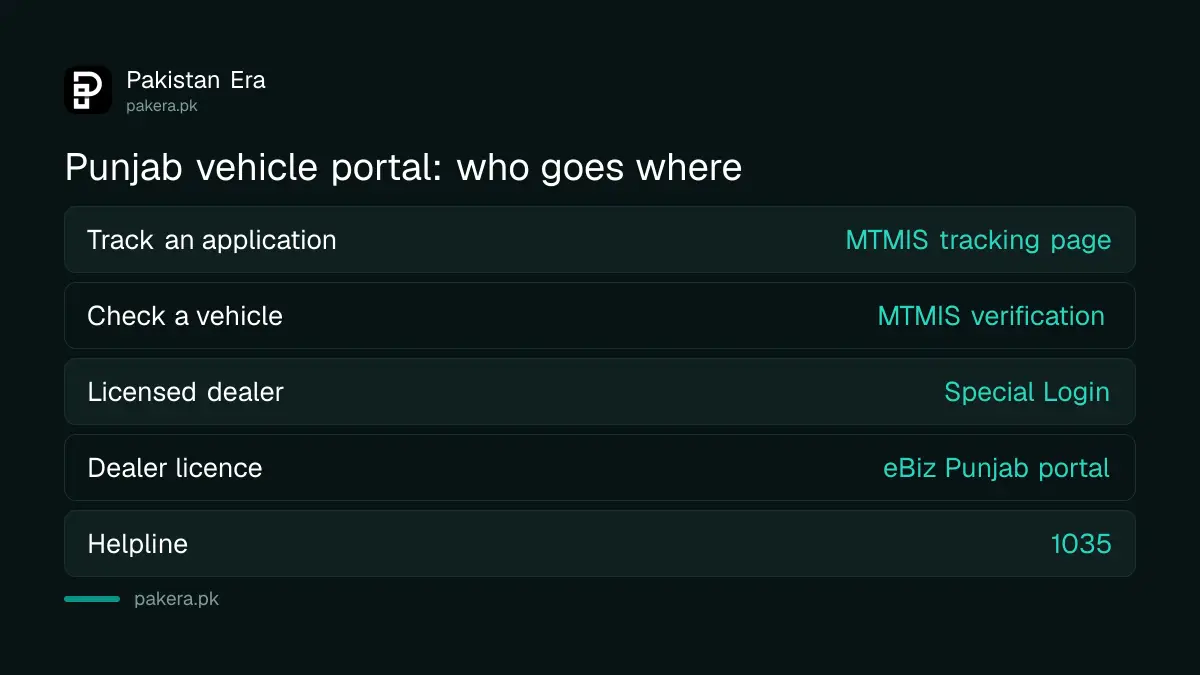
If you are an ordinary buyer, forget the login. There is no public account to create. Every public check on MTMIS works without one.
Track your registration application in five steps
Open the Application Tracking page, type the application number and the chassis number, copy the captcha, and press Verify. The form will not search on the application number alone. We tried that, and it returned "The Chasis Number field is required."
- Open mtmis.excise.punjab.gov.pk and choose Application Tracking from the menu.
- Type the application number from the receipt the dealer or the Excise counter gave you.
- Type the chassis number exactly as it appears on the sales certificate or invoice.
- Copy the six digits in the captcha image. Press the refresh button if you cannot read them.
- Press Verify and read the result. Take a screenshot for your records.
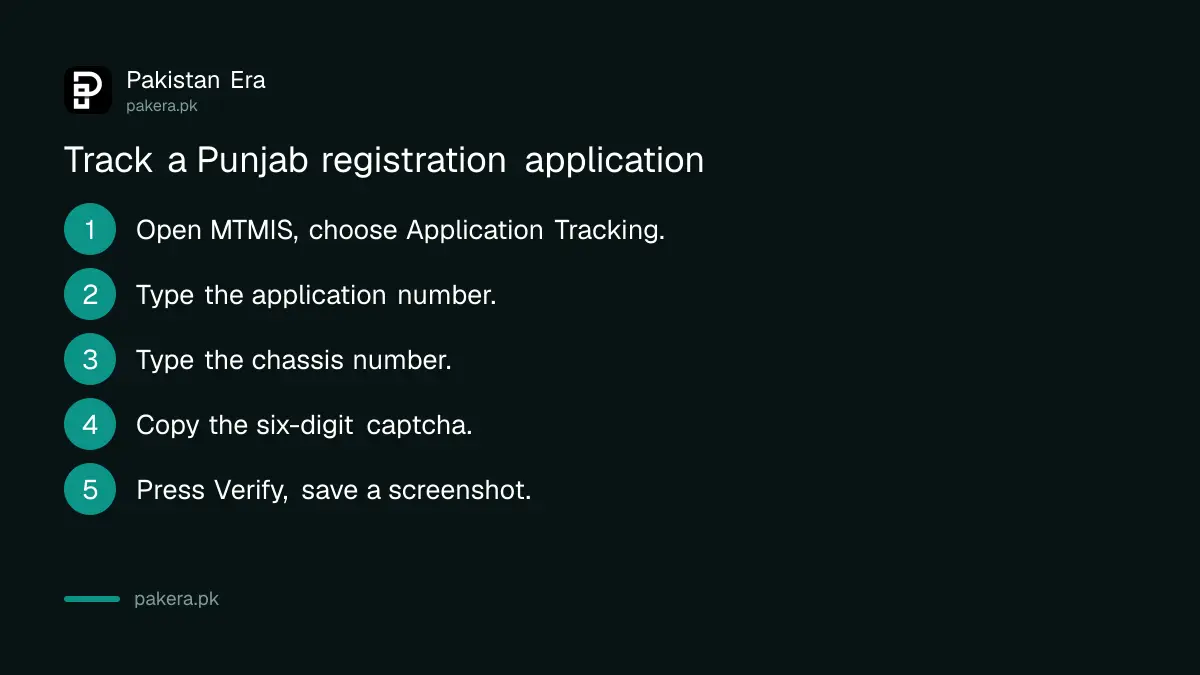
The chassis number is on the sales certificate and invoice. Copy it from the paper, because one wrong letter means no result. Lost the application number? Ask the dealer or the Motor Registration Authority office where you applied.
What the tracking result tells you
The tracking result shows where your application sits in the registration process. We could not see a live status screen, because we had no real application of our own. So we explain the stages that Excise's own pages describe, not screen labels we have not seen.
A new vehicle registration in Punjab moves through these stages, according to Excise's registration and dealer pages:
- Application entered: the dealer or the Excise office enters the Form-F data, the CNIC, the sales certificate and the invoice.
- Dues paid: the registration fee, the number plate fee and other taxes are paid.
- Posted to the MRA: for a dealer registration, the dealer delivers the documents after posting the challan to the Motor Registration Authority.
- Card sent by courier: the customer page asks you to give the dealer an address sticker for courier delivery.
- Returned shipment: if the courier cannot deliver, the card goes back to Excise.
If the result looks stuck, call the Excise helpline, 1035, which the department's home page lists. If the card went back to Excise, the steps for tracking it on TCS and collecting it are in the Punjab vehicle smart card status explainer, so we do not repeat them here.
Dealers register new vehicles through DVRS
Under DVRS, a licensed car or motorcycle dealer registers your new vehicle and hands over the number plates on the spot. Excise lists the dealer's service charge as Rs 2,000 for a car or commercial vehicle, and Rs 500 for a motorcycle or rickshaw.
Excise's DVRS page explains that dealers are licensed under the Punjab Motor Vehicle Transaction Licensees Act, 2015, and are "given access to MTMIS Centralized System". That is the dealer login people mean when they search for an e-MTTS login. It is not open to the public.
| Item | What Excise's page says |
|---|---|
| Service charge, car or commercial vehicle | Rs 2,000 |
| Service charge, motorcycle or rickshaw | Rs 500 |
| Documents from you | Form-F, CNIC copy, original sales certificate and invoice, address sticker |
| Bought on someone else's booking | Also a signed transfer order form and the first buyer's CNIC |
| Dealer's record keeping | Five years, open to audit |
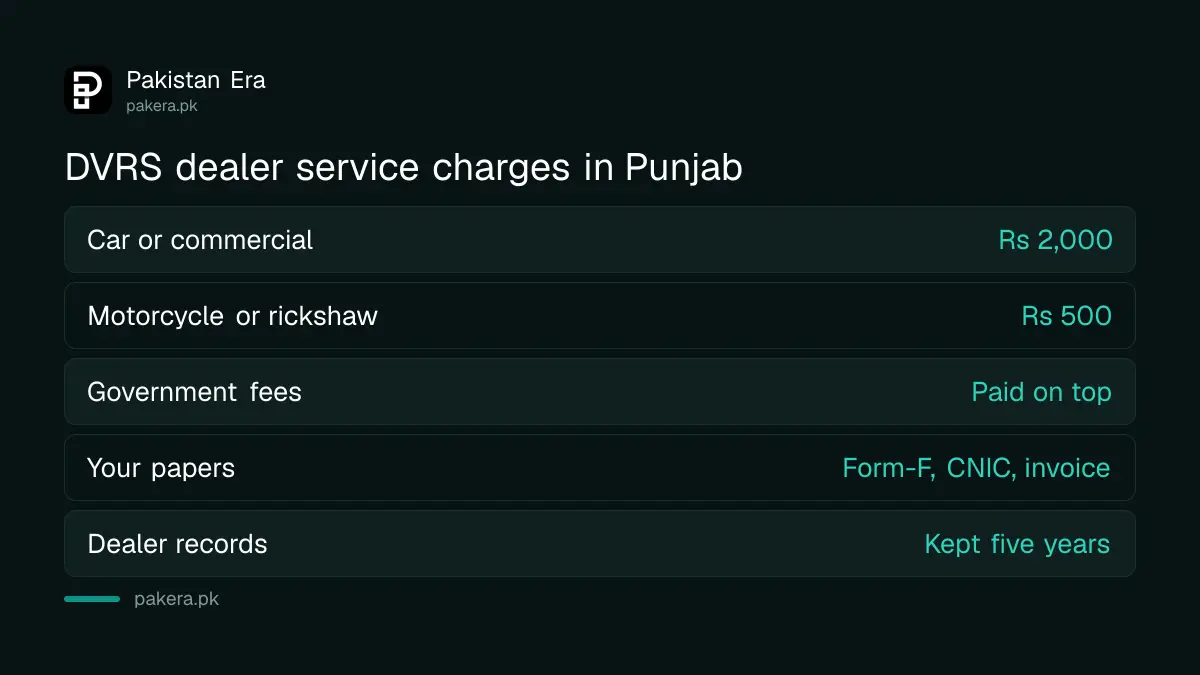
The service charge is on top of the government registration fee and taxes. Ask the dealer for a receipt that shows the two separately. Punjab now requires registration before a new vehicle is handed over, which is why most buyers meet DVRS whether they chose it or not. The no number plate, no delivery rule explains that change.
Excise publishes the list of authorised dealers on the same page. We counted just over 100 entries on 29 September 2026, with 10 marked cancelled. Lahore has the most, with 22 entries, then Faisalabad and Multan. Check your dealer's name there before you pay a service charge.
How a dealer gets a DVRS login
A dealer applies for a DVRS licence on the eBiz Punjab portal, not on MTMIS. Excise's guide lists ten documents, including three years of income tax returns and a bank statement showing at least Rs 3 million every month for six months.
The DVRS page asks for at least three years in the car or motorcycle trade, a proper office with IT equipment, and no criminal record for any partner. The other uploads include the CNIC, NTN certificate, an Excise professional tax clearance and a police character certificate.
On eBiz, the dealer registers through Citizen Login, confirms a six-digit code sent by email, and searches for "Dealer for Vehicle Registrations". Each document goes up as a separate PDF. Only after the licence is granted does the dealer get the showroom login.
Fix the common tracking problems
Most failed searches come from a missing chassis number, a typing mistake, or a captcha that expired. A few come from the network. Excise's portal has blocked some connections with a firewall page before, which is a block on that network, not an outage.
- "The Chasis Number field is required": add the chassis number. The form needs both boxes.
- Wrong captcha: press the refresh button next to the image and type the new digits.
- No record found: check each character of the application and chassis numbers against your receipt.
- Page will not load: try mobile data instead of office Wi-Fi, or another browser.
- Vehicle registered in another province: Punjab's portal only holds Punjab records. The vehicle verification portals for every province are listed separately.
Once the vehicle is registered, the same portal's Vehicle Verification option shows the owner record. Check your name and CNIC there before you transfer vehicle ownership later, because a mistake in the record follows the car.
Common questions
Is e-MTTS the official name of the Punjab portal?
Not on Excise Punjab's website. Its pages name the MTMIS portal for public checks and DVRS for dealers. We found no page on excise.punjab.gov.pk that uses "e-MTTS".
Can I track my application with only the application number?
No. When we tried on 29 September 2026, the form asked for the chassis number as well. Keep both numbers from your receipt and sales certificate.
Do I need an account to track my registration?
No. Application Tracking and Vehicle Verification are open to anyone. Only Special Login needs an account, and that is for authorised users such as licensed dealers.
How much does a dealer charge to register my new car?
Excise lists a DVRS service charge of Rs 2,000 for a car or commercial vehicle and Rs 500 for a motorcycle or rickshaw. Government fees and taxes are extra.
Who do I call if my application is stuck?
Call the Excise helpline, 1035, listed on the department's home page. Keep the application number, chassis number and your CNIC ready when you call.
How we verified this
What we checked, where we read it, and what we could not confirm.
We last checked this on 29 September 2026. We read Excise Punjab's Dealer Vehicle Registration System page, its DVRS page for customers, its motor vehicle registration page, its eBiz DVRS application guide and its home page. We opened the MTMIS home page, the Application Tracking form and the Special Login page, and submitted the tracking form once without a chassis number to see what it requires. We did not track a real application, so we have not seen the live status screen. Excise's Urdu instructions PDF is a scanned image and we could not read it.
About the author

Senior Writer, Public Services and Technology
Shahid joined us in 2024 as an author. He is a senior contributor to Pakistan's leading technology websites. He writes detailed articles, mostly covering his expertise in the latest tech, mobiles, apps, gadgets, and step-by-step guides. His ideology is to help people understand the latest trends and explain complex methods through very easy-to-understand guides.