FPSC Marksheet Check Online by CNIC and Date of Birth: 579 Finalized Cases Listed
Check your FPSC marksheet online with only your CNIC and date of birth. See the 579 finalized cases listed, the latest uploads and why yours may not show yet.
You can get your FPSC marksheet online by entering your CNIC number and date of birth at cp.fpsc.gov.pk/gr_one/gr_marksheet/gr_marksheets.php. It is free and needs no login. But it works only for cases FPSC has finalized. On 5 November 2026 the page listed 579 finalized cases, uploaded between June 2021 and 8 October 2026.
The Federal Public Service Commission (FPSC) calls this the "Online Marksheet" for General Recruitment (GR), which means its ordinary job tests, not CSS. We opened the page on 5 November and read the whole case list. Below is how to use it, why your case may be missing, and what to do if your marks look wrong.
Open the FPSC Online Marksheet page and enter two details
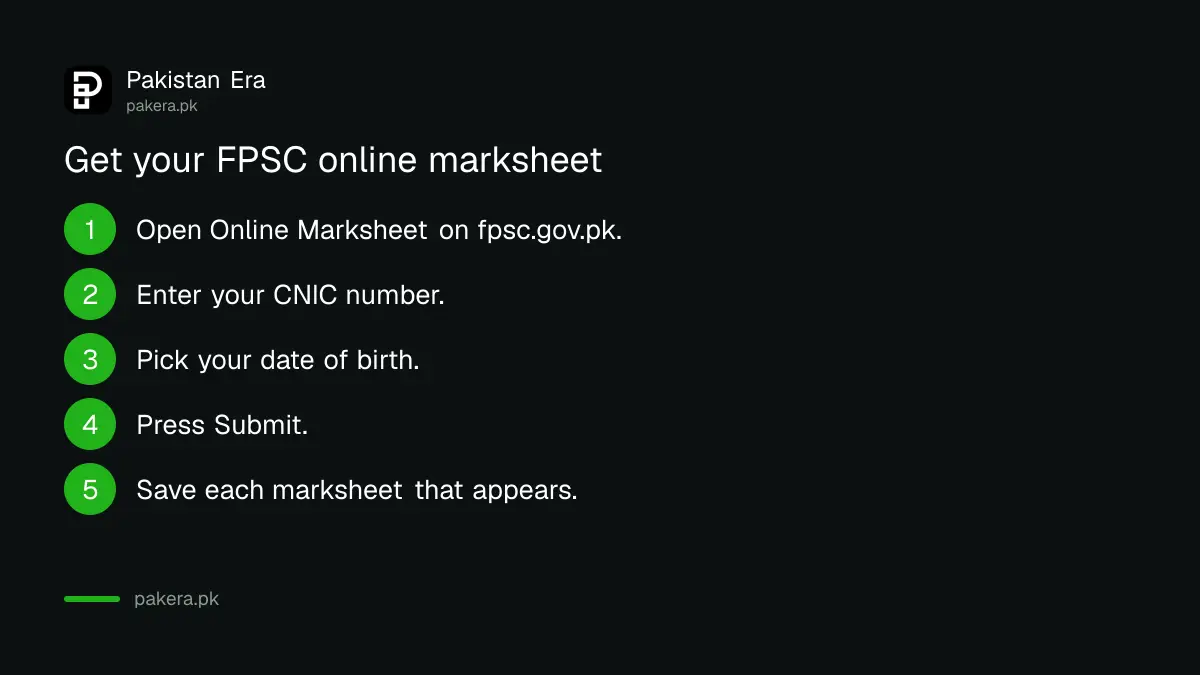
The FPSC Online Marksheet form asks for just two things: your CNIC number and your date of birth. Both are marked as required. There is a Submit button and a Cancel button. Nothing else is needed, not even your roll number.
- Go to fpsc.gov.pk, open Results, and click Online Marksheet. Or go straight to cp.fpsc.gov.pk/gr_one/gr_marksheet/gr_marksheets.php.
- Type your CNIC number in the "Enter your CNIC" box, the same CNIC you used on the application.
- Pick your date of birth from the calendar. The box is read only, so you must use the date picker.
- Press Submit.
- Save or print the marksheet for each case that shows up.
We did not submit a real CNIC, so we cannot show what the finished marksheet looks like. FPSC's page says only that marksheets "can be generated by entering CNIC & DOB".
Marksheets appear only after a case is finalized
Below the form, FPSC shows a "List of Finalized Cases". Each row has a case number, job title, ministry or department, advertisement number and the date the result was uploaded. If your post is not on this list, the marksheet will not come out yet.
FPSC calls these "finalized" cases. So a post whose written result came out recently, but whose interviews are still to come, is unlikely to be on the list yet. So if you sat an FPSC test last month, such as the Phase 3 written tests whose results came on 27 October, your marksheet for that post is not on this page yet.
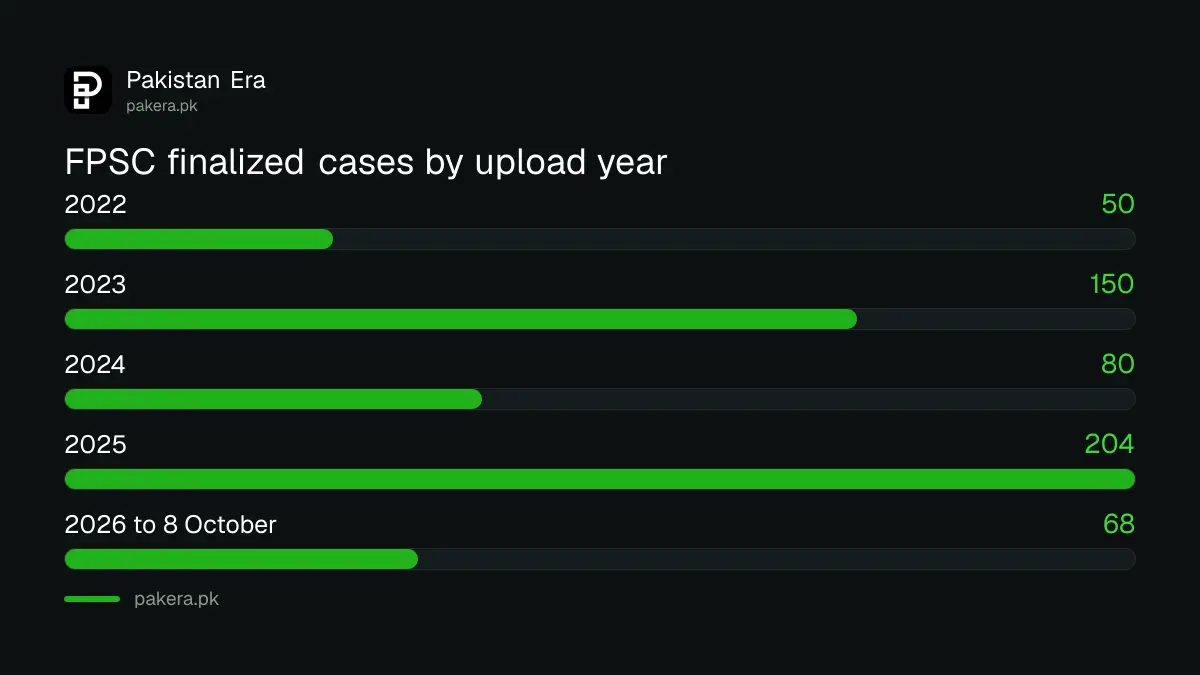
| Year results were uploaded | Cases on the list |
|---|---|
| 2021 | 27 |
| 2022 | 50 |
| 2023 | 150 |
| 2024 | 80 |
| 2025 | 204 |
| 2026 (to 8 October) | 68 |
| Total | 579 |
The latest finalized cases on the list
The newest upload is dated 8 October 2026. It is Assistant Director in the Airports Security Force, under Advertisement 02/2025. Five more cases were uploaded on 1 October 2026.
| Post | Department | Advt. | Uploaded |
|---|---|---|---|
| Assistant Director | Airports Security Force | 02/2025 | 8 October 2026 |
| Physiotherapist (Male) | AFIRM, Defence | 01/2026 | 1 October 2026 |
| Medical Officer (Male) | Health Department, Gilgit Baltistan | 04/2025 | 1 October 2026 |
| Office Assistant | Agriculture Department, Gilgit Baltistan | 05/2025 | 1 October 2026 |
| Senior Scientific Assistant | Naval Headquarters | 05/2025 | 1 October 2026 |
| Nursing Officer | Naval Headquarters | 05/2025 | 1 October 2026 |
The oldest case still on the page dates from 4 June 2021. So if you sat an FPSC test in 2019 or 2020 and the case finished in 2021 or later, it may still be there.
Fix the common reasons the marksheet does not show
Most failed searches come down to one of four things. Check them in this order before you write to FPSC.
- Case not finalized. Search the list for your job title and advertisement number. If it is missing, wait for the final result.
- Wrong date of birth. Use the date on your CNIC, the one you put on the FPSC form.
- Typing mistake. Check every digit of the CNIC number against your card.
- Old browser. The date box opens a calendar. If it does not open, try another browser.
To print your original application instead, use "Print Online Application" on the FPSC home page. Our guide to applying for an FPSC job online explains the tracking ID.
If your marks look wrong, use the representation route
The marksheet only shows marks. It does not reopen your case. If you think a mark is wrong, FPSC handles it as a representation. Our page on challenging an FPSC decision explains how and when to file one.
It also helps to know how FPSC scores a test and an interview. See the FPSC test pattern and the interview qualifying marks.
Common questions
How can I check my FPSC marksheet online?
Open cp.fpsc.gov.pk/gr_one/gr_marksheet/gr_marksheets.php, enter your CNIC and date of birth, and press Submit.
Do I need a roll number for the FPSC marksheet?
No. The form asks only for your CNIC number and date of birth.
Why is my FPSC marksheet not showing?
Usually because your case is not finalized yet. Only cases on FPSC's "List of Finalized Cases" have marksheets.
Is the FPSC online marksheet free?
Yes. The page has no fee or payment step.
Does the online marksheet cover CSS?
No. This page is for General Recruitment (GR) cases. CSS results are published separately by FPSC.
How many FPSC cases have online marksheets?
579 on 5 November 2026, with upload dates from 4 June 2021 to 8 October 2026.
How we verified this
What we checked, where we read it, and what we could not confirm.
We opened the FPSC Online Marksheet page at cp.fpsc.gov.pk on 5 November 2026, read the form and counted all 579 rows in the finalized case list by upload year. We did not enter a CNIC, so we cannot confirm what the marksheet shows. Check the page itself before you rely on the list, because FPSC adds cases as they finish.
About the author

Public Services and Education Journalist
Fajr Riaz is a journalist and content writer at Pakistan Era, based in Lahore. She covers the questions people meet in everyday life in Pakistan: how a public service works, what a change in the rules means, and where to find a reliable answer.