Meezan Bank App Registration: Sign Up Steps, Daily Transfer Limits and Forgot Password Fix
Register for the Meezan Bank app in a few steps, see the Rs 5m, Rs 2m and Rs 1m daily transfer limits, reset a forgotten password and fix failed sign ups.
To register for the Meezan Bank app, install Meezan Mobile from Google Play, the App Store or Huawei AppGallery and tap Register, or sign up on Meezan's online registration page at ebanking.meezanbank.com. Your Internet Banking username and password also work in the app. Below are the daily transfer limits, the fix for a forgotten username or password, and what to do when registration fails.
Meezan says the app is free and open to any active Meezan account holder, with "certain restrictions" on some account types. We read Meezan's own mobile banking page and its July to December 2026 schedule of charges on 27 October 2026. Every limit and number below comes from those two pages.
Meezan app registration needs four things and takes a few minutes
Meezan lists four requirements: an Android or Apple phone or tablet, the mobile number registered with the bank, a username and a password. If your number is not on the bank's record, registration stalls, so fix that at your branch first. The app costs nothing to use.
That registered number is the part that trips most people. Meezan secures the app with two-factor authentication, which means the bank checks you through a second channel tied to your account, not just a password. A number changed years ago and never updated at the branch will block you.
- Install Meezan Mobile from Google Play, the App Store or Huawei AppGallery. Use only the official store listing.
- Open the app and tap Register. Or open the online registration link on Meezan's site from a computer.
- Enter the account and identity details the form asks for, using the mobile number the bank holds for you.
- Complete the verification step the app shows. Meezan mentions biometric verification and other checks "when required".
- Create your username and password, then log in. The same login now works on Internet Banking too.
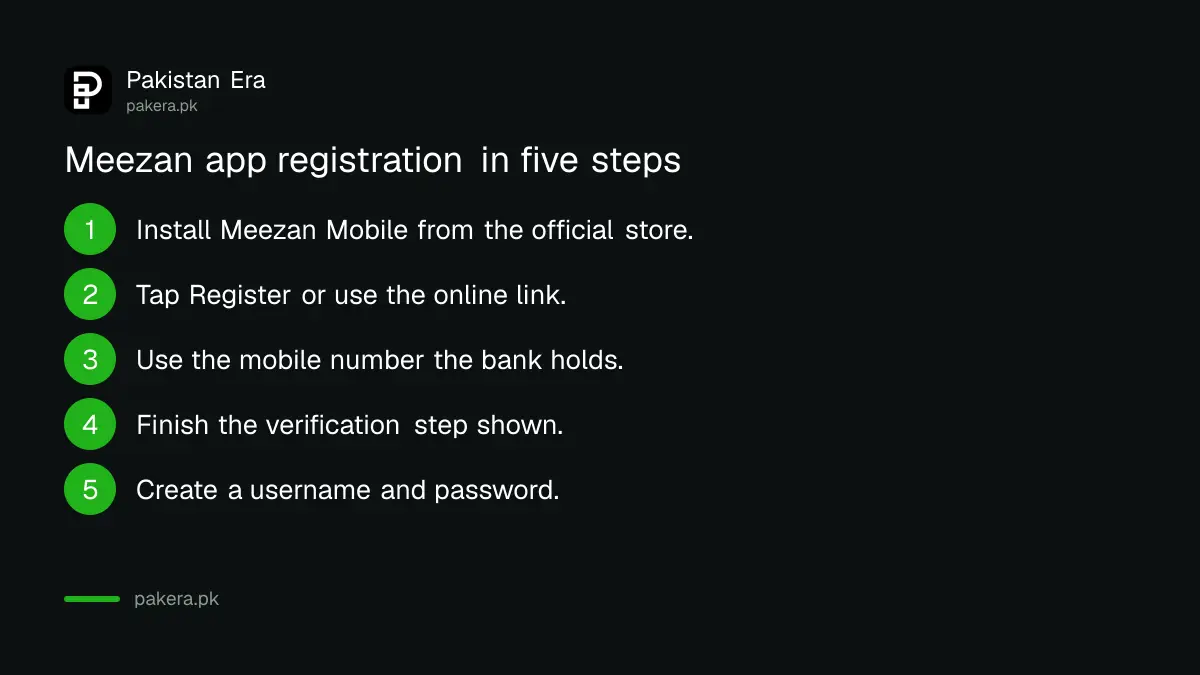
We did not open a Meezan account or register a live profile, so the exact screens may differ slightly from our wording. The requirements and links above are the bank's.
Meezan app transfer limits are Rs 5 million, Rs 2 million and Rs 1 million a day
Meezan sets three daily limits in the app. You can move up to Rs 5 million a day between accounts in the same name, Rs 2 million to other Meezan accounts and Rs 1 million to accounts at other banks. The last two apply to registered beneficiaries.
| Transfer type | Daily limit | Condition |
|---|---|---|
| Own accounts, same title (Meezan to Meezan) | Rs 5 million | Accounts in your own name |
| Other Meezan accounts (3PFT) | Rs 2 million | Registered third-party beneficiary |
| Other banks (IBFT) | Rs 1 million | Registered beneficiary at another bank |
| IBFT charge | Free up to Rs 25,000 a month | Above that, 0.1% or Rs 200, whichever is lower |
The app also lets you set your own lower limits. Meezan calls this Funds Transfer Limit Management. If you rarely send large sums, cutting the limit is a cheap safety step, and the reasons are set out in the SBP rules on how to check your bank app's linked devices and transfer limit.
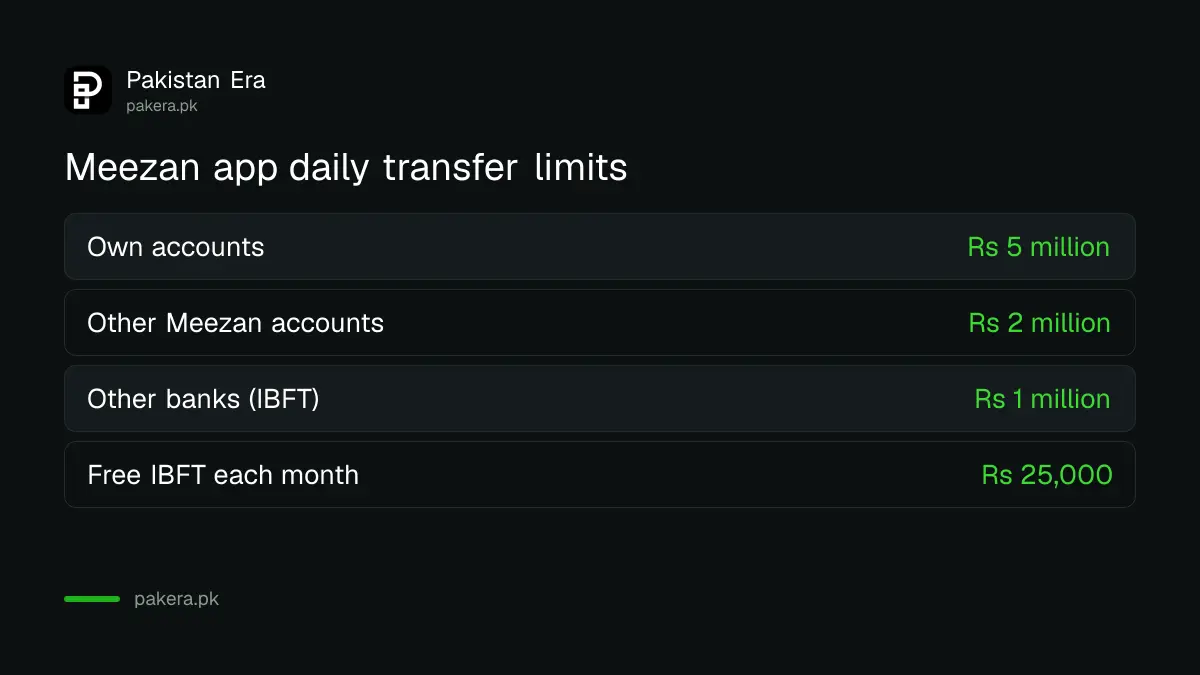
The IBFT charge comes from Meezan's schedule of charges for July to December 2026. The first Rs 25,000 you send to other banks each month is free. After that, each transfer costs 0.1% of the amount or Rs 200, whichever is lower. The same free Rs 25,000 rule shows up at other banks too, compared in IBFT charges in Pakistan.
A forgotten Meezan username or password resets from the login screen
Tap Forgot Username or Forgot Password on the app's login screen. Meezan also gives two web links for the same reset, and its 24/7 call centre on 111-331-331 or 111-331-332 can reset either one for you over the phone.
Try the app route first. It is quicker, and it keeps your details off a phone call. If the reset message never arrives, the usual cause is the same as at registration: the bank holds an old mobile number.
Beneficiaries are added through Internet Banking, according to Meezan's FAQ
Meezan's FAQ says you register and manage funds transfer beneficiaries through Internet Banking. Since the IBFT and 3PFT limits apply to registered beneficiaries, set them up on the web first, then send from the app.
The FAQ may lag behind the newest app version. We could not confirm whether the current app now adds beneficiaries directly, because that needs a live account. If you see an Add Beneficiary option in the app, use it.
The Meezan app does more than transfers
Meezan lists bill payments, Raast QR payments to shops, debit card controls, Al Meezan mutual funds, Payoneer linking and Tap and Go contactless payments on NFC Android phones. It also shows your filer status and CNIC expiry date on the profile screen.
- Debit card controls: activate the card, change the PIN, and switch ATM, shop and online use on or off.
- Raast: pay shops by scanning a Raast QR code. To be paid to your mobile number, create a Raast ID.
- Payoneer: open or link a Payoneer account to receive payments from abroad.
- Abroad: Meezan says the app works anywhere with a stable internet connection.
Registration fails for three common reasons
Meezan's own requirements point to three causes: the mobile number on record is old, the account is not active, or the account type is restricted from the app. A branch visit fixes the first two. The call centre can tell you whether your account type qualifies.
An inactive account is the one people miss. Meezan's SMS banking page lists dormant, deceased and closed accounts as not active. If yours has gone dormant after a long gap, follow the steps to reactivate a dormant bank account before trying again.
Never share the code or password with anyone who calls. Meezan staff do not need it. A caller who asks for it is running a scam.
Common questions
Is the Meezan Bank app free?
Yes. Meezan says the app is free to use. Transfers to other banks are free up to Rs 25,000 a month, then 0.1% or Rs 200, whichever is lower.
Can I use my Internet Banking login in the Meezan app?
Yes. Meezan says the same username and password work on both the app and Internet Banking.
What is the Meezan app IBFT limit?
Rs 1 million a day to registered beneficiaries at other banks. Other Meezan accounts get Rs 2 million, and your own accounts Rs 5 million.
What is the Meezan Bank helpline number?
The 24/7 call centre is 111-331-331 or 111-331-332. From abroad, dial +92-21 before either number.
Can I use the Meezan app outside Pakistan?
Yes. Meezan says it works globally with a stable internet connection.
Who can register for the Meezan app?
Any active Meezan account holder, though Meezan says certain restrictions apply to some account types. Call 111-331-331 to check yours.
How we verified this
What we checked, where we read it, and what we could not confirm.
Last checked 27 October 2026. We read Meezan Bank's mobile banking page at meezanbank.com, including its FAQ on registration, login, eligibility, charges, beneficiaries and transfer limits, and Meezan's schedule of service charges for 1 July to 31 December 2026 for the IBFT charge. We did not register a live account, so the screen names in the numbered steps are our plain description and may differ in the app. We could not confirm whether the newest app version adds beneficiaries without Internet Banking.
About the author

Senior Writer, Public Services and Technology
Shahid joined us in 2024 as an author. He is a senior contributor to Pakistan's leading technology websites. He writes detailed articles, mostly covering his expertise in the latest tech, mobiles, apps, gadgets, and step-by-step guides. His ideology is to help people understand the latest trends and explain complex methods through very easy-to-understand guides.