Send HD Photos and Videos on WhatsApp in Pakistan: HD Button, Document Trick and Every Size Limit
Tap HD before sending, or send the file as a Document up to 2 GB to keep the original. WhatsApp's video limits, formats and fixes for Android, iPhone and Web.
To send a photo or video in HD on WhatsApp, attach it in a chat, tap the HD icon at the top of the preview, choose HD quality, then send. For a file that must arrive exactly as it is, send it as a Document instead, which WhatsApp allows up to 2 GB. The HD button covers everyday photos. The Document route is for wedding videos, design files and anything a printer or editor will use.
Below are both methods for Android, iPhone and WhatsApp Web, the size and length limits that cause a video to fail, and what to do when the HD option is missing.
The HD button in a chat sends a sharper photo or video
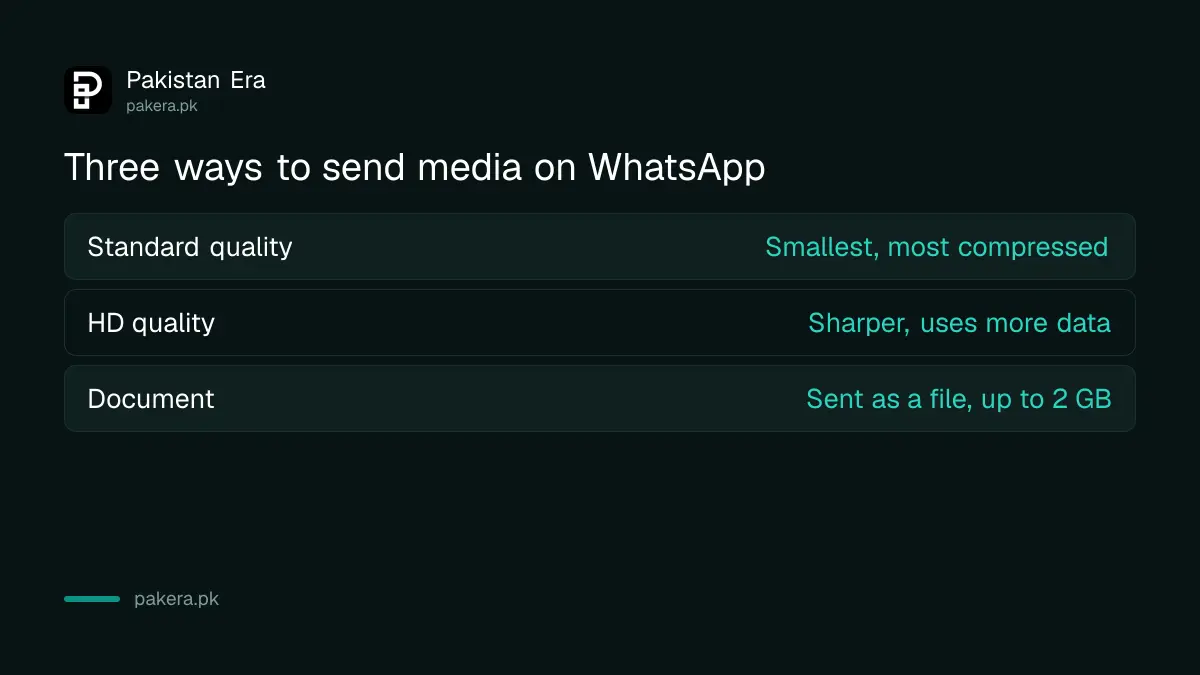
After you pick a photo or video, WhatsApp shows a preview with an HD icon. Tap it and choose HD quality instead of Standard quality. The HD version uses more data and takes longer to upload, but keeps more detail.
WhatsApp's help centre describes the same step on all three platforms. On the phone you tap the icon and pick Standard quality or HD quality. On WhatsApp Web you click the HD Media icon, choose the quality, then click Done before sending. The Web help page mentions this for photos.
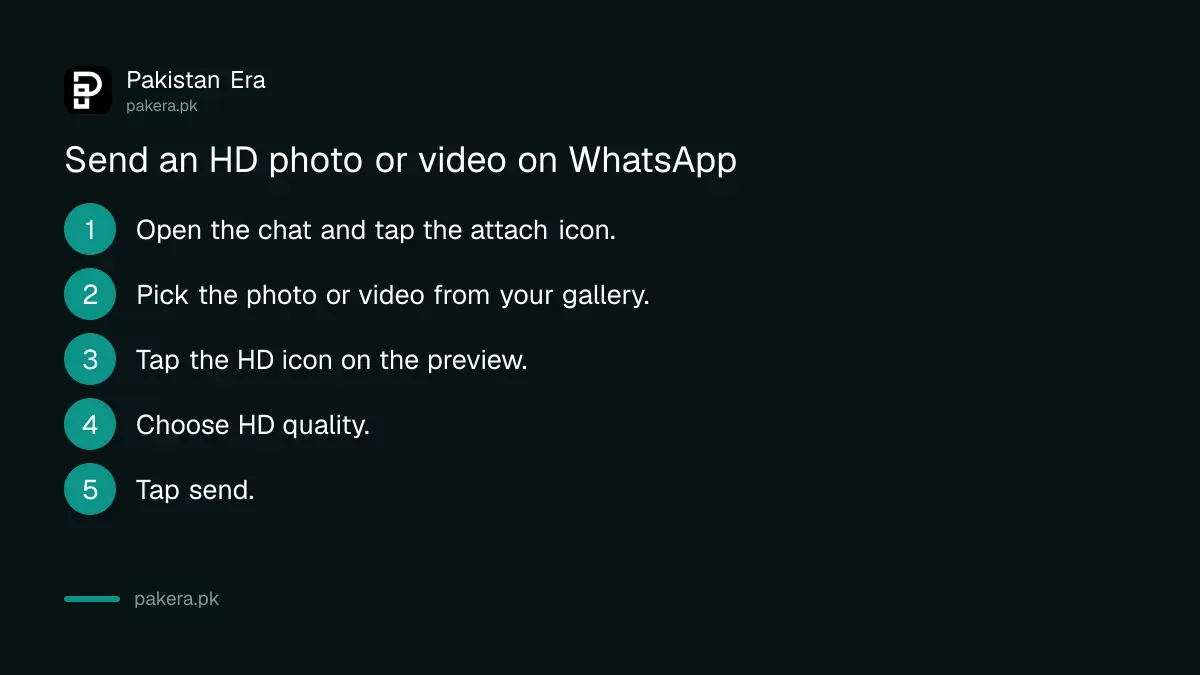
- Open the individual or group chat.
- Tap the attach icon, then Gallery (Android) or Photos (iPhone). You can select up to 100 photos at once.
- On the preview screen, tap the HD icon at the top.
- Choose HD quality.
- Tap send.
HD costs data. On a mobile package, a few HD videos can eat a daily bundle fast, so the steps to increase WhatsApp data on Jazz, Zong and Telenor are worth a look if you send a lot of media.
Send it as a Document when the original file matters
Tap the attach icon, choose Document, then browse to the photo or video and send. The file arrives as a file, not as a gallery preview, and WhatsApp accepts documents up to 2 GB, far above the normal video limit.
It is the route we would pick for anything that will be printed or edited, such as a passport photo for a shop in Lahore or a wedding clip for an editor in Karachi. WhatsApp's help pages state the 2 GB limit. They do not describe exactly how documents are processed, so if a file must be byte for byte identical, check it after it arrives.
- Open the chat and tap the attach icon.
- Tap Document.
- On Android, browse to the file, or tap the gallery option inside the picker if your phone shows one. On iPhone, pick from Files, or save the photo to Files first.
- Send. The receiver taps the file to download and open it.
On WhatsApp Web, click the plus sign, then Document, or drag the file straight into the text box.
WhatsApp video limits: 100MB and 720p on a fast connection
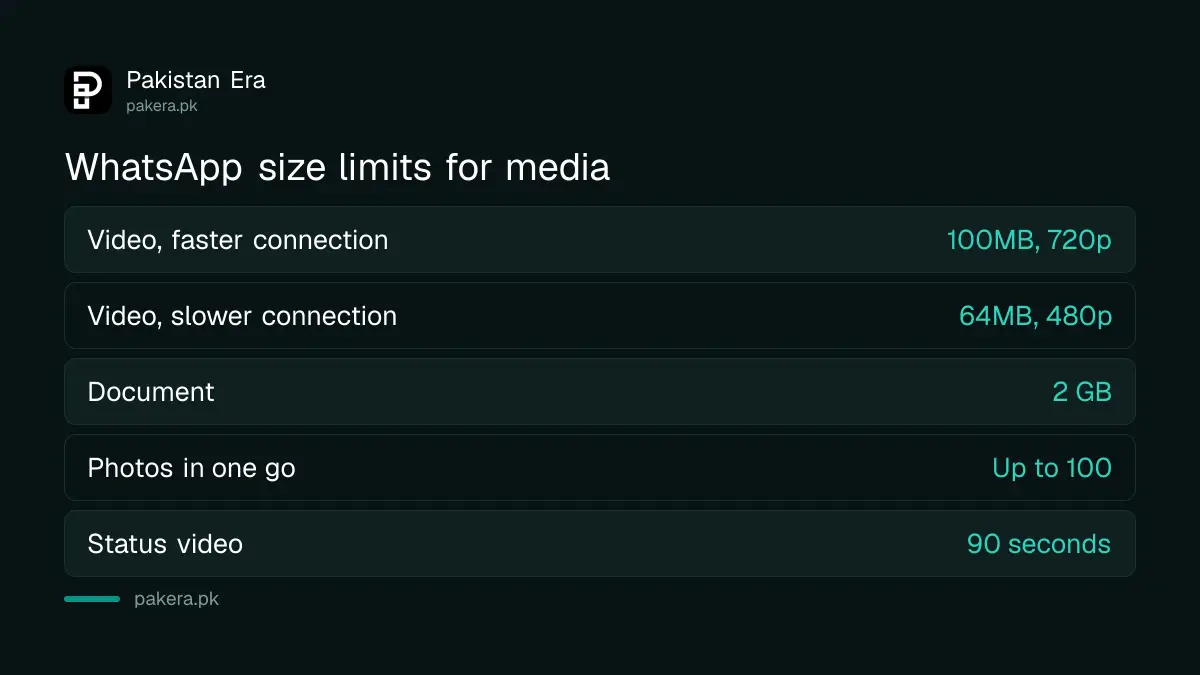
WhatsApp's default video limit is 100MB and 720p resolution on a faster connection, and 64MB and 480p on a slower one. Documents can be 2 GB. Supported video formats are 3GP, AVI, FLV, MKV, MOV and MP4.
| What you send | Limit in WhatsApp's help centre |
|---|---|
| Video on a faster connection | 100MB, 720p (default) |
| Video on a slower connection | 64MB, 480p (default) |
| Document (any file, including video) | 2 GB |
| Photos in one go | Up to 100 |
| Status video | 90 seconds, no HD |
| Profile picture | No HD; use at least 192 pixels wide and high |
One WhatsApp page also says the maximum size for videos sent or forwarded is 64MB on all platforms, a line that sits next to the 100MB figure. Reports differ even inside WhatsApp's own help centre, so plan on 64MB for a video that must go through, and use Document for anything bigger.
Why WhatsApp lowers the quality of your photos
WhatsApp compresses media when it is shared, so photos and videos can arrive softer than the original. A slow connection makes HD harder to send, and WhatsApp sets lower default limits for users on slower internet.
That is why a video recorded on a new phone in 4K arrives looking like an old clip. The HD button reduces the loss; the Document route avoids the gallery preview path entirely. For profile pictures, WhatsApp suggests an image at least 192 pixels in height and width to avoid a blurry result.
When a video will not send or the HD option is missing
Trim the video, record it at a lower resolution outside WhatsApp, or send it as a Document. If you received the video, forward it instead, because forwarded media does not upload again. Update WhatsApp if the HD icon does not appear.
WhatsApp notes that the maximum length of a video depends on your phone camera's quality, so a 4K clip hits the size limit sooner than a 1080p one. Some professional cameras and high audio sample rates may not be supported at all. On iPhone, WhatsApp also warns that sending a very large batch of photos at once can fail, so send them in smaller groups.
If storage is the real problem, the receiving phone may not save the file. The steps to free up WhatsApp storage on Android help, and keeping media in a WhatsApp chat backup protects it if the phone is lost.
Common questions
How do I send HD photos on WhatsApp?
Attach the photo, tap the HD icon on the preview, choose HD quality and send.
Can I send a video of more than 100MB on WhatsApp?
Yes, as a Document. WhatsApp allows documents up to 2 GB.
Can I post an HD status on WhatsApp?
No. WhatsApp says HD media is not currently available for status updates or profile pictures.
Does HD work on WhatsApp Web?
Yes for photos, according to WhatsApp's Web help page: click the HD Media icon, choose HD quality, click Done, then send.
Why did my 4K video arrive blurry?
WhatsApp compresses media and limits video to 720p by default, or 480p on a slow connection. Send it as a Document to keep the original.
Do forwarded videos lose more quality?
WhatsApp says forwarded media is not uploaded again, so forwarding does not add a fresh round of upload.
How we verified this
What we checked, where we read it, and what we could not confirm.
Last checked 25 October 2026. We read WhatsApp's help page on sending media, contacts or location in its Android, iPhone and Web versions, and its page on sending longer videos, on that date. All limits above come from those pages. We did not send test files, and we could not confirm on WhatsApp's pages whether documents are compressed in any way, or why one page gives 64MB as the maximum for all platforms while others give 100MB.
About the author

Technology Journalist & Multimedia Producer
Ahmad Ali is a technology journalist and multimedia producer at Pakistan Era, joining the team in October 2026. He covers consumer technology and digital life for Pakistani readers, combining research with hands-on product testing.