How to Set a Mobile Data Warning and Limit on Android and Check App Data on iPhone in Pakistan
Set a data warning and a hard data limit on Android, and see which apps use data on iPhone, in Pakistan. Follow the steps and protect your bundle from today.
Short answer: On Android, open Settings, Network and internet, then your SIM settings, and tap Data warning and limit. Switch on a warning to get an alert, or a limit to turn mobile data off at your cap. On iPhone, open Settings, Cellular and switch off data for the apps that use too much.
A monthly bundle can vanish fast when one app keeps loading video in the background. In Pakistan an empty bundle can mean paying the network's out-of-bundle rate, or no internet until you buy another package.
We read Google's and Apple's help pages on 13 October 2026. Android menu names differ by brand, so we give the path Google lists for Pixel and for other Android phones. We did not test every brand.
Android lets you set a data warning and a hard limit
Google lists two separate tools. A data warning sends a notification when your usage reaches the level you pick. A data limit goes further and turns mobile data off automatically when you reach it, so you cannot pass your cap by accident.
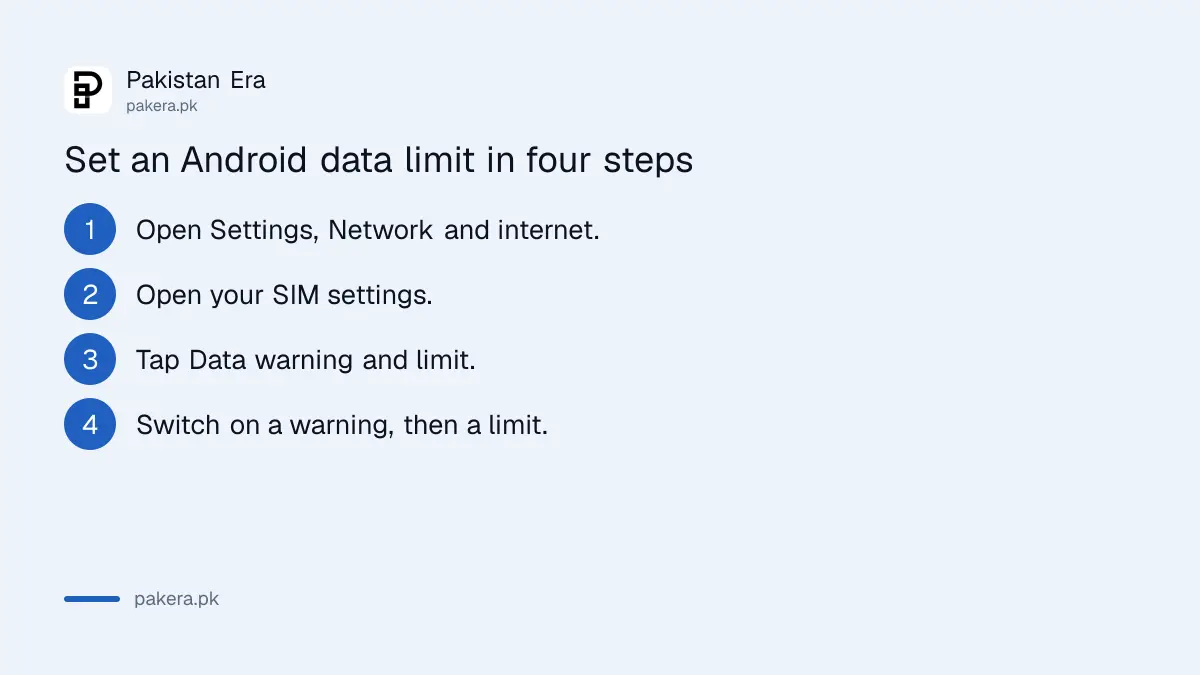
- On a Pixel, open Settings, then Network and internet, then SIMs. On other Android phones, open Settings, Network and internet, Internet, then tap Settings next to your network name.
- Tap Data warning and limit.
- Switch on Set data warning, tap Data warning, enter a number and choose MB or GB. Tap Set.
- To add a hard stop, switch on Set data limit, read the message, tap OK and enter your limit.
When the limit is reached, mobile data switches off and you get a notification. Google says you must turn mobile data back on yourself. Set the warning a little below the limit, for example at 8 GB for a 10 GB bundle, so you get a chance to react.
Android shows which apps used your data
Google says the same SIM screen shows your total mobile data use at the top. Tap App data usage to see a graph and a list of apps. The list shows which app used the most, so you know where to cut first.
Check the list once a week for the first month. Often a few apps cause most of the use. Common causes are video apps that autoplay, apps that back up photos, and apps that update themselves in the background.
For a single app, you can limit its background data in the app's own settings. Google also lists Data Saver, available on Android 7.0 and newer, which helps the phone use less mobile data on a limited plan. For more habits to cut use, see how to save mobile data on Android and iPhone.
iPhone shows data by app but Apple lists no limit setting
Apple says to open Settings, then Cellular, and scroll down to see how much cellular data each app has used. Each app has its own switch. When cellular data is off for an app, that app uses only Wi-Fi.
The Apple page we read does not list a data limit or a data warning setting. So the practical tool on iPhone is the per-app switch. Use it for apps that you only need at home, such as video, music and games with big downloads.
- Settings, Cellular: see use by app and switch off any app.
- Reset Statistics: clears the counters. Apple puts it in Settings, Cellular.
- System Services: shows the use by system services. Apple says you cannot switch these off one by one.
Apple also says Connectivity Assist can use cellular data alongside Wi-Fi when the Wi-Fi is weak, which may raise your use. If your usage is high and you mostly use Wi-Fi, check that setting in the same Cellular screen.
Use the table to pick the right tool
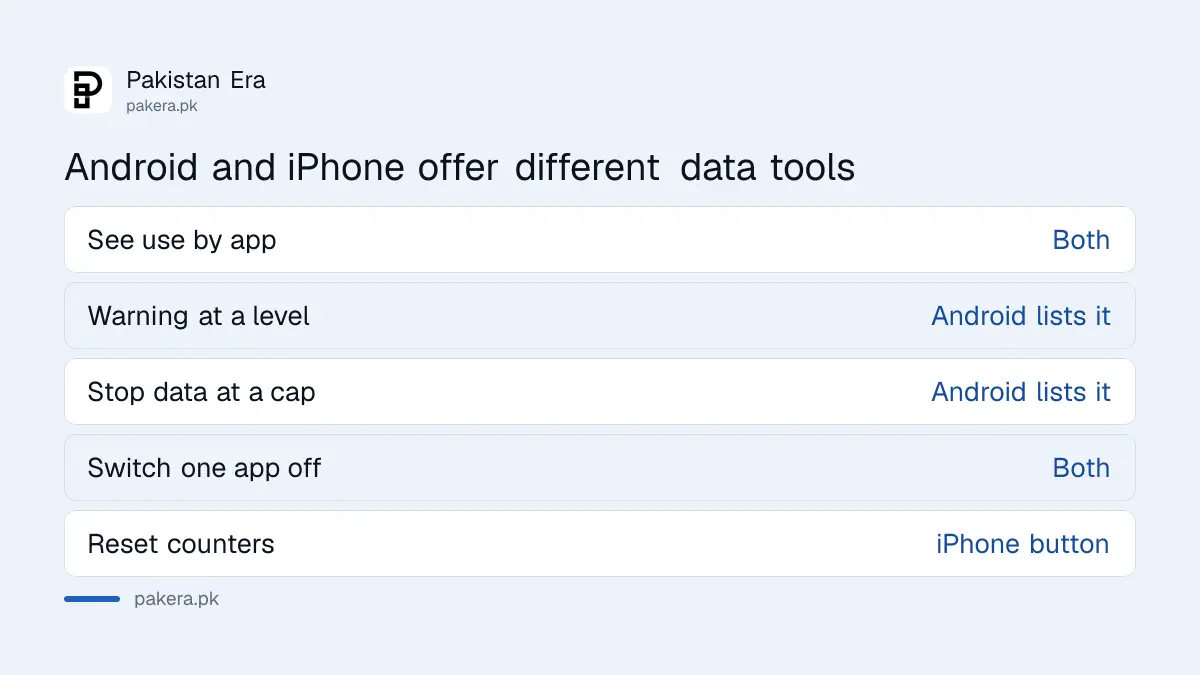
The two phone systems offer different controls. Android gives you alerts and a hard stop. iPhone gives you per-app switches. Neither replaces your network's own balance and expiry alerts, so use the phone tool and the network's SMS together.
| Need | Android | iPhone |
|---|---|---|
| See use by app | App data usage | Settings, Cellular |
| Warning at a level | Set data warning | Not listed on Apple's page |
| Stop data at a cap | Set data limit | Not listed on Apple's page |
| Block one app | Restrict background data | Switch the app off |
| Reset counters | Not covered on Google's page | Reset Statistics |
Pair the phone tools with your network's alerts
The phone counts what it sees. Your network counts what it bills. The two numbers can differ a little, and Apple says to contact your carrier for the most accurate figure. Always check your balance on the network before a big download.
PTA has rules on package expiry and usage alerts. You can read them in PTA's rule on package expiry and usage alerts. If you see a charge you do not understand, check what call, SMS and data cost without a package.
If your bundle runs out earlier than it should, share the phone's data use list with the network when you complain. A list that shows one app using several GB is stronger evidence than a general statement.
Common questions
What is the difference between a data warning and a data limit on Android?
A warning sends a notification at the level you choose. A limit turns mobile data off when you reach it, and you must turn it on again yourself.
Where do I find the data warning on a Pixel?
Open Settings, then Network and internet, then SIMs, and tap Data warning and limit.
Can I set a data limit on an iPhone?
The Apple page we read does not list one. You can see use by app in Settings, Cellular and switch off any app.
How do I stop one app using mobile data on iPhone?
Open Settings, then Cellular, and switch off the app. With cellular data off, the app uses only Wi-Fi.
Does Data Saver work on every Android phone?
Google says it is available on Android 7.0 and newer. Menu names can differ by brand.
Will the phone's number match my network's bill?
Not always. Apple says to contact your carrier for the most accurate usage, so check your network's balance as well.
How we verified this
What we checked, where we read it, and what we could not confirm.
Last checked on 13 October 2026, Pakistan time. We read Google's help page on reducing and managing mobile data usage, which lists the steps for Pixel and other Android phones, and Apple's help page on managing cellular data on iPhone. We did not test every Android brand, and menu names may differ on your phone.
About the author

Technology Journalist & Multimedia Producer
Ahmad Ali is a technology journalist and multimedia producer at Pakistan Era, joining the team in October 2026. He covers consumer technology and digital life for Pakistani readers, combining research with hands-on product testing.