How to Stop Your Phone Overheating While Charging in Pakistan, on Android and iPhone
A warm phone while charging is normal, a hot one is not. Use Apple and Samsung advice on chargers, cases, sun and wireless charging to cool it and spot a fault.
Short answer: A phone that is warm while charging is normal. A phone that is too hot to hold is not. Unplug it, take off the case, move it out of the sun, and charge again with a charger and cable approved for that phone. Apple designs iPhones for use between 0 and 35 degrees Celsius.
Pakistani homes and cars get hot for much of the year. Add a cheap charger and a thick case and the phone becomes a small heater. This guide uses what Apple and Samsung say on their own support pages, then turns it into steps you can follow tonight.
We read Apple's page on iPhone and iPad temperature and Samsung's page on Galaxy heating on 12 October 2026. We did not measure phone temperatures ourselves.
Warm is normal, and the phone protects itself when it is not
Apple says a device can warm up during setup, software updates, wireless charging, heavy apps and games, and video streaming. If it gets too hot, the phone slows charging, dims the screen and limits the camera until it cools. Samsung gives the same advice for Galaxy phones.
So a slow charge in a hot room is not always a faulty charger. It can be the phone protecting its battery. The fix is to cool the phone, not to buy a stronger charger.
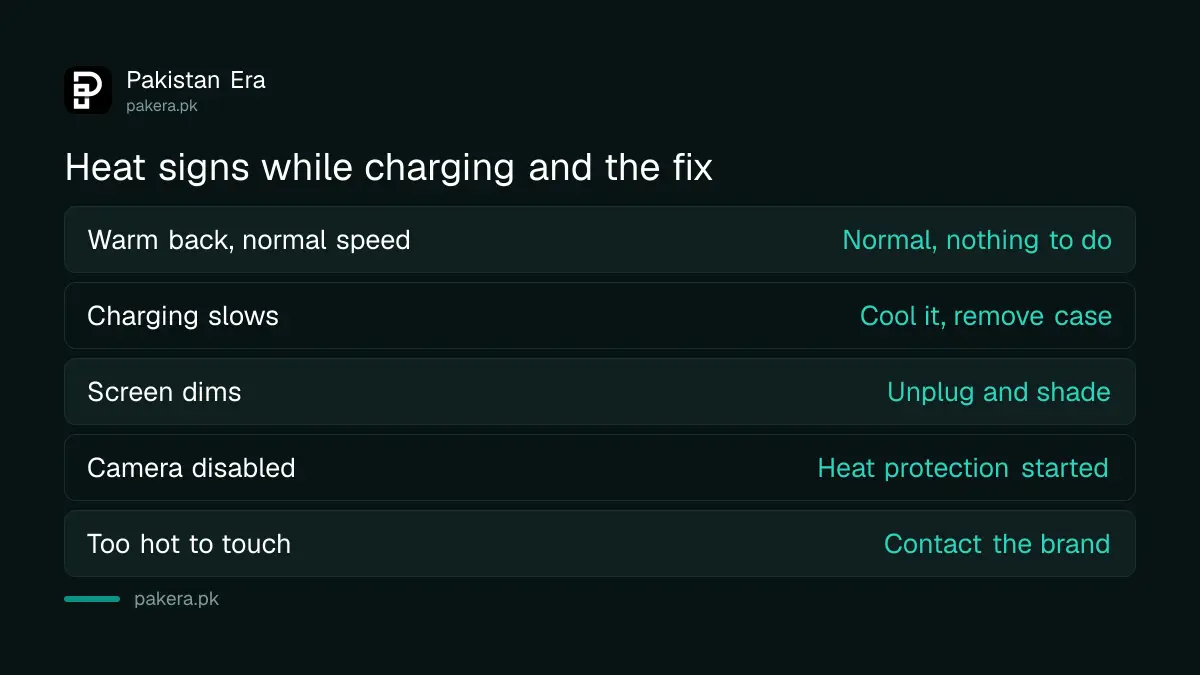
| Sign | Usual meaning | What to do |
|---|---|---|
| Warm back, normal speed | Normal charging | Nothing |
| Charging slows near 80 per cent | Phone is protecting the battery | Let it cool, remove the case |
| Screen dims, camera disabled | Heat protection has started | Unplug, shade, wait |
| Too hot to touch | Fault or bad charger | Unplug, contact the brand |
A bad charger or cable is the first thing to change
Samsung names charging with a non-Samsung, incompatible or defective charger and cable as a main cause of excess heat. It advises trying a different approved charger and cable. The cable matters as much as the plug, and a frayed one adds heat.
In Pakistan, loose-pack chargers and cables are everywhere. If a charger is unmarked, feels rough or has no brand and rating printed on it, do not use it overnight. Buy one from the phone brand or from a shop that gives a written warranty. Our guide on claiming an electronics warranty when a shop refuses explains why that receipt matters.
Also check the charging port. Samsung lists liquid, dust and metal particles in the connector as a cause of heat. Switch the phone off before you look into the port with a torch. Do not push a pin into it.
Take off the case and keep the phone out of the sun
Apple's advice when a device overheats is to turn it off, move it to a cooler place away from direct sunlight, and let it cool. Samsung adds that a phone left in a parked car on a hot day, near a heat source or in direct sun will overheat.
- Unplug the charger and close open apps.
- Take the phone out of its case, especially a thick or leather one.
- Move it to a shaded, airy spot. Do not put it in a fridge or on ice.
- Wait until it feels normal, then charge again on a hard surface, not on a bed or sofa.
- Turn off Wi-Fi, location and Bluetooth if you are not using them.

The fridge warning is our own advice, not from Apple or Samsung. A sudden big temperature change can put moisture inside the phone, so let it cool in the open air.
Wireless charging and heavy apps add heat
Apple lists wireless charging as a common cause of warmth. Samsung says to remove metal or magnetic objects, such as a card or a magnet, between the phone and the wireless charger. A pop socket or a wallet case can be enough to trap heat.
Gaming, GPS and video calls while charging push the heat higher. If you must use the phone, switch to a normal wired charger at lower power. Our guide on checking battery health on Android and iPhone shows how to see if heat has already worn the battery down.
When heat means a hardware fault
If the phone is still too warm to touch after a cool-down and a new approved charger, Samsung says to contact its support. We add one more sign: if the back cover lifts or the screen bulges, stop charging and take the phone to a service centre the same day.
Look first at your warranty. Our guide on checking phone warranty by IMEI for seven brands shows the quick way. Use the brand's service centre. A roadside battery swap can use a cheap cell with no protection circuit.
Charging in a hot room all night also wears the battery. If heat is a daily problem, charge during the day, near a fan, and unplug at 80 to 90 per cent where your phone offers a limit setting.
Common questions
Is it normal for my phone to get warm while charging?
Yes. Both Apple and Samsung say a phone can warm up while charging.
It should feel warm, not hot enough to be uncomfortable to hold.
What temperature is safe for an iPhone?
Apple says iPhones are designed for use between 0 and 35 degrees Celsius.
Apple lists a storage range of minus 20 to 45 degrees Celsius. A parked car in summer can pass that.
Does a thick case make charging hotter?
It can. A case traps heat, so take it off while charging if the phone runs warm.
Samsung's page also suggests removing the case or cover to improve airflow.
Can I use the charger from another brand?
Samsung recommends its approved chargers and cables. Using a non-approved or defective charger is named as a cause of heat.
A charger that is well made and rated for your phone is fine, but an unmarked one is a risk.
Should I put a hot phone in the fridge?
No. Apple's advice is to turn it off and move it somewhere cooler, away from the sun.
Fast cooling can cause moisture inside the phone.
When should I take the phone to a service centre?
Go if it stays too hot to touch after cooling, or if the back or screen is lifting.
Samsung tells owners in that case to contact its support.
How we verified this
What we checked, where we read it, and what we could not confirm.
We read Apple's page on iPhone and iPad temperature at support.apple.com and Samsung's page on Galaxy device heating at samsung.com on 12 October 2026. We found no Pakistan-specific heat guidance on either brand's pages, so the steps above apply the same advice to local conditions.
About the author

Technology Journalist & Multimedia Producer
Ahmad Ali is a technology journalist and multimedia producer at Pakistan Era, joining the team in October 2026. He covers consumer technology and digital life for Pakistani readers, combining research with hands-on product testing.