How to Test a Used Laptop's Hardware in Pakistan: Dell, HP and MacBook Built-In Diagnostics
Test a used laptop free before you pay in Pakistan: F12 then Diagnostics on Dell, Esc then F2 on HP, Command and D on a MacBook, plus three checks to add.
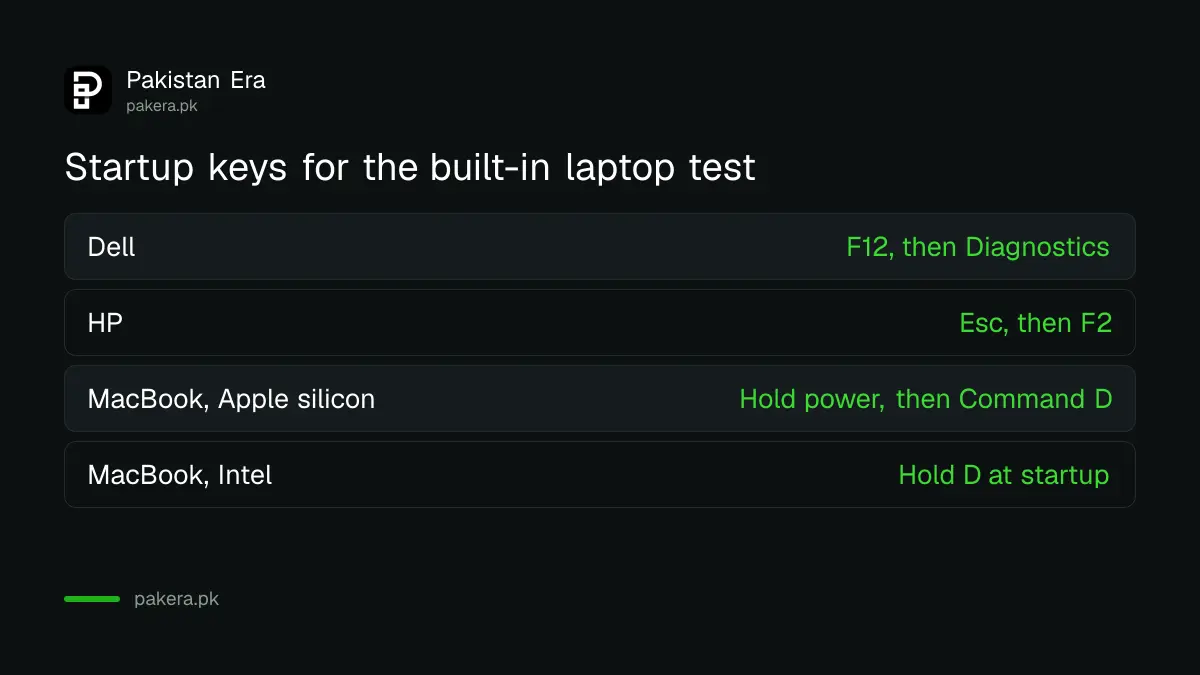
Every Dell, HP and Apple laptop has a free hardware test built in, and it runs before Windows or macOS even loads. Dell: press F12 at the Dell logo and choose Diagnostics. HP: press Esc repeatedly at power on, then F2. MacBook with Apple silicon: hold the power button to Options, then press Command and D.
Run it before you pay for a used laptop, or before you hand one over for repair. A failure gives you a code from the maker itself, which is far harder to argue with than "it was working fine yesterday".
| Laptop | Key to start the test | What a failure gives you |
|---|---|---|
| Dell | F12 at the Dell logo, then Diagnostics | Error code, validation code and Service Tag |
| HP | Esc repeatedly at power on, then F2 | A 24-digit Failure ID |
| MacBook, Apple silicon | Hold power to Options, then Command and D | An Apple Diagnostics reference code |
| MacBook, Intel | Hold D as it starts, or Option and D | An Apple Diagnostics reference code |
Dell laptops test themselves from the F12 menu
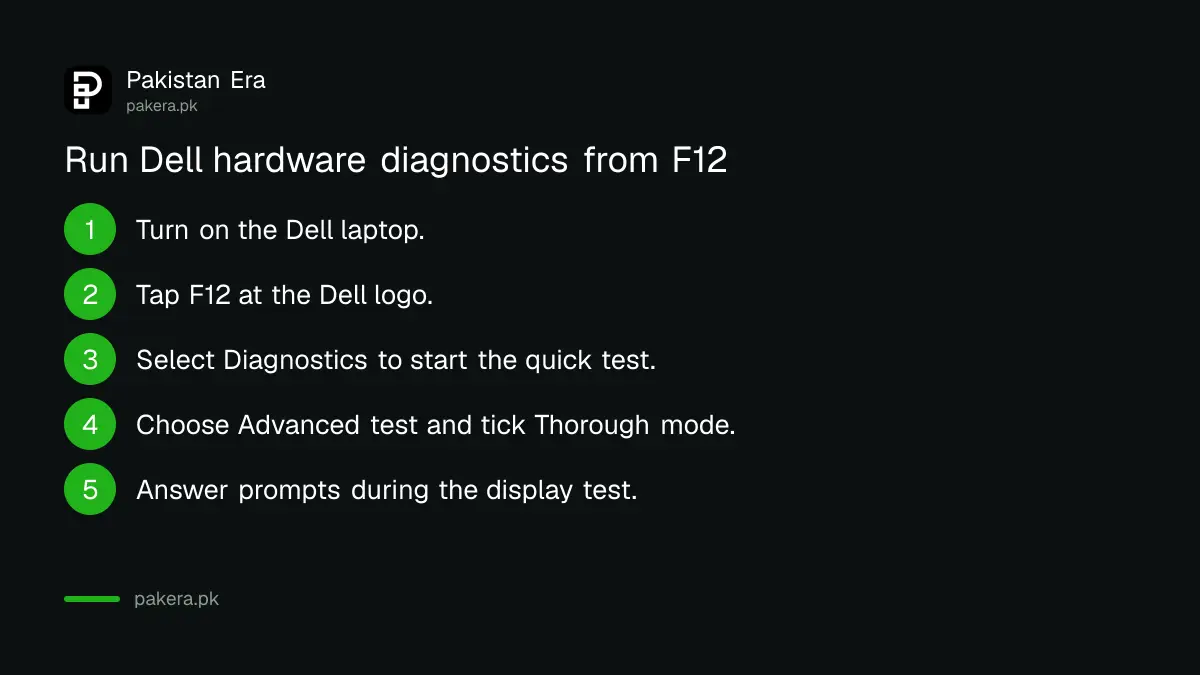
Dell's preboot diagnostics start from the One Time Boot Menu. Turn the laptop on and tap F12 several times at the Dell logo, then select Diagnostics. A quick test runs first. The mouse and touch screen do not work during testing, so use the keyboard.
- Turn on the Dell laptop.
- At the Dell logo, press F12 several times until the One Time Boot Menu appears.
- Select Diagnostics. The quick test starts.
- For a deeper check, press Esc, choose Advanced test, tick Thorough mode and select Run test.
- Answer the screen prompts during the display test.
"All tests passed successfully" is the result you want. If a test fails, Dell asks you to note the error code, the validation code and the Service Tag. The Service Tag is the seven character code on the laptop's sticker, and Dell's support site uses it for warranty and repairs.
HP laptops use HP PC Hardware Diagnostics with Esc and F2
HP's user guides give the route for HP PC Hardware Diagnostics (UEFI). Turn the laptop on or restart it, press Esc quickly and repeatedly, then press F2. The tool opens, and you choose a quick system test or a test of one part, such as memory or the hard drive.
- Shut the HP laptop down fully.
- Turn it on and tap Esc until the startup menu appears.
- Press F2 for System Diagnostics.
- Choose System Tests, then Quick Test. Pick an extensive test if you have time.
- Write down any Failure ID on paper or take a photo of the screen.
HP's guides say a failure that needs a part replaced produces a 24-digit Failure ID. Give it to HP support or the service centre. It tells them which part failed, so the laptop does not sit on a bench for days being diagnosed again.
MacBooks run Apple Diagnostics at startup
Apple Diagnostics is built into every recent Mac. On Apple silicon, shut down, then press and hold the power button until the startup options appear, and press Command and D. On an Intel Mac, hold D as it starts. Apple shows a reference code for any problem found.
- Apple silicon (M1 and later): hold the power button until Options appears, then press and hold Command (⌘) and D.
- Intel Mac: turn it on and hold D straight away. If that does nothing, hold Option and D.
Note the reference code and give it to an Apple authorised service provider. Before buying a used MacBook, also make sure the seller has removed it from their Apple Account. Macs with Apple silicon use the same Activation Lock as iPhones. The seller removes it by signing in at icloud.com/find, selecting the Mac and clicking Remove.
Three checks the hardware test does not cover
A pass means the tested parts showed no fault during that run. It does not show battery wear, a fake processor claim in an advert, or a keyboard key that sticks only when warm. Add three quick checks and a used laptop has little left to hide.
| Check | How | What it catches |
|---|---|---|
| Battery wear | Windows battery report, or Mac cycle count | A battery near the end of its life |
| Real specs | Windows Settings, System, About | An older processor or less RAM than advertised |
| Serial number | Sticker, box and the maker's warranty lookup | A swapped or refurbished unit sold as new |
| Every key and port | Type a full line, plug in a USB drive and the charger | Dead keys and loose ports |
The steps to check laptop battery health with the Windows battery report take two minutes. So do the steps to check a laptop's processor generation and RAM. The laptop buying checklist covers warranty lookups by serial number.
What to do when a test fails
On a laptop you are buying, a failed hardware test is a reason to walk away or to agree a much lower price in writing. On your own laptop, photograph the code, check the warranty with the maker, and take the code to the brand's authorised service centre.
- Run the test a second time to rule out a one-off error.
- Photograph the screen with the code and the serial number or Service Tag.
- Check the warranty on the maker's site with that serial number.
- Back up your files before any repair visit.
- Give the code to the service centre at drop-off and ask for a written job sheet.
Buying a used MacBook or iPhone? Check that it is not locked to its previous owner.
Common questions
How do I run a hardware test on a Dell laptop?
Turn it on and tap F12 at the Dell logo until the One Time Boot Menu appears. Select Diagnostics. For a deeper test, choose Advanced test and tick Thorough mode.
Which key opens HP hardware diagnostics?
HP's user guides say to press Esc repeatedly as the laptop starts, then press F2. That opens HP PC Hardware Diagnostics (UEFI).
How do I test a MacBook's hardware?
On Apple silicon, hold the power button until Options appears, then press Command and D. On an Intel Mac, hold D at startup.
Does a passed test mean the laptop has no problems?
No. It means the tested parts showed no fault during that run. Battery wear, software problems and the real specs need their own checks.
Will running diagnostics delete my files?
No. These built-in tests check hardware and do not erase data. Back up anyway before any repair, because a drive replacement would remove your files.
How long does a laptop hardware test take?
A quick test takes a few minutes. Dell's thorough mode and HP's extensive tests take much longer, so run them when the laptop can stay plugged in.
How we verified this
What we checked and where we read it.
Last checked 24 November 2026. We read Dell's knowledge base article How to Run Dell Preboot Diagnostics and Hardware Tests (version 24, modified 3 September 2026) and Apple Support's Use Apple Diagnostics to test your Mac. The HP route and the 24-digit Failure ID come from the HP PC Hardware Diagnostics (UEFI) section of HP's laptop user guides. Startup key timing varies slightly by model.
Free on WhatsApp
Get last dates and rule changes on WhatsApp
We post new last dates, fee changes and fixes for common problems, a few short posts a day.
Follow Pakera on WhatsAppOther followers cannot see your number.
Pakera Solves It
Which online process wasted your time this week?
A portal that will not load, a form nobody explains, a complaint that went nowhere. Tell us. Every week we pick one, solve it step by step and publish the answer.
About the author

Technology Journalist & Multimedia Producer
Ahmad Ali is a technology journalist and multimedia producer at Pakistan Era, joining the team in October 2026. He covers consumer technology and digital life for Pakistani readers, combining research with hands-on product testing.