iPhone Locked to Owner in Pakistan: How to Remove Activation Lock on a Used iPhone
Bought a used iPhone stuck on iPhone Locked to Owner? The seller removes it free at icloud.com/find, or Apple does with proof of purchase. Steps for Pakistan.
If a used iPhone shows "iPhone Locked to Owner", only two people can remove the lock: the previous owner, from their Apple Account, or Apple, through an Activation Lock support request backed by proof of purchase. The owner signs in at icloud.com/find, selects the iPhone and clicks Remove This Device. It is free and takes minutes.
No shop code, cable or paid "unlock" service is on that list. Apple built Activation Lock so a lost or stolen iPhone stays useless to anyone else, and the lock lives on Apple's servers, not on the phone.
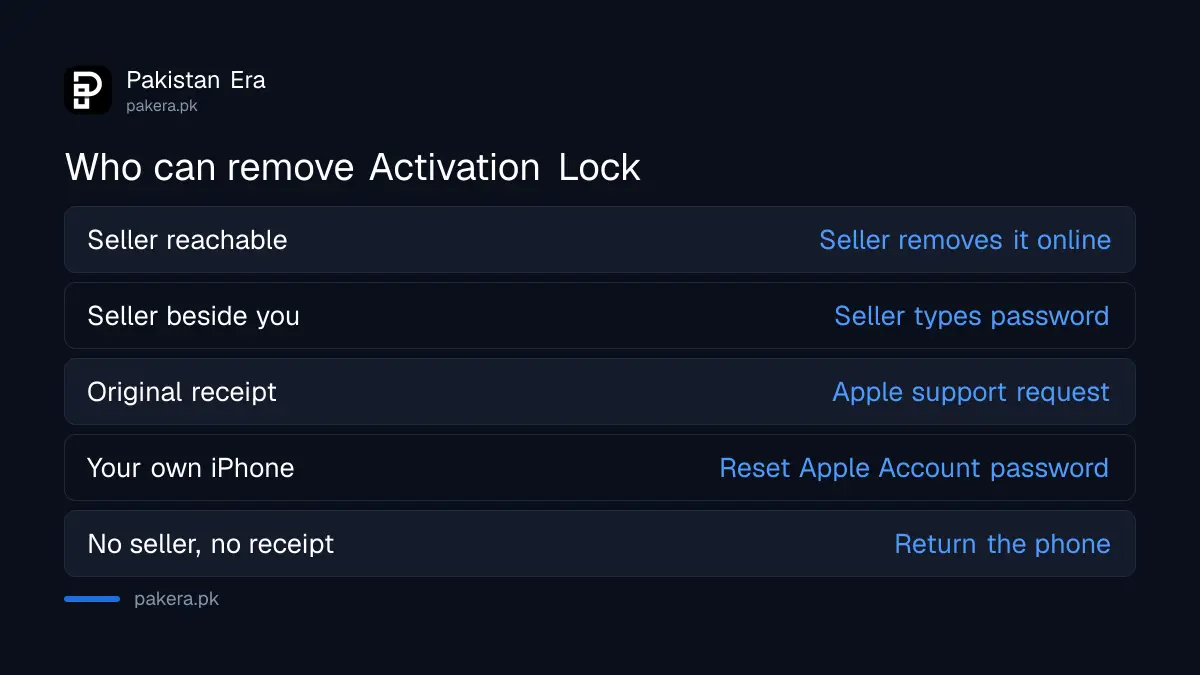
| Your situation | What works | Cost |
|---|---|---|
| You can reach the seller | Seller removes the iPhone at icloud.com/find, or enters their Apple Account password on the phone | Free |
| Seller is a family member who has died or is unreachable, and you have the original receipt | Activation Lock support request at al-support.apple.com | Free |
| It is your own iPhone and you forgot the password | Reset your Apple Account password, then sign in on the lock screen | Free |
| Seller vanished and you have no receipt | No legitimate route. Return the phone and ask for your money back | Your loss if the seller refuses |
Activation Lock ties the iPhone to one Apple Account
Activation Lock switches on by itself when the owner turns on Find My. Apple then stores that Apple Account on its activation servers, and the password is needed before anyone can erase, reactivate or use the iPhone again, even after a full reset.
That is why a factory reset does not help. Every time an iPhone is activated or restored, it checks with Apple. If the lock is still on, setup stops at the "iPhone Locked to Owner" screen on iOS 15 or later, and asks for the previous owner's Apple Account or passcode.
Apple Watch, Mac computers with Apple silicon or the T2 chip, and iPad use the same lock. So does a MacBook bought second hand from a friend who never signed out.
The previous owner removes the lock in five steps
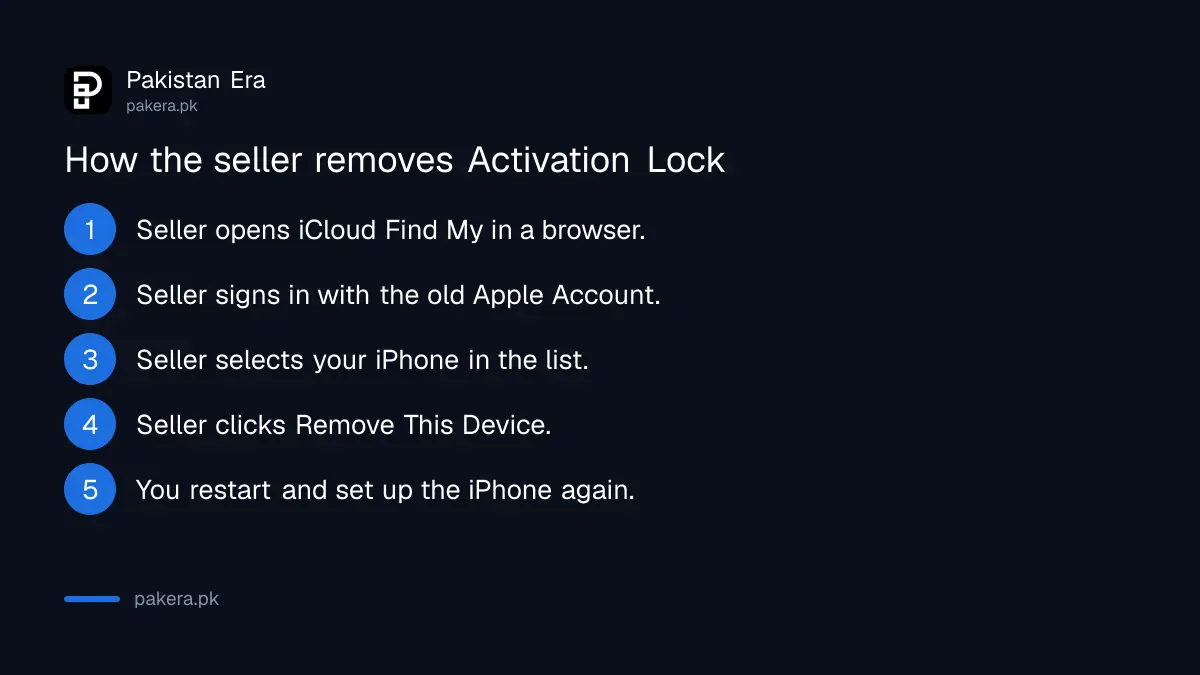
The quickest fix is a phone call to the seller. They do not need the iPhone in hand. They sign in to iCloud Find My in any browser, select the device and remove it from their account. Then you restart the iPhone and finish setup.
- Ask the seller to open icloud.com/find on a laptop or phone browser.
- They sign in with the Apple Account that was on the iPhone.
- They select your iPhone from the device list.
- They click Remove This Device and confirm.
- You restart the iPhone and run setup again. The Hello screen means it is free.
If the seller is standing next to you, it is even simpler. They type their Apple Account password on the "iPhone Locked to Owner" screen, then go to Settings on the phone and sign out. Never hand over your own Apple Account details in return.
Apple notes that for an iPhone, the web removal can work even when the phone is not offline. If removal fails, ask the seller to check they signed in with the right account. Some people have more than one Apple Account, so an older one is worth trying. The Apple Account unlock and iForgot steps help a seller who has forgotten their own password.
Apple removes the lock only with proof of purchase
When the previous owner cannot help, Apple accepts an Activation Lock support request at al-support.apple.com. Apple's support page says to start one if you have proof of purchase documentation. Apple decides each request, and a receipt that does not link you to that device can be refused.
Prepare these before you open the form:
- The iPhone's serial number and IMEI. They are printed on the original box and usually on the purchase invoice.
- The original sales receipt or invoice, showing the serial number or IMEI, the date and the seller.
- A working email address that you check daily, because Apple replies by email.
A handwritten slip from a market stall rarely meets this bar. If you bought the phone second hand, ask the seller for their original receipt from the first purchase. That paper, not your own resale slip, is what links the phone to a buyer.
Paid bypass offers do not remove the lock
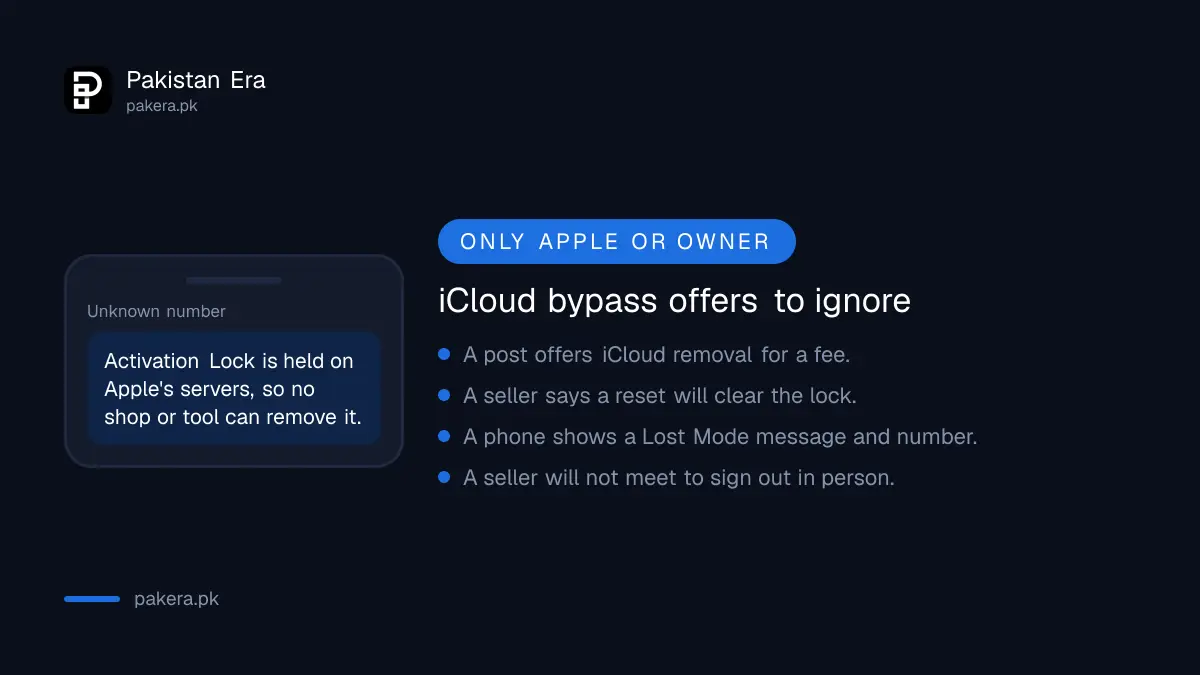
Nobody outside Apple can turn off Activation Lock. Offers on social media to "remove iCloud" for a few thousand rupees cannot change what Apple's servers hold. The lock is checked again at every setup, so any "fix" from a stranger is not a removal.
Apple also says parts taken from a device that had Activation Lock on are not eligible for warranty or AppleCare service. So a locked iPhone sold "for parts" is worth less than it looks.
A locked iPhone can also be a stolen one. The owner may have put it in Lost Mode, which shows a message and a phone number on the screen. If you see that, call the number or return the phone. If the IMEI is blocked, the steps to block or unblock a lost phone with PTA explain what the owner can do.
Check the lock before paying for the next one
Turn on the iPhone, start setup and look for the Hello screen. If a passcode screen or Home Screen appears, it has not been erased. If setup asks for a previous Apple Account, the lock is still on. Do not pay until the seller removes it in front of you.
The full used iPhone checklist covers PTA status, battery health and parts history as well. If you are the seller, follow the steps to erase a phone before selling so your buyer never sees this screen.
Common questions
Can a shop remove "iPhone Locked to Owner"?
No. The lock is held on Apple's servers. Only the previous owner, by removing the device from their Apple Account, or Apple, after a proof of purchase request, can turn it off.
Does a factory reset remove Activation Lock?
No. After any reset or restore, the iPhone checks with Apple during setup. If the lock is on, it asks for the previous owner's Apple Account or passcode again.
Can a buyer's own resale receipt be enough for Apple?
It may not be. Apple asks for proof of purchase documentation and decides each case. The original invoice from the first sale, showing the serial number or IMEI, is the strongest paper.
What if the previous owner has died?
Gather the original purchase receipt showing the serial number or IMEI, then file an Activation Lock support request with Apple. Apple reviews each request and may ask for more documents.
Can I use a locked iPhone for parts?
You can, but Apple says parts removed from a device with Activation Lock on are not eligible for warranty or AppleCare service, so the parts are worth less.
Does the same lock apply to Apple Watch and MacBook?
Yes. Apple Watch, iPad and Macs with Apple silicon or the T2 chip use Activation Lock. The previous owner removes them the same way at icloud.com/find.
How we verified this
What we checked and where we read it.
Last checked 24 November 2026. We read Apple Support's Activation Lock for iPhone and iPad, which covers the "iPhone Locked to Owner" screen, the setup check and the parts rule, and How to remove Activation Lock, which gives the icloud.com/find steps and links the Activation Lock support request at al-support.apple.com. Apple does not publish a fixed list of accepted documents for that request.
Free on WhatsApp
Get last dates and rule changes on WhatsApp
We post new last dates, fee changes and fixes for common problems, a few short posts a day.
Follow Pakera on WhatsAppOther followers cannot see your number.
Pakera Solves It
Which online process wasted your time this week?
A portal that will not load, a form nobody explains, a complaint that went nowhere. Tell us. Every week we pick one, solve it step by step and publish the answer.
About the author

Technology Journalist & Multimedia Producer
Ahmad Ali is a technology journalist and multimedia producer at Pakistan Era, joining the team in October 2026. He covers consumer technology and digital life for Pakistani readers, combining research with hands-on product testing.