Transfer Data From Old Phone to New Phone in Pakistan: Android, Samsung and iPhone (Every Method)
Transfer data from your old phone to a new phone in Pakistan: Android QR copy, Samsung Smart Switch, iPhone Quick Start, what does not move and the fixes.
To transfer data from an old phone to a new phone, start on the new phone's setup screen: Android phones copy over Wi-Fi after you scan a QR code, Samsung Galaxy phones use Smart Switch by cable or Wi-Fi, and iPhones use Quick Start. Below is the right method for every pair (Android to Android, to Samsung, iPhone to iPhone, iPhone to Android), what copies and what does not, and the fixes when the transfer stops halfway.
A new phone on Eid or after a wedding usually comes with one fear: losing contacts, photos and WhatsApp chats. The tools are free and built in. We read the official instructions from Google, Samsung Pakistan and Apple on 27 October 2026.
Pick the transfer method by the phones you have
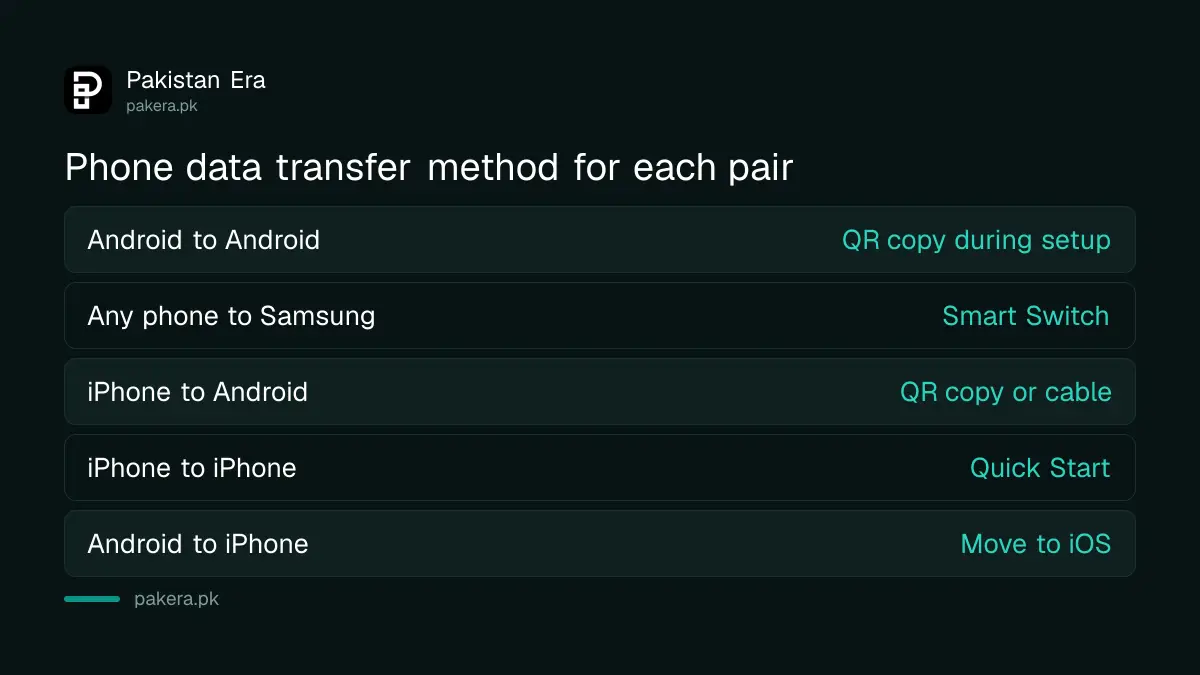
The method depends on which phone you leave and which you buy. Google's built-in copy covers Android to Android and iPhone to Android. Samsung adds Smart Switch for any phone moving to a Galaxy. Apple's Quick Start covers iPhone to iPhone.
| Old phone | New phone | Method | How it connects |
|---|---|---|---|
| Any Android | Android (Pixel, Infinix, Tecno, Xiaomi and others) | Copy apps and data during setup | QR code, wireless |
| Any Android or iPhone | Samsung Galaxy | Smart Switch | Wi-Fi, USB cable, PC or external storage |
| iPhone | Android | Copy during setup | QR code, or a cable |
| iPhone | iPhone | Quick Start | Phones side by side, Bluetooth and Wi-Fi |
| Android | iPhone | Apple's Move to iOS app | Wireless |
Android to iPhone has its own quirks, mostly around WhatsApp. Those steps are in moving from Android to iPhone with WhatsApp.
Prepare both phones before you start
Charge both phones, know the old phone's PIN or pattern, and sign in to your Google Account on the old phone. Google also asks you to back up the old phone and connect it to Wi-Fi. Samsung's Smart Switch will not run below 20 per cent battery.
- Charge both phones well above 20 per cent.
- Make sure you can unlock the old phone with its PIN, pattern or password.
- Connect the old phone to home Wi-Fi.
- Back up the old phone to your Google Account, or iCloud on an iPhone.
- Back up WhatsApp separately from inside WhatsApp, because it keeps its own backup.
- Do not sign in to WhatsApp on the new phone until the transfer is finished.
That last point matters. Samsung's page says WhatsApp chat history can move only if you have not signed in to WhatsApp on the new phone first. Sign in early and the chats stay behind. The full WhatsApp routine is in backing up and restoring WhatsApp chats.
Android to Android copies during setup with a QR code
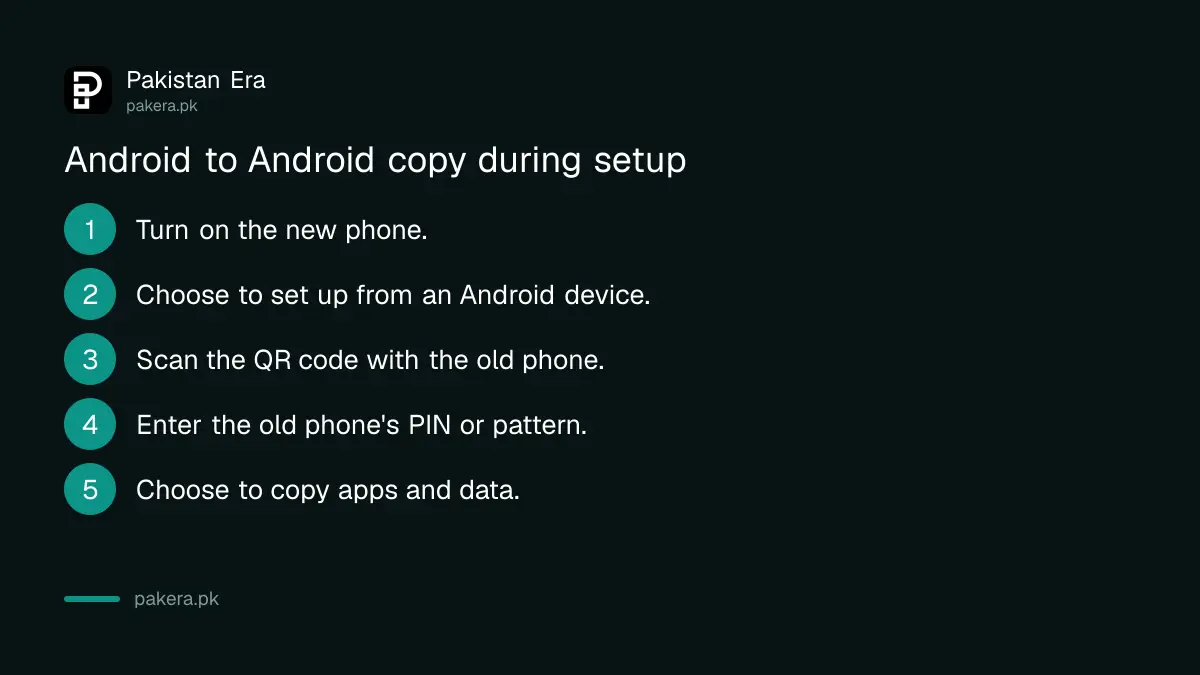
Turn on the new phone and choose to set it up from another device, then pick Android device. Scan the QR code with the old phone to pair them wirelessly. Enter the old phone's lock code, then choose to copy apps and data.
- Turn on the new phone and follow the setup screens.
- When asked to set up using another device, select Android device.
- Scan the QR code shown, using the old phone, and pair the two.
- Enter the old phone's PIN, pattern or password. This copies Wi-Fi passwords and Google accounts.
- Choose to copy apps and data and follow the steps.
- Keep both phones close and connected until setup says it is done.
If the old phone is lost or broken, skip the copy step. Connect to Wi-Fi, sign in with your Google Account and pick the backup to restore. Google says you need your Google Account and password for this, so recover them first if you have forgotten them.
Samsung Smart Switch moves data by cable, Wi-Fi, PC or memory card
Smart Switch comes pre-installed on Galaxy phones under Settings, Accounts and backup. It moves photos, videos, contacts, notes, calendar events and settings from Android or iPhone. Samsung recommends a cable for large amounts of data because it is faster.
| Connection | Requirement on Samsung's page |
|---|---|
| Cable from Android | Android 4.3 or later on both phones |
| Wi-Fi from Android | Android 4.0 or later on both phones |
| Cable from iPhone | iOS 5 or later on the iPhone |
| Wi-Fi from iPhone | iOS 12 or later on the iPhone |
| PC backup | Windows 10 or later, or macOS 10.13 or later |
Samsung also notes that you cannot charge during a wired transfer, so charge first. An OTG adapter, sold separately, may be needed for some cables. The app is also on Google Play and the Galaxy Store if you need it on the old phone.
iPhone to iPhone uses Quick Start with the phones side by side
Put the new iPhone next to the unlocked old one and follow the prompt. The old iPhone needs iOS 11 or later, Bluetooth on and Wi-Fi. You then choose to download from iCloud, which runs in the background, or transfer directly from the old phone.
Apple says to update both phones first and keep them plugged in and close together. If the prompt disappears, restart both. Transferring directly means waiting until it finishes on both phones, while downloading from iCloud lets you use the new phone sooner. That only helps if your last iCloud backup is recent.
Some data does not move on its own
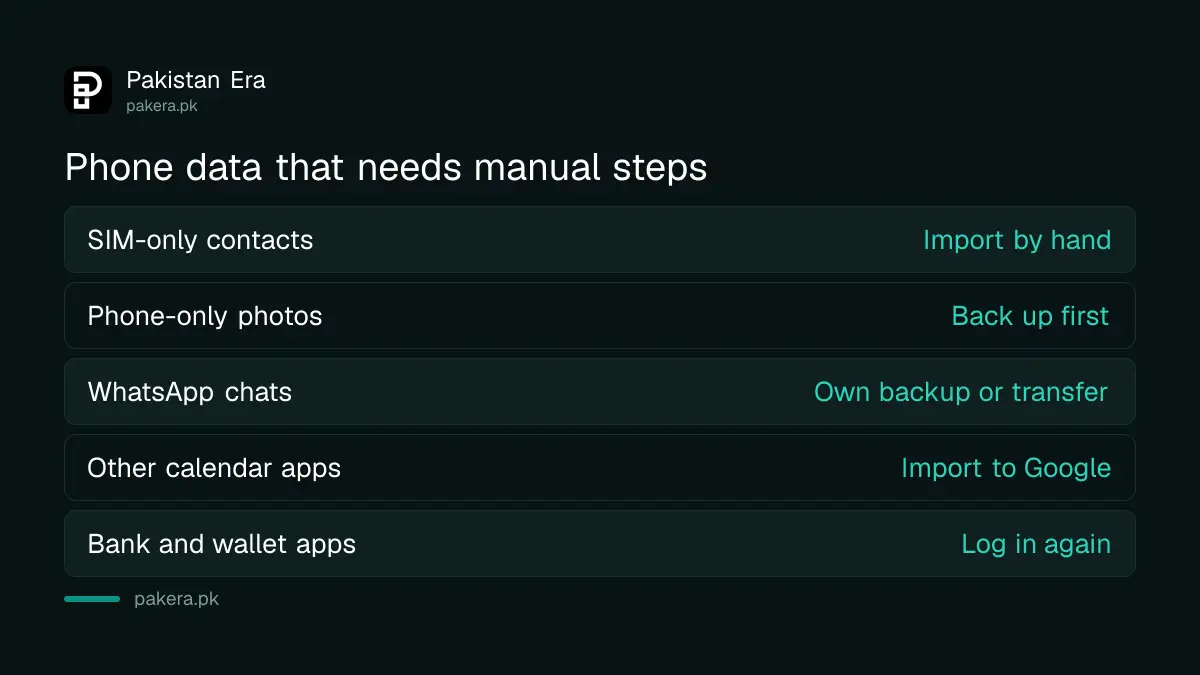
Contacts saved only to the SIM card, photos stored only on the phone, and events in calendar apps other than Google Calendar need manual steps. WhatsApp needs its own backup. Banking and wallet apps usually make you log in again and register the new device.
JazzCash, Easypaisa and bank apps usually ask for a fresh OTP on the new phone. Keep your SIM in the new phone before you open them. Once everything is across, wipe the old phone properly before you sell it, using the steps to erase a phone before selling it.
Common questions
Can I transfer data from old phone to new phone without a cable?
Yes. Android's setup copy works over a QR code and wireless pairing, Smart Switch works over Wi-Fi, and Quick Start uses Bluetooth and Wi-Fi.
Does Smart Switch work from an iPhone to a Samsung?
Yes. Samsung lists cable, Wi-Fi, iCloud and PC methods from iPhone. Wi-Fi needs iOS 12 or later on the iPhone.
Will my WhatsApp chats move to the new phone?
Only if you follow WhatsApp's own backup or transfer steps, and do not sign in to WhatsApp on the new phone before the transfer.
What if my old phone is broken?
Restore from your Google or iCloud backup during setup. You need your account password, and the backup must have been made before the phone broke.
Are SIM contacts copied automatically?
No. Google says contacts saved on a SIM card need to be imported by hand. Save them to your Google Account first.
How we verified this
What we checked, where we read it, and what we could not confirm.
We read Google's Android help page on copying data to a new Android device (support.google.com/android/answer/6193424), Samsung Pakistan's Smart Switch page (samsung.com/pk/apps/smart-switch) and Apple's Quick Start page (support.apple.com/102659) on 27 October 2026. The version requirements and the 20 per cent battery rule are Samsung's; the iOS 11 requirement is Apple's. Google's page does not state a minimum Android version for the setup copy. We did not run a transfer ourselves for this article.
About the author

Technology Journalist & Multimedia Producer
Ahmad Ali is a technology journalist and multimedia producer at Pakistan Era, joining the team in October 2026. He covers consumer technology and digital life for Pakistani readers, combining research with hands-on product testing.