YouTube Channel Terminated: How to Appeal From Pakistan, 1 Year and 2 Tries
YouTube terminated your channel? Appeal in YouTube Studio within 1 year, with only 2 tries. Steps, the backup form, copyright route and the new channel trap.
To appeal a terminated YouTube channel, open YouTube Studio, click Begin Review under the termination notice, then Start Appeal, and explain your case. You have up to 1 year from the termination date, and YouTube allows only two appeals in that year. Below are the exact steps, the backup form, the separate route for copyright terminations, and the mistake that gets Pakistani creators banned for good: opening a second channel while they wait.
A termination email usually lands without warning for small channels, and for a creator in Lahore or Karachi who earns from the channel, it means income stops the same day. We read YouTube's Help Centre article on channel and account terminations and its monetization policies on 24 October 2026. Every rule here comes from those pages.
A terminated channel can be appealed for up to 1 year
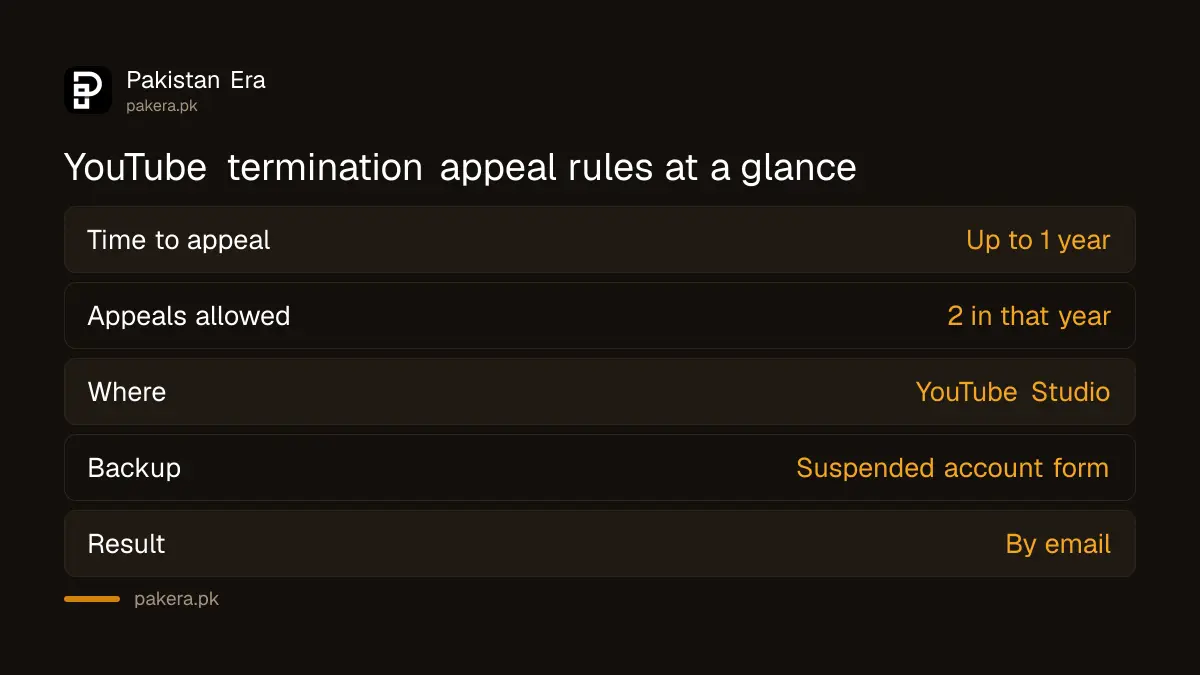
YouTube gives creators up to 1 year from the termination date to submit an appeal. Only two appeals are allowed within that year, and there is also a limit on appeals for a single termination. So your first appeal should be your best one.
YouTube says it tells you about a termination by email, or when you sign in to YouTube Studio. You lose the Studio dashboard and most features, but you can still sign in to Studio to read the termination details. That is where the appeal lives.
| Rule | What YouTube says |
|---|---|
| Time to appeal | Up to 1 year from the termination date |
| Appeals allowed | Two within that 1 year period |
| Where to appeal | YouTube Studio, Begin Review, then Start Appeal |
| Backup route | YouTube's suspended account form |
| Result | Sent by email |
| Earnings | No revenue after termination; unpaid earnings may be withheld |
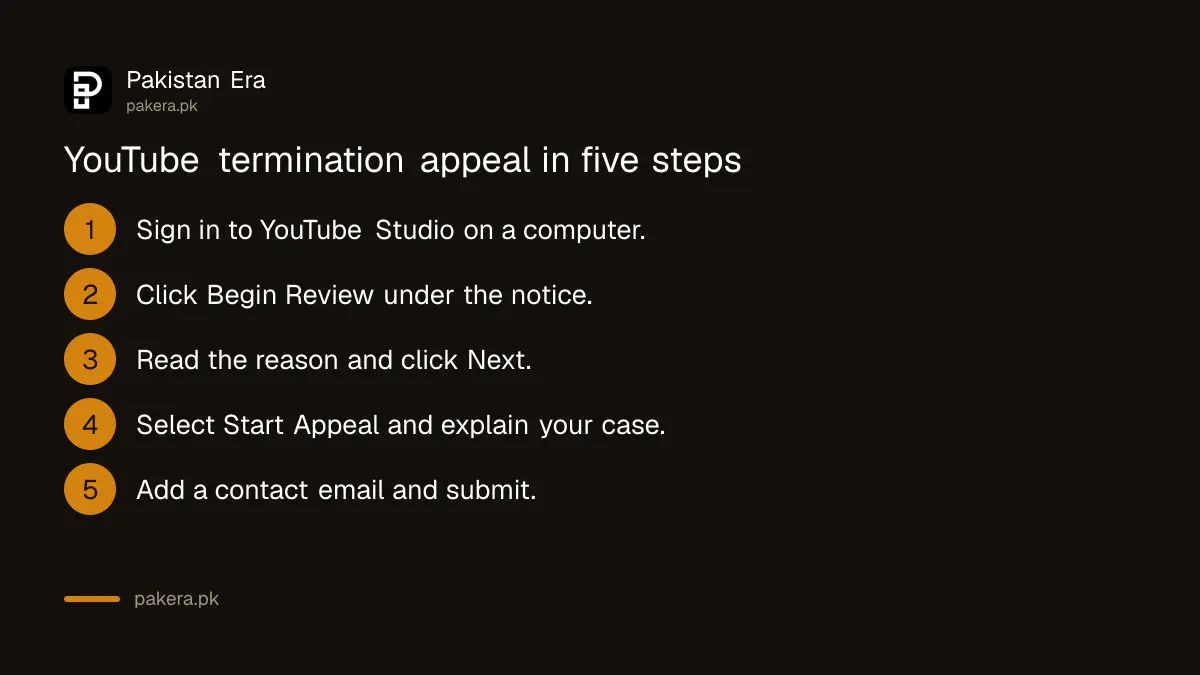
How to appeal a YouTube termination in 8 steps
Use a computer if you can. YouTube's steps are written for YouTube Studio on desktop, and you may be asked to sign in again or pass a Google verification step before the form opens.
- Open YouTube Studio at studio.youtube.com and sign in with the Google account that owned the channel.
- Below the termination information, click Begin Review. Complete any verification step Google shows.
- Read the reason for termination carefully.
- Click Next.
- Select Start Appeal.
- Click Next again.
- Enter a contact email you check daily, and explain why you think the decision is wrong.
- Click Submit.
If these steps fail, for example the button never appears, YouTube points to its suspended account form at support.google.com/accounts/contact/suspended. Use one route, not both on the same day; YouTube says it may send automated replies if an appeal was already reviewed.
Write the explanation in plain English. Name the video or policy if YouTube named one, say what the channel is for, and say what you have changed. If someone else had access, such as an editor or a hacker who ran a scam stream, say so clearly. A hacked channel needs securing first: the steps to recover a hacked YouTube channel come before any appeal.
YouTube terminates channels for three kinds of violation
YouTube lists three reasons: repeated violations of the Community Guidelines or Terms of Service, a single case of severe abuse such as spam or predatory behaviour, and a channel dedicated to a policy violation like hate speech, harassment or impersonation.
Pakistani channel habits that can fall into these categories include re-uploaded dramas and cricket clips, misleading thumbnails promising free money or jobs, and channels that copy another creator's name and logo. Impersonation is listed by name, so a fan channel that looks like the real thing is at risk.
Strikes add up before a termination. Copyright strikes run on their own clock; three copyright strikes in 90 days end a channel, as set out in the steps to fix a YouTube copyright strike. Content ID claims are different again and rarely cause a termination on their own.
Copyright terminations use a counter notification, not an appeal
If your channel was terminated for copyright strikes and you believe the claims are wrong, YouTube's route is a counter notification. You can still file it after signing in to YouTube Studio, or by email, fax or post.
YouTube warns that filing a counter notification begins a legal process. Treat it as a formal step, not a quick button. Only file one if you own the content or have a strong fair use case. The softer option is to contact the claimant and ask for a retraction, which YouTube also lists.
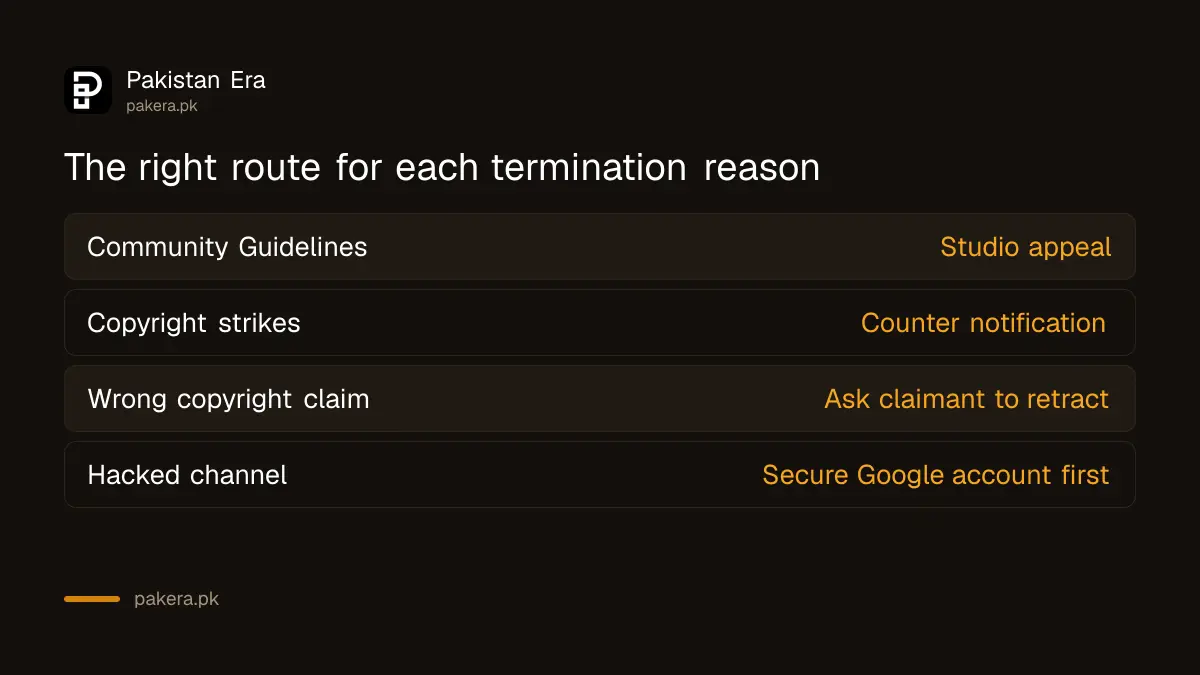
| Termination reason | Your route | Risk |
|---|---|---|
| Community Guidelines | Studio appeal, Begin Review | Low, two tries a year |
| Copyright strikes | Counter notification | Legal process starts |
| Copyright strikes | Ask claimant to retract | Depends on claimant |
| Hacked channel | Secure the Google account first | Act fast |
Never open a new channel while you appeal
After a termination YouTube prohibits you from using, owning or creating any other YouTube channel. The rule covers your existing channels, new ones, and channels where you are repeatedly or prominently featured. A new channel can be removed and can hurt the appeal.
This is where many creators lose everything. A second channel looks like a way to keep income going, but YouTube treats it as getting around the ban. The rule also blocks letting a terminated creator use your channel. So a brother or friend hosting your videos can put their own channel at risk.
Money is the second worry. YouTube says Partner Program members are no longer entitled to revenue once a channel is terminated, and it may withhold unpaid earnings. Your AdSense balance may not reach your bank. If the appeal succeeds, monetization does not always switch back on automatically; check the Earn tab and your AdSense payment setup.
One thing you can still do: YouTube says you can no longer download your YouTube content after termination, but you keep the ability to download your Google data. Google Takeout is the tool for that. Save your files before you lose access to anything else.
Common questions
How long does a YouTube termination appeal take?
YouTube shows the expected review time in YouTube Studio after you submit. The Help Centre gives no fixed number, and the result arrives by email.
What happens if YouTube rejects my appeal?
YouTube says you will be signed out once you accept the decision. You may have one more appeal left within the year, if the limit for that termination allows it.
Can I appeal from my phone?
YouTube's steps are written for a computer. Borrow a laptop or use a desktop browser if the mobile app does not show Begin Review.
Will I get my unpaid AdSense earnings?
Not guaranteed. YouTube says it may withhold unpaid earnings and refund advertisers or viewers where appropriate after a termination.
Can I make a new channel with a different Gmail?
No. YouTube bars terminated creators from creating or using any other channel, including new ones. Appeal the original instead.
Is a terminated channel the same as demonetized?
No. Demonetization removes ads but keeps the channel online. Termination removes the channel. For a single video with limited ads, use the yellow icon appeal.
How we verified this
What we checked, where we read it, and what we could not confirm.
We read YouTube's Help Centre article Channel or account terminations and the YouTube channel monetization policies on 24 October 2026. We did not appeal a real terminated channel, so the button names follow YouTube's written steps, and we could not confirm typical review times for Pakistani channels.
About the author

Technology Journalist & Multimedia Producer
Ahmad Ali is a technology journalist and multimedia producer at Pakistan Era, joining the team in October 2026. He covers consumer technology and digital life for Pakistani readers, combining research with hands-on product testing.