How to Get a Bank Statement Online in Pakistan: App, E-Statement or Branch
Get a bank statement in Pakistan from your app, a free e-statement or a stamped branch copy for visas and loans. HBL, Meezan, MCB and Bank Alfalah checked.
You can get a bank statement in Pakistan three ways: download it from your bank's app or internet banking, have it emailed to you as a free e-statement, or collect a stamped copy from your branch. Bank Alfalah's Alfa Web lets you download statements, and MCB and Bank Alfalah both say their e-statements cost nothing.
Which one you need depends on who is asking. A PDF you downloaded yourself is fine for your own records and often for a tax return. A visa office or a lender may want a copy signed and stamped by the branch. We read the banks' own help pages on 29 September 2026, and we only name a feature where the bank's page states it.
| Method | Where | Cost stated by the bank | Best for |
|---|---|---|---|
| Download in app or internet banking | Bank Alfalah Alfa Web, HBL Mobile (certificate) | Not stated | Quick copy, your own records |
| E-statement by email | MCB, Bank Alfalah | Free (MCB), no extra cost (Alfalah) | Regular monthly copies |
| Printed statement by post | Meezan Bank, every six months | Not stated | Standard record |
| Stamped copy from the branch | Any branch of your bank | See the bank's schedule of charges | Visa, loan, official use |
Three ways to get a bank statement in Pakistan
The fastest route is your bank's app or internet banking, where you can download a statement yourself. The second is an e-statement subscription, which emails a PDF on a schedule. The third is a stamped statement from your branch, which takes a visit.
Most people only need the first. It takes a few minutes if you are already registered for mobile or internet banking. If you are not, register first in the bank's app or on its internet banking site.
The stamped branch copy is slower but carries the bank's seal and an officer's signature. That is the version to get when a form says "attested" or "signed by the bank".
Your account must be active for any of this. A dormant account has to be reactivated first, and the steps to reactivate a dormant bank account apply before you can download anything.
Download a statement from your bank's app or internet banking
Bank Alfalah's internet banking, Alfa Web, lets you view account information and download account statements, according to the bank. HBL publishes a video guide to downloading an account maintenance and balance certificate in HBL Mobile. Meezan's app shows transaction history.
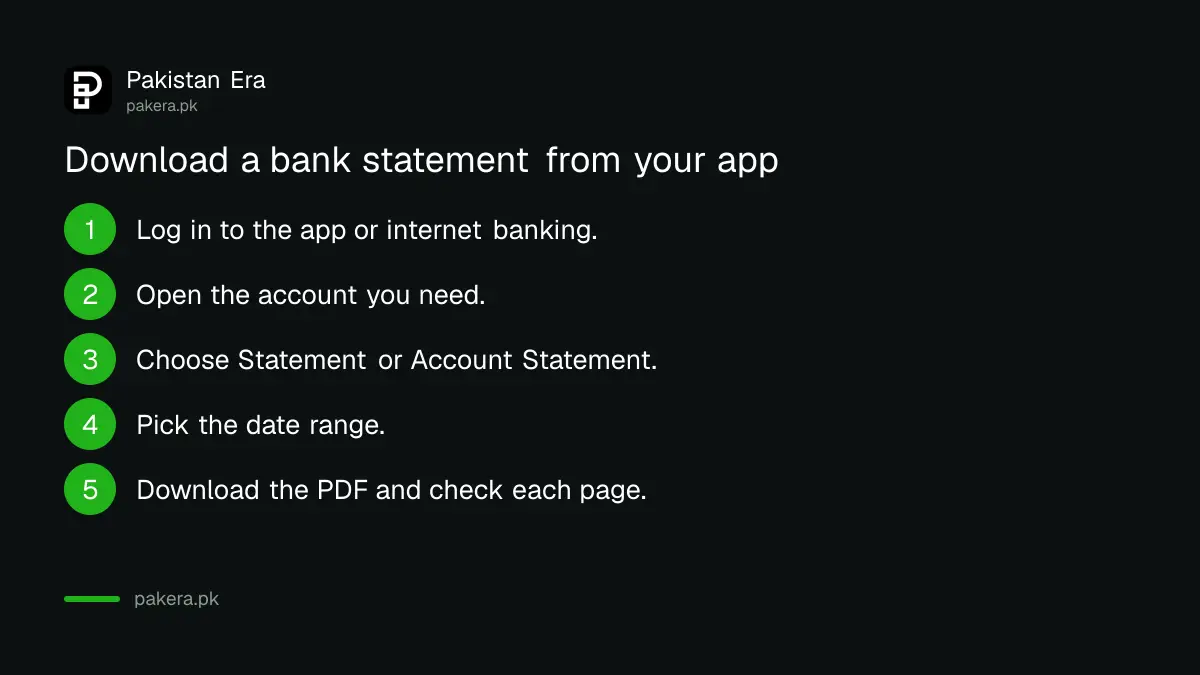
These are the general steps. Menu names differ by bank, so look for words like Statement, Account Statement or e-Statement.
- Log in to your bank's app or internet banking site.
- Open the account you need the statement for.
- Choose Statement or Account Statement.
- Pick the date range, for example the last six months.
- Download the PDF and save it. Open it once to check every page is there.
Here is what each bank's own page says, bank by bank:
- Bank Alfalah: Alfa Web lets you "view account information and download account statements" and subscribe to e-statements.
- HBL: HBL's site hosts a video titled "How to download account maintenance balance certificate with HBL Mobile". An account maintenance certificate confirms your account exists, and a balance certificate confirms the balance on a date. Both are often asked for alongside a statement.
- Meezan Bank: the Meezan Mobile App lets you view account balances, transaction history and account details. You register in the app or at Meezan's online registration page, and the 24/7 call centre is 111-331-331 or 111-331-332.
We did not find a statement download feature named on Meezan's app page. The app page lists transaction history, which is not the same as a formal statement, so ask the call centre if you need a statement PDF.
E-statements arrive by email and cost nothing at MCB and Bank Alfalah
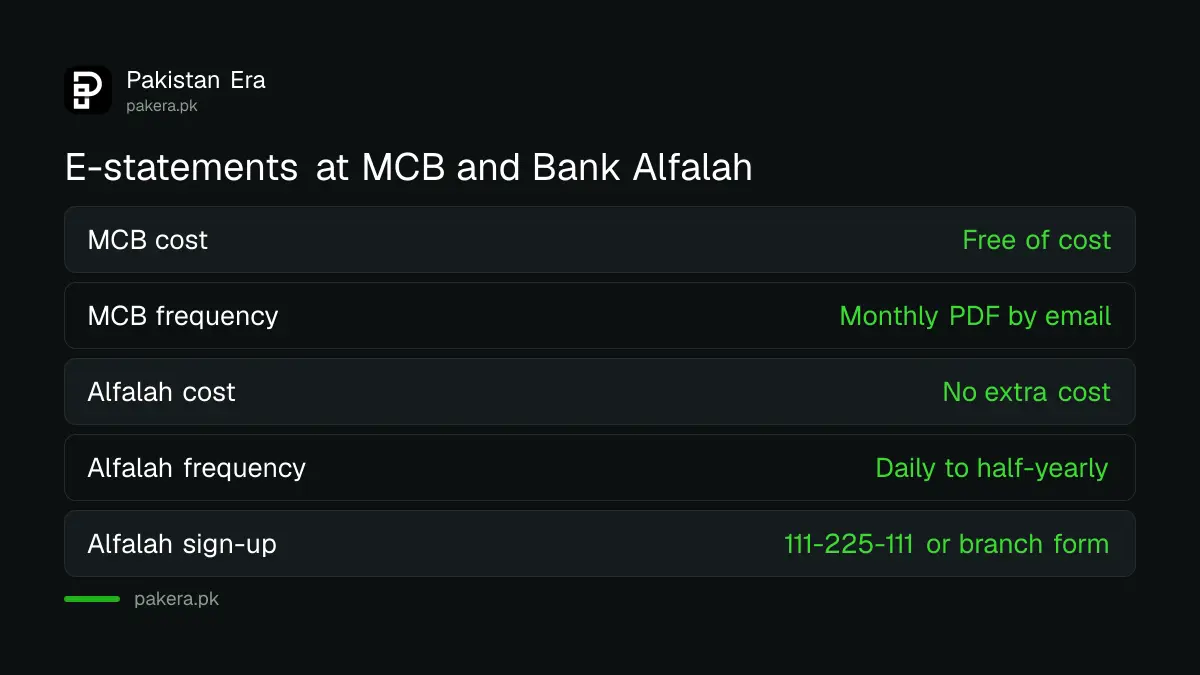
An e-statement is a PDF of your statement that the bank emails to you on a schedule. MCB says its e-statement is free of cost, sent monthly as a PDF. Bank Alfalah offers daily, weekly, monthly, quarterly or half-yearly e-statements at no extra cost.
MCB's page says it sends statements monthly, with a detailed transaction history on a semi-annual and bi-annual basis as well. It lists "no charges at all".
Bank Alfalah says all you need is a personal email address. To subscribe, call its contact centre on 111-225-111, download the E-Statement Subscription form and submit it at your branch, or use Alfa Web.
If your e-statement PDF is password protected, keep the password instructions from the bank's email, because a visa centre or lender cannot open a locked file. Save an unlocked copy only on your own device, and never send the password in the same email as the file.
If you are opening an account now, ask for the e-statement at the start. It saves a branch visit later. The documents you will need are in opening a bank account in Pakistan.
A stamped statement from the branch is the official copy
For a visa, a loan or any office that wants proof from the bank itself, ask your branch for a statement signed and stamped by a bank officer. Take your CNIC. Any fee is set in your bank's Schedule of Charges, which every bank publishes on its website.
We did not read each bank's schedule of charges for this, so we do not quote a fee here. The right figure is the one in the current schedule on your bank's own site. Ask at the counter before they print.
When you ask, be specific. Give the exact date range, say whether you need the IBAN and account title shown, and ask for each page to be stamped if the office requires it. A visa checklist that says "last six months" means six full months, so count back from the date you apply.
The bank's general fees and the ones you can avoid are in what your bank charges you. If a branch refuses a statement for no reason, the bank's complaint line comes first, and the bank helpline numbers list the one for your bank.
Match the statement to what the visa, loan or tax office wants
Read the requirement list of the office you are applying to before you get the statement. It tells you how many months, whether a downloaded PDF is accepted, and whether it must be stamped. Getting the wrong version means a second trip.
| Purpose | What to check on the requirement list | Version most likely needed |
|---|---|---|
| Visa | Number of months, stamped or not, balance certificate | Stamped branch copy, plus a balance certificate if asked |
| Bank loan | Months of history, salary credits visible | Whatever the lender's checklist names |
| Tax return | Profit earned, tax deducted, closing balance | Downloaded PDF or e-statement for your records |
| Your own records | Nothing | Downloaded PDF |
For a tax return, the statement helps you fill in the closing balance and the profit on your savings. You can also ask your bank for a tax deduction certificate showing the tax it took from your profit. The rules on that tax are in tax on bank profit and savings, and the return itself is in filling your FBR tax return and wealth statement.
For a loan, the lender looks at income and repayments over months, not a single balance. How that decision works is in how banks decide your home loan.
UBL's own e-statement page did not open for us on 29 September 2026, so we have left UBL out rather than guess. UBL customers can ask their branch or the bank's helpline.
Common questions
How do I get a bank statement online in Pakistan?
Log in to your bank's app or internet banking, open the account, choose Statement, pick the dates and download the PDF.
Is a bank e-statement free?
At MCB and Bank Alfalah, yes. MCB says free of cost, and Bank Alfalah says no extra cost.
Can I download a Bank Alfalah statement online?
Yes. Bank Alfalah says Alfa Web lets you view account information and download account statements.
Does a visa need a stamped bank statement?
Check the visa checklist. If it asks for a signed or attested statement, get a stamped copy from your branch.
How often does Meezan Bank send statements?
Every six months, according to Meezan Bank, which says the IBAN is printed on those half-yearly statements.
How do I subscribe to Bank Alfalah e-statements?
Call 111-225-111, submit the E-Statement Subscription form at your branch, or subscribe through Alfa Web.
How we verified this
What we checked, where we read it, and what we could not confirm.
Last checked on 29 September 2026. The Alfa Web features are from Bank Alfalah's internet banking page, and the e-statement frequencies, cost and subscription routes from its SMS banking and e-statements page. MCB's e-statement terms are from MCB's e-statements page. The HBL Mobile certificate is from HBL's own video guide page. The Meezan app features and call centre numbers are from Meezan's mobile banking page, and the half-yearly statements from its IBAN page. UBL's e-statement page timed out when we tried it. We did not read any bank's schedule of charges, so no fee is stated. If any detail has changed, tell us and we will correct it openly.
About the author

Tax, Bills and Technology Writer
Ali Akhtar is a young and curious voice here at Pakistan Era. He is currently pursuing his A-Levels and has a growing interest in Pakistan’s changing industrial landscape and educational trends. Ali likes to write in a way that helps him explain and explore the world around him. His writing reflects the perspective of the new generation navigating the evolving trends of Pakistan where technology, youth innovation, and shifting opportunities are reshaping the country’s future.