How to Redeem a Genshin Impact Code in Pakistan on the Gift Page
Redeem a Genshin Impact code in Pakistan on the official gift page: log in, pick your server, enter the code, claim mail in 30 days. Fixes for invalid codes.
To redeem a Genshin Impact code in Pakistan, open genshin.hoyoverse.com/en/gift, log in with your HoYoverse Account, pick your server, check your character nickname, type the code and tap Redeem. The rewards arrive in your in-game mail, which stays valid for 30 days, so log in and claim them soon.
The code only works if two things are already done: you have created a character in the game, and your game account is linked to a HoYoverse Account in the User Center. Most "code not working" problems in Pakistan come from skipping one of those, or from picking the wrong server.
| Step | What to check |
|---|---|
| Log in | The same HoYoverse Account you play with |
| Server | America, Europe, Asia, or TW, HK, MO: the one your character is on |
| Character Nickname | Fills in after you choose the server. Make sure it is yours. |
| Redemption Code | Typed exactly, before it expires |
| Claim | In-game mail, within 30 days |
How to redeem a Genshin Impact code on the gift page
The official gift page has four parts: log in, server, character nickname and redemption code. HoYoverse's help center gives this website as the way to redeem. Once you tap Redeem, the reward is sent by in-game mail and the redemption cannot be undone.
- Open genshin.hoyoverse.com/en/gift in a browser on your phone or computer.
- Tap Log In and sign in with your HoYoverse Account, or the Google, Apple or Facebook login linked to it.
- Under Server, choose the server your character plays on.
- Check that the Character Nickname is your own.
- Type the code in Redemption Code.
- Tap Redeem.
- Open Genshin Impact, go to the Paimon menu, open Mail and claim the reward.
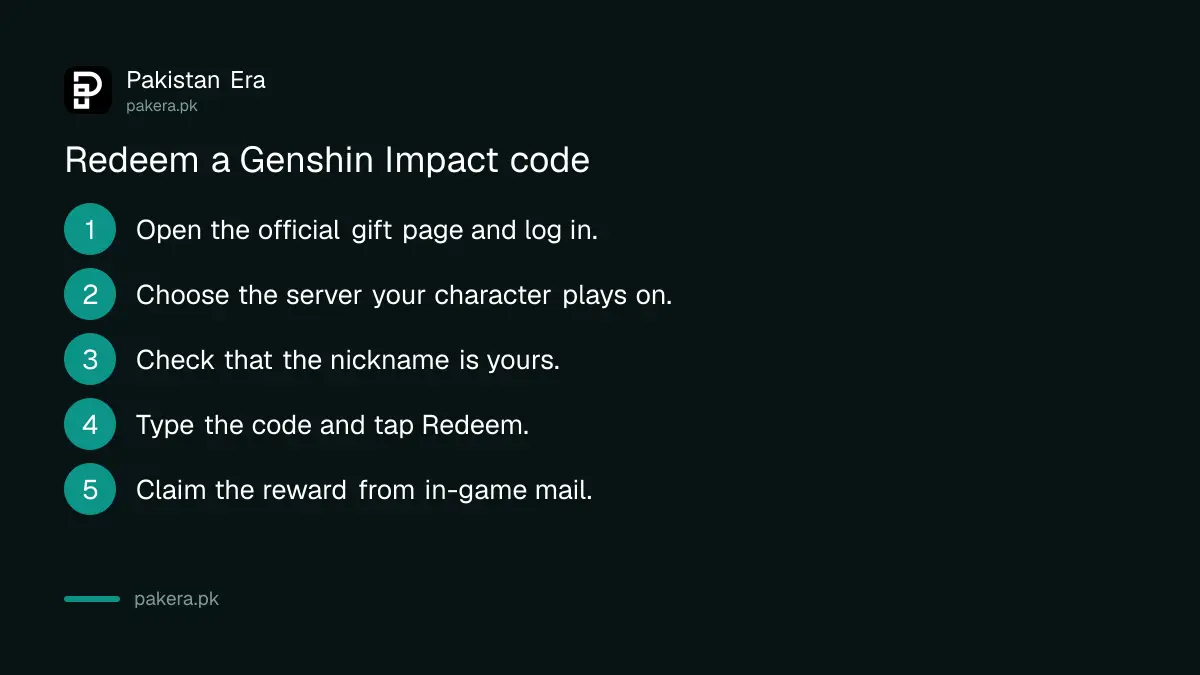
Your server is the one you picked when you first started. If you play on two servers, the nickname shown tells you which character will get the reward. Change the server until the right nickname appears.
Link your game to a HoYoverse Account before redeeming
The gift page cannot find your character unless your game account is linked to a HoYoverse Account. If you play with a guest login or only through a platform, link an email first. Do this in the game under Settings, Account, then User Center.
- In Genshin Impact, open the Paimon menu, then Settings, then Account.
- Open the User Center.
- Link an email address, or a Google, Apple, Facebook or X account.
- Come back to the gift page and log in with that same account.
Linking an email also protects your progress if you lose your phone. HoYoverse says an email, once linked, cannot be removed, only changed to another email. Use one you will keep, such as your main Gmail. If you lose access to that email, recovering a Gmail account comes first.
Why your Genshin code says invalid or used
A code fails when it has expired, was typed wrong, belongs to another server or has been used already. Each code works once, and the same character cannot redeem two codes of the same type. Check these causes in the table before trying again.
| Problem | Likely cause | Fix |
|---|---|---|
| Code invalid | Typed wrong or expired | Retype it, check 0 and O, I and l |
| Code already used | One use per code, or same code type used before | Wait for a new official code |
| No character found | Game not linked to HoYoverse Account | Link it in the User Center |
| Wrong nickname shown | Wrong server selected | Choose your character's server |
| Reward not in mail | Mail not checked, or more than 30 days passed | Log in and open Mail soon after redeeming |
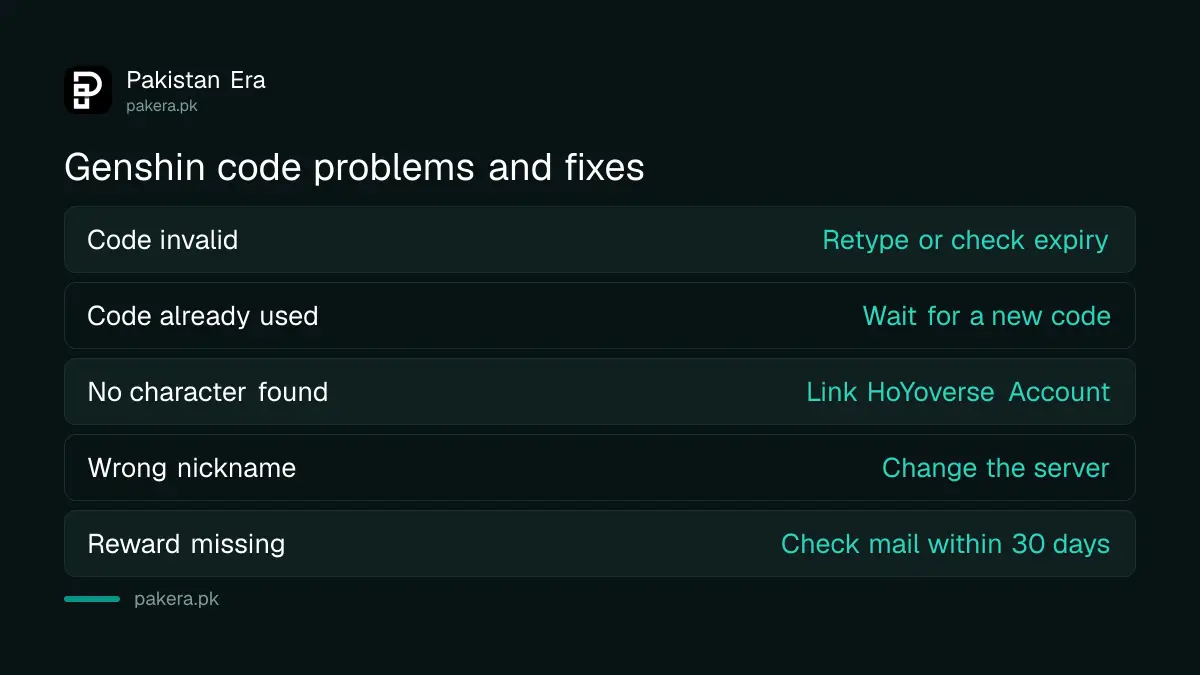
HoYoverse's help center also says codes are case sensitive and warns about mix-ups such as 0 and O. Copying and pasting the code avoids most typing mistakes.
Where real Genshin Impact codes come from
Official codes are shared through HoYoverse's own channels, which its help center names as HoYoLAB, YouTube and Twitch. Most are time limited. A code you see days later in a group chat has often expired.
HoYoverse's help center says codes from unofficial sources may be invalid, and that using third-party software to redeem codes breaks its Terms of Service. So never install an app that claims to redeem codes for you, and never give anyone your HoYoverse password to "add Primogems".
Codes give small rewards such as Primogems and Mora. To buy Genesis Crystals, the paid currency, see the Genshin Impact Genesis Crystals price in Pakistan. On an iPhone, those purchases go through Apple ID payment in Pakistan, which needs a card.
Claim your Genshin reward from in-game mail
After a successful redeem, the reward sits in your in-game mail, not in your inventory. The mail is valid for 30 days by default. Open the game, tap the Paimon menu, open Mail and tap Claim All. If 30 days pass, the reward is lost.
Be sure you were logged in to the right account before redeeming. HoYoverse says a redemption cannot be revoked, so a code sent to a second account cannot be moved to your main one.
Still stuck after checking the server, the link and the expiry date? Contact HoYoverse Customer Service from the in-game Help Center or the help link on the Genshin Impact website. Send your UID, the code, the time you tried and a screenshot of the message.
Common questions
Can I redeem a Genshin Impact code in Pakistan?
Yes. The gift page works from Pakistan in any browser. Log in, pick your server and enter the code.
Which server should I choose on the gift page?
The server your character plays on: America, Europe, Asia, or TW, HK, MO. The nickname shown confirms you picked the right one.
How long do Genshin redeem rewards stay in mail?
30 days by default. Claim them as soon as possible, because expired mail is deleted.
Can I use the same Genshin code on two accounts?
No. The gift page rules say each code can only be used once, and the same character cannot use two codes of the same type. Redeem it on your main account.
Why does the gift page not find my character?
Your game is not linked to a HoYoverse Account, or you have not created a character yet. Link an email in Settings, Account, User Center.
Do I need a VPN to redeem Genshin codes?
No. The official gift page opens normally from Pakistan. A VPN can cause verification and login errors instead.
How we verified this
What we checked and where we read it.
We opened the official Genshin Impact gift page on 24 November 2026 and read its fields (Log in, Server, Character Nickname, Redemption Code) and its six About Code Redemption rules. The redemption route and 30 day mail note are from the HoYoverse Help Center article How do I redeem a gift code?, updated 7 September 2026. Linking and email rules come from HoYoverse Help Center articles on linking an email and social accounts. The case-sensitivity and third-party software warnings come from HoYoverse's help article on invalid or used redemption codes.
About the author

Technology Journalist & Multimedia Producer
Ahmad Ali is a technology journalist and multimedia producer at Pakistan Era, joining the team in October 2026. He covers consumer technology and digital life for Pakistani readers, combining research with hands-on product testing.