Raast Request to Pay in Pakistan: How to Approve or Reject a Payment Request in Your Bank App
A Raast Request to Pay moves no money until you approve it with your PIN or TPIN. See where to find it in Allied Bank and MCB apps, and when to reject one.
Short answer: A Raast Request to Pay (RTP) is a payment request a shop or business sends to your bank app. No money moves until you open it and approve it with your PIN or TPIN. You can reject it instead. In Allied Bank's app it sits under Services, then Request to Pay. In MCB Live it shows as a pending request you approve or reject.
Raast is the State Bank of Pakistan's (SBP) instant payment system, and Request to Pay is the part most people meet by surprise. A notification says a merchant has asked you for money, and the obvious worry is whether it has already been taken. It has not. We read SBP's Raast merchant page and the Request to Pay instructions on Allied Bank's and MCB's own pages on 20 October 2026. Here is how it works and how to handle one safely.
Request to Pay lets the receiver ask, and only you can pay
SBP describes Request to Pay as a request started by the person being paid and sent to the person paying. Allied Bank's page adds that the payer can then approve and pay at once or at a later time. The request alone moves nothing. Your approval, confirmed with your PIN, is what sends the money.
That is the reverse of a normal transfer. Usually you type the account or Raast ID and push money out. With Request to Pay, the shop fills in the amount and details, and you only say yes or no. It saves typing errors at a counter or on a bill, which is why businesses use it.
SBP runs two kinds of request, Now and Later
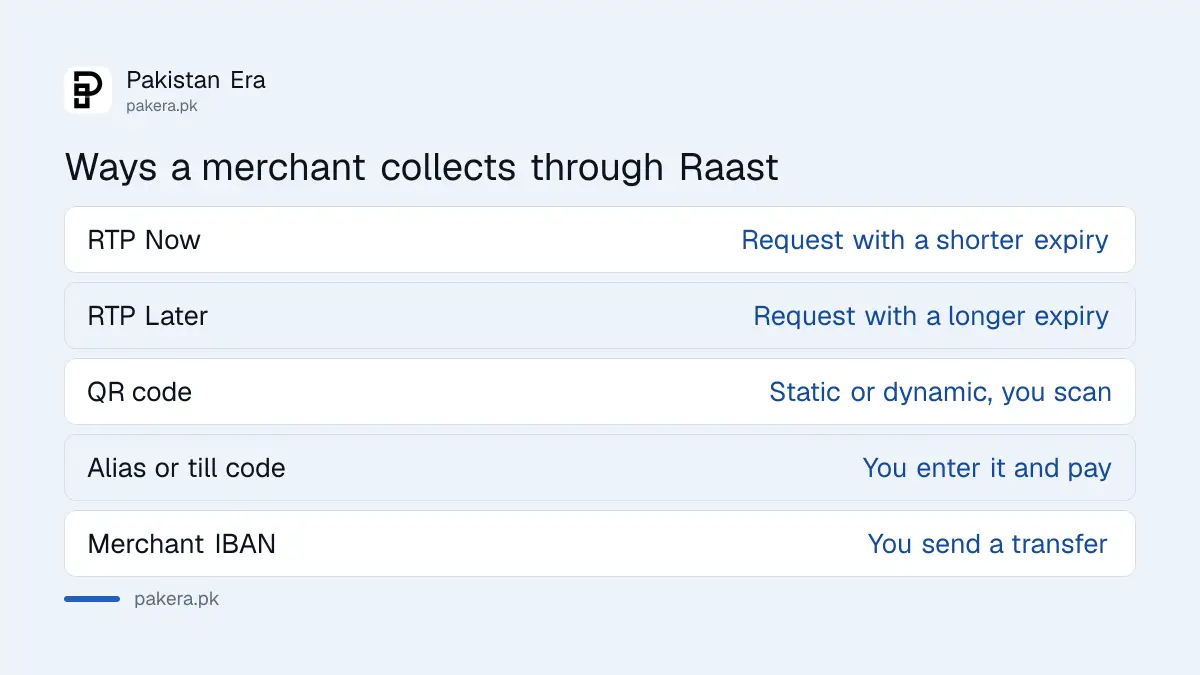
SBP's Raast person to merchant page lists RTP Now, a request with a shorter expiry period, and RTP Later, a request with a longer one. RTP Now suits a shop counter. RTP Later suits a bill or an invoice you pay over the coming days. SBP's page does not give the exact expiry times.
| How a merchant can collect through Raast | What you do |
|---|---|
| Request to Pay Now | Approve or reject a request that expires soon |
| Request to Pay Later | Approve or reject a request that stays open longer |
| Static or dynamic QR code | Scan the code and confirm the amount |
| Merchant alias or till code | Enter the alias and pay |
| Merchant IBAN | Send a transfer to the IBAN |
QR payments are covered in how to pay a shop by Raast QR. If you run a shop and want to send requests yourself, see how to accept Raast QR payments in your shop.
Approve a request in Allied Bank and MCB apps
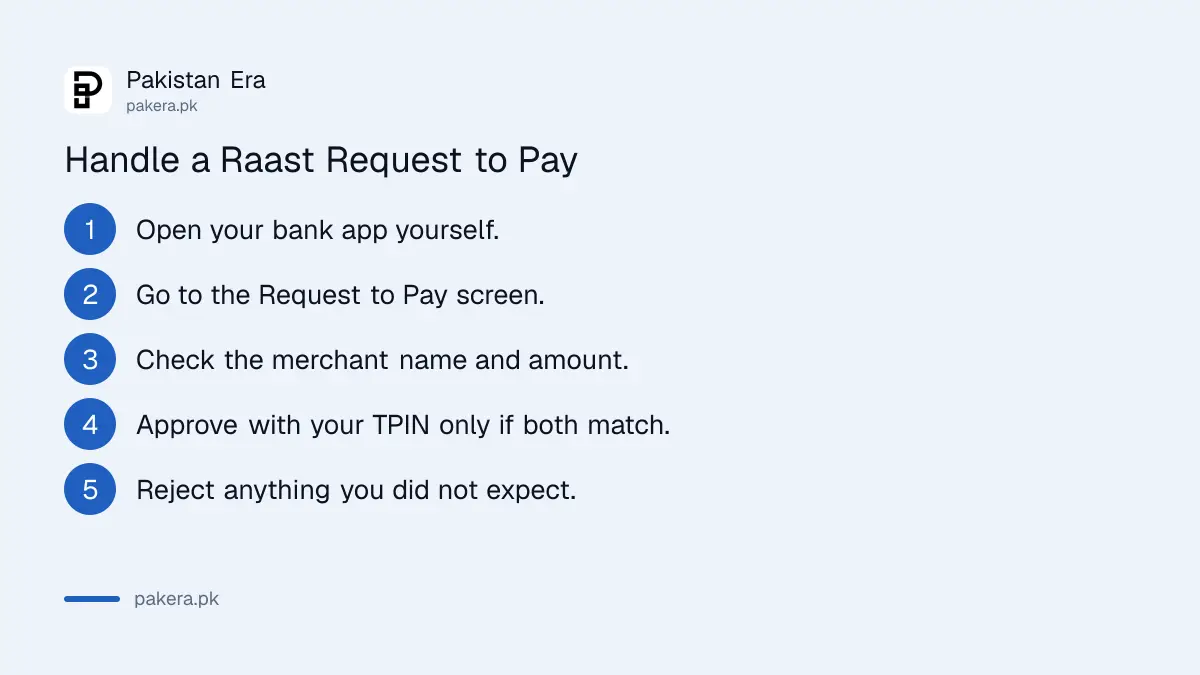
Allied Bank's page gives the path: open the app, tap Services, then Request to Pay. A list of requests waiting for your approval appears. Select the merchant's request, approve it, and enter your TPIN. MCB says the request arrives as pending in MCB Live, where you can approve or reject it.
- Open your bank app when the request notification arrives.
- Go to the Request to Pay or pending requests screen. In Allied Bank's app this is Services, then Request to Pay.
- Read the merchant's name, the amount and any bill or order number.
- If everything matches what you are buying, approve it and enter your TPIN.
- If anything is wrong, reject it. Do not approve to "check" it.
- Keep the confirmation screen or SMS.
MCB says an approved request is processed instantly. Other banks put the screen in different places, so search your app's menu for "Request to Pay" or "Raast". If your app asks for a TPIN rather than an SMS code, see why banks moved to TPIN and push alerts.
Reject any request you did not expect
Approving a request sends your money to whoever made it. So reject any request you were not expecting, even if it claims to be a refund, a prize or a delivery fee. Money coming to you never needs your approval on a payment request. Only money going out does.
The common trick is a phone call first. Someone says they are sending a refund and asks you to "accept" what arrives in your app. What arrives is a request to take money from you. Hang up, open the app yourself and reject it. The same caution applies to screenshots of payments, which is covered in how to verify a payment really reached you.
- Match the merchant name on the request to the shop or company you are dealing with.
- Match the amount to your bill, to the last rupee.
- Never approve a request while someone is on the phone telling you to.
- Never share your TPIN, PIN or OTP with anyone, including people saying they are from your bank.
If you approved a fraudulent request, report it at once
Call your bank's helpline straight away and report it as fraud. SBP's 2023 digital security rules tell banks to use the Fraudulent Transaction Dispute Handling system for all fraudulent transactions, including Raast ones. The receiving bank must then block the disputed funds quickly.
Speed matters, because the rules give banks clocks measured in minutes, not days. The full process, the 10 day investigation and the 3 day reversal are set out in how to claim a digital fraud refund. If you simply sent money to the wrong person rather than a fraudster, see how to get money back from a wrong transfer.
Allied Bank's page also says Raast payments are free, with no transaction charges. So a request should show only the bill amount. A request that adds a "service fee" you did not agree to is another reason to reject it.
Common questions
Does a Raast Request to Pay take money automatically?
No. The money moves only after you open the request and approve it with your PIN or TPIN. If you do nothing or reject it, nothing is paid.
What is the difference between RTP Now and RTP Later?
SBP says RTP Now has a shorter expiry period and RTP Later a longer one. SBP's page does not give the exact times.
Where do I find payment requests in my app?
In Allied Bank's app it is Services, then Request to Pay. In MCB Live requests appear as pending. In other apps, search the menu for Request to Pay or Raast.
Is there a fee to pay a Raast request?
Allied Bank says Raast transfers carry no transaction charges. Check your own bank's schedule of charges if you are unsure.
Someone asked me to accept a refund request. Is that safe?
No. A refund coming to you does not need your approval. A request you approve sends money out of your account, so reject it.
Who can send me a Request to Pay?
Merchants and businesses using Raast. MCB's page says the merchant selects the customer's account or IBAN and enters the payment details.
How we verified this
What we checked, where we read it, and what we could not confirm.
Last checked 20 October 2026. We read the Request to Pay modes on SBP's Raast person to merchant page, the app steps and the no charges line on Allied Bank's Raast page, and the approve or reject process in MCB's Raast P2M FAQ, all on 20 October 2026. The Raast fraud dispute rule is from SBP's BPRD Circular No. 04 of 2023, Annexure A. SBP does not publish the expiry times for RTP Now and RTP Later, and we did not test a live request in any app.
About the author

Technology Journalist & Multimedia Producer
Ahmad Ali is a technology journalist and multimedia producer at Pakistan Era, joining the team in October 2026. He covers consumer technology and digital life for Pakistani readers, combining research with hands-on product testing.