SMS Not Sending or Not Received on Jazz, Zong, Ufone or Telenor: How to Fix It
SMS not sending or OTP not received in Pakistan? Check balance and SMS bundle, the message centre number, block lists like Ufone UBlock, and a full inbox.
SMS not sending or not arriving on Jazz, Zong, Ufone or Telenor? First check your balance or SMS bundle, then the message centre number in your Messages settings, then whether the number is blocked on your phone or on a call block service. If you cannot send to anyone, it is almost always balance or the message centre number. If only one person is affected, it is a block or a problem on their side.
Codes, bank OTPs and verification messages that never arrive usually come down to a full inbox, a second messaging app, a SIM in the wrong slot, or a SIM that has lost service. Each is covered below with its fix.
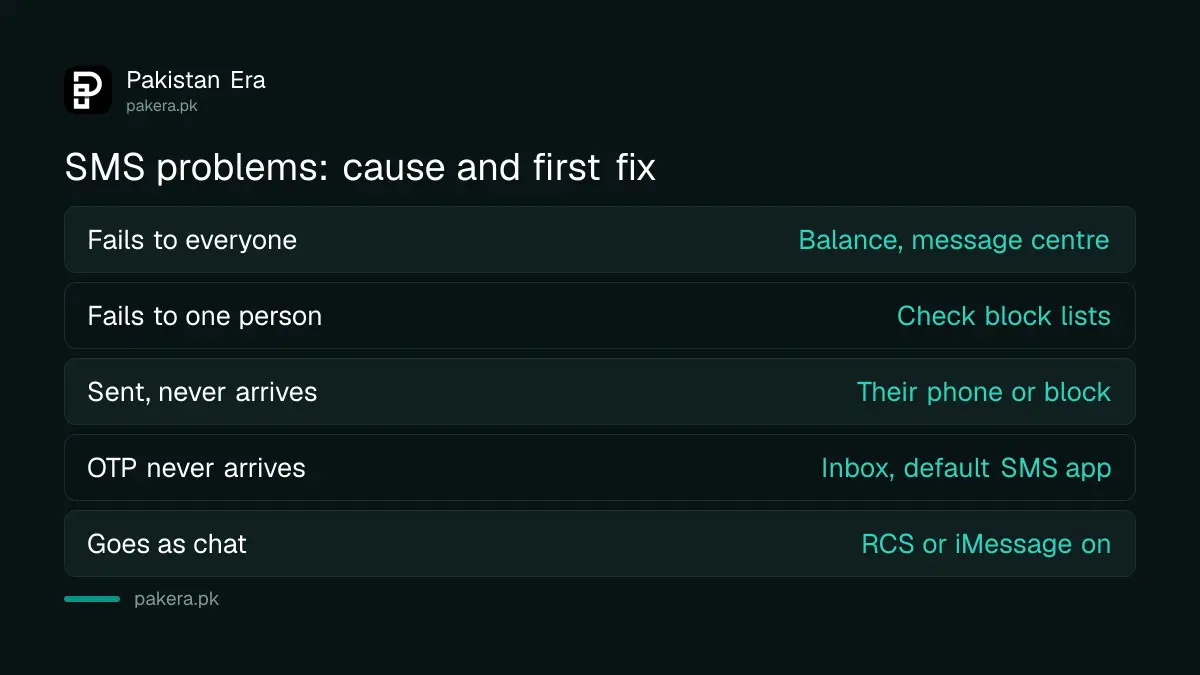
| What happens | Most likely cause | First fix |
|---|---|---|
| Cannot send to anyone | No balance or SMS bundle, or wrong message centre number | Check balance, then message centre |
| Cannot send to one person | Number blocked, or their network | Check your block lists |
| SMS sends but never arrives | Their phone is off, full or blocked you | Ask them to check |
| OTP or code never arrives | Full inbox, wrong default app, no signal | Clear space, reset default SMS app |
| Message goes as chat, not SMS | RCS or iMessage on | Send as SMS, or turn RCS off |
Check your balance and SMS bundle first
An SMS is charged from your balance unless you have an SMS bundle. With zero balance and no free SMS left, messages fail with "not sent". Check your SMS left with *111# on Telenor, *102# on Zong or *706# on Ufone, and recharge or buy a bundle.
- Telenor: *111# shows remaining SMS and *444# shows your balance.
- Zong: *102# shows bundle usage, including SMS, and *222# shows balance.
- Ufone: *706# shows remaining resources, *124# shows balance.
- Jazz: the SIMOSA app shows your package and balance free; *111# gives your balance.
Some bundles give SMS only to the same network. A message to another network then comes out of your balance. If you send many texts, Zong SMS packages and Telenor SMS packages list the bundles with their codes.
Fix the message centre number
Your phone sends every SMS through your network's message centre. If its number in the Messages settings is missing or wrong, nothing sends to anyone, even with full balance. Samsung says this is the cause when SMS fails to every contact on an otherwise working phone.
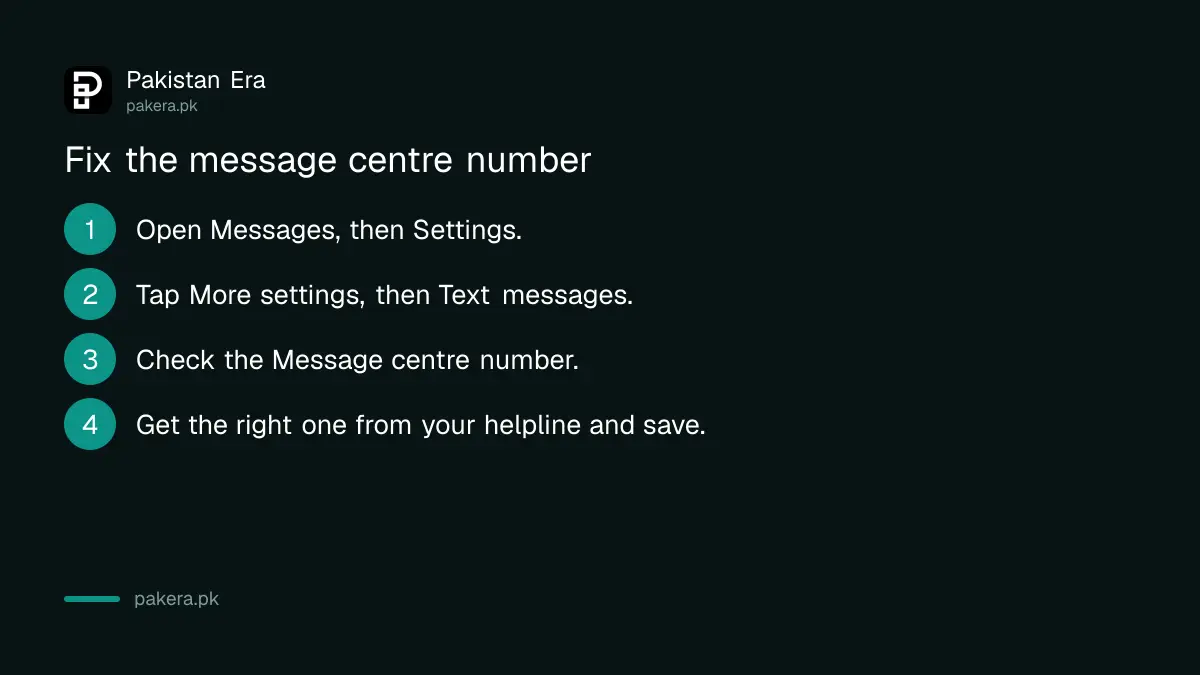
- Open the Messages app and tap the three dots, then Settings.
- Tap More settings, then Text messages.
- Find Message centre. A phone number for your network should sit under it.
- If it is blank or looks wrong, call your helpline and ask for the correct message centre number for your SIM.
- Type it in with +92, save, and restart the phone.
The easiest way to get the correct number back is often to take the SIM out, restart, and put it back: most phones read the message centre number from the SIM. This problem is most common after moving a SIM from an imported phone, or after porting a number to a new network.
When SMS fails to one person only
If texts go to everyone except one number, the problem is a block or the other person's line. Samsung says a failure to one contact is very likely on the network side. Check your phone's block list and any paid call block service, then ask the person to check theirs.
- Phone block list. Open the Phone or Messages app settings, then Block numbers. Remove the number if it is there.
- Ufone UBlock. Ufone's UBlock service on *420# blocks both SMS and calls from numbers on your blacklist, for Rs 2 a day. Dial *420# to remove a number.
- Zong Call Block. Zong's blocking service runs on 420. Dial 420 to manage it.
- The other person. Their phone may be off, out of coverage, full, or set to block you.
More block services and their charges are in the number block codes for Jazz, Zong and Ufone.
When OTPs and codes do not arrive
A bank OTP or app code is a normal SMS from a short code. It fails for the same reasons as any SMS, plus three more: a full inbox, a second app set as the default SMS app, or the SIM sitting in a slot without signal. Clear space, reset the default app and wait 2 minutes before requesting again.
- Delete old message threads so the inbox is not full.
- Open Settings, Apps, Default apps, SMS app, and pick your phone's own Messages app.
- Make sure the SIM with that number has signal bars and is not in airplane mode.
- Restart the phone, then request the code once. Requesting many times can lock you out for a while.
- Clear the Messages app cache under Settings, Apps, Messages, Storage if messages still do not appear.
If you are abroad, OTPs to a Pakistani SIM arrive only while it is roaming, so check whether your bank offers in-app approvals instead of SMS OTPs. Never share an OTP with anyone who calls you, even if they say they are from your bank or network.
Check that your SIM is still active
If you cannot send SMS or make calls at all, the SIM may be blocked, unused for months, or failing biometric re-verification. Try a call. If calls fail too, the problem is the SIM, not the Messages app, and the fix is at a franchise with your CNIC.
A SIM can be suspended after a long gap in use, or blocked if the CNIC behind it has expired. A SIM blocked for biometric verification explains that case. If the SIM is fine and SMS still fail, complain to the operator, keep the complaint number, and escalate to PTA on 0800-55055.
Common questions
Why are my messages not sending on Zong?
Check your balance with *222# and SMS left with *102#. If both are fine, check the message centre number in your Messages settings, then call 310 if it still fails.
Why do I get SMS from everyone but not from one bank?
The bank's sender may be blocked on your phone, or your number may be old in the bank's records. Check your block list, then confirm the number with the bank.
What is the message centre number?
It is the number of your network's SMS centre, stored in the Messages settings. Your helpline can tell you the correct one for your SIM. Taking the SIM out and putting it back often restores it.
Do promotional SMS blocks stop OTPs?
Blocking marketing messages through 3627 or an operator's promotional SMS block is meant for advertising, not account codes. If OTPs stop after you set a block, unblock it and test once.
Why does my iPhone send a message as iMessage?
iMessage is used when both phones are Apple and online. A green bubble means SMS. If iMessage fails, the phone can resend as a text message.
Can a full inbox stop SMS?
Yes. A phone that is out of storage may not save new messages. Delete old threads and free some space, then ask for the message again.
How we verified this
What we checked and where we read it.
We read the message centre steps and the advice on failures to one contact in Samsung's SMS support page (last updated 30 January 2026) on 24 November 2026. UBlock's price and its SMS and call blocking are from Ufone's UBlock page, and Zong's balance and usage codes from Zong's FAQs, both read the same day. Telenor's *111# and *444#, Ufone's *706# and *124#, and Jazz's SIMOSA route come from each operator's own pages as recorded in the linked guides. Menu names differ between phone brands.
About the author

Technology Journalist & Multimedia Producer
Ahmad Ali is a technology journalist and multimedia producer at Pakistan Era, joining the team in October 2026. He covers consumer technology and digital life for Pakistani readers, combining research with hands-on product testing.