How to Check Your Android Security Patch Date in Pakistan
Find your Android security patch date in Settings, see what the October 2026 Google and Samsung updates fixed, and what to do if your phone is months behind.
To check your Android security patch, open Settings, tap About phone, then Android version. Look at the line called Android security update or security patch level. In October 2026, a date of 5 October 2026 (shown as 2026-10-05) or later means a Pixel has this month's fixes. Samsung's October package is called SMR Oct-2026 Release 1.
Most people in Pakistan never look at this date. They check the Android version number and stop there. But the version number tells you which features you have. The patch date tells you whether the holes that criminals use have been closed. A phone on Android 17 with a patch from March is less safe than it looks.
Google published its Pixel security bulletin for October 2026 on 6 October. Samsung's own October list is also out, though its page gives no release date. Here is how to read your phone's date, what the October updates fixed, and what to do if your phone is months behind.
Find the security patch date on your Android phone
Open the Settings app, tap About phone, then tap Android version. Google says this screen shows three things: your Android version, your Android security update date and your Google Play system update date. The security update line is the one to read.
- Open the Settings app.
- Tap About phone (or About tablet).
- Tap Android version.
- Read the line that says Android security update. It shows a date.
- Note the Google Play system update date on the same screen too.
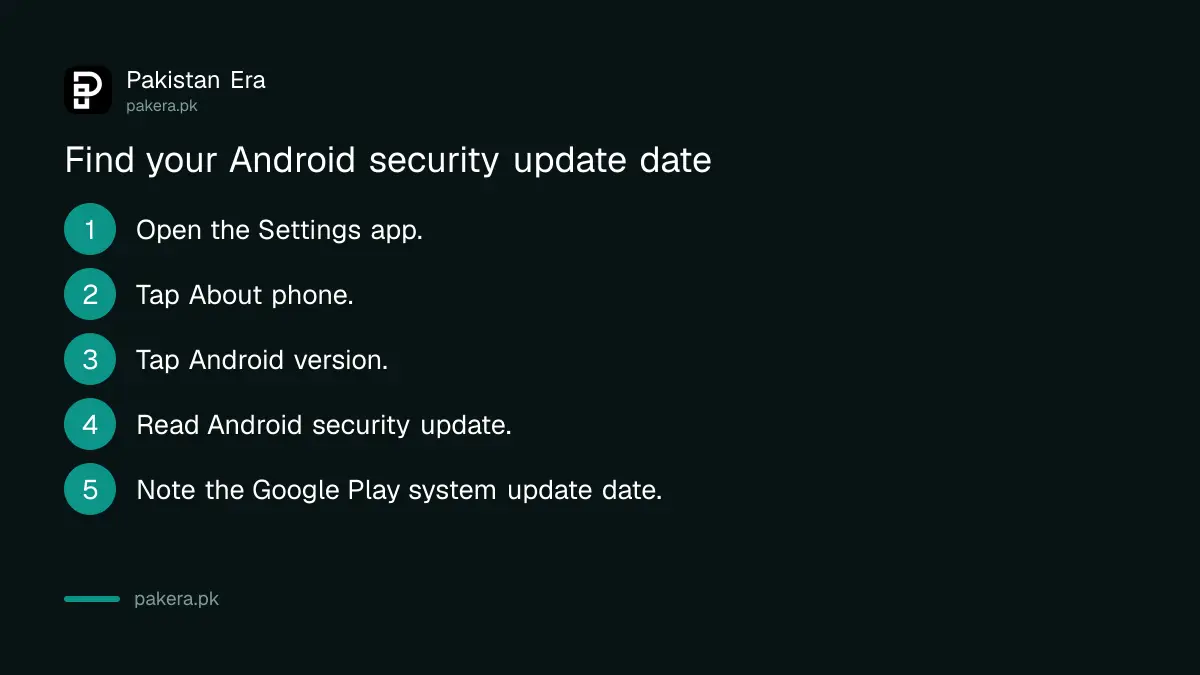
Those steps come from Google's own help page, "Check and update your Android version". Menu names differ between brands. On Samsung, Xiaomi, Infinix, Tecno, Oppo and Vivo phones, the same date can sit under a slightly different heading, such as Software information. If you cannot find it, type "security" in the search bar at the top of Settings.
We did not run these steps on every brand for this page. The Google steps above are what Google publishes, and they match a standard Android phone.
What the October 2026 security updates fixed
Google's Pixel bulletin, published on 6 October 2026, says a patch level of 2026-10-05 or later fixes every issue in it and in the October Android Security Bulletin. Samsung says its October package fixes Google's Android issues plus 27 of its own, numbered SVE.
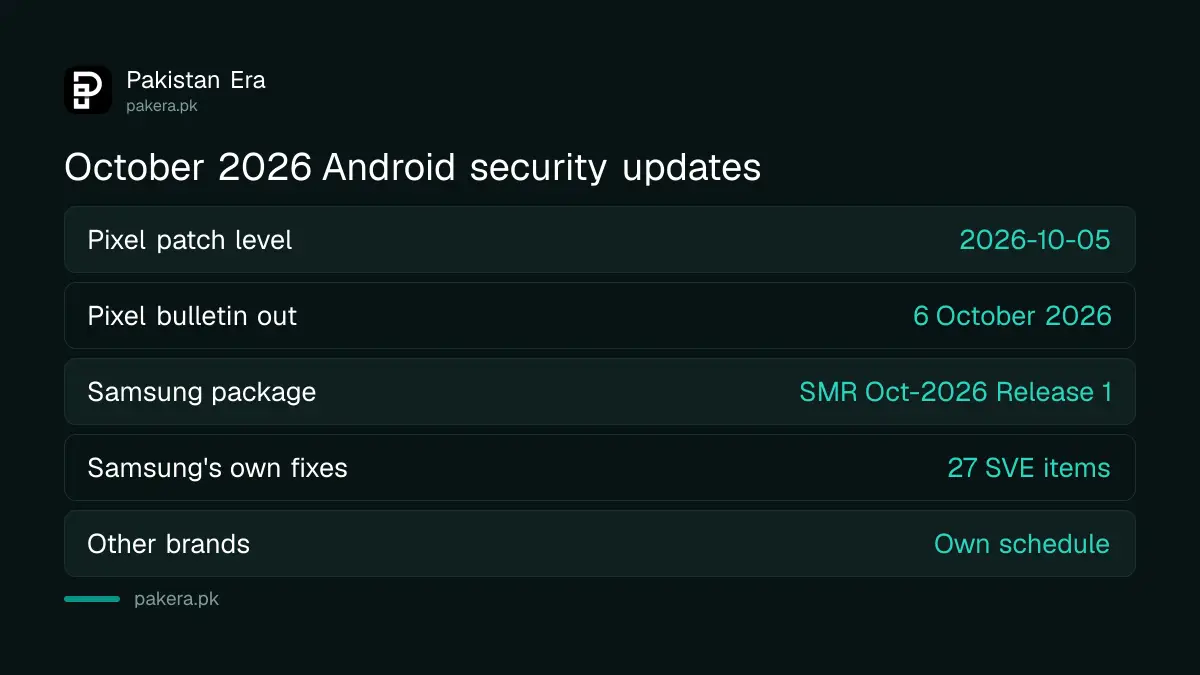
| Maker | October 2026 update | What it says |
|---|---|---|
| Google Pixel | Patch level 2026-10-05 | Published 6 October. Fixes all issues in the Pixel bulletin and the October Android bulletin |
| Samsung Galaxy | SMR Oct-2026 Release 1 | Google's Android patches plus 27 Samsung items |
| Samsung, Google part | 9 critical, 33 high | Severity of the Google CVEs Samsung lists for October |
| Other brands | Their own schedule | Google says timing depends on the maker and network |
Google's Pixel list has three Pixel issues it rates critical, one of them in Bluetooth. Samsung lists its own October items against phones running Android 14, 15, 16 and 17. Most are flaws a harmful app already on the phone could use to take more control. That is why the date matters even if you never install anything strange: one bad app is enough.
A CVE is a public ID number for a known security flaw. You do not need to read them. You only need your phone's date to be recent.
Install the update if your patch is old
Go to Settings, then System, then Software updates, and follow the steps on the screen. Charge the phone first and use Wi-Fi. If no update appears, your maker has not sent one to your model in Pakistan yet, or your phone no longer gets them.
- Charge the phone to at least half before you start.
- Use Wi-Fi if you can. Monthly patches are smaller than full Android upgrades, but they still use data, and the steps in our ways to save mobile data apply.
- Back up your photos and chats first. A security patch rarely causes trouble, but a backup costs nothing.
- Free some space. An update will not install on a full phone, and the fixes in clearing a full phone's storage help here.
Google says update schedules vary by device, maker and mobile network. Samsung says the same about its own patches: delivery can differ by region and model. So a phone bought in Pakistan may get the October patch days or weeks after the same model in another country.
How old is too old for a patch date
If your security update date is more than three months old and Software updates finds nothing, your phone is falling behind. If it is more than a year old, your maker has probably stopped sending patches to that model. That phone is risky for banking apps.
| Your patch date | What it means | What to do |
|---|---|---|
| October 2026 | Up to date | Nothing |
| July to September 2026 | A little behind | Check Software updates every week |
| Before July 2026 | Behind | Check your maker's update list for your model |
| Before October 2025 | Probably no longer supported | Keep banking off it, plan to replace |
Those thresholds are our own guide, not a rule from Google. Brands publish their own lists of which models still get updates. We keep track of the big Android upgrades for Android 17 phones in Pakistan, the One UI 9 update for Galaxy phones and the HyperOS update for Xiaomi phones.
A phone that is out of support still works. It just stops getting fixes. If you keep one for calls, use a newer phone for JazzCash, Easypaisa and bank apps.
Keep an old phone safer until you replace it
Install apps only from the Play Store, keep Google Play Protect on, and remove apps you do not use. Update each app, because app updates keep coming after system patches stop. Lock the SIM with a PIN and turn on two-step verification for WhatsApp and Gmail.
Play Protect scans your apps for harm, and the steps for checking Play Protect and app permissions take a few minutes. Also look at the Google Play system update date on the same About phone screen. Google sends those updates through the Play Store, so even some older phones keep getting them.
Be careful with links in SMS and WhatsApp messages. An old phone with an unpatched browser is exactly what a fake "your parcel is held" link is built for. And if you sell the phone later, wipe it properly first.
Common questions
Where is the security patch date on Android?
Open Settings, tap About phone, then Android version. Google says the Android security update date shows there. Some brands put it under Software information.
What is the latest Android security patch in October 2026?
For Pixel phones, it is 2026-10-05, from Google's bulletin of 6 October 2026. Samsung's October package is SMR Oct-2026 Release 1. Other brands set their own dates.
Is the Android version the same as the security patch?
No. The version, such as Android 17, sets the features. The security patch date shows when the phone last got security fixes. A new version can still have an old patch.
Why has my phone not got the October update in Pakistan?
Google and Samsung both say update timing varies by model, region and network. Check Software updates again in a week. If nothing comes for months, your model may be out of support.
Does a security update delete my data?
A normal monthly update does not erase your data. Still, back up first, charge the phone and use Wi-Fi, because a failed install is easier to fix with a backup.
Is it safe to use a bank app on a phone with an old patch?
It is riskier. Old patches leave known flaws open. Use a supported phone for banking and wallets if you can, and keep Play Protect on.
How we verified this
What we checked, where we read it, and what we could not confirm.
Last checked on 9 October 2026. Sources: Google's Pixel Update Bulletin for October 2026, published 6 October 2026; Samsung's Samsung Mobile Security firmware updates page, entry SMR-OCT-2026; and Google's Android Help page "Check and update your Android version". Google's main October Android Security Bulletin page did not open for us on 9 October, so the CVE counts come from Samsung's list. Brands other than Google and Samsung did not publish October dates that we could read.
About the author

Technology Journalist & Multimedia Producer
Ahmad Ali is a technology journalist and multimedia producer at Pakistan Era, joining the team in October 2026. He covers consumer technology and digital life for Pakistani readers, combining research with hands-on product testing.