How to Fix Phone Storage Full on Android and iPhone in Pakistan
See what fills your phone, clear junk, offload apps, back up photos and trim WhatsApp media on Android and iPhone in Pakistan. Follow the steps and free space.
To fix a full phone, open Settings, then Storage, and see which category is biggest. On Android, tap Free up space. On iPhone, open General, then iPhone Storage. Photos, videos, WhatsApp media and unused apps are the usual culprits.
The "Storage almost full" warning always arrives at the worst moment, usually when you are about to record a wedding video or install an update. The fix takes about ten minutes, and you do not need to buy anything first.
Check what is using your storage first
Both phones show a storage breakdown in Settings. On Android, open Settings, tap Storage and pick a category. On iPhone, open Settings, tap General, then iPhone Storage. Start with the biggest block, because that is where the space is.
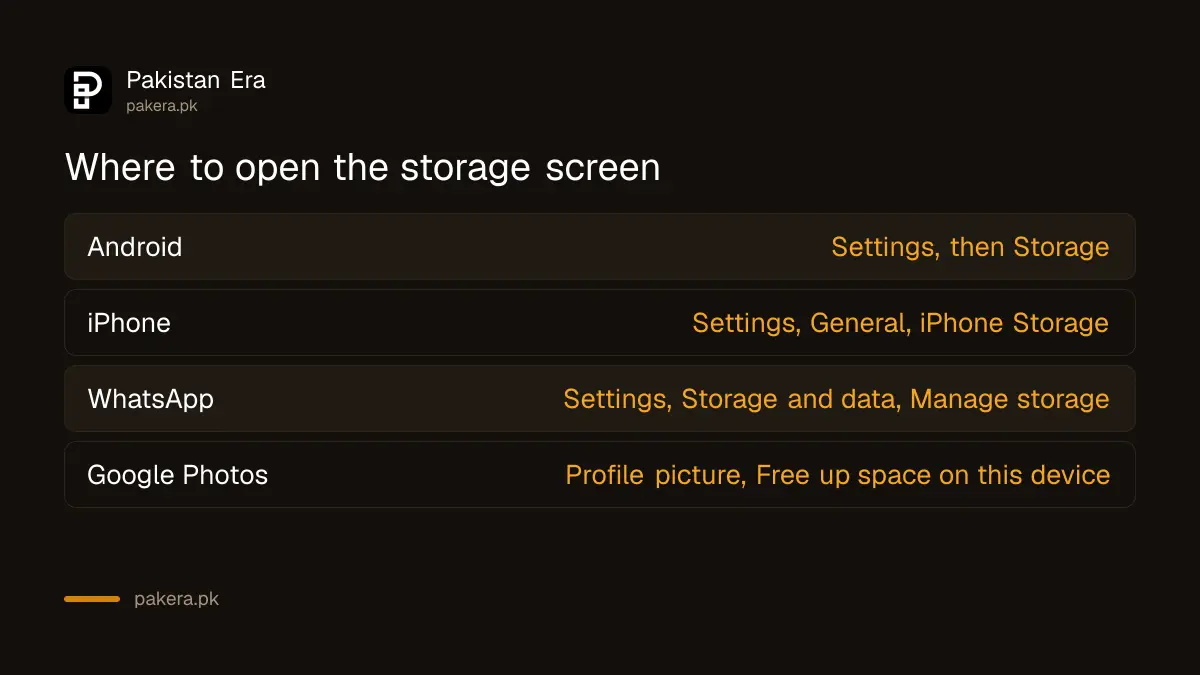
Google says some Android steps only work on Android 14 and up, so older phones may show slightly different menus. Apple lists the usual categories as Apps, Photos, Media, Messages and System. It also says cached and temporary data may not be counted as app usage.
| Phone | Where to look | What it shows |
|---|---|---|
| Android | Settings, then Storage | Usage by category, plus a Free up space option |
| iPhone | Settings, General, iPhone Storage | Apps listed by size, plus recommendations |
| Settings, Storage and data, Manage storage | Media sorted by newest, oldest or largest |
Free up space on Android in a few taps
On Android, go to Settings, Storage, then Free up space. Select the files you want gone and tap Move files to Trash. Files by Google can also clear junk files, and Google Photos can remove copies it has already backed up.
- Open Settings and tap Storage, then Free up space.
- Scroll to a category such as photos, videos or apps you have not used recently.
- Tap Select files, choose what to remove, then tap Move files to Trash.
- Open Files by Google, tap Menu, then Clean, and tap Clean on the Junk files card.
- Open Google Photos, tap your profile picture and tap Free up space on this device.
Be careful with the last two steps. Google warns that junk files cleared in Files by Google are permanently deleted. Google Photos removes the phone copy only after the photo is backed up, and it may keep items under 30 days old on the device.
Android also has Smart Storage. Turn it on under Free up space, then Menu, then Settings, and the phone clears backed-up photos and videos by itself when storage is nearly full.
Free up space on iPhone without losing your data
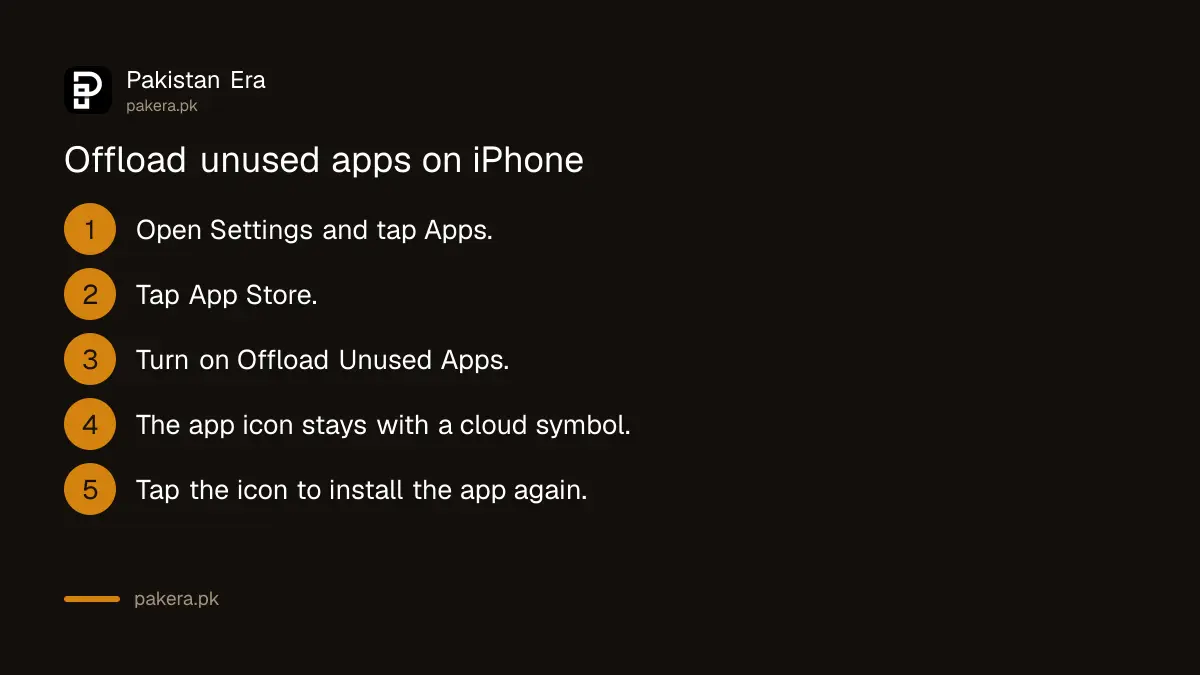
On iPhone, open Settings, General, iPhone Storage and read the recommendations. Offloading an app removes the app but keeps its documents and data. Deleting an app removes both. Turn on Offload Unused Apps to let the phone do it when storage runs low.
Tap an app's name in the storage list to see its size. In that view you can offload or delete it. For automatic offloading, go to Settings, Apps, App Store and turn on Offload Unused Apps. Offloaded apps stay on the Home Screen with a cloud symbol. Tap it to install the app again.
Photos are usually the largest block. Apple says that with iCloud Photos, Optimize iPhone Storage keeps space-saving copies on the phone and full-resolution originals in iCloud. You need enough iCloud space for that to work.
Back up photos first, then clear them from the phone
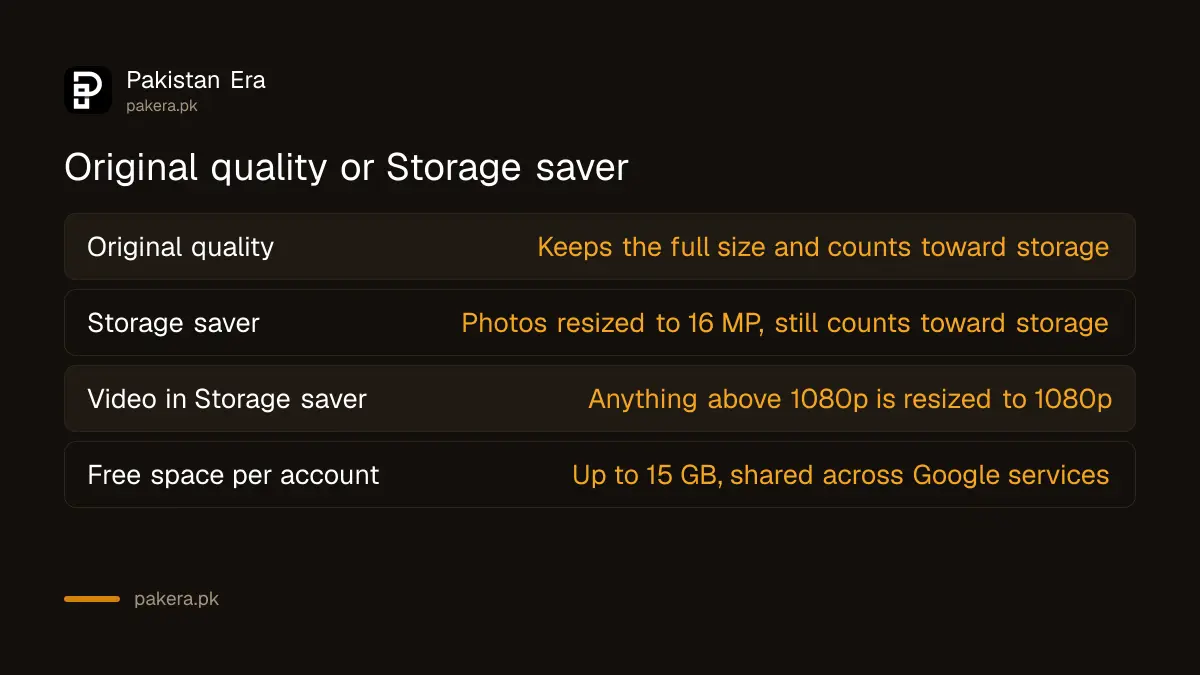
Never delete photos to free space until a backup is confirmed. Google Photos gives each Google Account up to 15 GB, shared across Google services. Storage saver quality reduces file size, but it still counts toward that 15 GB.
Google says photos in Storage saver are resized to 16 MP and videos above 1080p are resized to 1080p. That is fine for phone screens. Keep Original quality only if you print large photos or edit video. When the 15 GB fills, you can pay for more Google storage or move older photos to a computer.
Clean WhatsApp media, the quiet space eater
On Android, open WhatsApp, tap More, then Settings, Storage and data, then Manage storage. Sort by Largest, select items and tap Delete. Deleting here is permanent for you, and other people in the chat still keep their copies.
WhatsApp's Help Center notes that a deleted item cannot be downloaded again from the chat. That matters for forwarded videos and good morning images, which pile up in family groups. Back up before you delete anything you may want later. The steps for that are in backing up and restoring WhatsApp chats.
Auto-download is the other half of the problem. If every video in every group saves itself, the phone fills again within weeks. Limiting automatic downloads also cuts data use, which helps if you save mobile data on Android and iPhone.
Choose between a memory card and cloud storage
A memory card suits phones that have a card slot and a lot of offline video. Cloud storage suits photos you want safe if the phone is lost. Many new phones have no card slot, so check yours before you buy one.
We did not check card or cloud prices for this article, so none are quoted. Compare the monthly cloud price with the one-time card price on the day you buy. A card can fail and is not a backup. Cloud storage keeps your photos if the phone is stolen, but it stops growing when you stop paying.
Common questions about a full phone
Why does my phone say storage is full when I deleted photos?
Deleted items may sit in a trash folder before they are gone for good. Google says it cannot restore an item moved to trash more than 30 days ago, so check and empty the trash in your gallery app.
Is it safe to clear junk files on Android?
Yes. Google says junk files are temporary app files, and clearing them does not change app settings. The files are deleted permanently, so read the confirmation before you tap Clear.
What does offloading an app do on iPhone?
It frees the space the app uses and keeps its documents and data. Deleting the app removes the app and its related data.
Will Google Photos delete my photos from the cloud if I free up space?
No. Free up space removes the copy on your phone only. The backed-up copy stays in Google Photos, and you can still see it when you are online.
Do I need a memory card or cloud storage?
Use cloud storage for backup and a card for extra offline space, if your phone has a slot. A card alone is not a backup.
How we verified this
What we checked, where we read it, and what we could not confirm.
Last checked 7 October 2026. Android steps come from Google's Android Help page on freeing up storage, the Files by Google help pages and the Google Photos pages on freeing up space and backup quality. iPhone steps come from Apple Support's pages on checking storage and managing storage on iPhone. WhatsApp steps come from the WhatsApp Help Center page on freeing up storage. Menu names change between phone brands and software versions, and we did not run these steps on a phone for this article. The makers' own pages cover Android storage and iPhone storage.
About the author

Technology Journalist & Multimedia Producer
Ahmad Ali is a technology journalist and multimedia producer at Pakistan Era, joining the team in October 2026. He covers consumer technology and digital life for Pakistani readers, combining research with hands-on product testing.