How to Check iPhone Warranty in Pakistan by Serial Number, Free
Check iPhone warranty in Pakistan in Settings, General, AppleCare and Warranty, or by serial number at checkcoverage.apple.com, and why phones from abroad vary.
To check an iPhone's warranty in Pakistan, open Settings, then General, then AppleCare & Warranty. Or enter the serial number at checkcoverage.apple.com from any browser. Both are free and show whether the phone is still inside Apple's one-year limited warranty, covered by an AppleCare plan, or out of cover.
The online check also works for a phone you are about to buy, because it needs only the serial number. That makes it one of the fastest ways to catch a "new" iPhone that was actually sold, activated or replaced months ago.
| Where you check | What you need | Best for |
|---|---|---|
| Settings, General, AppleCare & Warranty | The iPhone in hand | Your own phone |
| checkcoverage.apple.com | The serial number | A phone you are about to buy |
| mysupport.apple.com | Your Apple Account | All your devices, plus proof of coverage |
| Mac: System Settings, General, AppleCare & Warranty | The Mac in hand | MacBook and iMac |
Check the warranty in iPhone Settings
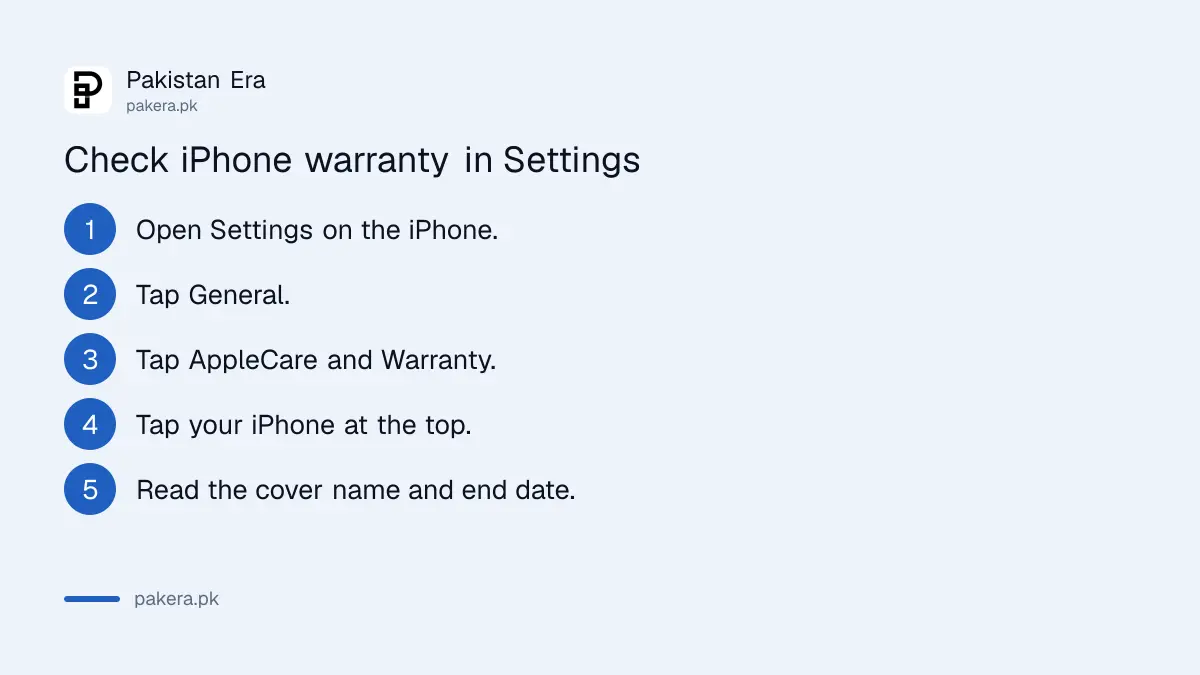
On a recent iPhone, the coverage screen sits inside Settings. Apple's path is Settings, General, AppleCare & Warranty, then tap your device. The screen shows the coverage type and the date it ends, with nothing to type in.
- Open Settings.
- Tap General.
- Tap AppleCare & Warranty.
- Tap your iPhone at the top. Paired AirPods or an Apple Watch may be listed below it.
- Read the coverage name and its end date.
On a Mac, the path is the Apple menu, System Settings, General, AppleCare & Warranty. Apple's own shortcut link, coverage.apple.com/cc/acW4820, opens the same screen on a device that supports it.
Check any iPhone by serial number online
Apple's Check Coverage site works for a phone you do not own yet. Ask the seller for the serial number, or read it yourself in Settings, General, About. Enter it at checkcoverage.apple.com, type the code shown in the image, and Apple shows the phone's service and support cover.
Read the serial number from the phone, not only from the box. A box can be swapped. If the number in Settings does not match the box and the invoice, stop and ask why.
Read the result with three questions in mind:
- Is repair cover still active? If yes, the one-year warranty or an AppleCare plan is running. Note the end date.
- Has the cover expired? Then the phone was first sold more than a year ago, or its plan ended. That is fine for a used phone but not at a new-phone price.
- Does Apple hold a valid purchase date? If not, ask for the original invoice, because Apple may ask for proof of purchase before service.
A "new" iPhone whose cover started months before your purchase was sold or activated earlier. The used iPhone checklist covers the other checks to make at the same time, including PTA status and Activation Lock.
Apple's limited warranty lasts one year and has limits
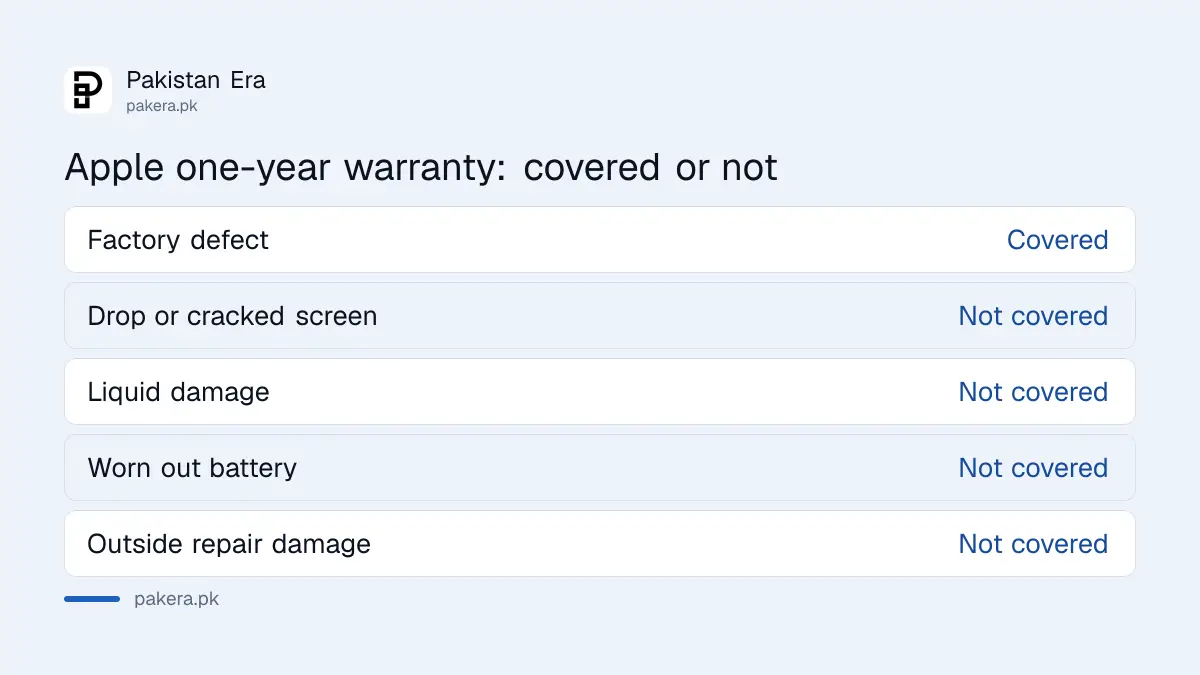
Apple's limited warranty covers iPhone hardware for one year from the date of the original retail purchase. It does not cover accidental damage, liquid contact, cosmetic damage, unauthorised repairs or normal wear, and Apple may ask for proof of purchase before service.
| Covered | Not covered |
|---|---|
| Hardware defects in materials and workmanship | Drops, cracks and other accidents |
| Defects found within one year of the first retail sale | A battery that has simply worn down with normal use |
| Service by Apple or its authorised providers | Damage from liquid contact |
| The phone in the country of first sale | Damage from service by anyone other than Apple or its authorised providers |
| Phones with an intact serial number | Phones with a removed or defaced serial number, or modified phones |
If the battery is the worry, check its health in Settings first. The steps to check battery health on iPhone and Android explain what the percentage means.
A phone sold abroad may get no warranty service in Pakistan
Apple's warranty says it may restrict warranty service for iPhone and iPad to the country where Apple or its authorised distributors first sold the device. So an iPhone bought in Dubai or London can show "Active" online and still be refused service here.
That matters because many iPhones in Pakistan arrive from abroad. Before you rely on the cover, ask an Apple authorised service provider whether they will accept that phone. Apple's own locator at locate.apple.com has a Pakistan page for finding authorised Apple locations. Search your city and pick one that offers service, not only sales.
Apple also notes that not every AppleCare product is sold in every country. A plan bought abroad carries that country's terms. The rules for bringing a phone from abroad cover customs and PTA, which are separate from warranty.
Get proof of coverage before a repair visit
A service provider may ask for proof that the phone is covered. Apple's mysupport.apple.com page lets you download it. Sign in, choose the device and click View Proof of Coverage. Carry it with the invoice and your CNIC.
- Go to mysupport.apple.com and sign in with your Apple Account.
- Choose the iPhone.
- Click View Proof of Coverage and save the PDF.
- If the option is missing, turn on two-factor authentication for your Apple Account, then try again.
Back up the phone before you hand it over. If a shop or brand refuses a valid warranty claim, the steps for a warranty claim on electronics in Pakistan explain the consumer court route.
Common questions
How do I check if my iPhone is under warranty in Pakistan?
Open Settings, General, AppleCare & Warranty and tap your iPhone. Or enter its serial number at checkcoverage.apple.com. Both show the cover type and end date.
Where is the iPhone serial number?
Go to Settings, General, About. The serial number is listed there. It is also printed on the original box, but the number in Settings is the one to trust.
Is an iPhone bought in Dubai covered in Pakistan?
Not always. Apple's warranty says iPhone service may be restricted to the country where the phone was first sold. Ask an Apple authorised service provider before relying on it.
Does Apple warranty cover a broken iPhone screen?
No. Apple's one-year limited warranty excludes accidental damage such as drops and cracks. It covers defects in materials and workmanship.
What if Apple has no valid purchase date for my iPhone?
Then Apple has no confirmed sale date for that serial number. Ask the seller for the original invoice, because Apple may need proof of purchase before service.
Can I check AirPods or Apple Watch warranty the same way?
Yes. Enter their serial number at checkcoverage.apple.com, or open AppleCare & Warranty on the paired iPhone, where they are listed under your devices.
How we verified this
What we checked and where we read it.
Last checked 24 November 2026. We read Apple Support's Find information about your warranty or AppleCare plan for the Settings, Mac, mysupport and Check Coverage routes and the proof of coverage steps, and the Apple One Year Limited Warranty for iPhone for the one-year term, the exclusions, proof of purchase and the country restriction. Result labels on Check Coverage can change wording over time.
Free on WhatsApp
Get last dates and rule changes on WhatsApp
We post new last dates, fee changes and fixes for common problems, a few short posts a day.
Follow Pakera on WhatsAppOther followers cannot see your number.
Pakera Solves It
Which online process wasted your time this week?
A portal that will not load, a form nobody explains, a complaint that went nowhere. Tell us. Every week we pick one, solve it step by step and publish the answer.
About the author

Technology Journalist & Multimedia Producer
Ahmad Ali is a technology journalist and multimedia producer at Pakistan Era, joining the team in October 2026. He covers consumer technology and digital life for Pakistani readers, combining research with hands-on product testing.