Edit PDF in Gemini Free in Pakistan: Create and Edit PDFs, Docs, Sheets and Slides in the Chat (Web and App)
Gemini now creates and edits PDFs, Docs, Sheets and slides in the chat, free in Pakistan. See what works on web and app, the steps, and fixes if it is missing.
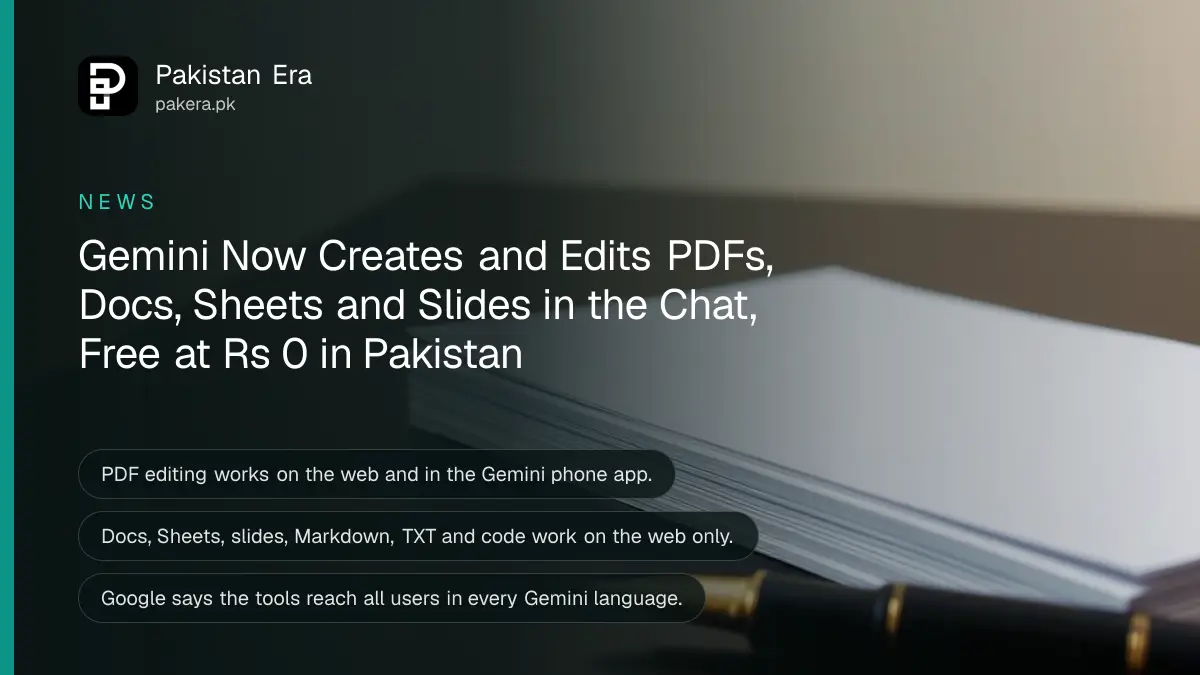
Gemini can now create, preview and edit PDFs, Google Docs, Sheets, slide decks, Markdown, TXT and code files inside the chat, and Google says this works for all users in every language where the Gemini app is available, which includes Pakistan and the free plan. PDF editing works on the web and in the phone app. Every other file type works on the web only, at gemini.google.com.
Google announced the change on 29 October 2026. For students and office workers in Pakistan, the useful part is simple: you can turn handwritten notes into a PDF study guide, then fix a line yourself without leaving the chat. We read Google's announcement and the Gemini plans page for Pakistan on 31 October 2026. Below is what works where, and what to try when it does not.
Gemini now edits PDFs, Docs, Sheets and slides inside the chat
Google's post says you can generate a file in the chat, open it full screen, type edits directly, highlight text to ask a question about it, or ask Gemini to rewrite a part. The supported formats are PDF, Google Docs, Google Sheets, slide decks, Markdown, TXT and code.
| File type | Web (gemini.google.com) | Phone app |
|---|---|---|
| Create, preview, edit | Create, preview, edit | |
| Google Docs | Yes | Not yet |
| Google Sheets | Yes | Not yet |
| Slide decks | Yes | Not yet |
| Markdown, TXT and code | Yes | Not yet |
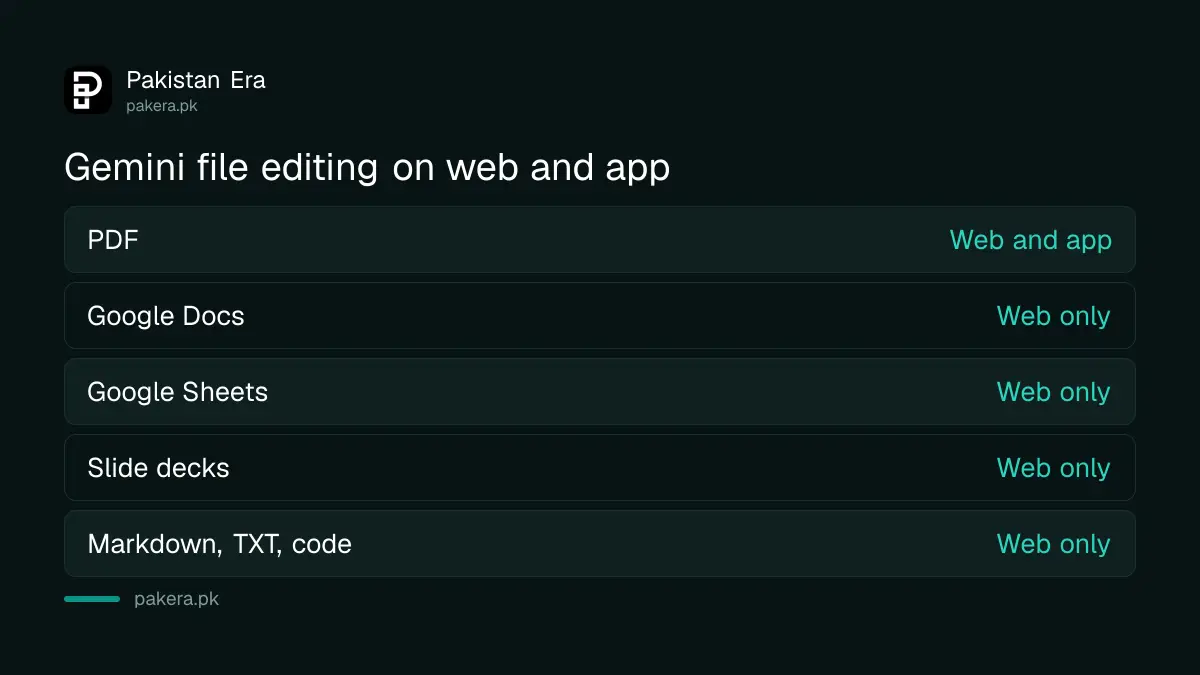
"Not yet" in the table means Google lists those formats for the web only. It has not given a date for the app.
The free Gemini plan in Pakistan gets the feature too
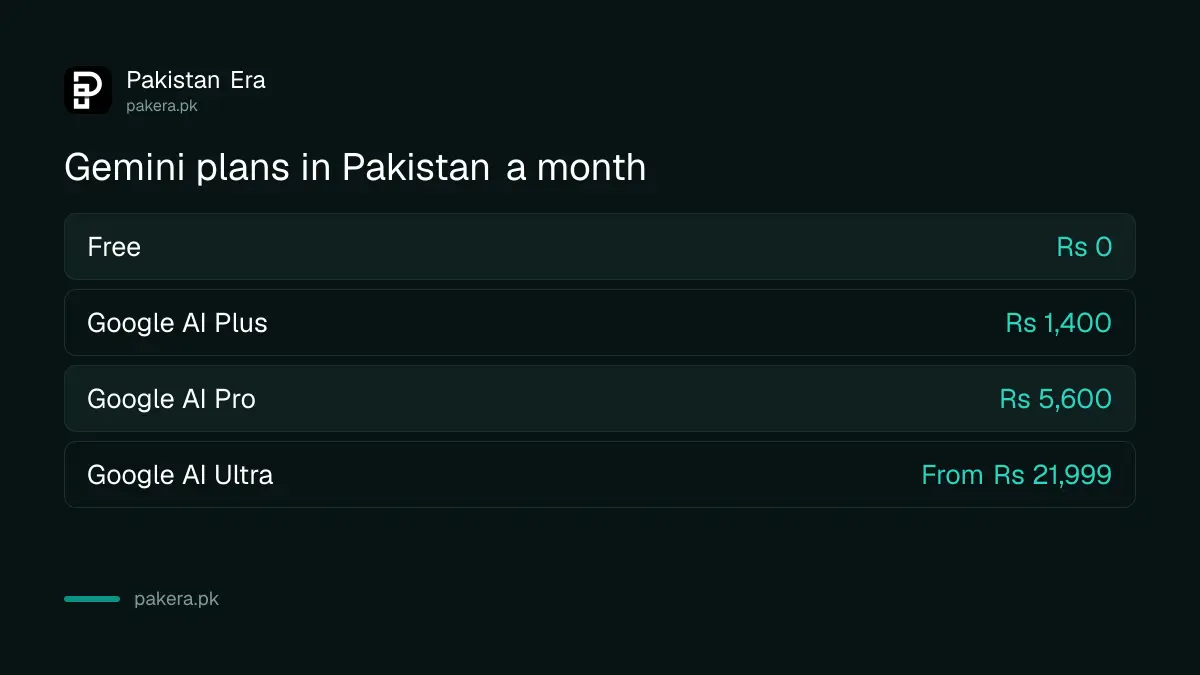
Google says the file tools are available to all users in all languages where the Gemini app runs. The free plan in Pakistan costs Rs 0 and uses the Flash-Lite model. Paid plans start at Rs 1,400 a month for Google AI Plus, which gives double the free usage limits.
So you do not need to pay to try it. What you may hit is a usage limit, because a long PDF or a slide deck takes more work than a short reply. When that happens, Gemini tells you to wait, and the reasons and reset times are covered in Gemini limit reached in Pakistan.
| Plan in Pakistan | Price a month | Usage compared with free |
|---|---|---|
| Free | Rs 0 | Base, Flash-Lite model |
| Google AI Plus | Rs 1,400 | 2 times |
| Google AI Pro | Rs 5,600 | 4 times, includes Gemini 4 Argon |
| Google AI Ultra | From Rs 21,999 | Highest |
How to make and edit a PDF in Gemini
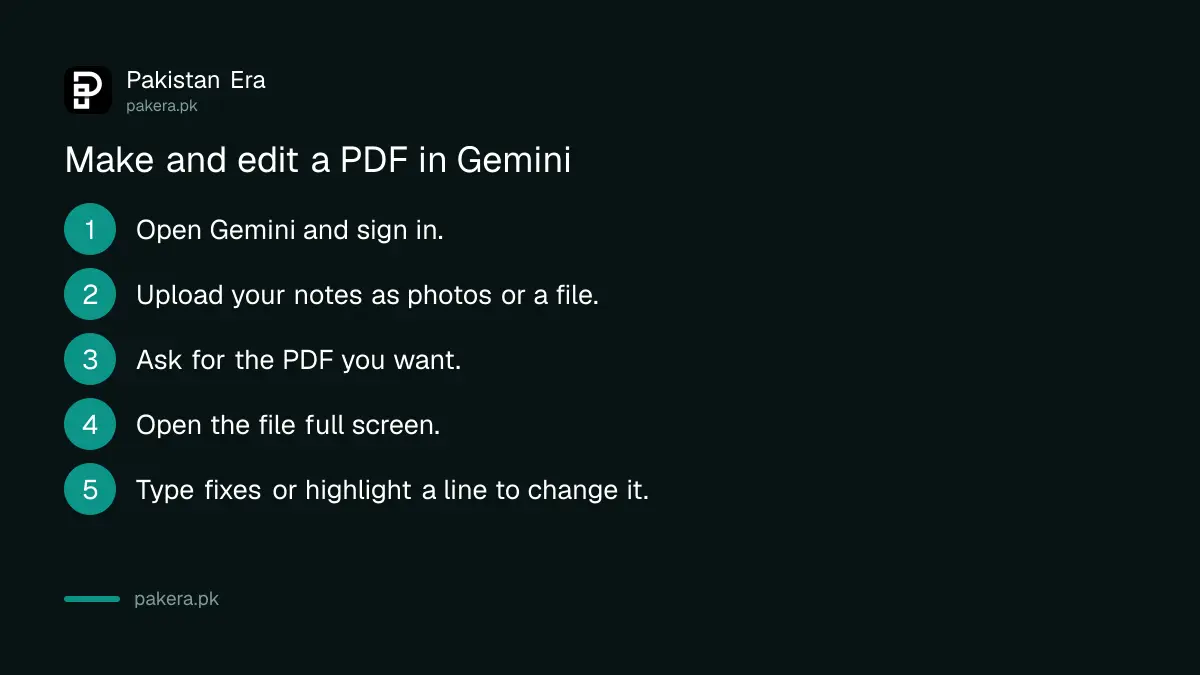
Google's own example is a student who uploads photos of handwritten lecture notes and asks for a PDF study guide. The steps below follow that example. Menu names can differ slightly between the web and the app, so look for the full screen option on the file Gemini makes.
- Open gemini.google.com or the Gemini app and sign in with your Google account.
- Upload your notes as photos or a file, using the upload option in the chat box.
- Ask for the file you want, for example: "Make a two page PDF study guide from these notes, with headings and a short quiz at the end."
- Open the file Gemini creates and expand it to full screen.
- Type your own fixes directly, or highlight a line and ask Gemini to change it.
- Save the finished file using the options shown on it, since Google's post does not describe the download menu.
If your notes are printed rather than handwritten and in Urdu, Urdu OCR with Google Drive can turn them into text first. For a quick one page scan without editing, scanning notes into a PDF with ChatGPT is another free route.
When the edit option does not appear
Google says the tools are now available to all users. If you do not see a file preview, the likely cause is the device or the file type, not your country.
- Docs, Sheets or slides on a phone: Google lists these for the web only. Open gemini.google.com in a laptop browser.
- No preview at all: update the Gemini app from the Play Store or App Store, then sign out and back in.
- School or work account: your administrator may limit Gemini. Try a personal Gmail account.
- Limit reached: wait for the reset or shorten the request.
- Under 13: the Gemini app has an age rule, and Google One help gives it as over 13 or the age set in your country.
Keep private documents out of the chat
A file you upload becomes part of your Gemini activity unless you turn saving off. Do not upload a CNIC copy, bank statement, payslip or medical report just to tidy the layout. Remove names and numbers first, or type a blank template instead.
You can clear old uploads and stop saving new ones by following the steps to delete Gemini chats and turn off activity. If you study from long PDFs, Gemini Notebook keeps sources in one notebook and cites them, which suits revision better than one long chat.
Common questions
Is Gemini PDF editing free in Pakistan?
Yes. Google says the feature is available to all users in all languages where the Gemini app runs, and Pakistan's free plan costs Rs 0.
Can I edit a Google Doc in the Gemini phone app?
Not yet. Google lists PDF editing on web and mobile, and Docs, Sheets, slides, Markdown, TXT and code on the web only.
Can Gemini turn handwritten notes into a PDF?
Yes. Google's own example is a PDF study guide made from uploaded handwritten lecture notes, which you can then edit.
Does it work in Urdu?
Google says the tools work in all languages where the Gemini app is available. We did not test the quality of Urdu text in a generated PDF.
When was this launched?
Google announced it on 29 October 2026 on its official blog.
Why do I not see the file preview yet?
Check that you are on the web for non-PDF files, update the app, and try a personal account. A usage limit can also stop a long file.
How we verified this
What we checked, where we read it, and what we could not confirm.
Last checked 31 October 2026. We read Google's announcement You can now generate, preview, and edit documents, PDFs, presentations, spreadsheets, and more directly in Gemini, dated 29 October 2026, and the Gemini plans page for Pakistan, which showed prices in PKR, on 31 October 2026. We did not test the feature on a Pakistani account, so we cannot confirm when it reached every user here or how Urdu files look.
About the author

Technology Journalist & Multimedia Producer
Ahmad Ali is a technology journalist and multimedia producer at Pakistan Era, joining the team in October 2026. He covers consumer technology and digital life for Pakistani readers, combining research with hands-on product testing.