Zong SIM Not Working: How to Find the Cause and Fix It
Restart, then test your Zong SIM in another phone. Works there? Text your IMEI to 8484. Fails everywhere? A Rs 400 replacement at a Zong centre.
If your Zong SIM stops working, first restart the phone, then put the SIM in another phone. If it works there, the problem is your phone, often a PTA registration issue you can check by texting your IMEI to 8484. If it fails in every phone, the SIM or the number is the problem, and Zong fixes that at a service centre, where a replacement SIM costs Rs 400. For help, call 310 from another Zong phone or 051-111-222-111 from any network.
Update, 10 October 2026: On Jazz? We wrote the Jazz SIM fixes too. See the Jazz fixes.
We read Zong's help, settings, terms and price pages on 22 September 2026. Zong's own Chinese language help page on zong.com.pk lists the main reasons a Zong SIM stops working, and we have used it alongside the English pages.
Find the cause from what you see
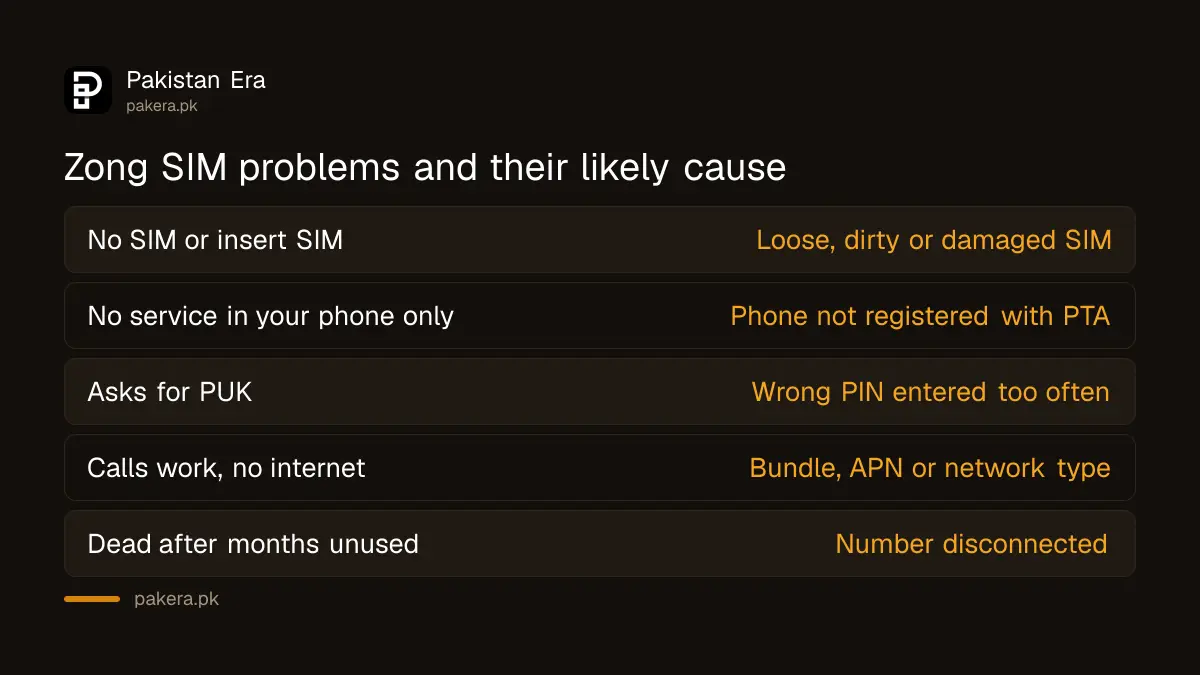
| What you see | Likely cause | First fix |
|---|---|---|
| "No SIM" or "Insert SIM" | SIM loose, dirty or damaged | Clean and reseat it, then try another phone |
| "No service" or "Emergency calls only" | Weak signal, number blocked, or phone not registered | Restart, then test the SIM in another phone |
| Asks for PIN or PUK | SIM lock after wrong PIN | Unblock with the PUK |
| Calls work, internet does not | Bundle finished, wrong APN or network type | Dial *102#, check APN is zonginternet |
| Works in other phones, not yours | Phone not registered with PTA | Text your IMEI to 8484 |
| Dead after months of no use | Number disconnected for inactivity | Reactivate an expired SIM |
Quick fixes to try first
These take ten minutes and cost nothing. Do them in this order and test after each one.
- Restart the phone. Switch it off fully, wait a minute, switch it on.
- Turn airplane mode on for 30 seconds, then off. This forces the phone to find the network again.
- Take the SIM out. Wipe the gold contacts gently with a dry cloth and put it back firmly.
- Put the SIM in slot 1 on a two SIM phone. Zong's help page suggests this for internet problems.
- Put the SIM in another phone. This one test tells you whether to fix the phone or the SIM.
When the SIM works in another phone
Then the SIM is fine and your phone is the problem.
Check PTA registration. A phone not registered with PTA is blocked from Pakistani networks. Zong's DIRBS page says to dial *#06# to see the IMEI, then text the IMEI to 8484 to check its status. Zong's help page lists the SMS at 10 paisa plus tax. If the reply says the phone is not registered, register it with PTA.
Check the phone's network settings. Zong's 4G settings page gives the Android path: Settings, SIM and Network, Mobile Networks, your Zong SIM, Preferred Network Type, then 4G or LTE. If the SIM is disabled in the SIM manager, turn it on.
Reset network settings. Most phones have this in Settings under Reset or General Management. It clears WiFi passwords but not photos or apps.
When the SIM fails in every phone
Then the problem is the SIM or the number. These are the causes on Zong's own pages:
- The SIM is damaged or old. A worn SIM stops reading. Zong also asks customers still using a non 4G SIM to replace it at an outlet. A change of SIM costs Rs 400 on Zong's price page.
- The number was inactive too long. Zong's terms say a number unused for 180 days can be disconnected and given to someone else. Act fast if this may apply to you.
- The SIM was blocked after a loss report. If you or a family member reported it lost, it is blocked on purpose, and you can reactivate the self-blocked Zong SIM.
- A postpaid bill or credit limit. Zong's help page says a postpaid SIM is locked when the balance runs out, and unlocks within about 15 minutes of payment.
- A foreigner's visa has expired. Zong's help page says PTA locks SIMs registered to foreigners when the visa expires. The owner must bring a passport and valid visa to a Zong centre.
- A block by Zong or PTA. Some SIMs are blocked for ownership or compliance reasons, and getting a blocked SIM reopened takes a separate process.
When calls work but internet does not
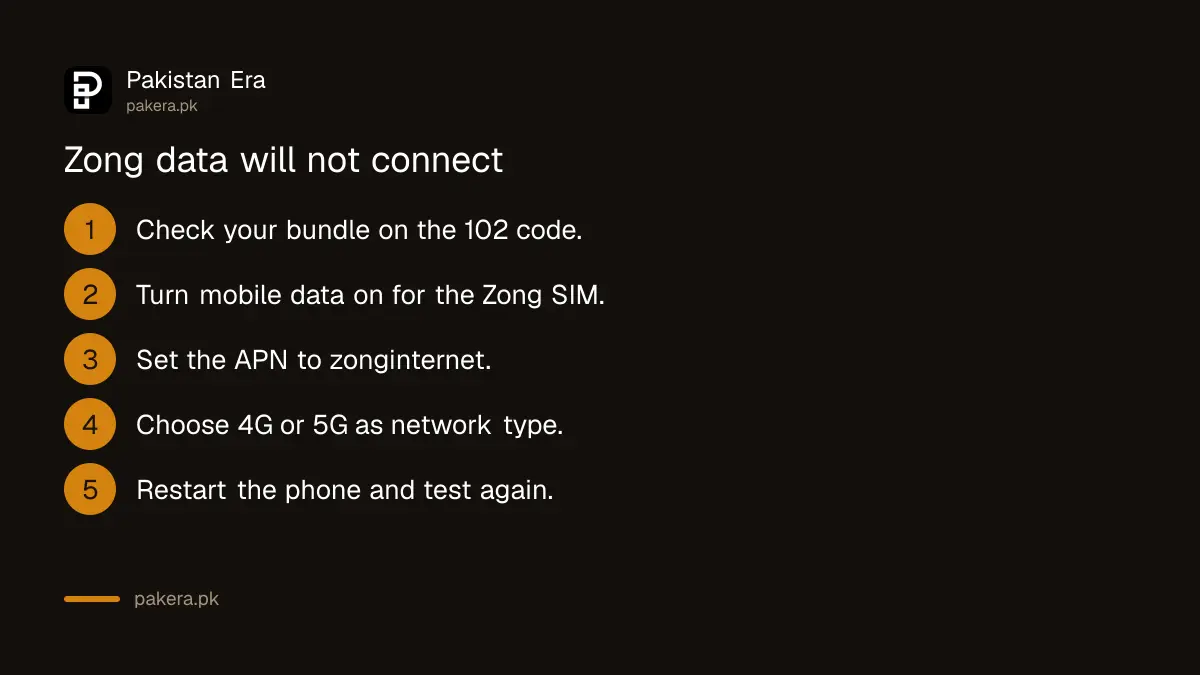
- Dial *102# to see if your bundle is finished. Zong lists this at 10 paisa plus tax.
- Make sure mobile data is on and set to the Zong SIM.
- Check the APN. Zong's help page lists the name and APN as zonginternet, with authentication none. Restart after changing it.
- Set the network type to 4G or 5G, not 3G only.
- Remember that data in Zong's free offers does not work from 7 PM to 11:59 PM, according to Zong.
If data connects but is slow, test your Zong internet speed before you complain.
Getting help from Zong
If nothing above works, contact Zong. The options on Zong's pages on 22 September 2026 were:
- 310 from a Zong number, 24 hours. Zong says a call connected to an officer costs Rs 2 plus tax.
- 051-111-222-111 from any other network, at normal call rates.
- SMS "help" to 310, which Zong says is free.
- A Zong service centre or franchise, with your original CNIC.
Zong's site says its live chat is unavailable until further notice. Ask for a complaint number every time. If Zong does not fix the problem, you can complain to PTA with that number.
A warning. If someone calls you, says your Zong SIM "will be blocked" and asks for an OTP or your CNIC photo to "keep it working", hang up. That is a SIM swap trick. Call 310 yourself.
Common questions
Why is my Zong SIM showing no service?
Weak signal, a blocked number or an unregistered phone. Test the SIM in another phone to find out which.
How do I know if my phone is blocked by PTA?
Dial *#06# to get the IMEI and text it to 8484. The reply shows the phone's status.
How much is a new Zong SIM if mine is damaged?
Zong's price page lists a change of SIM at Rs 400 on the same number, or Rs 1,500 for an eSIM.
What is the Zong internet APN?
Zong's help page lists zonginternet.
My Zong SIM stopped working after months unused. Can I get it back?
Possibly, if the number has not been given to someone else. Zong's terms allow reissue after 180 days of no use, so go to a service centre quickly.
Can I fix a Zong SIM over the phone?
Settings and bundle problems, yes. A damaged or replaced SIM needs a visit with your CNIC and a thumb check.
How we verified this
What we checked, where we read it, and what we could not confirm.
Last checked 22 September 2026. The causes for postpaid lock, expired visa and unregistered devices, the 8484 SMS charge, the zonginternet APN and the slot 1 advice are from Zong's Chinese language self-care page at zong.com.pk/about-zong/customer-self-care-chinese, which we read and translated. The 4G setting path is from zong.com.pk/zong-4g-sim-settings. The *#06# and 8484 steps are from zong.com.pk/dirbs. The 180 day inactivity rule is from zong.com.pk/pta-terms-conditions. The Rs 400 and Rs 1,500 fees are from zong.com.pk/sim-price. The non 4G SIM replacement is from Zong's 5G SIM upgrade page. *102# and its charge are from zong.com.pk/faqs, and the 7 PM rule from zong.com.pk/exclusion-of-busy-hour. The helplines are from zong.com.pk/contact-us, and the live chat notice from zong.com.pk/live-chat-notification--zong-5g. We did not test a Zong SIM ourselves.
About the author

Tax, Bills and Technology Writer
Ali Akhtar is a young and curious voice here at Pakistan Era. He is currently pursuing his A-Levels and has a growing interest in Pakistan’s changing industrial landscape and educational trends. Ali likes to write in a way that helps him explain and explore the world around him. His writing reflects the perspective of the new generation navigating the evolving trends of Pakistan where technology, youth innovation, and shifting opportunities are reshaping the country’s future.