Bluetooth Not Connecting to Your Phone in Pakistan: Fix Earbuds, Speakers and Car on Android and iPhone
Bluetooth earbuds, speaker or car not connecting to your phone? Forget and re-pair on Android and iPhone, turn on Media and Phone audio, and fix one earbud.
Earbuds, speaker or car not connecting to your phone? Turn Bluetooth off and on, restart both devices, then delete the device from your phone's Bluetooth list ("Forget" on Android, "Forget This Device" on iPhone) and pair it again from scratch with the accessory in pairing mode. That clears most failures in under five minutes.
If the device connects but there is no music or no call sound, the fix is a different switch. Match your problem below.
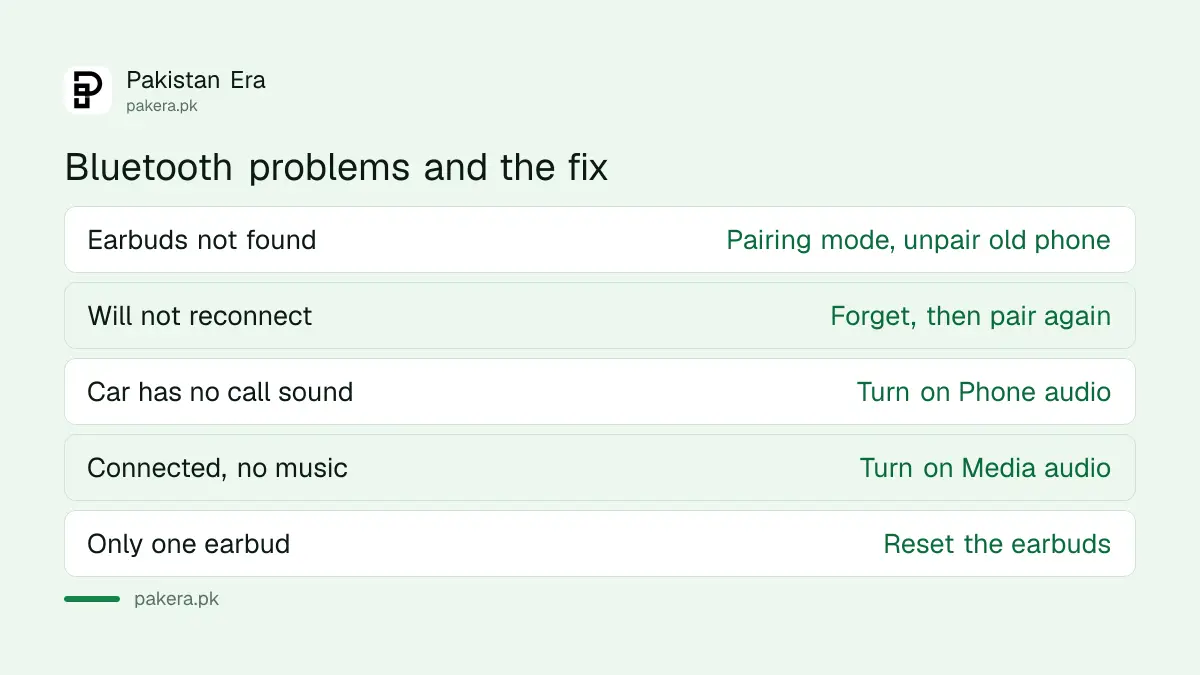
| Problem | Likely cause | Fix |
|---|---|---|
| Earbuds not found at all | Not in pairing mode, or still linked to another phone | Hold the case button until the light flashes; unpair from the old phone |
| Paired before, now will not connect | Old pairing record is broken | Forget the device, then pair again |
| Car shows phone but no calls | Phone audio switched off | Turn on Phone audio for the car |
| Connected, no music | Media audio off, or another device playing | Turn on Media audio, check volume |
| Only one earbud works | Earbuds out of sync with each other | Put both in the case, reset the earbuds |
Do the basic Bluetooth checks first
Google's first steps are to turn Bluetooth off and back on, confirm both devices are paired and connected, and restart them. Apple adds: keep them close, make sure the accessory is charged, and put a new accessory into discovery mode.
- Charge the earbuds, case or speaker for at least 15 minutes. A flat accessory often shows no error at all, and a loose cable is a common reason a case charges slowly or not at all.
- Turn Bluetooth off and on from Quick Settings or Control Center.
- Restart the phone, and switch the accessory off and on.
- Keep the accessory within a metre of the phone while pairing.
- Put a new accessory in pairing (discovery) mode. Most earbuds enter it when you open the case and hold its button until a light flashes. Check the box or manual for your model.
Forget the device and pair it again
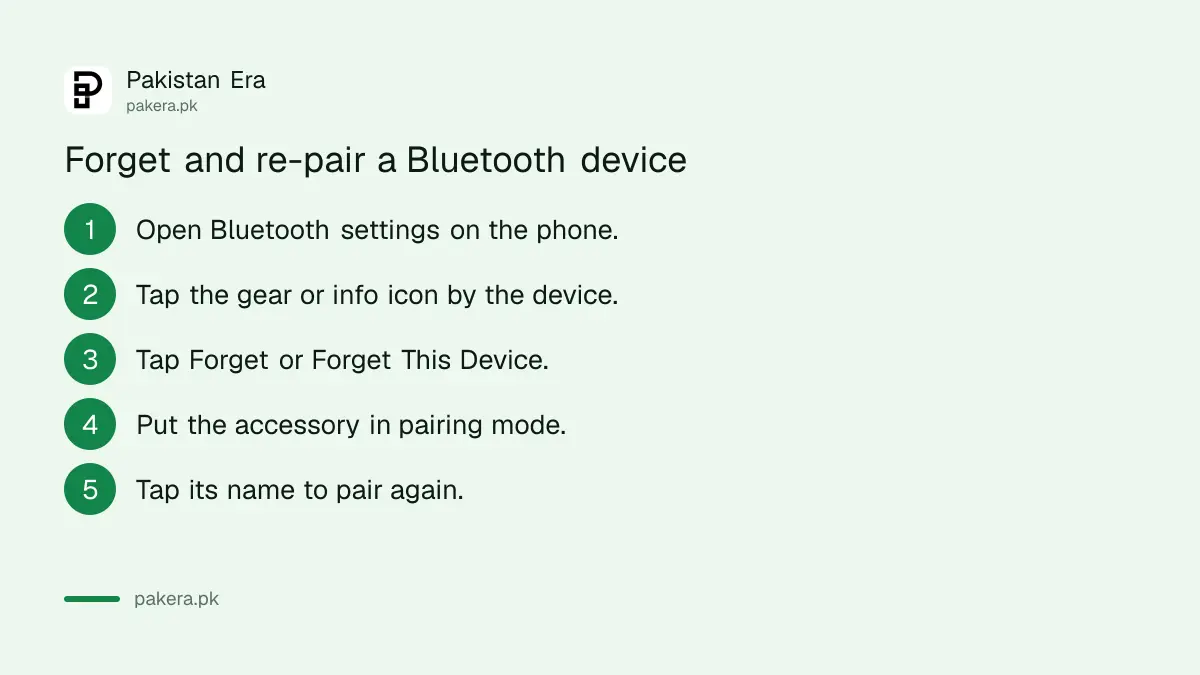
If an accessory paired before but now refuses, delete the saved pairing on the phone and start fresh. On Android, open Connected devices, tap the settings icon next to the device, and tap Forget. On iPhone, tap the info button next to it and choose Forget This Device.
Android (Samsung, Xiaomi, Infinix, Tecno, Vivo, Oppo)
- Open Settings, then Connected devices (Samsung: Connections, Bluetooth).
- Find the accessory under Saved devices or Paired devices.
- Tap the settings (gear) icon next to its name, then Forget or Unpair.
- Put the accessory in pairing mode.
- Tap Pair new device and choose its name. If asked for a passcode, Google suggests 0000 or 1234.
iPhone
- Open Settings, then Bluetooth.
- Tap the info button next to the accessory, then Forget This Device.
- Put the accessory back in discovery mode.
- Tap its name under Other Devices to pair.
If the accessory pairs with other phones but not yours, Apple says to unpair it from those other devices first. Earbuds bought second hand, or shared with a sibling, are often still tied to someone else's phone and connect to it the moment they are in range.
Fix a car that will not connect or has no call sound
For a car, clear the pairing on both sides: forget the car on the phone, delete the phone from the car's list using the car's manual, then pair again. If calls still have no sound, turn on Phone audio for the car in its Bluetooth settings.
- On the phone, forget the car under saved Bluetooth devices.
- On the car's screen, delete your phone and any old phones you no longer use. Car systems often hold a short list and refuse new pairings when it is full.
- Make the car discoverable, then pair from the phone or the car, whichever the car's manual says.
- If both screens show a PIN, check they match and tap Pair.
- Tap Allow when asked for contacts and call history, if you want names to show on the car screen.
Calls ringing on the phone and not the car? On Android open the car's settings icon in Bluetooth and turn on Phone audio (Phone calls on Samsung). Google notes that not every car supports calls or music over Bluetooth, so check the manual if the switch is missing.
Fix no music, low volume or one earbud
When a device connects but plays nothing, turn on Media audio for it, raise the volume on both the phone and the accessory, and make sure no other paired device is taking the sound. For a single dead earbud, reset the earbuds following the maker's steps.
- Media audio: Android Settings, Connected devices, the settings icon next to the accessory, turn on Media audio (Audio on Samsung).
- Two volumes: the phone and the earbuds or car each have their own level. Raise both.
- Another device took the sound: a laptop or tablet paired to the same earbuds may be playing. Turn Bluetooth off on the other device.
- One earbud silent: put both earbuds in the case, close the lid for 30 seconds, then reset them. Most models reset by holding the case button or touch pads for 10 to 15 seconds; the exact method is in the manual.
- App cannot see the accessory: on iPhone, Settings, Privacy and Security, Bluetooth, and allow the app. On Android, allow the app's Nearby devices permission.
Still dropping out? Walls, a phone in a back pocket and crowded Wi-Fi all weaken Bluetooth. Keep the phone on the same side of the body as the earbuds.
When Bluetooth itself will not turn on
If the Bluetooth switch is greyed out or no accessory at all will connect, the fault is in the phone. Update the software, try Safe Mode on Android, then reset network settings. Apple says to contact Apple Support at this point.
- Install the latest system update.
- Android: restart in Safe Mode and test. If it works there, remove apps added just before the fault.
- Reset network settings (this also clears saved Wi-Fi passwords): Android Settings, System or General management, Reset, Reset network settings; iPhone Settings, General, Transfer or Reset iPhone, Reset, Reset Network Settings.
- Still dead? Take the phone to the maker's authorised service centre.
The same Bluetooth basics apply to laptops; the Windows steps for Bluetooth earbuds on a Windows 11 laptop differ only in the menus. To send the screen rather than sound to a TV, screen mirroring from a phone uses Wi-Fi instead.
Common questions
Why are my earbuds not showing on my phone?
They are not in pairing mode, or they are connected to another phone nearby. Charge them, open the case, hold the button until the light flashes, and turn Bluetooth off on any other phone they used.
How do I connect my phone to my car's Bluetooth again?
Forget the car on your phone and delete your phone from the car's list. Then make the car discoverable and pair again. Turn on Phone audio and Media audio for the car afterwards.
Why does Bluetooth connect but there is no sound?
Media audio is off, the accessory's volume is low, or another device is playing. Turn on Media audio for the accessory and raise the volume on both the phone and the accessory.
What PIN do I use to pair a Bluetooth device?
Most accessories need no PIN. If one asks and you do not know it, Google suggests trying 0000 or 1234, the most common codes.
Why does only one earbud work?
The two earbuds have lost sync. Put both in the case, close the lid, then reset them by the maker's method and pair again as a new device.
How we verified this
What we checked and where we read it.
We checked these official pages on 25 November 2026: Google's Android Help page "Fix Bluetooth problems on Android" (support.google.com/android), for the basics, clearing car pairings, pairing from phone or car, the 0000 or 1234 passcodes, and the Media audio and Phone audio switches; and Apple's "If a Bluetooth accessory won't connect to your iPhone or iPad" (support.apple.com/111804), for discovery mode, charging, app Bluetooth permission, unpairing from other devices and when to contact Apple. Menu names vary by brand and software version.
Free on WhatsApp
Get last dates and rule changes on WhatsApp
We post new last dates, fee changes and fixes for common problems, a few short posts a day.
Follow Pakera on WhatsAppOther followers cannot see your number.
Pakera Solves It
Which online process wasted your time this week?
A portal that will not load, a form nobody explains, a complaint that went nowhere. Tell us. Every week we pick one, solve it step by step and publish the answer.
About the author

Technology Journalist & Multimedia Producer
Ahmad Ali is a technology journalist and multimedia producer at Pakistan Era, joining the team in October 2026. He covers consumer technology and digital life for Pakistani readers, combining research with hands-on product testing.