How to Set Up a Passkey on Your Google Account in Pakistan, Free
Add a free passkey to your Gmail or Google account in Pakistan at g.co/passkeys. Steps, Android 9 and iOS 16 rules, and why never to make one on a shared phone.
To add a passkey to your Google or Gmail account in Pakistan, open g.co/passkeys, sign in, tap "Create a passkey" and confirm with your phone's fingerprint, face or screen lock PIN. It is free and takes five short steps. You need Android 9, iOS 16, Windows 10 or newer.
Most Gmail accounts in Pakistan are lost the same way. Someone gets the password from a fake login page, or talks the owner into reading out a code. A passkey stops both tricks, because there is no password to type into a fake page and nothing to read out.
Google posted a fresh reminder to set up passkeys on 8 October 2026. We read it and Google's full passkey help page on 9 October 2026. Here are the steps, the device rules, and the one warning that matters most in Pakistani homes.
A passkey lets you sign in to Google with your fingerprint or PIN
A passkey replaces typing your password with unlocking your phone. When you sign in, Google asks your phone to confirm it is you, and you use your fingerprint, face scan or screen lock PIN. Your fingerprint never leaves your phone and is not shared with Google.
Google says passkeys cannot be shared, copied, written down or given away by accident. That is why they resist phishing, the fake-page trick behind most hacked accounts. A scammer can copy Google's login page perfectly, but a passkey only works on the real Google site.
Adding a passkey does not remove anything. Your password, phone number and recovery email all stay on the account. If you use 2-Step Verification, a passkey sign-in skips the second step, because unlocking your own phone already proves you have it.
Check your phone and computer support Google passkeys
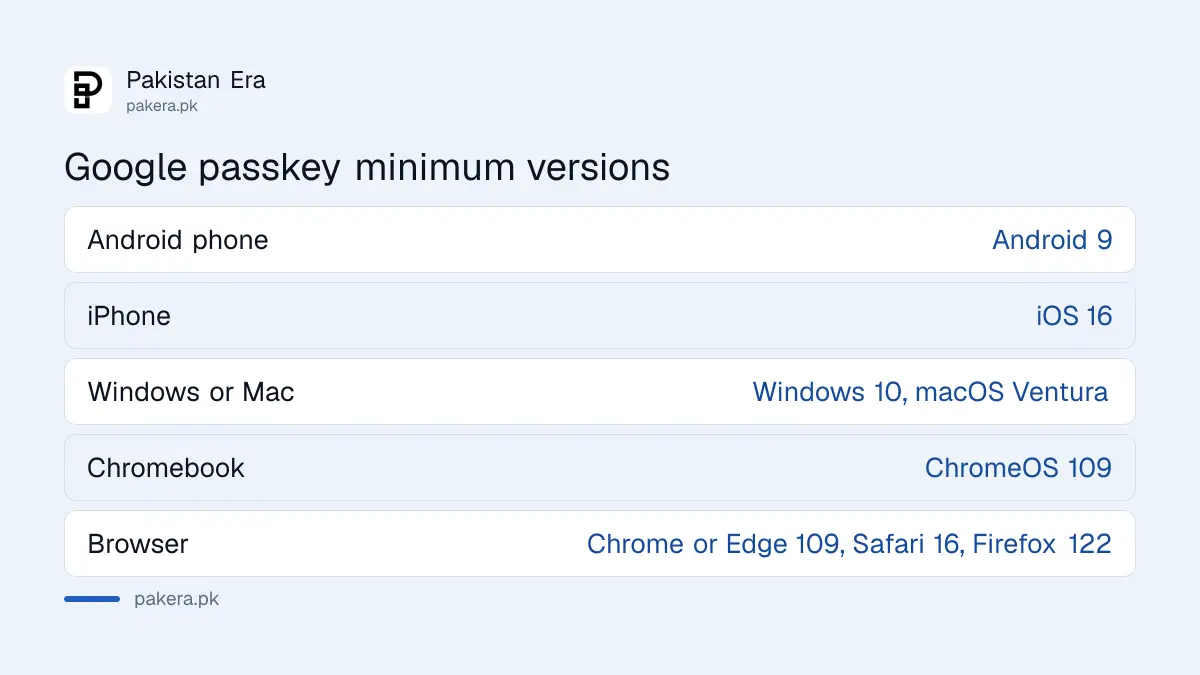
Google passkeys work on phones with Android 9 or iOS 16 and newer, and on computers with Windows 10, macOS Ventura or ChromeOS 109 and newer. Your browser must be Chrome or Edge 109, Safari 16 or Firefox 122, or newer. Most phones bought in Pakistan in the last few years meet this.
| Device or browser | Minimum version |
|---|---|
| Android phone | Android 9 |
| iPhone | iOS 16 |
| Windows computer | Windows 10 |
| Mac | macOS Ventura |
| Chromebook | ChromeOS 109 |
| Browser | Chrome 109, Edge 109, Safari 16, Firefox 122 |
Before you start, turn on a screen lock on your phone. A passkey cannot work without one. On an iPhone, Google will also ask you to turn on iCloud Keychain. If you plan to sign in on a laptop using your phone, keep Bluetooth on.
One small catch. Some browsers block passkeys in Incognito or private mode. Use a normal window.
How to create a passkey for your Google account
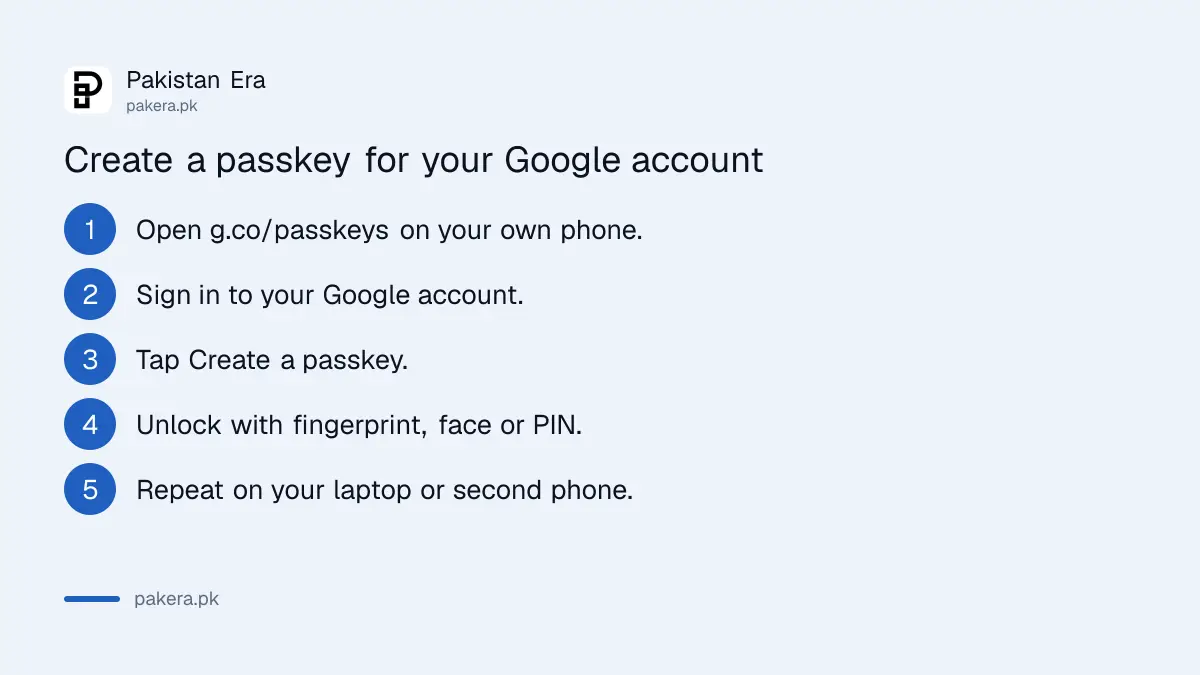
Go to g.co/passkeys or myaccount.google.com/signinoptions/passkeys, sign in, tap "Create a passkey" and follow the prompts. Your phone asks for your fingerprint, face or PIN, and the passkey is saved. Do this on each phone or laptop you own and use often.
- On your own phone, open g.co/passkeys in Chrome or Safari.
- Sign in to your Google account, or confirm it is you if asked.
- Tap "Create a passkey" and follow the prompts.
- Unlock with your fingerprint, face scan or screen lock PIN.
- Repeat on your laptop or second phone if you use one.
Google says a brand new passkey can take up to 7 days before it shows at sign-in. If you already have a trusted passkey or security key, that wait can be shorter. So do not panic if it does not appear the next morning.
If Google ever finds a passkey it thinks is suspicious, it disables it and tells you. You then have 30 days to confirm you added it, or it is deleted.
Never create a Google passkey on a shared family phone
Google's own warning is clear: only create passkeys on devices you personally own and use. Anyone who can unlock that phone can then open your Google account, even after you sign out. In many Pakistani homes one phone is shared, so this matters.
Think about who knows your phone's PIN. A sibling, a child, a spouse, the shop that repaired it. If they can unlock the phone, a passkey on it lets them into your Gmail, your Google Photos and anything that uses "Sign in with Google".
So the rule is simple:
- Your own phone, with a PIN only you know: create a passkey.
- A shared family phone or office computer: do not.
- A phone you are about to sell: remove your account first. The steps are in erasing your phone before selling it.
Android has one extra rule. After you sign out of an Android phone, its passkey still works for 6 hours. After that, you sign in another way, and the phone makes a new passkey.
Sign in on a laptop with your phone's passkey
On the laptop's Google sign-in page, enter your email. A QR code appears. Scan it with your phone's camera, tap "Use passkey to sign in", and unlock your phone. Google says to keep Bluetooth on for this.
Next time you use the same laptop and phone together, you just get a notification on the phone.
If you prefer your password first, you can switch it back. Open your Google Account, go to Security and sign-in, and under "How you sign in to Google" turn off "Skip password when possible". Your passkey stays saved as an option.
A passkey is one layer. The others, 2-Step Verification and a recovery number, are covered in turning on two-step verification on Gmail, WhatsApp and Facebook. WhatsApp has its own passkey too, set up as shown in turning on a WhatsApp passkey.
Common questions
Is a Google passkey free in Pakistan?
Yes. Passkeys are a free part of every Google account. You only need a phone or computer that supports them and a screen lock.
Will a passkey delete my Gmail password?
No. Google says adding a passkey does not change or remove your password or recovery options. You can still sign in with your password if you need to.
What happens if I lose the phone with my passkey?
You can still sign in with your password and recovery options. Then remove the lost phone's passkey from myaccount.google.com/signinoptions/passkeys. If you cannot get in, use Google's recovery steps.
Why doesn't my new passkey show when I sign in?
Google says a new passkey can take up to 7 days to become available at sign-in. Make sure your phone and browser are up to date and you are not in Incognito mode.
Can I use a passkey on a Google account from my school or office?
Sometimes. On a Google Workspace account, your admin decides if you can sign in with just a passkey. You can still add one as a second step or recovery option.
How we verified this
What we checked, where we read it, and what we could not confirm.
We checked on 9 October 2026. The set-up link and the fingerprint and privacy points are from Google's post Sign in quickly and securely with passkeys, dated 8 October 2026. Device and browser versions, the 7-day wait, the 30-day suspicious passkey window, the 6-hour Android rule, the shared-device warning and the "Skip password when possible" setting are from Google's help page Sign in with a passkey instead of a password. If you are already locked out, the steps are in recovering a Gmail or Google account. We did not create a test passkey for this article.
About the author

Technology Journalist & Multimedia Producer
Ahmad Ali is a technology journalist and multimedia producer at Pakistan Era, joining the team in October 2026. He covers consumer technology and digital life for Pakistani readers, combining research with hands-on product testing.