How to Make Your Instagram Account Private and Restrict Someone in Pakistan, Free
Make your Instagram account private in Settings and use Restrict to limit one person without a block. See the steps, the age rules and what Restrict hides.
Short answer: In Instagram, open Settings, tap Account Privacy and switch on Private account. Only people you approve can then see your posts. To handle one pushy person without blocking them, use Restrict: their comments are hidden from others and their messages go to Message Requests.
A public Instagram account is open to anyone with the username: strangers, fake profiles, people who like to copy photos. Many Pakistani users, especially women and teenagers, do not want that. Two settings fix most of it, and both are free: a private account, and Restrict.
We read two Instagram Help Center pages, "Make your Instagram account private" and "Restrict or unrestrict someone on Instagram". We did not change a live account, so menu labels follow Instagram's wording and can shift between app versions.
A private account lets you approve who sees your posts
When your account is private, only followers you approve can see your photos and videos. You switch it on in Settings under Account Privacy. Anyone else sees only your profile basics and has to send a follow request.
| Who | What Instagram says |
|---|---|
| Under 18 | Account is private by default |
| Under 16 | Needs a parent or guardian's permission to switch to public |
| 16 to 17 | Can switch to public without permission, unless supervision is set up |
| Business profile | Cannot be private; switch back to a personal account first |
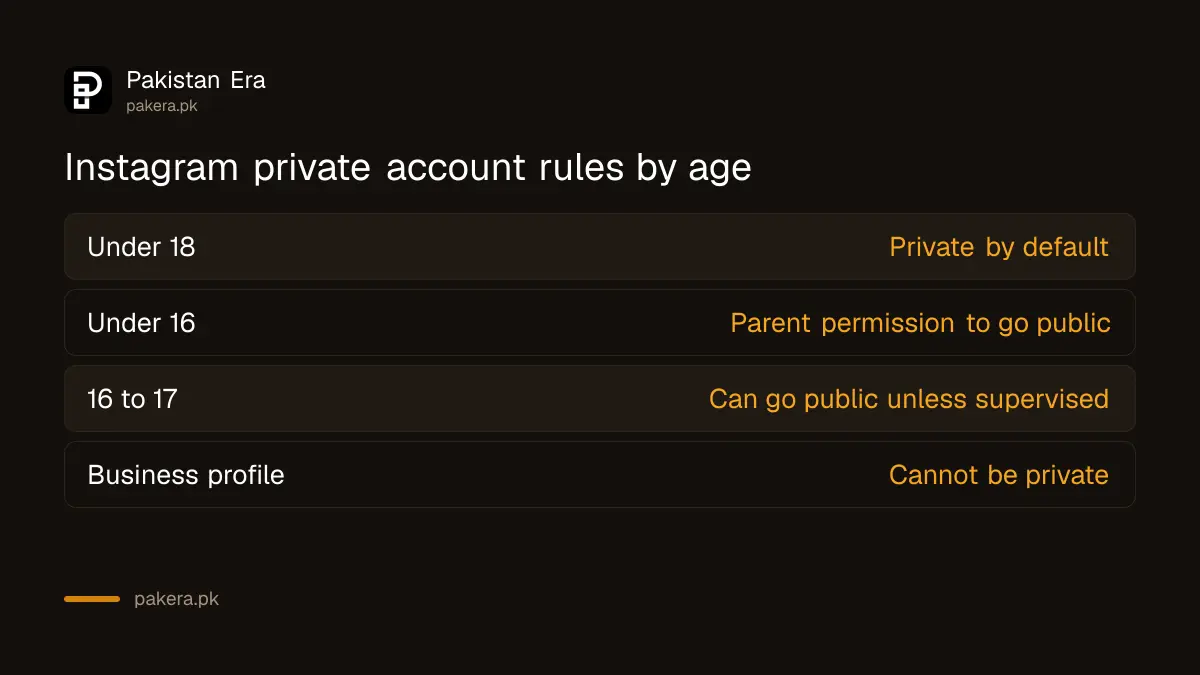
The age rules above come from Instagram's help page. Parents who want more control can read how Instagram teen accounts and parental supervision work.
How to make your account private step by step
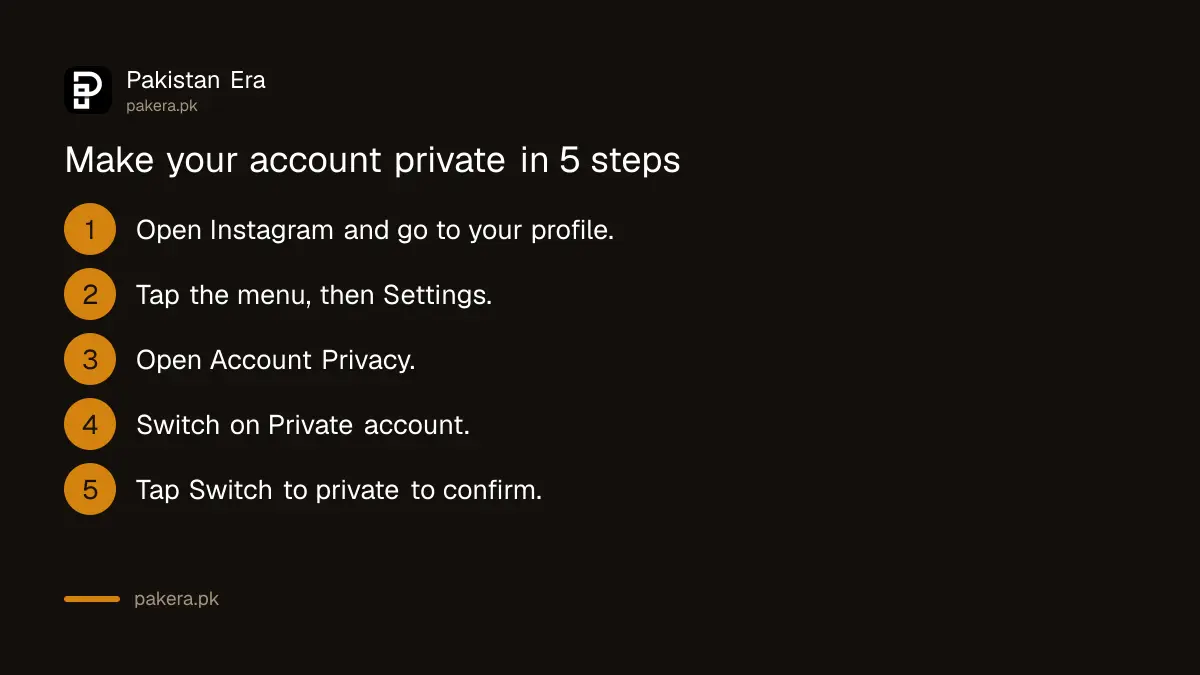
Open Instagram, tap More or your profile menu, then Settings. Choose Account Privacy under "Who can see your content". Switch on Private account and tap Switch to private to confirm. The change applies at once.
- Open Instagram and go to your profile.
- Tap the menu, then Settings. On the website, click More in the bottom left, then Settings.
- Find Account Privacy below "Who can see your content".
- Switch on Private account.
- Tap Switch to private to confirm.
- Review your followers list and remove any you do not know.
Think about who you want inside the circle: family, classmates, friends you have met. Everyone else can send a request, and you decide one by one. There is no cost and no need to ask Instagram. You can switch back to public at any time from the same screen, unless you are a teen with the age limits above.
Switching to private does not remove people who already follow you. Go through your followers and remove those you do not know. An old follower list can contain fake profiles added years ago.
Restrict quietly limits a person without a block
Restrict is a softer step than blocking. A restricted person cannot see when you are online or whether you read their messages. Their new comments on your posts are visible only to them, unless you approve them. You get no alerts for their comments.
Their chat moves to Message Requests, and future messages go there too. You can read a message without them knowing, then delete it or block them. Instagram says you can restrict someone from a chat, from a comment, from Settings under Restricted, or from their profile through Options.
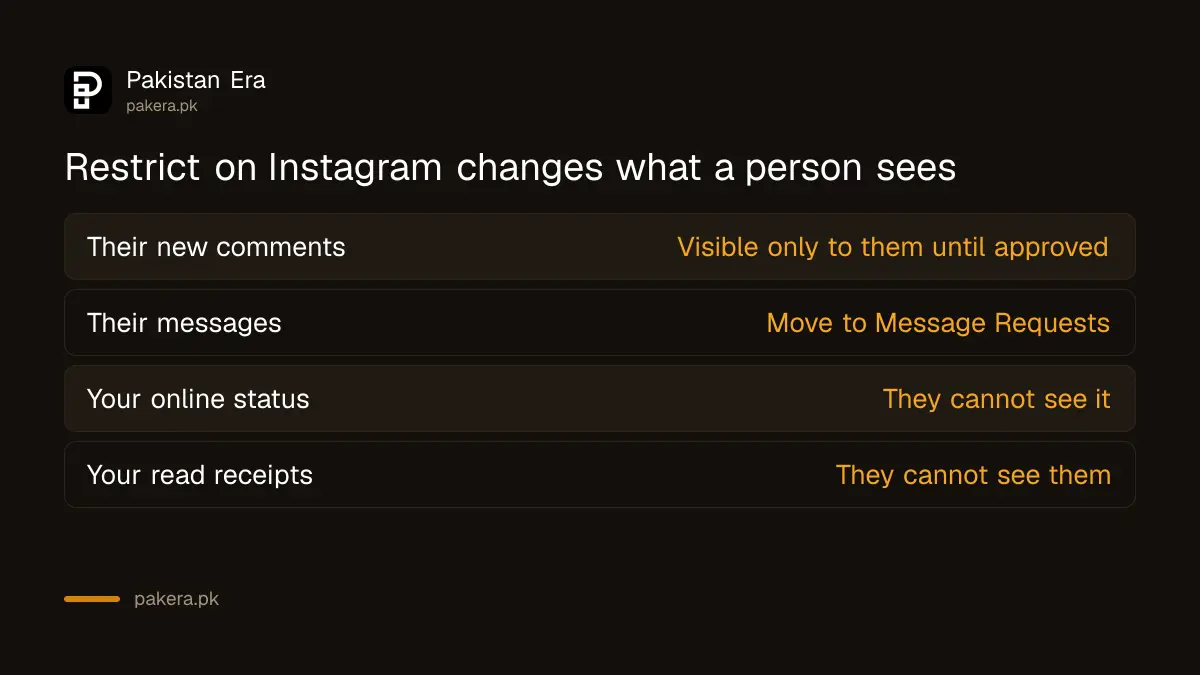
Restrict is not a block, and the person can still follow you if your account allows it. Use it for a relative, colleague or ex who keeps commenting, when a block would cause a fight. If they threaten you or ask for money or photos, do not stop at Restrict. Save the evidence and follow reporting online blackmail in Pakistan.
Lock the account itself, not only the posts
A private account does not stop someone taking over your login. Turn on two-step verification and keep a recovery email you control. If someone does get in, act at once and follow the steps in recovering a hacked Instagram account.
Also look at fake profiles. If someone copies your photos into a new account, report it. The method is the same one in reporting a fake profile in Pakistan. If you no longer want the account at all, see deleting or deactivating an Instagram account.
We did not read Instagram's official pages on activity status, tags or message controls for this article, so we do not give steps for them here.
Common questions
Can strangers see my posts on a private account?
No. Only approved followers see them, per Instagram's setting. People who already followed you before you switched to private stay as followers until you remove them.
Can I make a business account private?
No. Instagram says business profiles cannot be private. Switch back to a personal account first, then switch on Private account.
Does Restrict tell the person?
Instagram's page does not say the person is notified. Their comments stay visible to them, and they cannot see when you are online or read their messages.
How do I unrestrict someone?
Go to your profile menu, tap Restricted under "How others can interact with you", search the account and tap Unrestrict. You can also unrestrict from their profile options.
Are teen accounts private by default?
Yes. Instagram says accounts of people under 18 are private by default, and under 16s need parent or guardian permission to make theirs public.
Is it better to block or restrict?
Block when you want no contact at all. Restrict when you want to avoid a fight but stop them seeing your activity. Report threats whichever you choose.
How we verified this
What we checked, where we read it, and what we could not confirm.
Last checked on 11 October 2026. We read Instagram's Help Center pages Make your Instagram account private and Restrict or unrestrict someone on Instagram. Neither page gives Pakistan specific rules, and we changed no live account.
About the author

Technology Journalist & Multimedia Producer
Ahmad Ali is a technology journalist and multimedia producer at Pakistan Era, joining the team in October 2026. He covers consumer technology and digital life for Pakistani readers, combining research with hands-on product testing.