Ufone VIP Call *3322#: Price, Do Not Disturb, Block Callers and Unsubscribe Code
Ufone VIP Call on *3322# lets only chosen callers reach you, for Rs 2 a day on prepaid. All 9 codes for whitelist, blacklist, Do Not Disturb and to unsubscribe

Ufone VIP Call lets only the people you choose ring your number. Others must enter your VIP PIN, or their call goes to a "personal secretary" number you pick. Dial *3322# to subscribe. It costs Rs 2 a day on prepaid and Rs 18 plus tax a month on postpaid. To stop it, send UNSUB to 3322.
We read Ufone's VIP Call page on 8 November 2026. We did not subscribe. Below are the prices, every SMS command for the whitelist, blacklist and Do Not Disturb, a cheaper pay per use option for prepaid, and how to stop the daily charge.

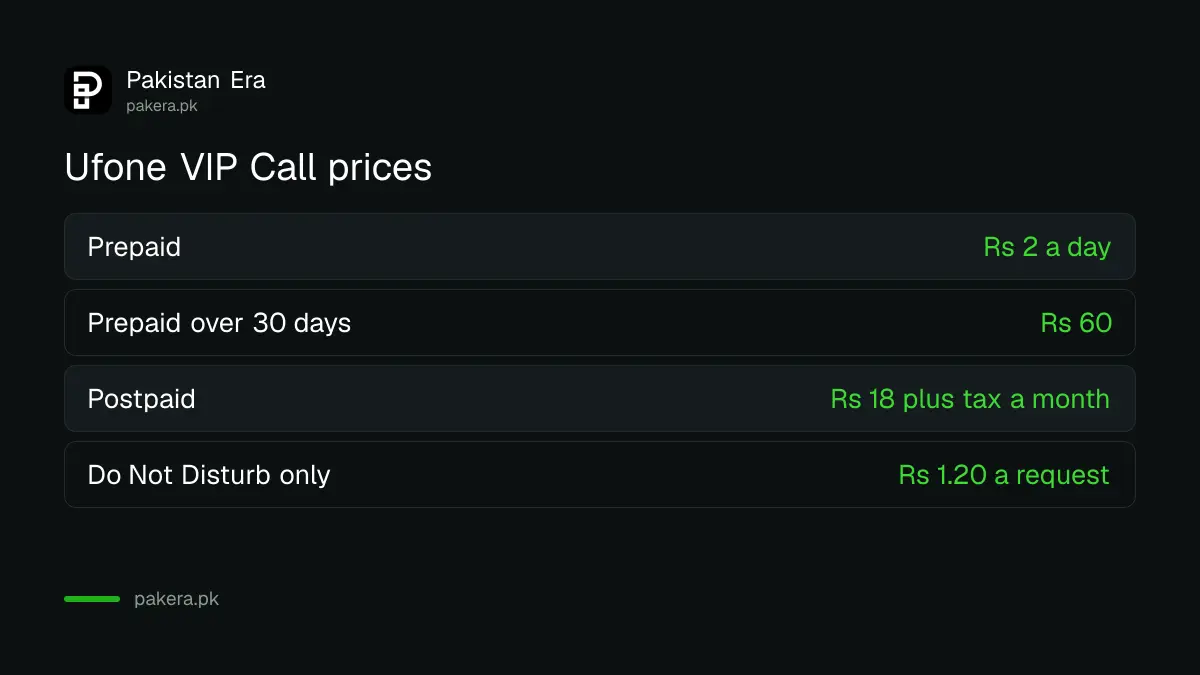
Ufone VIP Call costs Rs 2 a day on prepaid
Ufone charges prepaid users Rs 2 a day for VIP Call, which renews daily. Postpaid users pay Rs 18 plus tax a month. Prepaid users can also use Do Not Disturb alone for about Rs 1.20 a request, without subscribing.
| Plan | Price | Over 30 days |
|---|---|---|
| Prepaid VIP Call | Rs 2 a day, renews daily | Rs 60 |
| Postpaid VIP Call | Rs 18 plus tax a month, renews monthly | Rs 18 plus tax |
| Prepaid Do Not Disturb only | Rs 1 plus tax, or Rs 1.20 with tax, per request | Depends on use |
The 30 day total is our sum. Ufone's page also lists the validity as "weekly" while charging daily, and it does not explain that line. Ufone says you can use VIP Call even with no balance, and any Ufone 4G number can subscribe.
How Ufone VIP Call decides who gets through
When VIP Call is on, a caller reaches you only if they know your VIP PIN or are on your whitelist. Everyone else goes to your personal secretary, one Ufone number you choose. Blacklisted numbers are blocked from you and from your secretary.
- VIP PIN: only people who have your PIN get connected.
- Whitelist: these numbers ring straight through, with no PIN. Add as many as you like.
- Personal secretary: one Ufone 4G number that gets your other calls. It cannot be on another network.
- Blacklist: these numbers are blocked. Add as many as you like.
- Default: Ufone says all calls go to your own number until you set rules.
This suits a shopkeeper, a doctor or anyone whose number is too widely shared. If you only want to block one or two pests, the free blocking in your phone may be enough, as shown in blocking calls and SMS on Jazz, Zong and Ufone.
Every Ufone VIP Call code in one table
Most actions use the short code 3322, by SMS or through the *3322# menu. VIP ON and VIP OFF switch the service without cancelling it. Do Not Disturb runs for 12 or 24 hours at a time.
| What you want | SMS to 3322 | Or dial |
|---|---|---|
| Subscribe | SUB | *3322# |
| Turn VIP Call on | VIP ON | *847# |
| Turn VIP Call off, stay subscribed | VIP OFF | *3322# |
| Add a whitelist number | ADD WL | *3322# |
| Add a blacklist number | ADD BL | *3322# |
| Do Not Disturb for 12 hours | DND12 | *3322# |
| Do Not Disturb for 24 hours | DND 24 | *3322# |
| Turn Do Not Disturb off | DND off | *3322# |
| Unsubscribe | UNSUB | *3322# |
Ufone's page writes the DND commands as "send DND12 to *3322#". An SMS cannot go to a code with a star and a hash, so we take the number to be 3322. Use the *3322# menu if the SMS does not work. More Ufone codes are in our Ufone codes list.
How to set up Ufone VIP Call in 5 steps
Subscribe with *3322#, then set a secretary, a whitelist and a PIN from the same menu. Share the PIN only with people you want to hear from. Test it by asking a friend who is not on the list to call.
- Dial *3322# from your Ufone number, or send SUB to 3322.
- Dial *3322# again and add your personal secretary, one Ufone number.
- Send ADD WL to 3322 to add family and close contacts to the whitelist.
- Share your VIP PIN only with the people who should reach you.
- Ask a friend outside the list to call, and check the call goes to your secretary.
How to stop Ufone VIP Call charges
Send UNSUB to 3322, or dial *3322# and choose unsubscribe. Sending VIP OFF only pauses the service. Ufone's FAQ calls it turning off without unsubscribing, so expect the daily fee to continue. If you did not subscribe and see the charge, stop it and complain on 333.
That difference between VIP OFF and UNSUB is the trap here. If your balance keeps dropping by small amounts, check for other daily services too: Ufone caller tunes and Ufone package unsubscribe codes cover the usual ones. The 333 helpline and other contacts are in Ufone's helpline guide.
Common questions about Ufone VIP Call
What is the Ufone VIP Call code?
*3322#, or send SUB to 3322. The same code opens the settings menu.
How much does Ufone VIP Call cost?
Rs 2 a day on prepaid and Rs 18 plus tax a month on postpaid, on Ufone's page.
How do I unsubscribe Ufone VIP Call?
Send UNSUB to 3322, or dial *3322#. VIP OFF only pauses it.
Can my personal secretary be on Jazz or Zong?
No. Ufone says the secretary must be one Ufone 4G number.
Can I use Do Not Disturb without subscribing?
Yes, on prepaid. Each request costs Rs 1 plus tax, which Ufone also gives as Rs 1.20 with tax.
Does Ufone VIP Call work with zero balance?
Ufone's FAQ says yes, the service works without balance.
How we verified this
What we checked, where we read it, and what we could not confirm.
Last checked 8 November 2026. Prices, codes and the FAQ come from Ufone's VIP Call page. The 30 day total is our sum. We did not subscribe, so we have not seen the *3322# menu ourselves.
About the author

Technology Journalist & Multimedia Producer
Ahmad Ali is a technology journalist and multimedia producer at Pakistan Era, joining the team in October 2026. He covers consumer technology and digital life for Pakistani readers, combining research with hands-on product testing.