Windows 10 in Pakistan: Get Free Security Updates Until October 2027
Windows 10 lost support in 2025, but Microsoft's ESU gives free security updates to October 2027. See the free option, the conditions, and the Office 2021 date.
Windows 10 no longer gets security updates on its own, but you can still get them free until 12 October 2027. Open Settings, then Update & Security, then Windows Update, and tap "Enroll now". Syncing your PC settings to a Microsoft account makes it free. The paid option is US$30.
Microsoft ended Windows 10 support on 14 October 2025. A PC in Pakistan that still runs it has had no security fixes since then, unless its owner signed up for Microsoft's Extended Security Updates, or ESU, programme. Most people never did, because nothing on the screen forces it.
We read Microsoft's own ESU, Windows 11 and Office lifecycle pages again on 5 October 2026. There is also a nearer deadline this month: Office 2021 support ends on 14 October 2026.
Windows 10 security updates stopped on 14 October 2025
Microsoft's support page says Windows 10 reached end of support on 14 October 2025. The PC keeps working, but it gets no more security updates, feature updates or technical help. The only way to keep receiving security fixes is to enrol in ESU.
A security update closes holes that viruses and hackers use to get into a computer. Without them, every new flaw found in Windows 10 stays open on your machine for good. That matters most on a PC used for online banking, a freelance account or office email.
ESU does not bring new features, bug fixes or support calls. Microsoft is clear that it covers "critical and important security updates" only. For a family PC or an office machine that cannot run Windows 11, that is still the part that counts.
ESU is free if you back up your PC settings
Microsoft offers three ways to enrol in ESU. Syncing your PC settings with Windows Backup costs nothing. Redeeming 1,000 Microsoft Rewards points is also free if you have them. Or you can pay once: US$30 or the local currency equivalent, plus tax.
| ESU option | Cost | What you need |
|---|---|---|
| Back up PC settings | Free | A Microsoft account and Windows Backup turned on |
| Microsoft Rewards | 1,000 points | Enough Rewards points in your account |
| One-time purchase | US$30 plus tax | A card that allows international online payments |
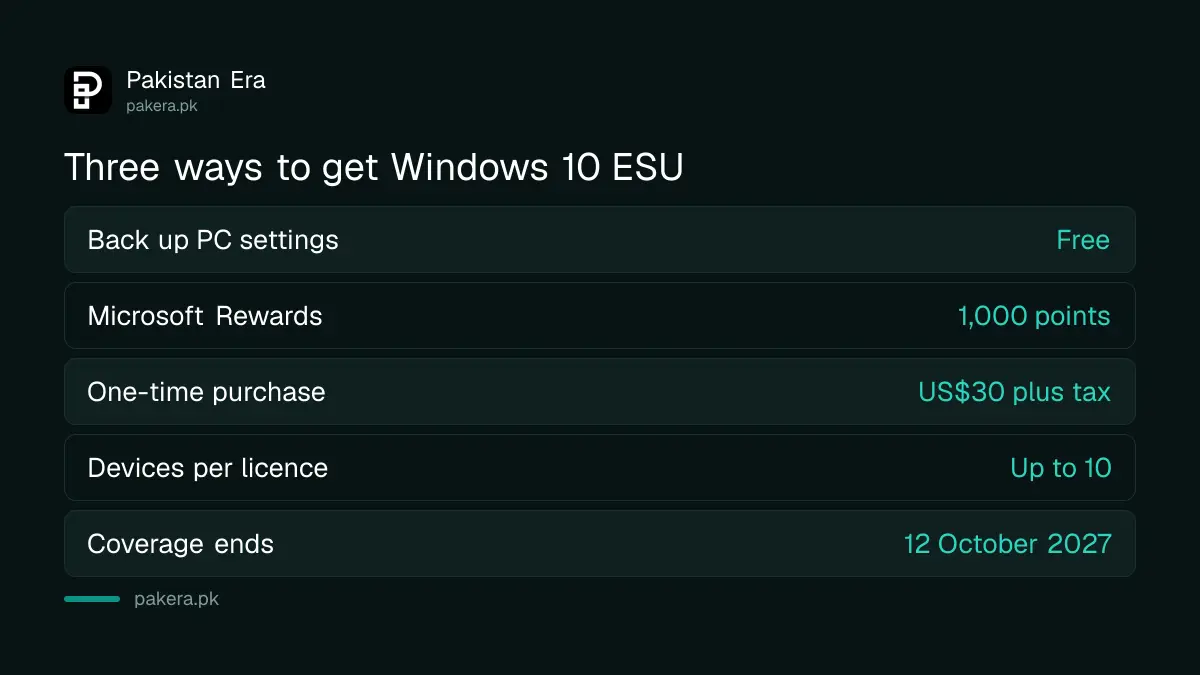
All three give the same thing: security updates until 12 October 2027. One licence covers up to 10 PCs on the same Microsoft account. So a family with three old laptops pays once, or nothing at all.
For most readers the free backup option is the obvious pick. If you choose to pay by card from Pakistan, your bank may add FBR advance tax under section 236Y, the same 0.5% or 1% charge that applies when paying for Steam games. Microsoft also says enrolment options "may vary by region".
Your PC must meet five conditions to enrol
Microsoft lists clear requirements. The PC must run Windows 10 version 22H2, be fully updated, and be signed in with a Microsoft account that is an administrator. Office and school PCs managed by an IT department cannot use the consumer programme.
- Windows 10 version 22H2, in the Home, Pro, Pro Education or Workstations edition.
- The latest Windows updates installed, including the ESU preparation package KB5126256.
- A Microsoft account with administrator rights on the PC.
- Not a child account.
- Not joined to a company domain, managed by an IT system, or set up as a kiosk.
To check your version, press the Windows key, type "winver" and press Enter. If it says 22H2, you are fine. An older version needs updating through Windows Update first. If you sign in with a local account, Windows will ask you to sign in with a Microsoft account during enrolment.
Enrol in ESU from Windows Update in a few minutes
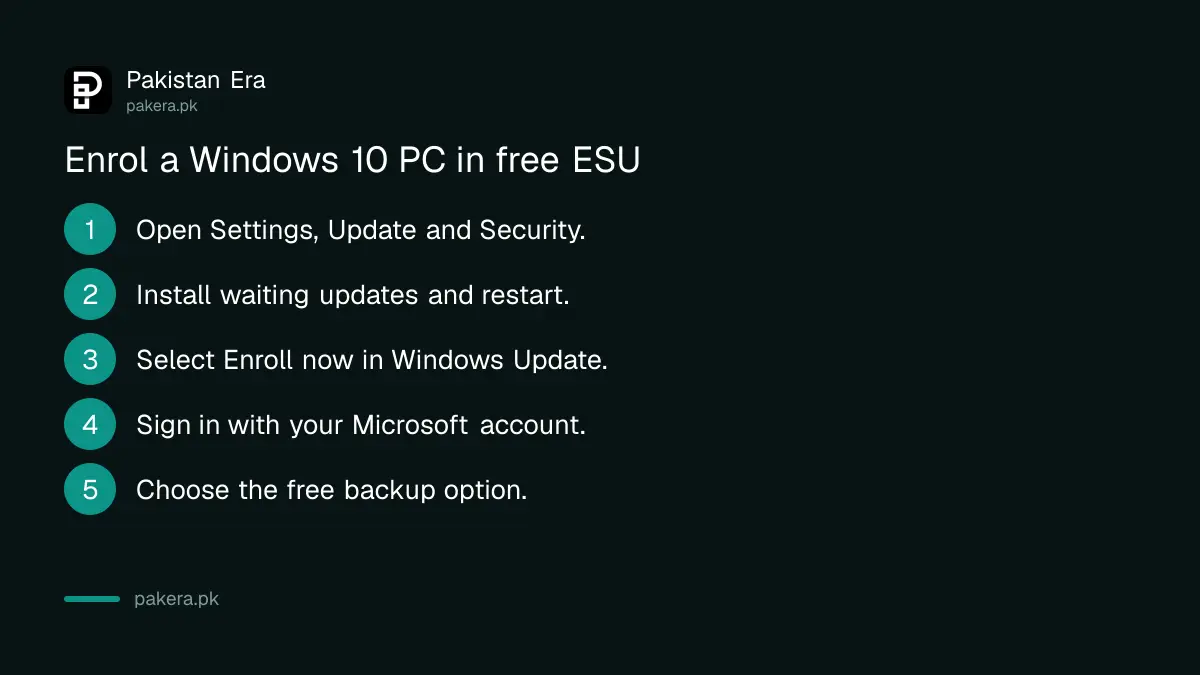
The enrolment link sits inside Windows Update. If your PC qualifies, you see an "Enroll now" link there. Sign in, choose the free backup option, and the PC is covered. You can add more PCs later from the same screen.
- Open Settings, then Update & Security, then Windows Update.
- Install any waiting updates and restart.
- Select "Enroll now" when the ESU link appears.
- Sign in with your Microsoft account if asked.
- Choose to back up your settings, use Rewards points, or pay.
No "Enroll now" link? The PC is missing an update or a condition above. Run Windows Update again and check the version. Microsoft's ESU help page has the full list.
Ignore anyone selling "Windows 10 ESU keys" on social media. Enrolment happens inside Windows with your own Microsoft account. A cracked activation tool is one of the easiest ways to invite malware, and malware on a banking PC can end with a cybercrime complaint.
Office 2021 support ends on 14 October 2026
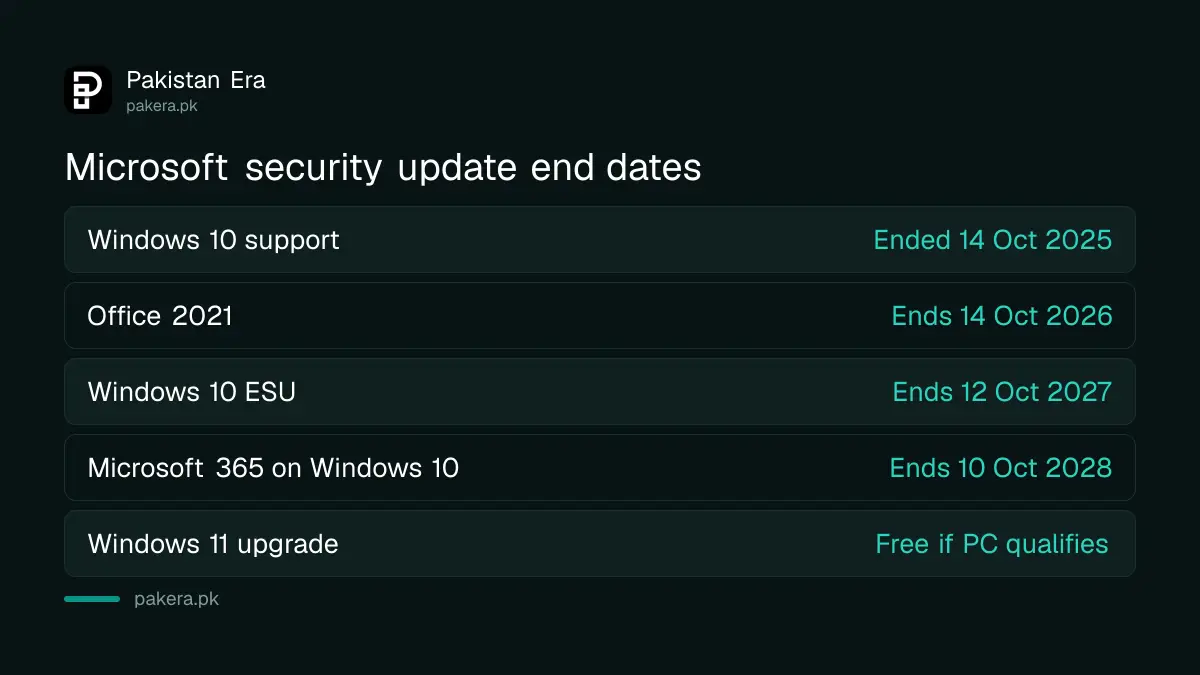
Microsoft's lifecycle page lists the retirement of Office 2021 on 14 October 2026, at 7am US Pacific time, which is just before 7pm in Pakistan. After that, Office 2021 gets no more security updates. Office is a separate product from Windows, so ESU does not cover it.
This affects the Home and Student, Home and Business and Professional editions of Office 2021. They will keep opening files, but new flaws will not be fixed.
Microsoft 365, the subscription version, is different. Microsoft says it will keep giving Microsoft 365 apps security updates on Windows 10 until 10 October 2028. The current Microsoft 365 price in Pakistan is worth checking before you decide.
Windows 11 is the long-term fix if your PC can run it
ESU only buys time until October 2027. The lasting fix is Windows 11, which is a free upgrade for a PC that meets Microsoft's requirements. The main ones are a compatible 64-bit processor, 4 GB of RAM, 64 GB of storage and a TPM 2.0 security chip.
Microsoft's free PC Health Check app tells you in a minute whether your PC qualifies. If yours passes, the upgrade comes through Windows Update, and ESU is no longer needed.
If it fails, enrol in ESU now and plan a replacement before October 2027. ESU gives you about a year to save for it, and laptop installments can spread the cost further.
Common questions
Is Windows 10 ESU really free in Pakistan?
Yes, if you back up your PC settings with Windows Backup and a Microsoft account. Microsoft says options may vary by region.
How long does Windows 10 ESU last?
Until 12 October 2027. You can enrol at any time before then, but the PC is exposed until you do.
Can I use one ESU licence on more than one PC?
Yes. Microsoft allows one licence on up to 10 devices using the same Microsoft account.
Does Windows 10 still work without ESU?
Yes. It keeps running, but it gets no security fixes, so it gets less safe over time.
Does ESU cover Office 2021?
No. Office 2021 is a separate product, and its support ends on 14 October 2026.
Why don't I see the Enroll now link?
Your PC probably needs Windows 10 version 22H2, the latest updates, or an administrator Microsoft account.
How we verified this
What we checked, where we read it, and what we could not confirm.
We first checked on 29 September 2026 and checked every date and price again on 5 October 2026. The ESU options, the 12 October 2027 end date, the 10-device rule, the requirements and the steps are from Microsoft's Windows 10 ESU page. The 14 October 2025 end of support and the Microsoft 365 date of 10 October 2028 are from Microsoft's Windows 10 end of support page. The Office 2021 date is from Microsoft's Office 2021 lifecycle page, and the Windows 11 requirements from Microsoft's Windows 11 specifications page. We did not see a Pakistan rupee price for the paid ESU option. The 236Y rates are from FBR's withholding tax rate card, updated to 30 June 2026.
About the author

Senior Writer, Public Services and Technology
Shahid joined us in 2024 as an author. He is a senior contributor to Pakistan's leading technology websites. He writes detailed articles, mostly covering his expertise in the latest tech, mobiles, apps, gadgets, and step-by-step guides. His ideology is to help people understand the latest trends and explain complex methods through very easy-to-understand guides.