Apple App Store Refund in Pakistan: Request on reportaproblem.apple.com, Answer in 48 Hours
Request an Apple App Store refund from Pakistan at reportaproblem.apple.com in 4 steps. Apple answers in 24 to 48 hours; card refunds can take up to 30 days.
To get a refund for an app, game or subscription bought on the Apple App Store, sign in at reportaproblem.apple.com, choose "I'd like to", then "Request a refund", pick a reason and the item, and submit. Apple says to allow 24 to 48 hours for an answer. In Pakistan, App Store purchases are paid by card, so an approved refund can take up to 30 days to show on your bank statement.
This is the route for a ChatGPT Plus bought on an iPhone, a game top-up a child bought by mistake, or a free trial that turned into a charge. Apple, not the app maker, decides App Store refunds. OpenAI, for example, says refunds for ChatGPT plans bought through Apple must be requested from Apple. We read Apple's refund request page and its refund status page on 5 November 2026. We did not file a refund request for this guide.
Request an App Store refund in 4 steps
Apple's refund form works in any browser, on your iPhone, iPad or a computer. You need the Apple Account that made the purchase. Wait for the email receipt first: Apple says you cannot request a refund while a charge is still pending.
- Sign in to reportaproblem.apple.com with your Apple Account.
- Tap or click I'd like to, then choose Request a refund.
- Choose the reason you want a refund, then choose Next.
- Choose the app, subscription or other item, then choose Submit.
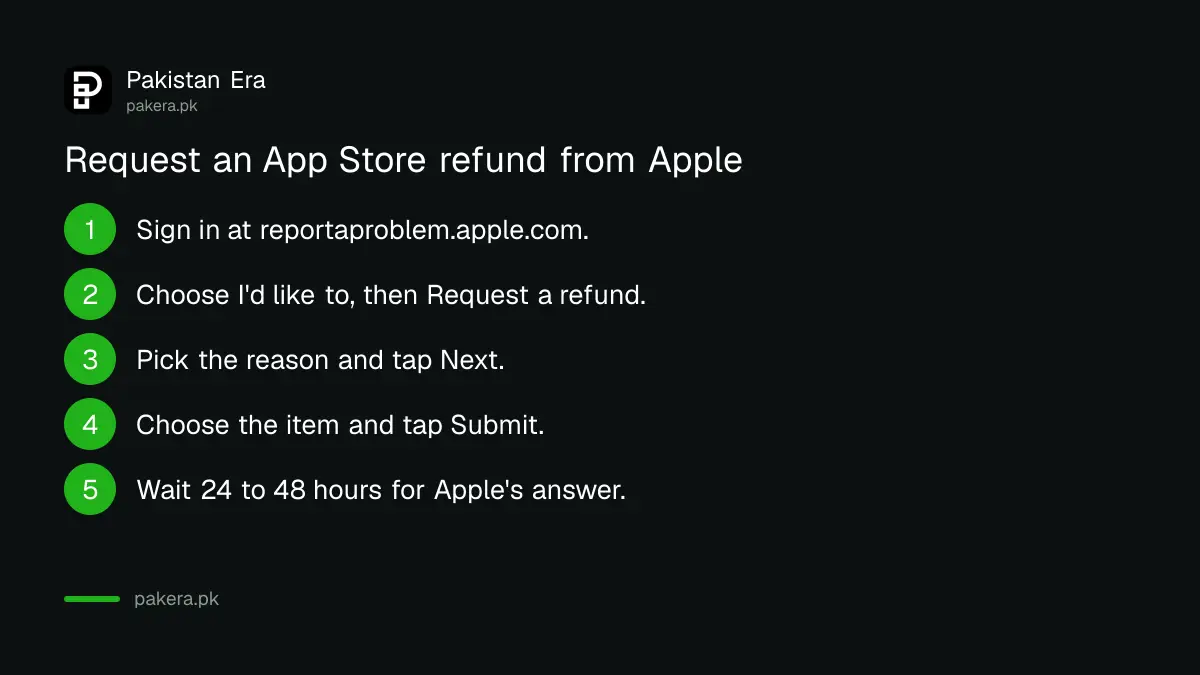
Pick the reason that matches what happened, such as a purchase made by mistake or by a child. Apple says refund eligibility can vary by country, and its Media Services terms set the rules, so there is no guarantee of approval.
Find the right Apple Account before you start
If you cannot see the charge on reportaproblem.apple.com, it was probably made with a different Apple Account. Many Pakistani families share one iPad but use two or three Apple IDs, so this is common. Apple's receipt email tells you which account paid.
- Search your email for "receipt from Apple" or "invoice from Apple".
- Find the receipt with the same amount as the charge on your bank SMS or statement.
- The receipt shows what was bought and which Apple Account was used.
- Sign in to reportaproblem.apple.com with that account.
- If you are the Family Sharing organiser, tap the Apple Account button and choose All to see purchases charged to the shared card.
If there is an unpaid order on the account, Apple says you must pay it before you can request a refund. That often happens when a card was declined on renewal; our guide to fixing declined cards on Apple and Google Play covers it.
Apple answers in 24 to 48 hours; the money takes longer
Apple says to allow 24 to 48 hours for an update on your request. If it is approved, the money goes back to the same payment method you used. How long it takes to reach you depends on that method. For cards, Apple says up to 30 days.
| How you paid | When the refund shows, per Apple |
|---|---|
| Apple Account balance (store credit) | Up to 48 hours |
| Mobile phone billing | 30 to 60 days |
| Debit or credit card, and other methods | Up to 30 days |
For most people in Pakistan, the last row is the one that applies. Apple's payment list for Pakistan does not include mobile phone billing, so a Jazz, Zong, Telenor or Ufone balance cannot pay for iPhone apps; our guide to App Store payment methods in Pakistan explains what does work. If 30 days pass with nothing on your statement, Apple says to contact your bank.
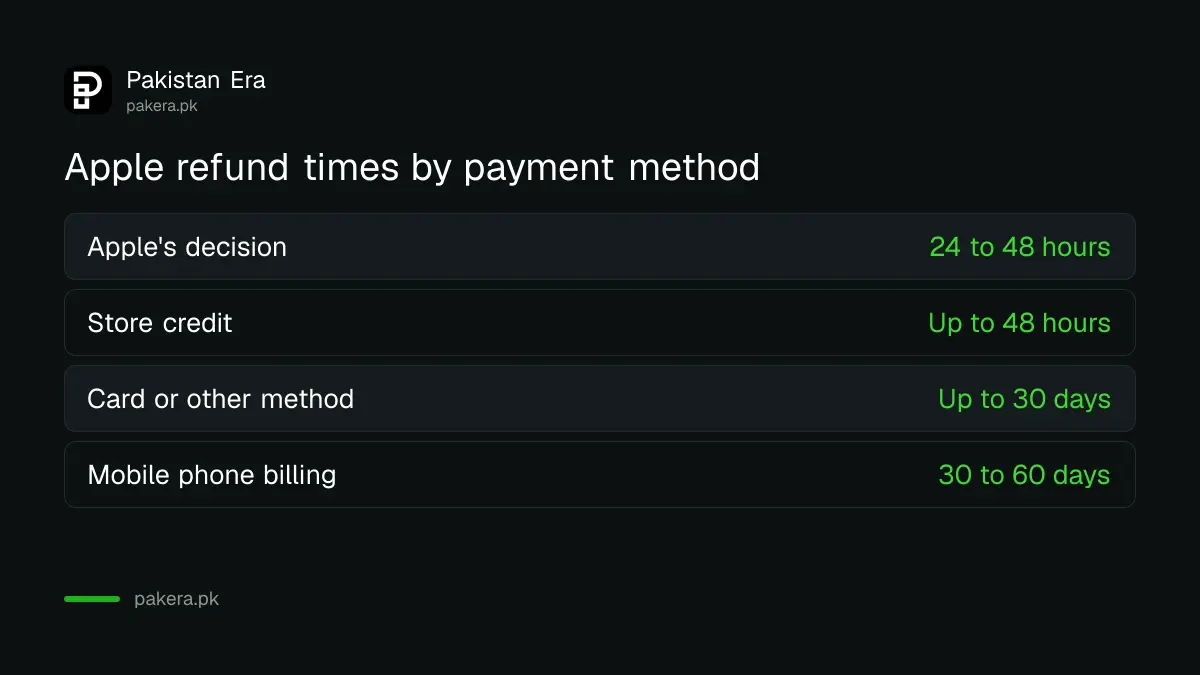
Keep in mind that the bank may show the refund in rupees at a different exchange rate from the original charge, and the foreign transaction fee your bank charged on the purchase may not come back. That is a bank matter, not Apple's.
Check your refund status on the same website
You track the request where you filed it. Apple says calling or chatting with Apple Support will not speed up a request already made. Check the website, or your bank, instead.
- Go to reportaproblem.apple.com and sign in.
- Choose Check Status of Claims. If it is not there, you have no pending refund requests.
- Tap or click Pending to see the status.
Apple also warns that you may lose access to refunded items. A refunded game loses what you bought, and a refunded ChatGPT Plus goes back to the Free plan.
Cancel the subscription too, or it renews
A refund covers a past charge. It does not stop the next one. If you do not want the subscription any more, cancel it in your iPhone settings as well, so it does not renew next month. You can also cancel without asking for a refund.
- Open Settings on your iPhone and tap your name.
- Tap Subscriptions.
- Choose the subscription and tap Cancel Subscription.
For ChatGPT, OpenAI also says deleting your OpenAI account does not cancel an Apple subscription, so cancel in Settings first. See our guide to deleting a ChatGPT account, and if ChatGPT Plus shows Free after you paid, try these 5 checks before asking for a refund.
A charge you never made is a security problem first
If you see an App Store charge that nobody in your family made, treat it as a possible account takeover, not just a refund. Change your Apple Account password, check the signed-in devices, and tell your bank. Then request the refund.
Our guide to a hacked Apple Account lists the checks. If the card was used somewhere else too, your bank must act under State Bank rules; see claiming a digital fraud refund from your bank. Never share the 6-digit Apple verification code with anyone who calls you, even if they say they are from Apple.
Common questions
How do I get a refund from the App Store in Pakistan?
Sign in at reportaproblem.apple.com, choose I'd like to, then Request a refund, pick a reason and the item, and submit.
How long does an Apple refund take?
Apple says to allow 24 to 48 hours for an answer. If approved, a card refund can take up to 30 days to show on your statement.
Can I get a refund for ChatGPT Plus bought on iPhone?
Yes, you can ask. OpenAI says refunds for plans bought through Apple are handled by Apple, through reportaproblem.apple.com.
Why can't I see my purchase on reportaproblem.apple.com?
It was probably made with another Apple Account, or it is still pending. Check the Apple receipt email to see which account paid.
Will calling Apple speed up my refund?
No. Apple says contacting it by phone or chat does not speed up a request that is already filed.
Does a refund cancel my subscription?
No. Cancel it separately in Settings, your name, Subscriptions, or it may renew.
How we verified this
What we checked, where we read it, and what we could not confirm.
We read Apple Support's pages "Request a refund for apps or content that you bought from Apple" and "Check the status of a refund" on support.apple.com on 5 November 2026, and OpenAI's refund page for the ChatGPT point. We did not file a refund request. Apple decides each request case by case, and eligibility can vary by country.
About the author

Technology Journalist & Multimedia Producer
Ahmad Ali is a technology journalist and multimedia producer at Pakistan Era, joining the team in October 2026. He covers consumer technology and digital life for Pakistani readers, combining research with hands-on product testing.