Onic SIM Not Working in Pakistan? Activate With the ICCID and Try These 5 Fixes
Onic SIM not working? Activate it by scanning the ICCID in the app, then try Onic's 5 fixes. How to get usage logs by email and who to contact for help today.
To activate an Onic SIM, open the Onic app, go to Activate Your SIM, and scan the ICCID printed on the SIM, or type it in by hand. If it then does not work, Onic's FAQ gives 5 fixes: change the SIM slot, restart the phone, toggle Airplane Mode, try another device, and change location. Your usage logs come by email from the app.
We read Onic's FAQ and help centre on 7 November 2026. We did not activate an Onic SIM ourselves, so the steps below are Onic's own, with our notes on where things tend to go wrong. If you do not yet have an Onic SIM, read the warning below before you buy one.
Activate your Onic SIM with the ICCID in the app
Onic's FAQ gives one route: open the app, go to Activate Your SIM, and scan the ICCID with the scanner, or enter it by hand. The ICCID is the long serial number printed on the SIM card, and it identifies that one card.
- Finish your biometric check at the SIM pickup point first.
- Put the SIM in your phone and connect to Wi-Fi or another internet line.
- Open the Onic app with the account you used to order.
- Go to Activate Your SIM.
- Scan the ICCID on the SIM with the scanner, or type it in.
Keep the SIM's plastic holder until the SIM is working, since the printed number may be easier to read there. Do the scan in good light. If the scanner will not read it, type the digits slowly and check for look-alike digits such as 1 and 7. Where to collect a card is listed in Onic's SIM pickup points.
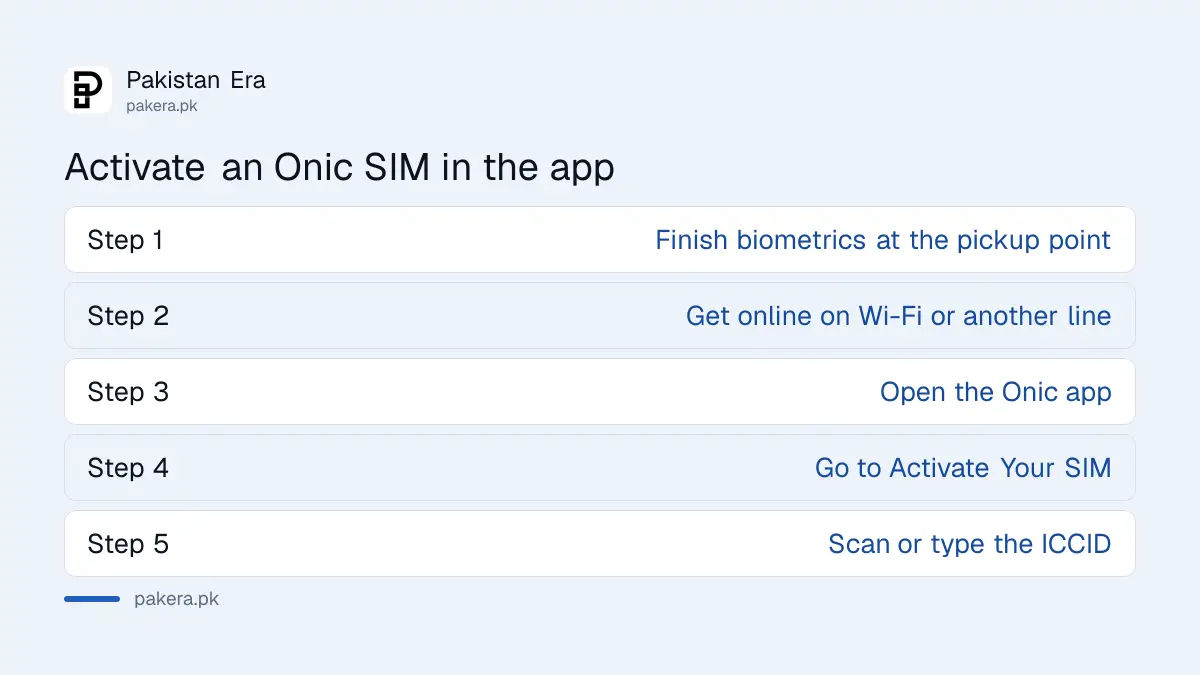
Onic gives 5 fixes when the SIM has no connection
Onic's FAQ lists five things to try: change the SIM slot, restart the phone, toggle Airplane Mode, use another device, and change location. Run them in that order, because each one tells you whether the phone, the SIM or the network is at fault.
| Onic's fix | What the result tells you |
|---|---|
| Change SIM slot | Works in the other slot: that slot or its settings are the problem |
| Restart the phone | Works now: a stuck connection, nothing more |
| Toggle Airplane Mode | Works now: the phone reconnected to the tower |
| Use another device | Works there: your first phone is the problem |
| Change location | Works elsewhere: local coverage is the problem |
Fails in a second phone and in a second place? Then contact Onic. A phone that shows no network with any SIM may have a PTA problem instead, and checking your phone's PTA status takes a minute. Onic runs on PTML, the company behind Ufone, so weak coverage indoors has the same fixes, and fixing poor calls indoors may help at home.
Get your Onic usage logs by email in 6 steps
Onic sends usage records by email instead of showing a full list on screen. In the app, go to Dashboard, then Usage Logs, choose Data, Voice or SMS, pick a period, and tap Get Logs. Then check your inbox for the report.
- Log in to the Onic app.
- Go to Dashboard, then Usage Logs.
- Choose Data, Voice or SMS logs.
- Pick a time period.
- Tap Get Logs.
- Check the email inbox on your Onic account for the report.
Check the spam folder if the report does not arrive. This matters because the report is your evidence. If your data vanishes faster than you expected, the log shows the days and amounts to quote in a complaint. A phone can also use data without you noticing, and choosing which SIM uses mobile data stops the wrong line being charged on a dual SIM phone.
Renew or change an Onic plan inside the app
Onic runs its plans through the app. Open Packages Available, select a plan and pay online. Onic says the plan starts after successful payment. An active plan is needed before you can add data, voice, roaming or international call add-ons.
| Task | Where in the app or who to ask |
|---|---|
| Change or renew plan | Packages Available, then pay online |
| Add data, voice, roaming, IDD | Add-ons, only with an active plan |
| Live help | OnicAI Assist chat in the app or on the web, 24/7 |
| happiness@onic.pk, reply within 1 working day | |
| Phone | 051-111-339-111 |
Plan prices are compared in Onic's weekly, monthly and annual packages. The numbers above and Onic's social channels are in the Onic helpline numbers.
Check PTA's Onic order before you buy a new SIM
PTA's order of 11 September 2026 told PTML to stop Onic's new sales and activations and to move existing users to PTML within three months. PTML's challenge in court was reported in October. So do not treat a new Onic SIM as a settled long term choice.
If your SIM is already active, the order does not cancel your number. Keep your details and email up to date, since the app is how Onic reaches you. Avoid paying for a long plan until the position is clear, unless Onic confirms in writing what happens to it. Details are in PTML's challenge to the Onic order, and if you want to leave, the codes are in the Onic MNP code.
Common questions about Onic SIMs
How do I activate my Onic SIM?
Open the Onic app, go to Activate Your SIM, then scan the ICCID printed on the SIM or type it in. Biometric verification at the pickup point comes first.
What is the ICCID on an Onic SIM?
It is the long serial number printed on the SIM card. The app uses it to link that card to your account.
Why is my Onic SIM not working?
Try Onic's five fixes: change the SIM slot, restart, toggle Airplane Mode, use another device, and change location. If none works, contact Onic.
How do I check my Onic data usage?
In the app, go to Dashboard, then Usage Logs, choose Data, pick a period and tap Get Logs. The report comes by email.
What is the Onic helpline number?
051-111-339-111. You can also use OnicAI Assist chat 24/7 or email happiness@onic.pk.
Can I add data to Onic without a plan?
No. Onic says an active plan is needed before you can use add-ons.
How we verified this
What we checked, where we read it, and what we could not confirm.
Last checked 7 November 2026. Activation, usage logs, plan changes, fixes and contact routes come from Onic's FAQ and Onic's help centre. We did not activate a SIM, so the notes on what each result means are our own reasoning, not Onic's. The order details come from PTA's determination, read on pta.gov.pk on 10 October 2026. The court challenge is reported, not confirmed by PTML.
About the author

Technology Journalist & Multimedia Producer
Ahmad Ali is a technology journalist and multimedia producer at Pakistan Era, joining the team in October 2026. He covers consumer technology and digital life for Pakistani readers, combining research with hands-on product testing.